00191369-02.pdf - 第236页
6 Vision functions User M anual HS-50 6.5 Teach Fiducial Software Version SR.501.xx 12/99 Issue U S 236 t I I t 6.5.6.1 Center Option If you click on the Ce nter button t he T est fiducial menu will cl ose a nd the vi de…
User Manual HS-50 6 Vision functions
Software Version SR.501.xx 12/99 Issue US 6.5 Teach Fiducial
235
t IIt
6.5.6 Test Fiducial Menu
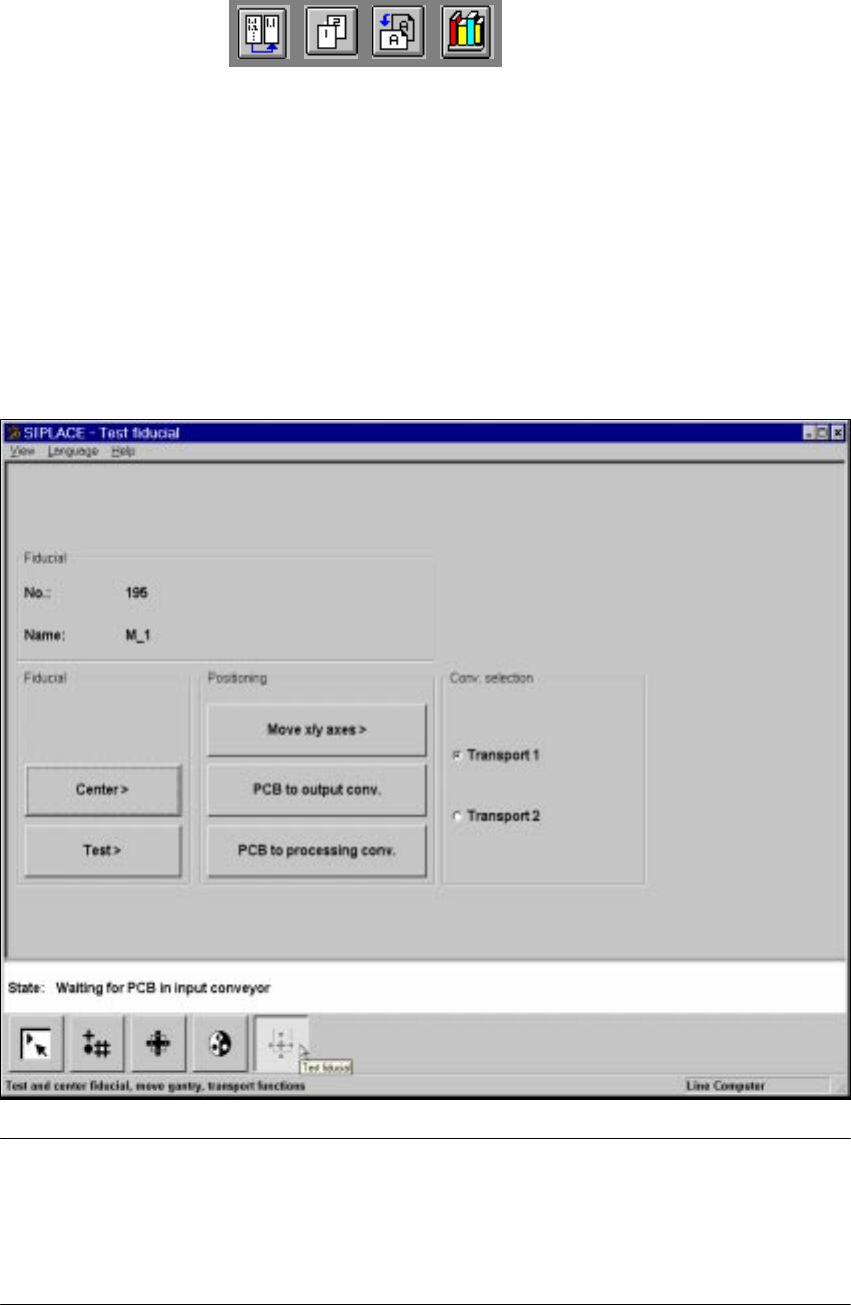
In the Test fiducial menu the following options are available: 6
– Centering the fiducial (Center)
– Testing the fiducial (Test)
– Positioning the teaching gantry (X/Y movement) (move X/Y axes)
– Transporting the board onto the output conveyor (PCB to output conveyor)
– Transporting the board onto the processing conveyor (PCB to processing conveyor)
6
Fig. 6.5 - 23 Test fiducial menu, options
NOTE 6
Buttons are active when the text on the button is black (rather than gray). This means that you
can launch the associated function by clicking on the button with the mouse.
The Center and Test options will only be available if you have already loaded a fiducial and a
model already exists for this fiducial.
If you have selected a fiducial the fiducial number and the fiducial name will appear in the display
field. 6
6 Vision functions User Manual HS-50
6.5 Teach Fiducial Software Version SR.501.xx 12/99 Issue US
236
t IIt
6.5.6.1
Center
Option
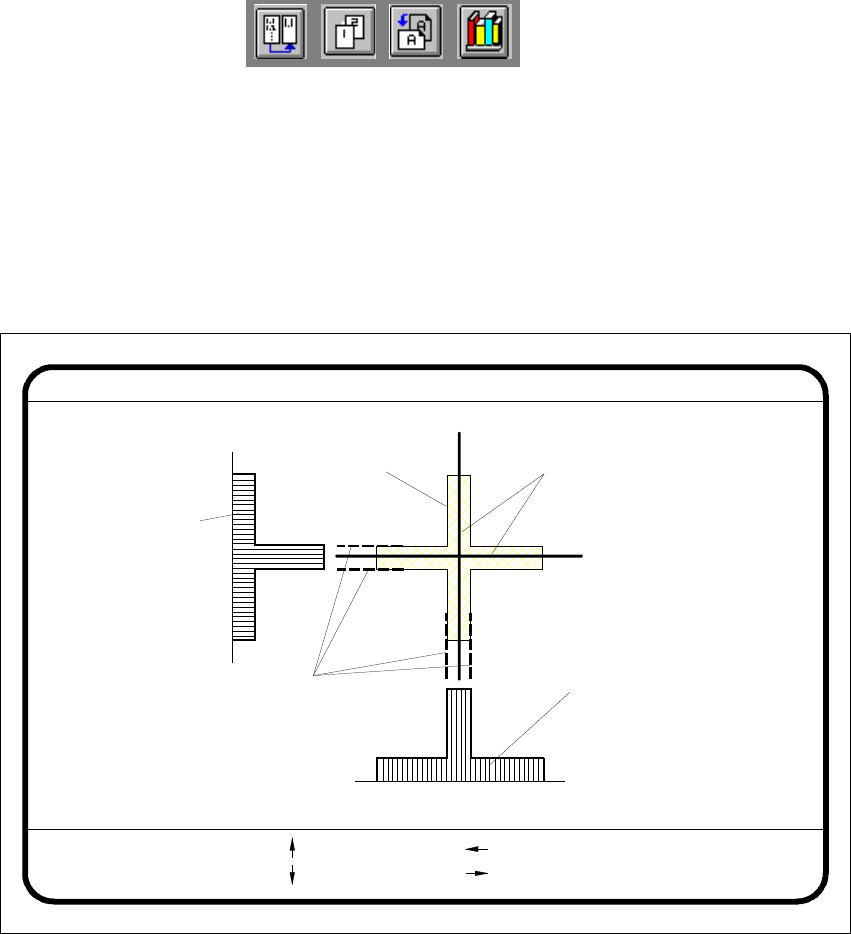
If you click on the Center button the Test fiducial menu will close and the video image is shown
on the screen. The picture shows the 2D fiducial structure and the rows and columns profiles of
the 1D structure used for determining precisely the center of the fiducial. Header and footer will
be shown as well. 6
6
Fig. 6.5 - 24 Test fiducial menu, Center video image
The Center function determines via software the center of the fiducial. The parameters for the
function, the edges of the fiducial structure, are selected via a dialog. The system draws edge line
markings as suggestions at possible edge positions. 6
Å With the arrow keys shift the current edge line marking designated in the header.
Å With Return you can accept the position of the suggested edge line marking or the one whose
position you changed. The system will then show you the next edge line marking. The se-
quence in which testing takes place is ’Fiducial edge left’, ’Fiducial edge right’, ’Fiducial edge
top’, and lastly, ’Fiducial edge bottom’. This notation appears in the header.
Edge ok
Fiducial No. = 8 Edge = left
Ret :
Center fiducial
: up
: dn
: right
: left
Fiducial
Result: Centering crosshair
Edge line markings to be shifted
via cursor keys
Row profile of fiducial
Column profile
of fiducial
User Manual HS-50 6 Vision functions
Software Version SR.501.xx 12/99 Issue US 6.5 Teach Fiducial
237
t IIt
The results of fiducial centering are indicated by a cross. The X and Y offset values of the fiducial
center will be entered in the fiducial data field. 6
PLEASE NOTE 6
An incorrectly centered fiducial will cause a placement offset.
Å Press the Esc key to quit the option and return to the Test fiducial menu.
6.5.6.2 Test Option
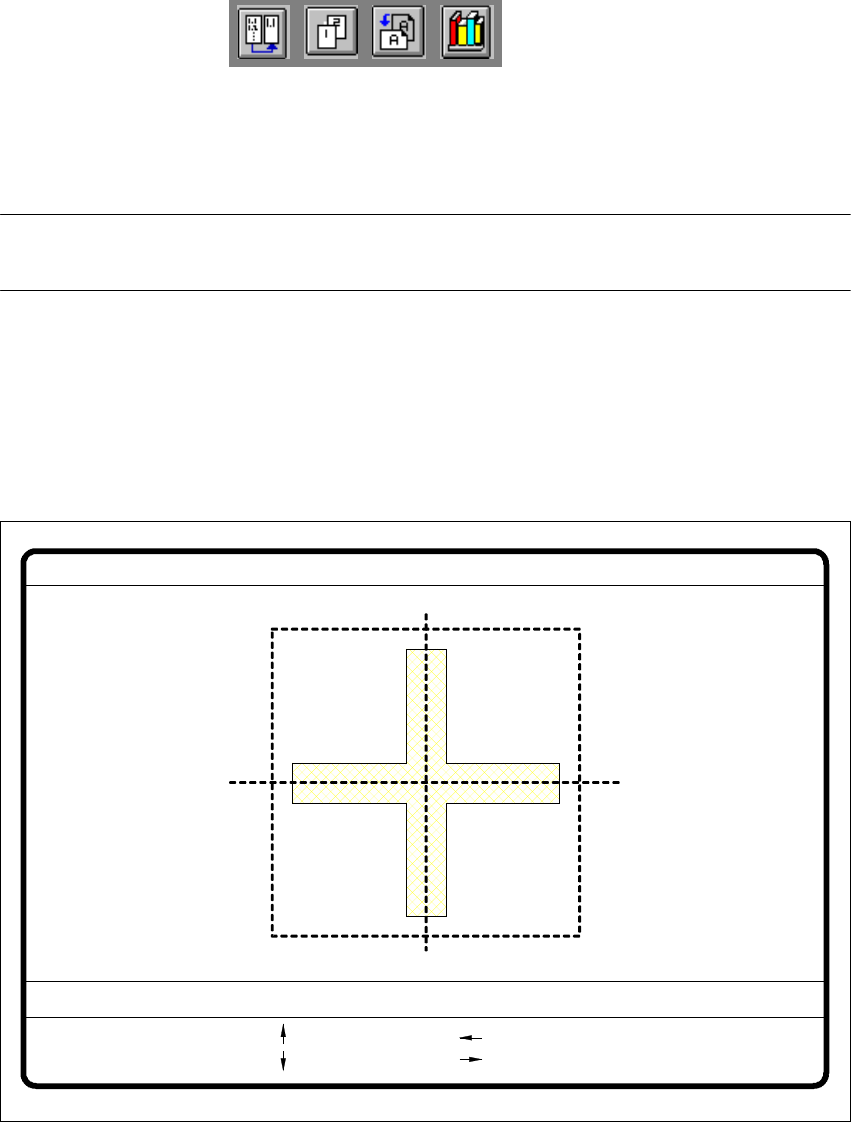
If you click on the Test button the Test fiducial menu will close and the video image be displayed
on the screen. 6
6
Fig. 6.5 - 25 Test fiducial menu, Test video image
The dimensions of the pattern structure and search area are stored in the station computer. These
figures are required for calculating the travel path for the corners test. The centering offsets of any
fiducial centering which may already have been carried out will also be taken into account in cal-
culating the travel path. 6
Fiducial No. = 8 Quality fact. = 70Test fiducial
test
1..6 : x/y step
Ret :
x/y step width = ...
: x axis +
: x axis -
: y axis +
: y axis -