5OM-1011-002.pdf - 第20页
3.2 Controllers in [MAIN MENU] 0305-001 1-5 Tg0861-PM-MD VIEWMETER This displays the data on video signals from the computer graphic card. The displayed data items are Refresh Rate (V ertical Frequency (shown as “FV”)) a…
3.2 Controllers in [MAIN MENU]
Use the arrow buttons ([ ], [ ]) to adjust the following menu items.
3.2 Controllers in [MAIN MENU]
0305-001 1-4 Tg0861-PM-MD
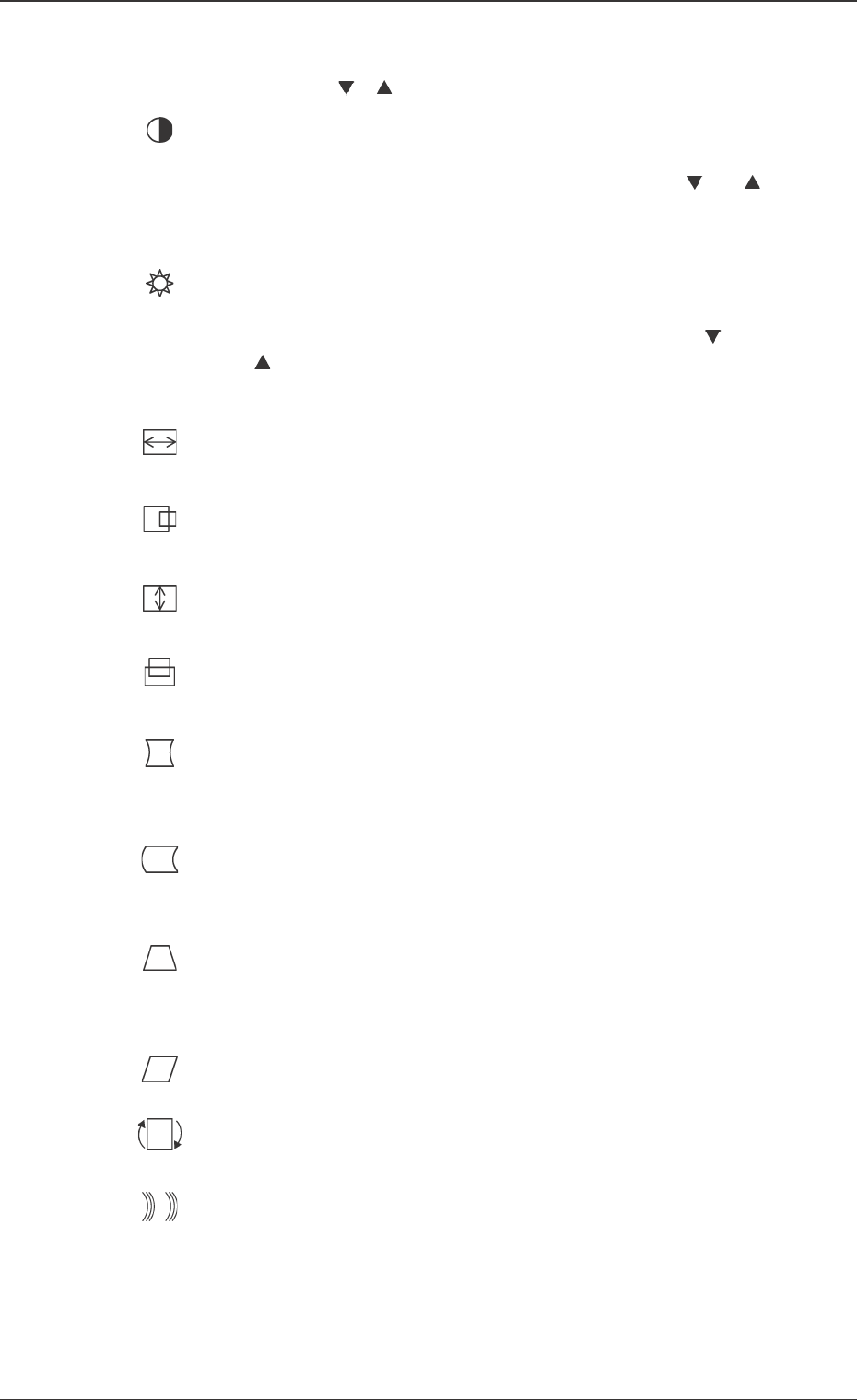
CONTRAST
The contrast in the display is adjusted.
Shortcut: Before displaying the [MAIN MENU], press [
] or [ ]
and the [CONTRAST/BRIGHTNESS] controller display will ap-
pear.
BRIGHTNESS
The brightness of the display is adjusted.
Shortcut: Before displaying the [MAIN MENU], press [ ] or
[ ] and the [CONTRAST/BRIGHTNESS] controller display
will appear.
H. SIZE (Horizontal Magnitude)
The width of the image is adjusted.
H. POSITION
The image is moved to the right or left.
V. SIZE (Vertical Magnitude)
The height of the image is adjusted.
V. Position
The image is moved up and down.
PINCUSION
The dent or swell of the image in the vertical direction is cor-
rected.
PIN BALANCE
The dent or swell of the image (curvature in the same direction) in
the vertical direction is corrected.
TRAPEZOID
The upper side and lower sides of the image become of the same
width.
PARALLEL
The both ends of the image are inclined to the right or left.
Tilt
The entire image is turned.
MOIRE
Small or large wave patterns and interference stripes, which ap-
pear as unnecessary color patterns in the background, are con-
trolled.
Note : MOIRE interference stripes are much more noticeable
when the image displayed includes lines with small inter-
vals or detailed patterns.
3.2 Controllers in [MAIN MENU]
0305-001 1-5 Tg0861-PM-MD
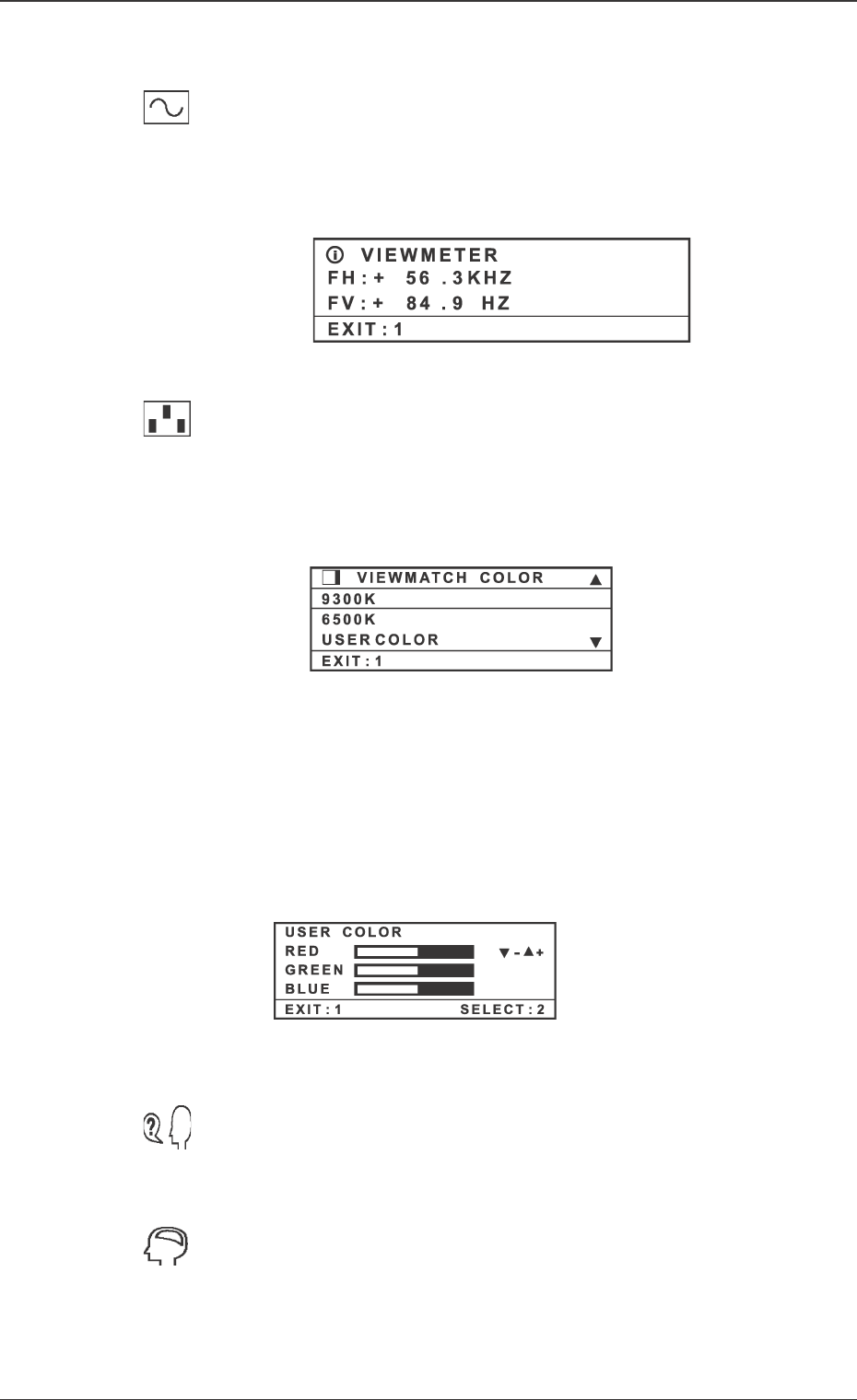
VIEWMETER
This displays the data on video signals from the computer
graphic card. The displayed data items are Refresh Rate
(Vertical Frequency (shown as “FV”)) and Scan Rate
(Horizontal Frequency (shown as “FH”)).
VIEWMATCH
COLOR
There are three color temperature adjustment options; two
preset color temperature adjustment and USER COLOR
which can individually adjust each of Red (R), GREEN
(G) and BLUE (B). This product has been set to 9300K
(9300 Kelvin) when delivered from the factory.
9300K - It adds blueish color to the image to give a cold at-
mosphere to the white. (It is frequently used in of-
fices with fluorescent lamps).
6500K - It adds a redish color to the image to give a warm
atmosphere to the white and a rich atmosphere to
the red.
USER COLOR - Red (R), Green (G) and Blue (B) are ad-
justed individually.
LANGUAGE
The language (English, French, German, Italian, or Span-
ish) to be used in the menu and controllers can be se-
lected.
MEMORY RECALL
If the monitor is operated in the preset timing mode, the
setting at the delivery of the machine is restored.
Note : This function does not affect the changes performed
using the [USER CONTROL] controller.
Fig. 5A5
Fig. 5A6
Fig. 5A7
4. Monitor Maintenance
0305-001 1-6 Tg0861-PM-MD
4. Monitor Maintenance
Screen Maintenance
• Wipe the screen using a clean and soft cloth without scuffing to remove dirt
and dust.
• If any dirt is left, apply non-ammonia and non-alcohol glass cleaner slightly
on a clean and soft cloth without scuffing, and wipe the screen with it.
Cabinet Maintenance
• Wipe the cabinet with dry and soft cloth.
• If any dirt is left, apply non-ammonia and non-alcohol neutral detergent slightly
on a clean and soft cloth without scuffing to wipe the surface of the cabinet.
Note: Do not use ammonia or alcohol cleaner. Some chemical cleaners might
affect the monitor screen and cabinet. We do not take responsibility
for damage caused by using ammonia or alcohol cleaner.
• Turn off the power of the monitor.
• Do not apply spray or liquid directly on the moni-
tor screen or cabinet.
CAUTION