5OM-1011-002.pdf - 第30页
Tg0861-PM-MD The "INFO." displays are provided to inform the operator of warn- ing messages (device information). Note: When the [RESET] button is pressed, the device informa- tion disappears. Be sure to check …
Tg0861-PM-MD
2. Management Information
2.1 INFO. Display
• This display shows various information during automatic operation.
After each information, automatic operation still continues.
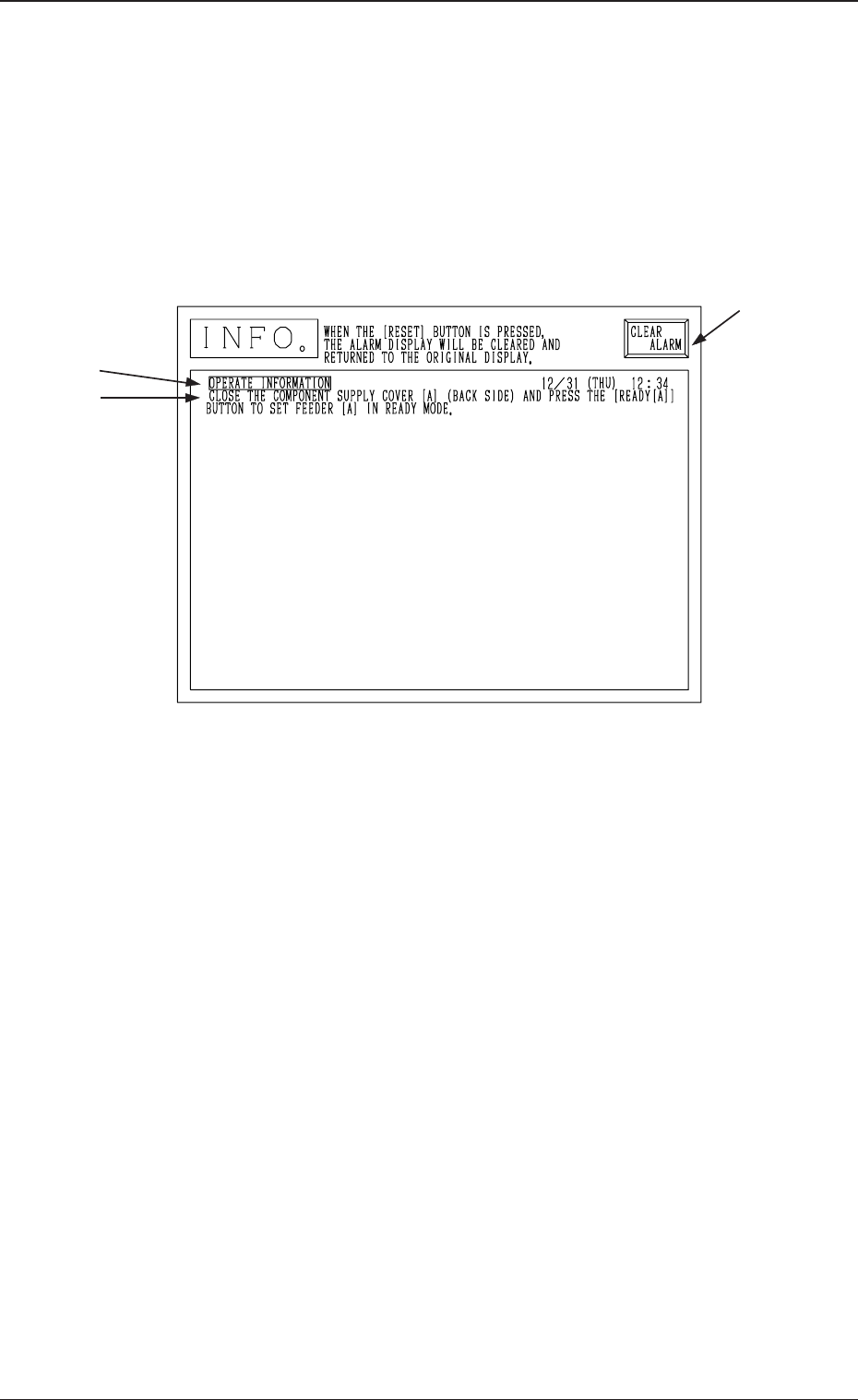
When device information is issued, the following display appears on the screen.
The sample display in Fig. 5C2 shows that the supply cover on the Beam A side
(rear side) is open.
(Operation Possible on Beam B Side.)
A : Item
B : Device Information Message
C : This key is used to stop buzzer sound.
Ref.: When the [RESET] button on the operation panel is pressed, buzzer
sound stops and the display before the device information was
issued resumes.
Refer to “2.2 List of Device Information Messages” for details.
A
B
C
0305-001 3-2
2. Management Information
Fig. 5C2
Tg0861-PM-MD
The "INFO." displays are provided to inform the operator of warn-
ing messages (device information).
Note: When the [RESET] button is pressed, the device informa-
tion disappears.
Be sure to check the contents carefully before pressing the
[RESET] button.
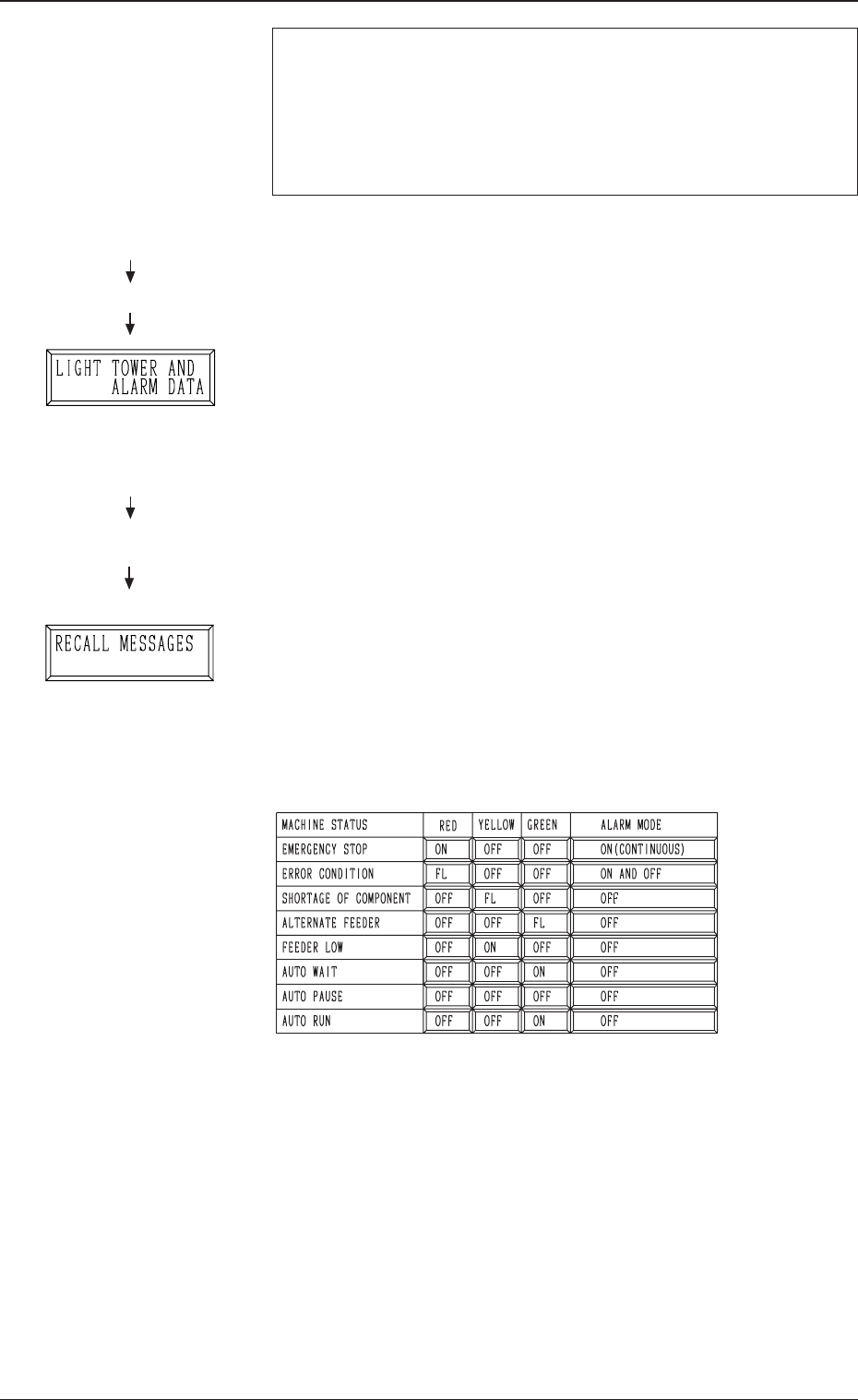
• Parameters related to the light tower and the buzzer can be set up at the
“LIGHT TOWER AND ALARM DATA” display.
• When the information display is not big enough to show all informa-
tion items, it is scrolled up.
To review the cleared items after scrolling, open the “RECALL MES-
SAGES” display.
• When several information items are issued, the tower lights and buzzer
are activated to issue the latest information.
• When the [CLEAR ALARM] key is pressed, the tower lights and buzzer
are turned off unconditionally.
Once this key is pressed while the tower lights and buzzer are working
according to the latest information item among the several ones, the
tower lights and buzzer stop working. Even if the information item
before the latest one is reviewed, they do not re-issue the warning mes-
sages related to the reviewed item.
Available Parameters
How to cancel the warning message (device information)
(1) While the buzzer is sounding, press the [CLEAR ALARM] key.
(Fig. 5C2)
The buzzer stops sounding.
(2) Check the contents of the device information message on the opera-
tion monitor.
(3) Follow the guidance (message) and perform the operation.
(4) Press the [RESET] key to resume the original display.
Hierarchical Sequence
“MAIN MENU”
“AUTO OPN. MODE <PLACE-
MENT>”
“AUTO OPN. SUB-MENU”
Hierarchical Sequence
(Display)
“MAIN MENU”
“MACHINE SET-UP”
0305-001 3-3
2.1 INFO. Display
Fig. 5C5
Fig. 5C3
Fig. 5C4
Tg0861-PM-MD
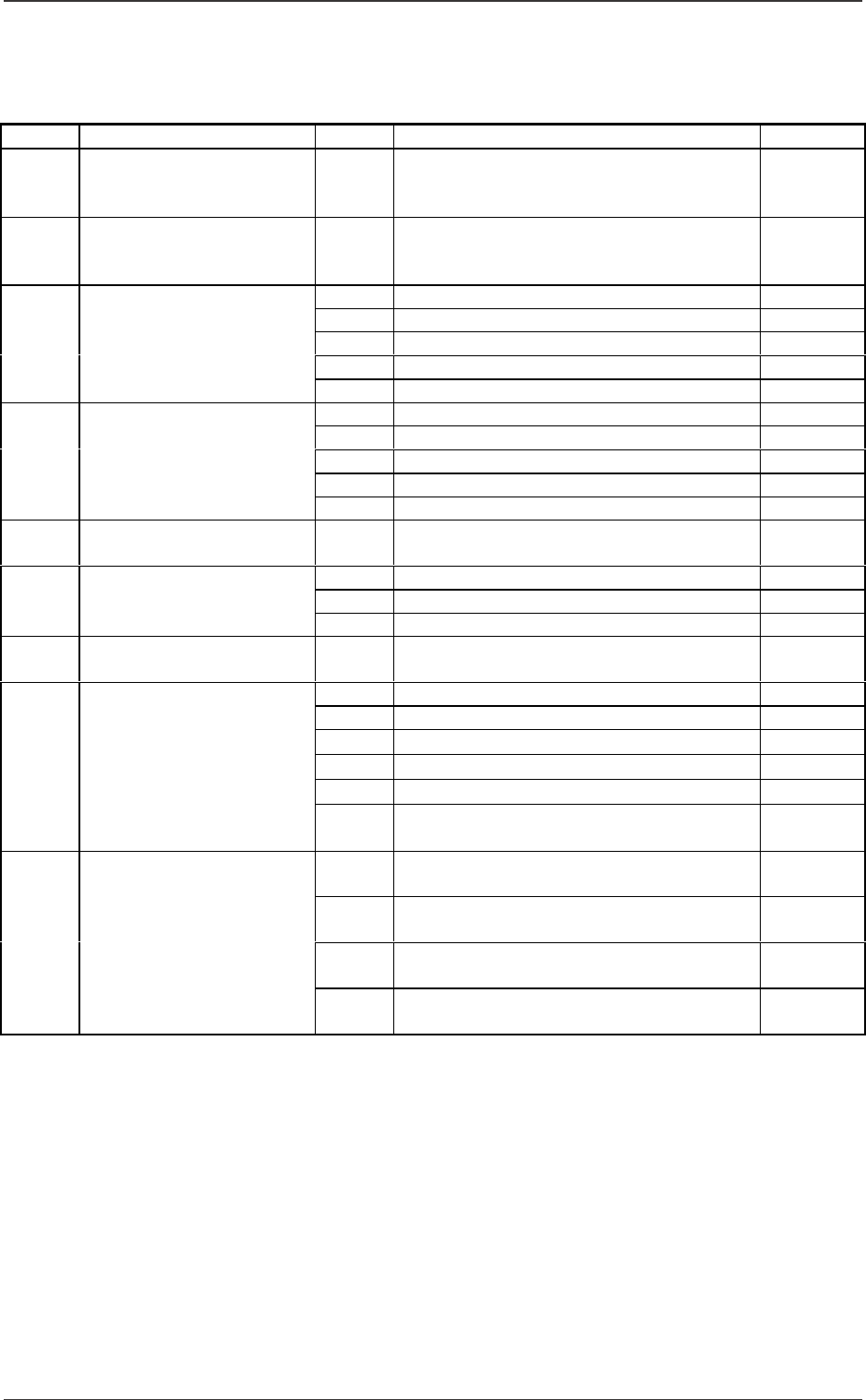
2.2 List of Device Information Messages
0305-001 3-4
2.2 List of Device Information Messages
Table 5C1
Items A Device Information Messages B Remarks
01H WARNING:
DECREASING OF CMP.
HDLG RATE (FOR NOZ)
01H NOZZLE MESSAGE RATE :
02H WARNING:
DECREASING OF CMP.
HDLG RATE (FOR FDR)
01H FEEDER MESSAGE RATE :
01H CMP. MISSING (SENSOR)
02H CMP. VERTICAL (SENSOR)
03H CMP. MISSING (RECOG)
04H CMP. RECOG ERROR
03H ALTERNATED FEEDER
05H SHORTAGE OF COMPONENT
01H CMP. MISSING (SENSOR)
02H CMP. VERTICAL (SENSOR)
03H CMP. MISSING (RECOG)
04H CMP. RECOG ERROR
05H START AUTO
RECOVERY MODE
05H SHORTAGE OF COMPONENT
06H ALARM FOR
SHORTAGE OF CMP.
01H FEW COMPONENTS TO FEED.
01H FINISHED PRODUCT INTERVAL :
02H AUTO RUN INTERVAL :
08H PRODUCT
INFORMATION
03H NOZZLE USAGE INTERVAL :
09H MACHINE INTERFACE
SIGNAL
01H NO SIGNAL FROM FURNACE.
0AH PICK-UP ERROR 01H CMP. MISSING (SENSOR)
02H CMP. VERTICAL (SENSOR)
03H CMP. MISSING (RECOG)
04H CMP. RECOG ERROR (RECOG)
05H SHORTAGE OF COMPONENT
07H SHORTAGE OF COMPONENT
(ALTERNATED FDR)
01H FEEDER WAS NOT SEATED AT
BEAM-A SIDE (BACK).;BPH053
02H FEEDER WAS NOT SEATED AT
BEAM-A SIDE (BACK).;BPH054
0BH OPERATE
INFORMATION
03H FEEDER WAS NOT SEATED AT
BEAM-B SIDE (BACK).;BPH055
04H FEEDER WAS NOT SEATED AT
BEAM-B SIDE (BACK).;BPH056