APC - 224650 Issue 1.pdf - 第34页
ALL PURPOSE CLAMPING (APC) ADJUSTMENTS AND SETTINGS 1.22 All Purpose Clamping (APC) Manual Chapter Issue 1 Nov 16 25. Use Next or Previous to hig hlight Set Reference Vision Height . 26. Select Run Diagnost . The message…
ALL PURPOSE CLAMPING (APC)
ADJUSTMENTS AND SETTINGS
Chapter Issue 1 Nov 16 All Purpose Clamping (APC) Manual 1.21
ADJUSTMENTS AND SETTINGS
Vision Height
WARNING
BOARD CLAMPS. EXTREME CARE MUST BE EXERCISED WHEN WORKING IN
THE TOOLING AREA OF THE MACHINE TO AVOID INJURY. THE FOILS ON THE
FRONT AND REAR BOARD CLAMPS ARE VERY SHARP.
NOTE
Ensure the board file used has the correct board thickness value. Check rail /
camera X motor bracket clearance. Remember that the vision height may be
higher if a thinner board is used.
1. Select Unload Screen.
2. Open the front printhead cover.
3. Remove the screen from the machine.
4. Place the board on the rails and slide to a central position.
5. Refit the screen.
6. Close the front printhead cover.
7. Press the System button.
8. Select Load Screen.
9. Select Maintenance.
10. Select Diagnostics.
11. Use Next or Previous to highlight Rail System.
12. Select Select Module.
13. Use Next or Previous to highlight Toggle Board Clamp.
14. Select Run Diagnost.
15. Select Exit.
16. Use Next or Previous to highlight Rising Table.
17. Select Select Module.
18. Use Next or Previous to highlight Raise Table To Vision Height.
19. Select Run Diagnost.
20. Remove the left hand safety cover.
21. Using a suitable metric rule, measure the distance between the bottom of
the screen to the top of the board.
If the dimension is 79.5mm, go to Step 28.
22. Use Next or Previous to highlight Drive Table Using Jog Buttons.
23. Select Run Diagnost.
24. Using jog buttons drive the rising table to achieve a vision height of 79.5mm.
NOTE
The right jog button drives the rising table up, the left jog button drives the
rising table down. The rising table must not be jogged up higher than the
specified dimension, camera damage may occur.
ALL PURPOSE CLAMPING (APC)
ADJUSTMENTS AND SETTINGS
1.22 All Purpose Clamping (APC) Manual Chapter Issue 1 Nov 16
25. Use Next or Previous to highlight Set Reference Vision Height.
26. Select Run Diagnost. The message ‘This Will Alter The Printer Config-
uration File - Please Confirm’ is displayed.
27. Select Confirm.
28. Use Next or Previous to highlight Home Rising Table.
29. Select Run Diagnost.
30. Refit the left hand safety cover.
31. Select Exit.
32. Select Exit.
33. Remove the board from the rails.
34. Select Back.
35. If the vision height has been adjusted a vision calibration and an offset
calibration must be carried out.
Rail Lifted Sensors 1. Select Maintenance.
2. Select Diagnostics.
3. Select Confirm.
4. From the displayed table, select Rising Table.
5. Select Home Table.
6. Select Back.
7. From the displayed table, select Rail System.
8. Select Home Rails.
9. Remove the left and right hand side safety covers to gain access to the rear
rail.
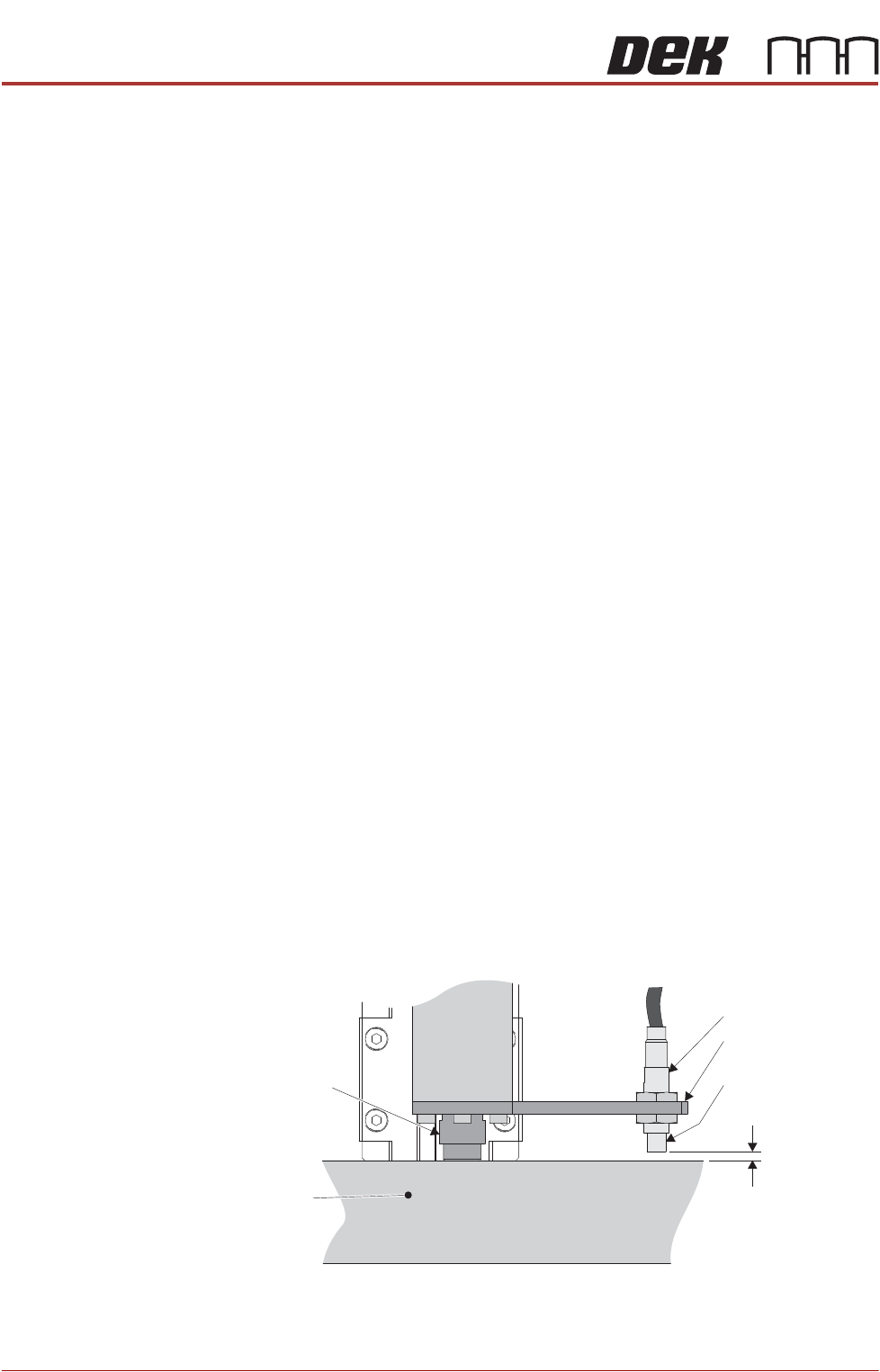
10. Identify the rear right rail transport leg and the rail stop bar (clatter bar)
11. Adjust the sensor position, so that a 3.5mm feeler gauge fits between the
sensor and the top face of the clatter bar and a 4mm feeler gauge does not
fit.
12. Repeat Step 11 for left hand end of the rear rail.
Rail Stop Bar
(Clatter Bar)
Sensor LED
Side View on Rear Right Rail Transport Leg
Sensor Support
Bracket
Sensor
3.5mm - GO
4mm - NO GO
Shock Absorber
ALL PURPOSE CLAMPING (APC)
ADJUSTMENTS AND SETTINGS
Chapter Issue 1 Nov 16 All Purpose Clamping (APC) Manual 1.23
13. Select Board Width parameter.
14. Enter a value of 40.5mm (minimum board width), and select Accept.
15. Select Rails To Board Width.
16. Repeat Steps 11 and 12.
17. Select Back.
18. Select Exit Diagnostics.
19. Select Confirm.
Board at Left/Right
Optos
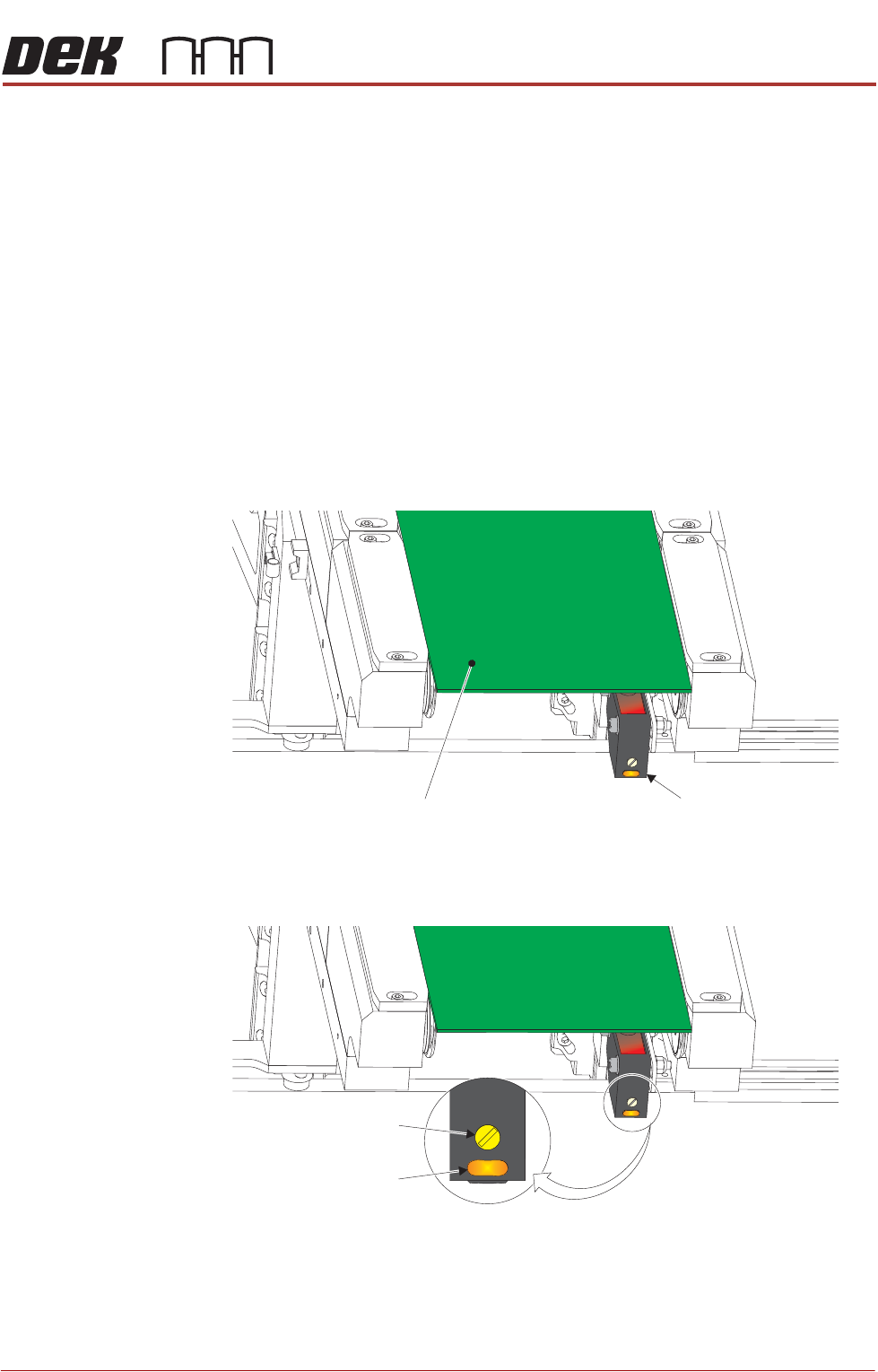
The board at left/right optos switching threshold can be adjusted by means of a
sensitivity control. This ensures that when a board is fed into the machine (via
the transport belts) the sensor output switches to ON.
To achieve an optimum setting carry out the following procedure:
1. Place a board on the rails covering the sensor.
2. Turn the sensitivity control fully anti-clockwise, ensure that the amber LED
is extinguished.
3. Re-adjust the sensitivity control clockwise until the amber LED illuminates.
NOTE
If the amber LED is flashing, this indicates a weak signal. Re-adjust the
sensitivity control.
View on Inroad Conveyor
Board at Left SensorBoard
Sensitivity Control
Test LED