APC - 224650 Issue 1.pdf - 第36页
ALL PURPOSE CLAMPING (APC) ADJUSTMENTS AND SETTINGS 1.24 All Purpose Clamping (APC) Manual Chapter Issue 1 Nov 16 4. Remove the board from the rails a nd confirm the amber LED extinguishes. 5. T urn the board 90° and pos…
ALL PURPOSE CLAMPING (APC)
ADJUSTMENTS AND SETTINGS
Chapter Issue 1 Nov 16 All Purpose Clamping (APC) Manual 1.23
13. Select Board Width parameter.
14. Enter a value of 40.5mm (minimum board width), and select Accept.
15. Select Rails To Board Width.
16. Repeat Steps 11 and 12.
17. Select Back.
18. Select Exit Diagnostics.
19. Select Confirm.
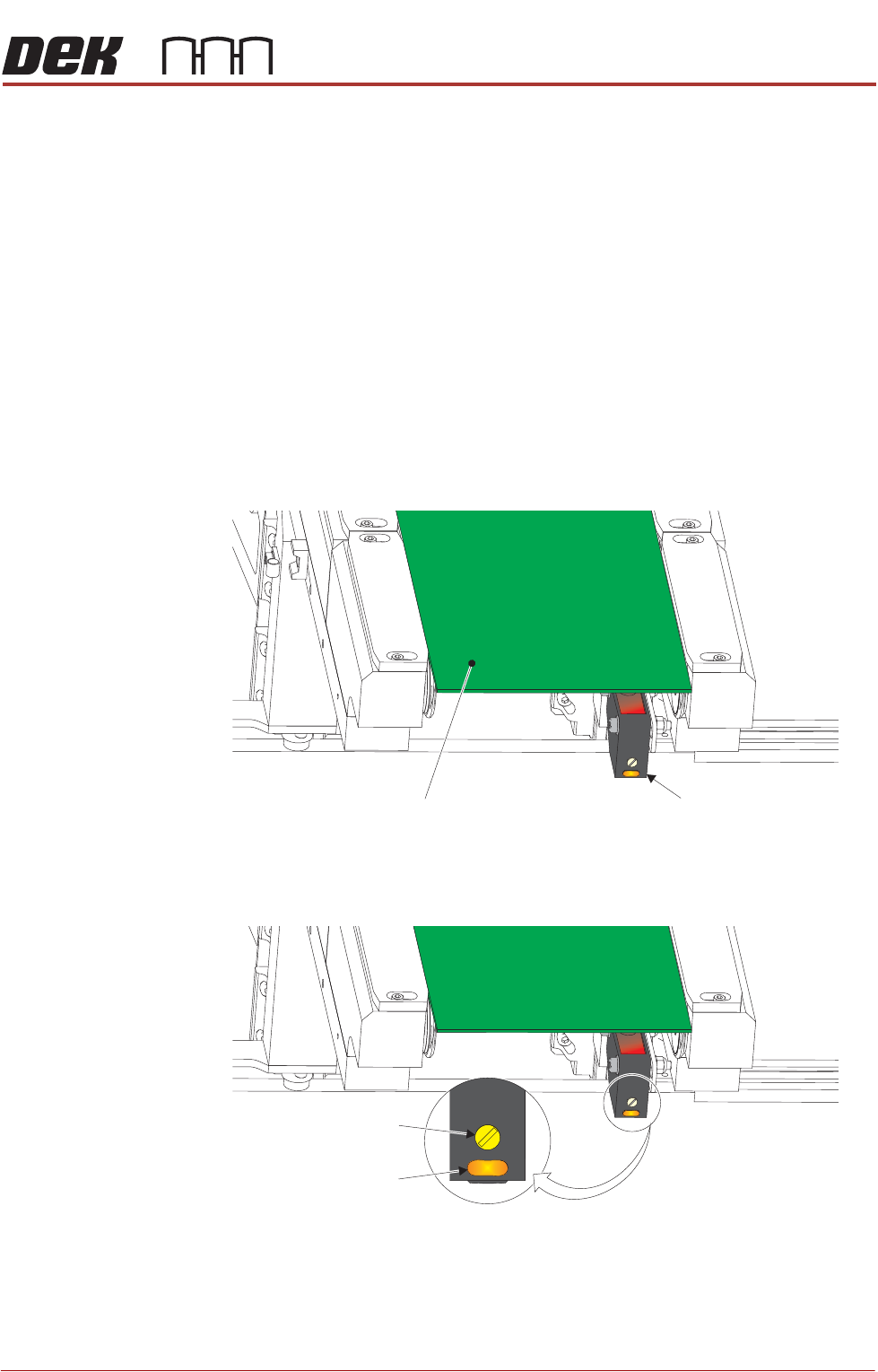
Board at Left/Right
Optos
The board at left/right optos switching threshold can be adjusted by means of a
sensitivity control. This ensures that when a board is fed into the machine (via
the transport belts) the sensor output switches to ON.
To achieve an optimum setting carry out the following procedure:
1. Place a board on the rails covering the sensor.
2. Turn the sensitivity control fully anti-clockwise, ensure that the amber LED
is extinguished.
3. Re-adjust the sensitivity control clockwise until the amber LED illuminates.
NOTE
If the amber LED is flashing, this indicates a weak signal. Re-adjust the
sensitivity control.
View on Inroad Conveyor
Board at Left SensorBoard
Sensitivity Control
Test LED
ALL PURPOSE CLAMPING (APC)
ADJUSTMENTS AND SETTINGS
1.24 All Purpose Clamping (APC) Manual Chapter Issue 1 Nov 16
4. Remove the board from the rails and confirm the amber LED extinguishes.
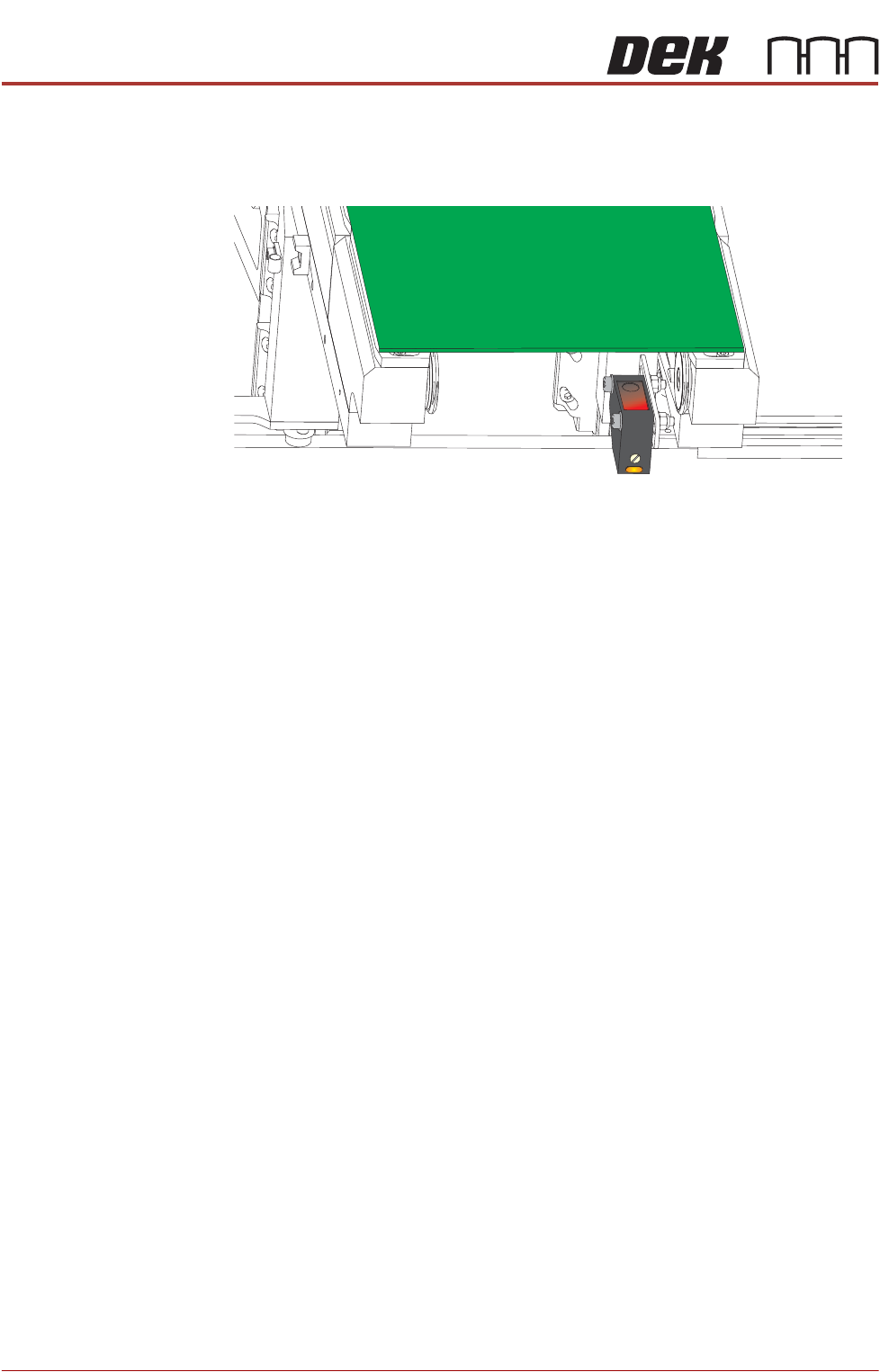
5. Turn the board 90° and position back onto the rail system (so that the board
lies on top of the rail system as shown in the graphic below).
6. Confirm that the amber LED is extinguished. If the amber LED illuminates,
turn the sensitivity control anti-clockwise until the amber LED extinguishes.
7. Remove the board.
8. Position the board back on the rail system, as in Step 1, and confirm that the
amber LED illuminates.
9. If the board has holes or cut-outs, go to Step 10.
Otherwise, go to Step 13.
10. Slide the board backward and forward across the sensor ensuring that the
LED is only triggered by the leading and trailing edges of the board.
11. If the LED flickers when encountering holes or cut-outs, turn the sensitivity
control clockwise a further quarter turn.
12. Repeat Steps 10 and 11 until the correct setting is achieved.
13. Remove the board from the rails and confirm that the amber LED extin-
guishes.
Front Rail
Parallelism
1. Select Open Cover Commands.
2. Select Carriage To Rear.
3. Select Unload Screen.
4. Open the front printhead cover.
5. Remove the screen from the machine.
6. Close the front printhead cover.
7. Press the System button.
8. Select Back.
9. Select Maintenance.
10. Select Diagnostics.
11. Use Next or Previous to highlight Rail System.
12. Select Select Module.
ALL PURPOSE CLAMPING (APC)
ADJUSTMENTS AND SETTINGS
Chapter Issue 1 Nov 16 All Purpose Clamping (APC) Manual 1.25
13. Ensure that Home Rail Width is highlighted.
14. Select Run Diagnost.
15. Select Exit.
16. Use Next or Previous to highlight Rising Table.
17. Select Run Diagnost.
18. Use Next or Previous to highlight Rising Table to Transport Height.
19. Select Run Diagnost.
20. Open the front printhead cover.
21. Remove any tooling from the manual tooling plate.
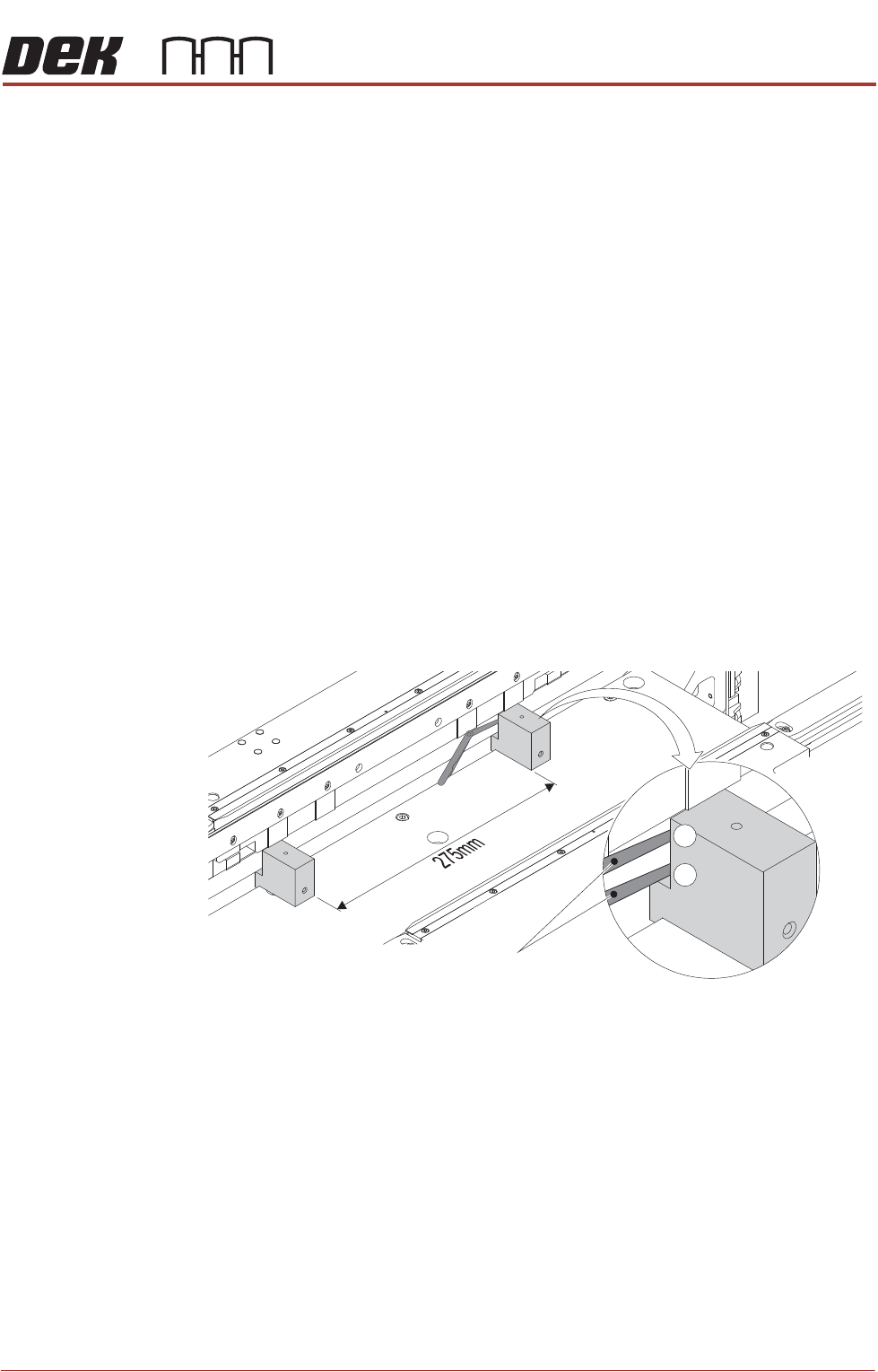
22. Place the rail setting jigs (Part No 205816) on the manual tooling plate,
spaced approximately 275mm apart about the centre, ensuring that they are
against the front of the table.
23. Using the jog buttons, carefully lift the table until the rails are clear of the
clatter bars.
24. Using a 0.05mm feeler gauge as a no-go gauge, check positions 1 and 2
(shown in graphic) on both rail setting jigs.
If a gap >0.05mm is present, adjustment is needed. Continue at Step 25.
If adjustment is not necessary continue at Step 31.
View on Rear of Front Rail
0.05mm Feeler Gauge
1
2