APC - 224650 Issue 1.pdf - 第74页
ALL PURPOSE CLAMPING (APC) REPLACEMENT PROCEDURES 1.62 All Purpose Clamping (APC) Manual Chapter Issue 1 Nov 16 8. T o allow for spanner access, slightly lift the mid plate. Using a 5.5mm A/ F spanner to preven t cylinde…
ALL PURPOSE CLAMPING (APC)
REPLACEMENT PROCEDURES
Chapter Issue 1 Nov 16 All Purpose Clamping (APC) Manual 1.61
Mid Plate
Pneumatic
Cylinder
Replacement
There are two mid plate pneumatic cylinders per APC module, if replacement
is required then both cylinders in a module should be replaced as a pair.
Remove 1. Ensure the Prepare for Replacement procedure has been completed.
2. Remove the board clamp foil, as detailed in Board Clamp Foil Replacement
- Remove.
3. Remove the top plate, as detailed in Top Plate Replacement - Remove.
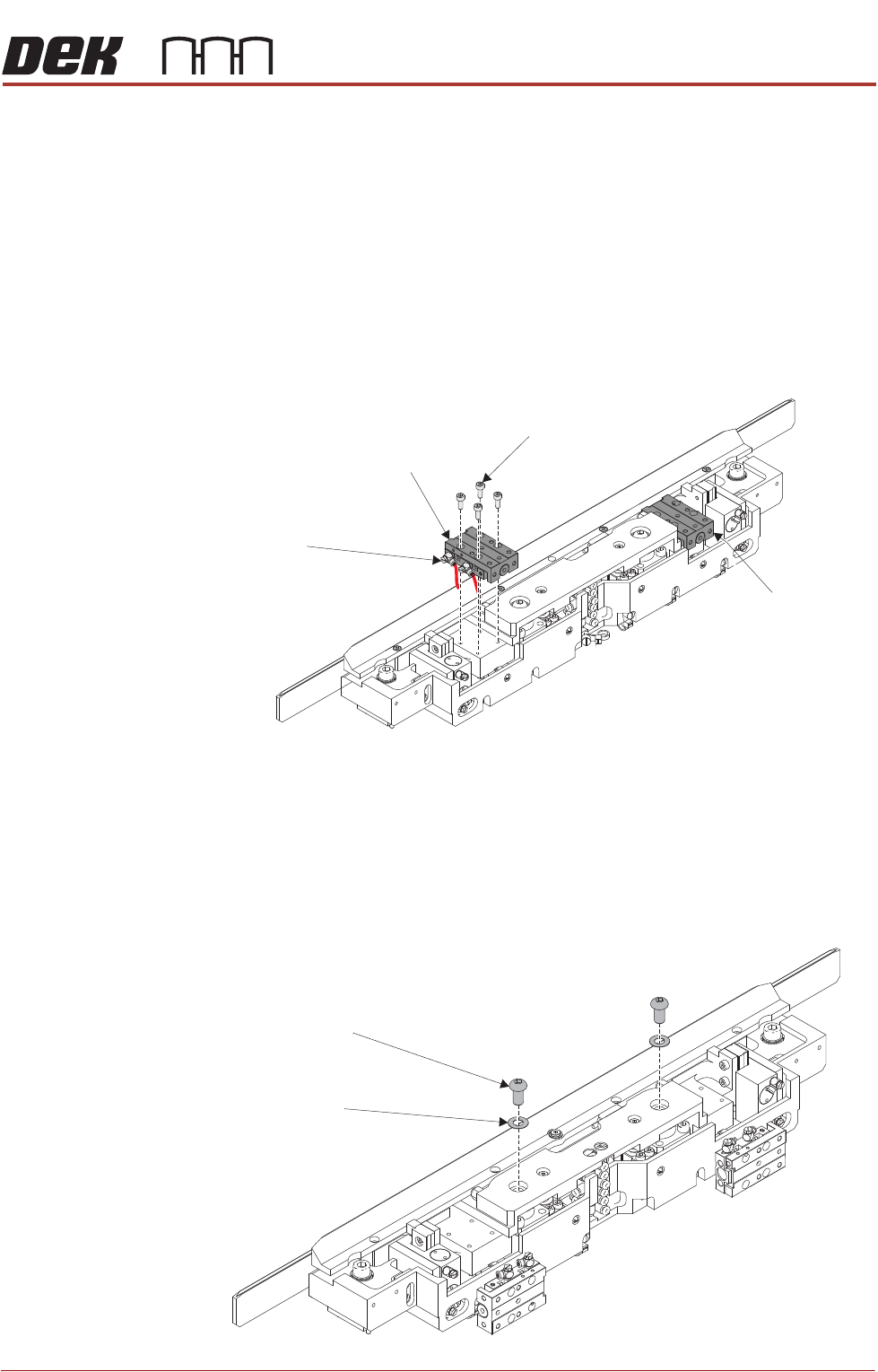
4. Using a 2.5mm Allen key, remove the cap head screws from the first slide
table. Leave the pneumatic elbow fittings attached to the slide table.
5. Move the slide table from its mounting, and allow it to hang over the rear of
the module, the weight being supported by the still attached pneumatic
fittings.
6. Repeat Steps 4 to 5 for the other slide table.
7. Using a 5mm Allen key, remove the socket button head screws and shim
washers from the mid plate.
Slide Table
Cap Head Screw
(4 positions)
Pneumatic Elbow Fittings
(2 positions)
Slide Table
Socket Button Head Screw
(2 positions)
Shim Washer
(2 position)
ALL PURPOSE CLAMPING (APC)
REPLACEMENT PROCEDURES
1.62 All Purpose Clamping (APC) Manual Chapter Issue 1 Nov 16
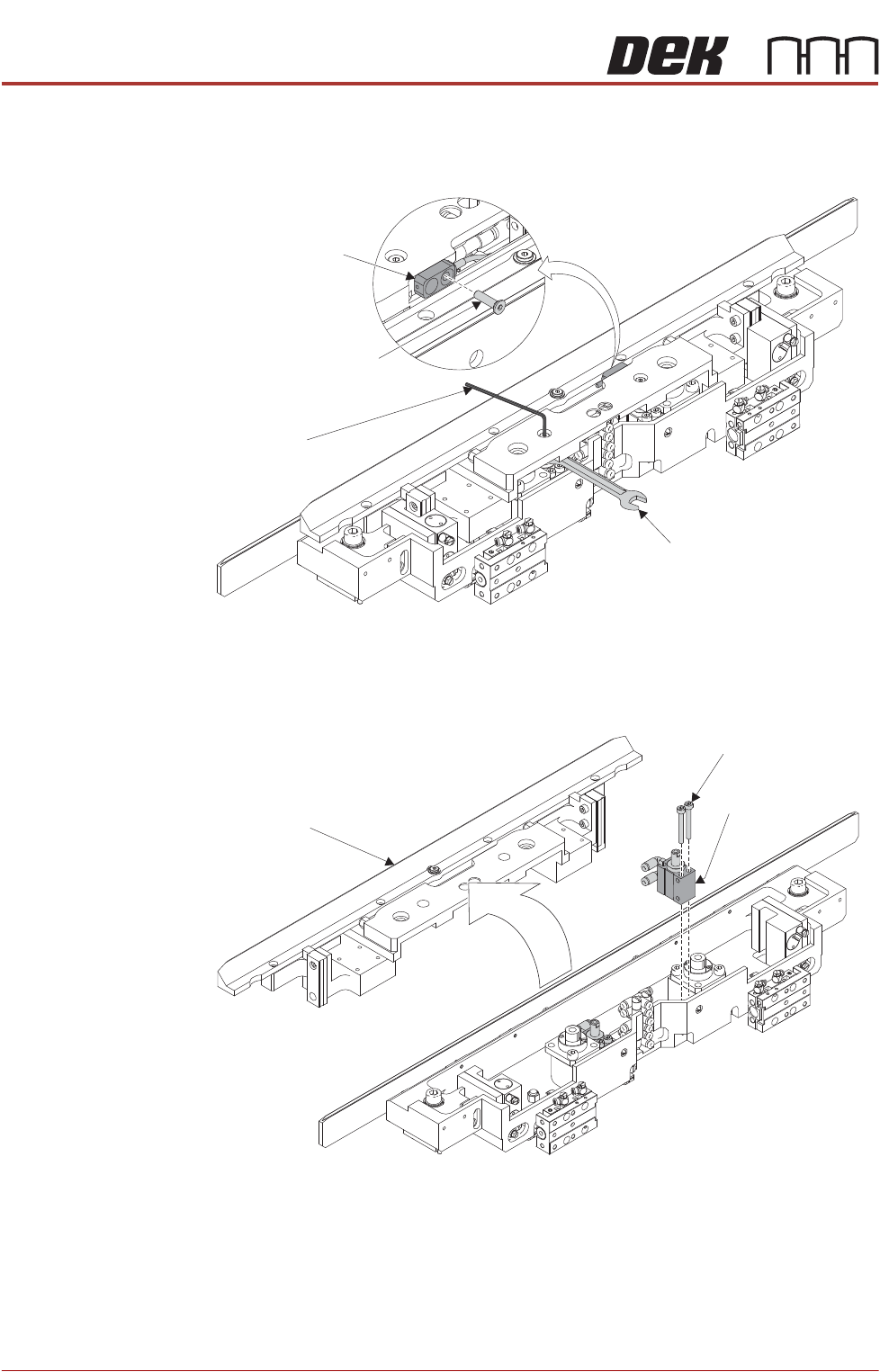
8. To allow for spanner access, slightly lift the mid plate. Using a 5.5mm A/F
spanner to prevent cylinder rod rotation, remove the lift cylinder shoulder
screws connecting the mid plate to the lift cylinders.
9. Using a 2.5mm Allen key, remove the countersunk screw securing the
sensor to the mid plate. Feed the sensor back through the clearance hole.
10. Remove the mid plate assembly.
11. Disconnect the blue pneumatic tubes from the lift cylinder’s elbow fittings,
making a note of which tube goes to which fitting.
12. Using a 2.5mm Allen key, remove the cap head screws that secure the lift
cylinder to the base assembly.
13. Remove the lift cylinder.
14. Repeat Steps 11 to 13 for the other lift cylinder.
Allen Key
5.5 A/F Spanner
Sensor
Countersunk Screw
Midplate
Assembly
Lift Cylinder
Cap Head Screws
ALL PURPOSE CLAMPING (APC)
REPLACEMENT PROCEDURES
Chapter Issue 1 Nov 16 All Purpose Clamping (APC) Manual 1.63
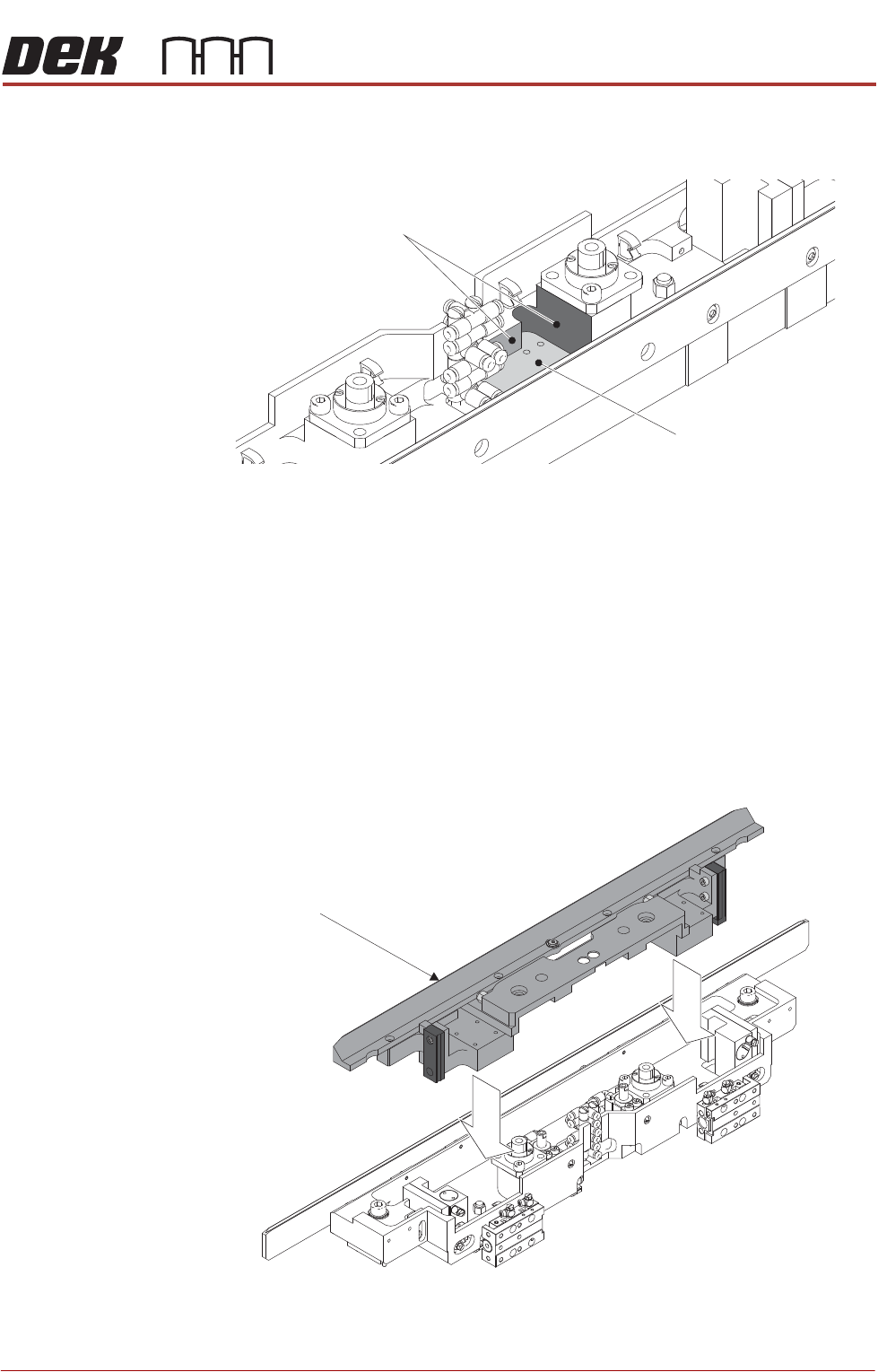
Replace 1. Using IPA wipes, clean the lift cylinder mounting/datum faces on the base
assembly.
2. Fit two elbow couplings to the lift cylinder, ensuring that the air ports will face
towards the centre of the APC module base assembly.
3. Fit the lift cylinder to the base assembly, ensuring that it is pushed in fully
against the datum faces.
4. Using a 2.5mm Allen key, secure the the lift cylinder to the base assembly
with the cap head screws.
5. Reconnect the blue pneumatic tubing, ensuring they are connected cor-
rectly as noted in Step 11 of the removal procedure.
6. Repeat Steps 2 to 5 for the other lift cylinder.
7. Install the mid plate assembly.
8. Feed the sensor back through the clearance hole. Secure the sensor to the
mid plate using a 2.5mm Allen key and countersunk screw .
Lift Cylinder
Mounting Surface
Lift Cylinder Datum Faces
Midplate
Assembly