APC - 224650 Issue 1.pdf - 第93页
ALL PURPOSE CLAMPING (APC) MAINTENANCE SCHEDULE Chapter Issue 1 Nov 16 All Purpose Clamping (APC) Manual 1.81 Quarterly Maintenance Quarterly maintenance should only be complet ed by an ASM engineer or a suitably trained…
ALL PURPOSE CLAMPING (APC)
MAINTENANCE SCHEDULE
1.80 All Purpose Clamping (APC) Manual Chapter Issue 1 Nov 16
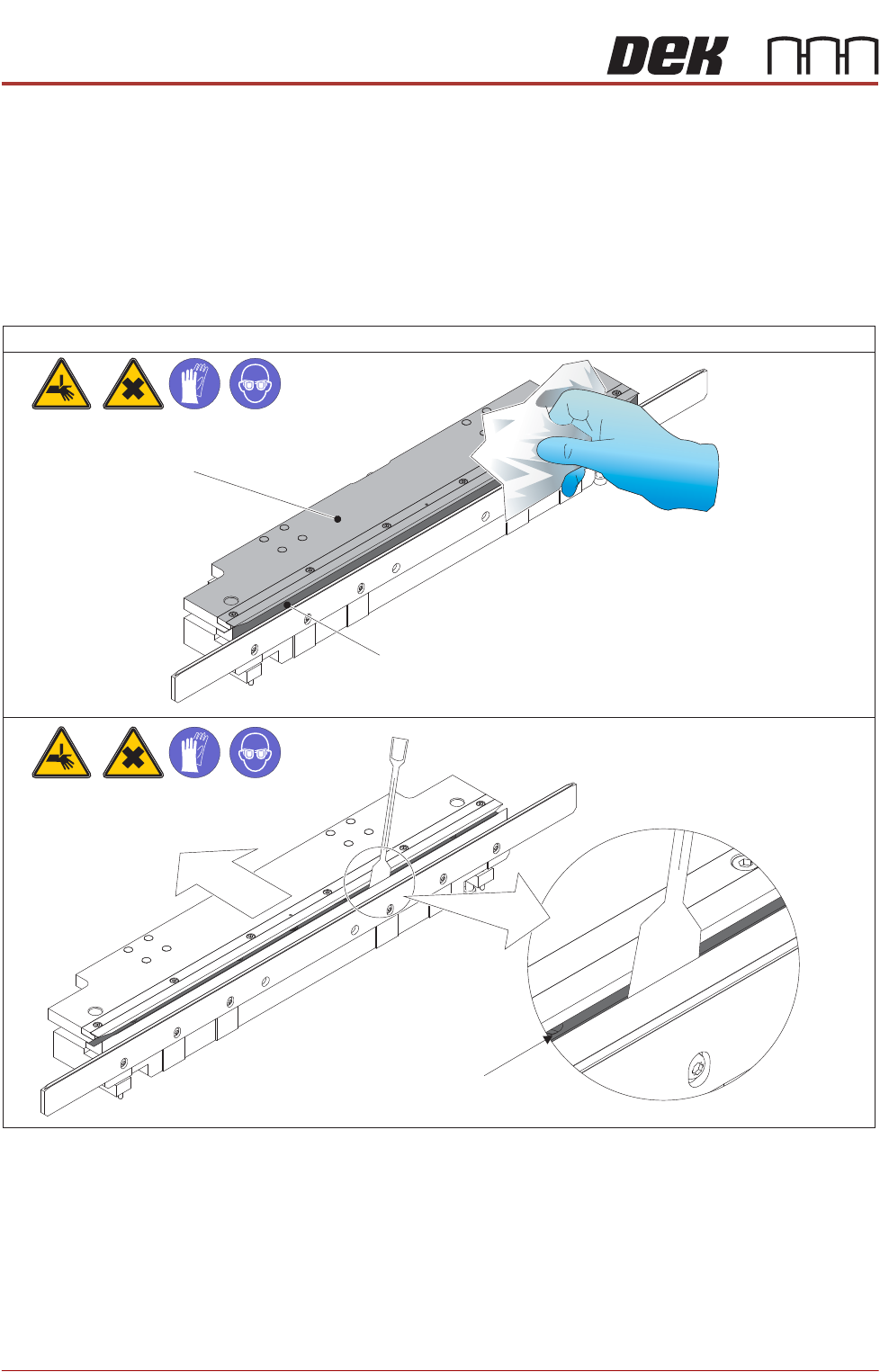
Clean APC Modules Ensure the APC modules are free from paste and debris:
NOTE
Cleaning procedures are identical for both modules.
1. Wipe top plates and snug bar face, and ensure free from paste and debris.
2. Slide top plate rearwards, clean internal snug area and ensure free from
paste and debris.
Check Board Clamp
Foils For Wear/
Damage
Check board clamp foils for any signs of wear or damage (bent foils, impact
damage etc).
If worn or damaged, see Board Clamp Foil Replacement in the Replacement
Procedures section of this Chapter.
Tasks
1
Top Plate
Snug Bar Face
2
Snug Bar Internal Face
ALL PURPOSE CLAMPING (APC)
MAINTENANCE SCHEDULE
Chapter Issue 1 Nov 16 All Purpose Clamping (APC) Manual 1.81
Quarterly Maintenance
Quarterly maintenance should only be completed by an ASM engineer or a
suitably trained customer engineer.
WARNING
BOARD CLAMPS. EXTREME CARE MUST BE EXERCISED WHEN WORKING IN
THE TOOLING AREA OF THE MACHINE TO AVOID INJURY. THE FOILS ON THE
FRONT AND REAR BOARD CLAMPS ARE VERY SHARP.
MANDATORY
TOXIC CHEMICALS MAY BE PRESENT. SAFETY GLOVES MUST BE WORN.
MANDATORY
TOXIC CHEMICALS MAY BE PRESENT. EYE PROTECTION MUST BE WORN.
Preparation Remove the stencil if fitted.
General
APC System Tick
Check general operation of the APC Modules (see following page).
Summary/Remarks
Signed: Date:

ALL PURPOSE CLAMPING (APC)
MAINTENANCE SCHEDULE
1.82 All Purpose Clamping (APC) Manual Chapter Issue 1 Nov 16
Check general
operation of the APC
Modules
To check the general operation of the APC modules:
1. Load a suitable product to check the APC module operation.
2. Select Setup Product \ Tooling and set the APC clamping mode parame-
ter to Snug.
3. Place an example board on the inroad conveyor.
4. Select Setup Tooling.
5. Select Load Board.
6. Select Auto Board.
7. Check the board is snugged correctly.
8. Select Unload Board.
9. Select Auto Board.
10. Repeat Steps 2 to 9 for the other APC clamping modes, Clamp and Snug
and Clamp.
If the clamping modes do not perform as expected, follow the Pneumatic
System Settings and Board Transit Clearance Check procedures in the Adjust
-
ment and Settings section of this Chapter.