APC - 224650 Issue 1.pdf - 第57页
ALL PURPOSE CLAMPING (APC) REPLACEMENT PROCEDURES Chapter Issue 1 Nov 16 All Purpose Clamping (APC) Manual 1.45 T op Plate Replacem ent Remove 1. Ensure the Prepare for Replacement procedure has been completed. 2. Remove…
ALL PURPOSE CLAMPING (APC)
REPLACEMENT PROCEDURES
1.44 All Purpose Clamping (APC) Manual Chapter Issue 1 Nov 16
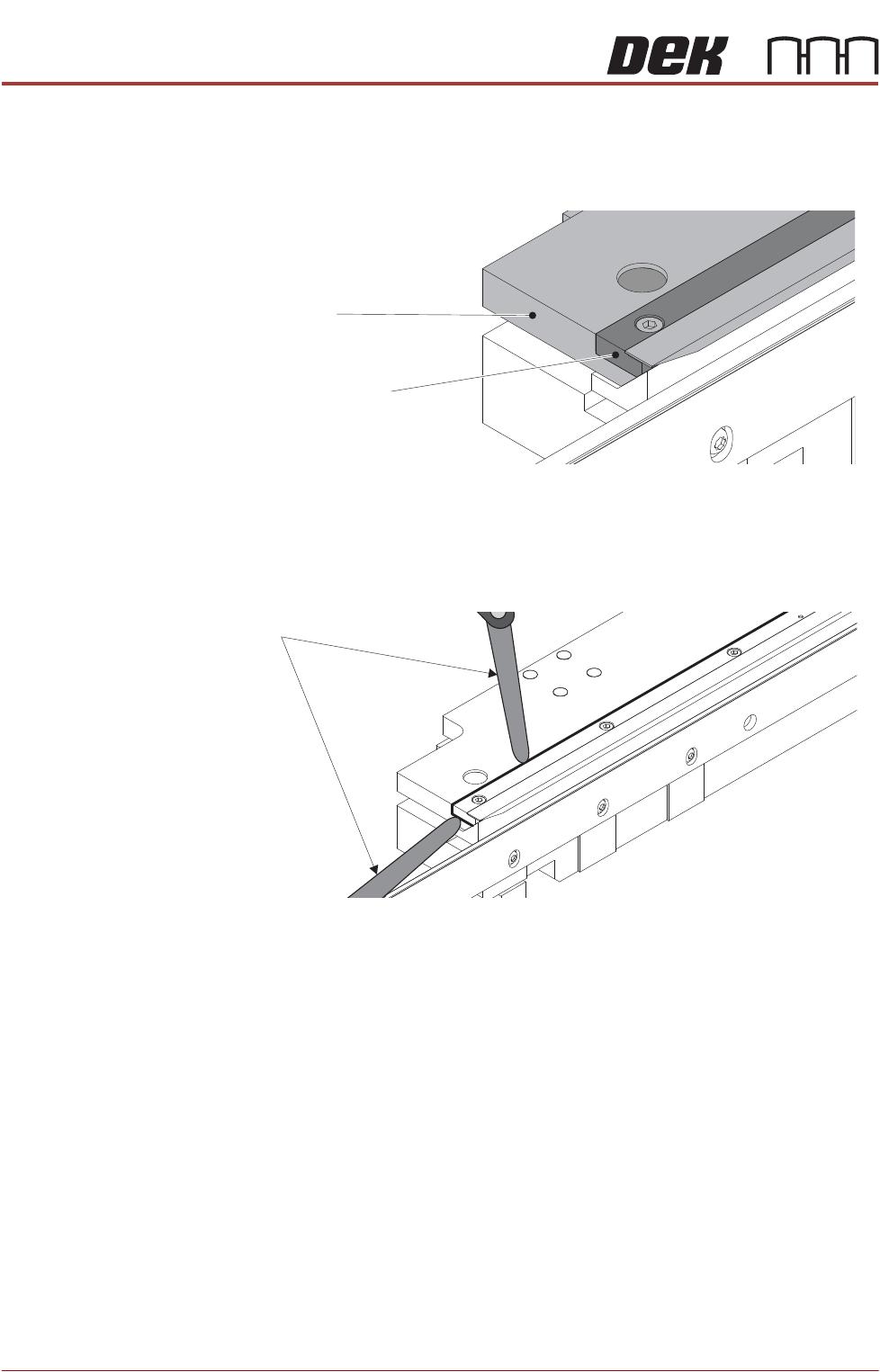
2. Check that the foil assembly is fitted fully home on the top plate:
a. Ensure the ends of the foil assembly are flush with the ends of the top
plate.
b. Check that a 0.05mm feeler gauge will not go between the foil assembly
and the top plate. Perform check in multiple locations along the length,
and at the ends.
View on Ends of Top Plate and Foil Assembly
Top Plate End
Foil Assembly End
Feeler Gauge
ALL PURPOSE CLAMPING (APC)
REPLACEMENT PROCEDURES
Chapter Issue 1 Nov 16 All Purpose Clamping (APC) Manual 1.45
Top Plate Replacement
Remove 1. Ensure the Prepare for Replacement procedure has been completed.
2. Remove the board clamp foil as detailed in Board Clamp Foil Replacement.
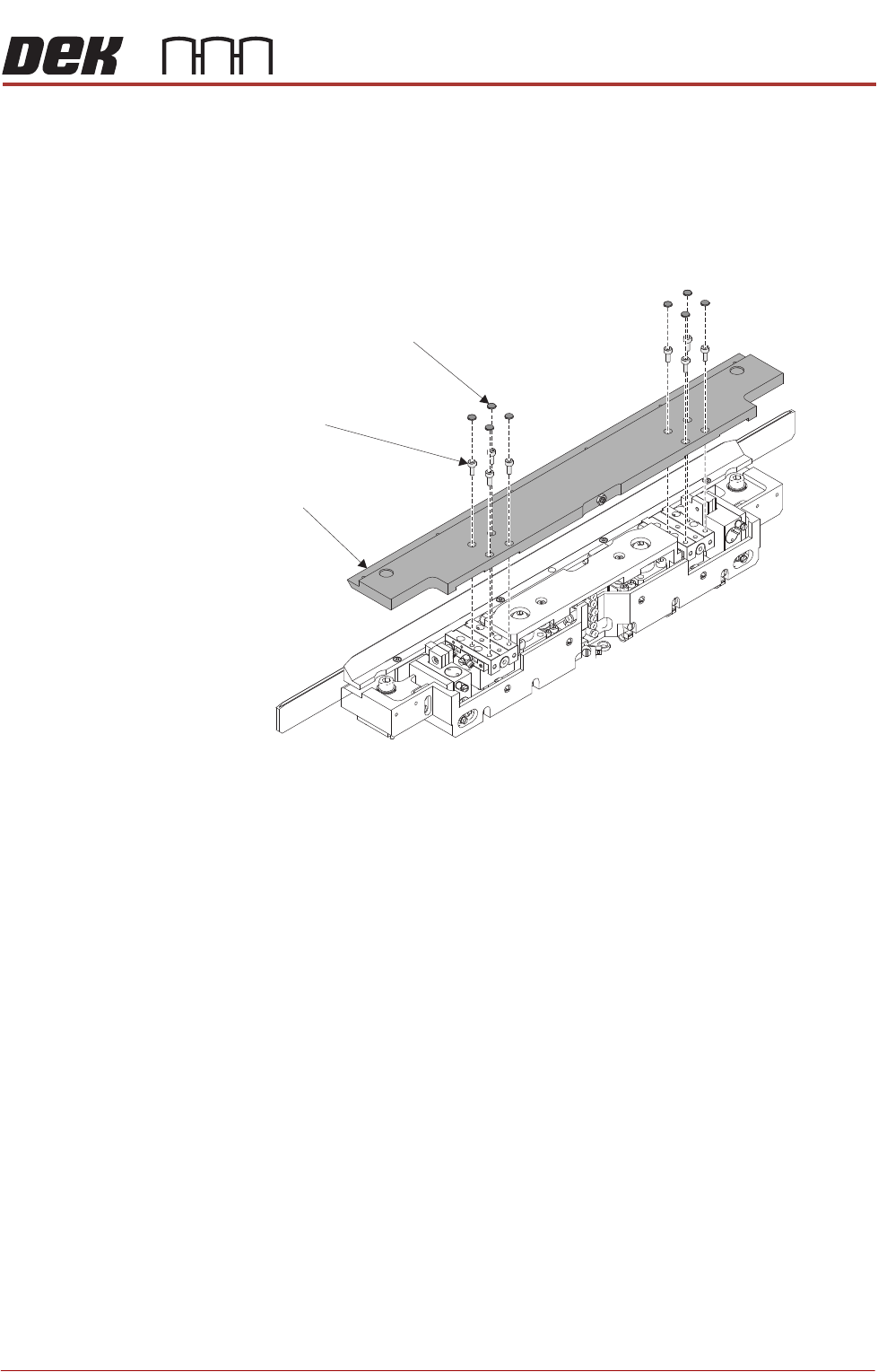
3. Using a sharp pointed tool, pierce each dust cap in the centre and prise out
from the top plate. Discard dust caps when removed.
4. Using a 2.5mm Allen key, remove the cap head screws from the top plate.
5. Remove the top plate.
Replace 1. Install the top plate on top of the APC module.
2. Apply thread lock compound to the 8 M3 cap head screws, install and
loosely tighten to fix the top plate to the module.
NOTE
The 8 cap head screws will be fully tightened later in the procedure.
Top Plate
Dust Caps
(8 positions)
Cap Head Screws
(8 positions)

ALL PURPOSE CLAMPING (APC)
REPLACEMENT PROCEDURES
1.46 All Purpose Clamping (APC) Manual Chapter Issue 1 Nov 16
3. Use the isolator switch valve to reapply the air supply to the APC modules.
4. In Diagnostics \ Rail System, use Next or Previous to highlight Toggle
OTS Over Top Clamp.
5. Select Run Diagnost to toggle ON, so that the top clamps are retracted.
6. Tighten the 8 M3 cap head screws to 1.4Nm. Visually check that the top
plate is parallel with the base of the module.
7. Install 8 new green dust caps on top of the top plate retaining cap head
screws.
NOTE
If the top plate-sliding table position has already been setup (shown by set
screw and locknut already being fitted to top plate, and Varnistop being
present on the locknut) - proceed to Step 13.
8. In Diagnostics \ Rail System, use Next or Previous to highlight Toggle
OTS Over Top Clamp.
9. Select Run Diagnost to toggle OFF, so that the top clamps are extended.
If working on the rear APC module, ensure that the snug bar is able to pivot
on its central point.
Isolator Switch Valve
Location of APC Pneumatic Manifold