APC - 224650 Issue 1.pdf - 第47页
ALL PURPOSE CLAMPING (APC) ADJUSTMENTS AND SETTINGS Chapter Issue 1 Nov 16 All Purpose Clamping (APC) Manual 1.35 Pneumatics System Settings The following section details the setti ngs required for the pne umatics system…

ALL PURPOSE CLAMPING (APC)
ADJUSTMENTS AND SETTINGS
1.34 All Purpose Clamping (APC) Manual Chapter Issue 1 Nov 16
8. Check that the board transits into the printing area successfully with the
minimum of noise (no excessive clicking or knocks).
If the board does not arrive into the printing area, or excessive noise
(clicking, knocking etc) is encountered then the Home Position Rail Width
and Board Guide Setting procedure should be completed.
9. Carry out the Output Conveyor Check as detailed below.
Output Conveyor
Check
1. Select Transport Height.
2. Select Unload Board.
3. Select Auto Board.
4. Check that the board exits the printing area successfully, and comes to a
stop on the output conveyor with the minimum of noise (no excessive
clicking or knocks).
If the board does not exit the printing area and arrive successfully at the
output conveyor, or excessive noise (clicking, knocking etc) is encountered
then the Home Position Rail Width and Board Guide Setting procedure
should be completed.
Rail to Table Height The rail to table height ensures that the board is supported correctly and evenly
during the print process.
NOTE
Rail to Table Height setting is factory set and no attempt should be made to
make adjustment. If the transport rails have been removed from the printer, a
coplanitary procedure must be carried out before commencing printing. Please
contact your local customer support office for more details.
ALL PURPOSE CLAMPING (APC)
ADJUSTMENTS AND SETTINGS
Chapter Issue 1 Nov 16 All Purpose Clamping (APC) Manual 1.35
Pneumatics
System Settings
The following section details the settings required for the pneumatics system.
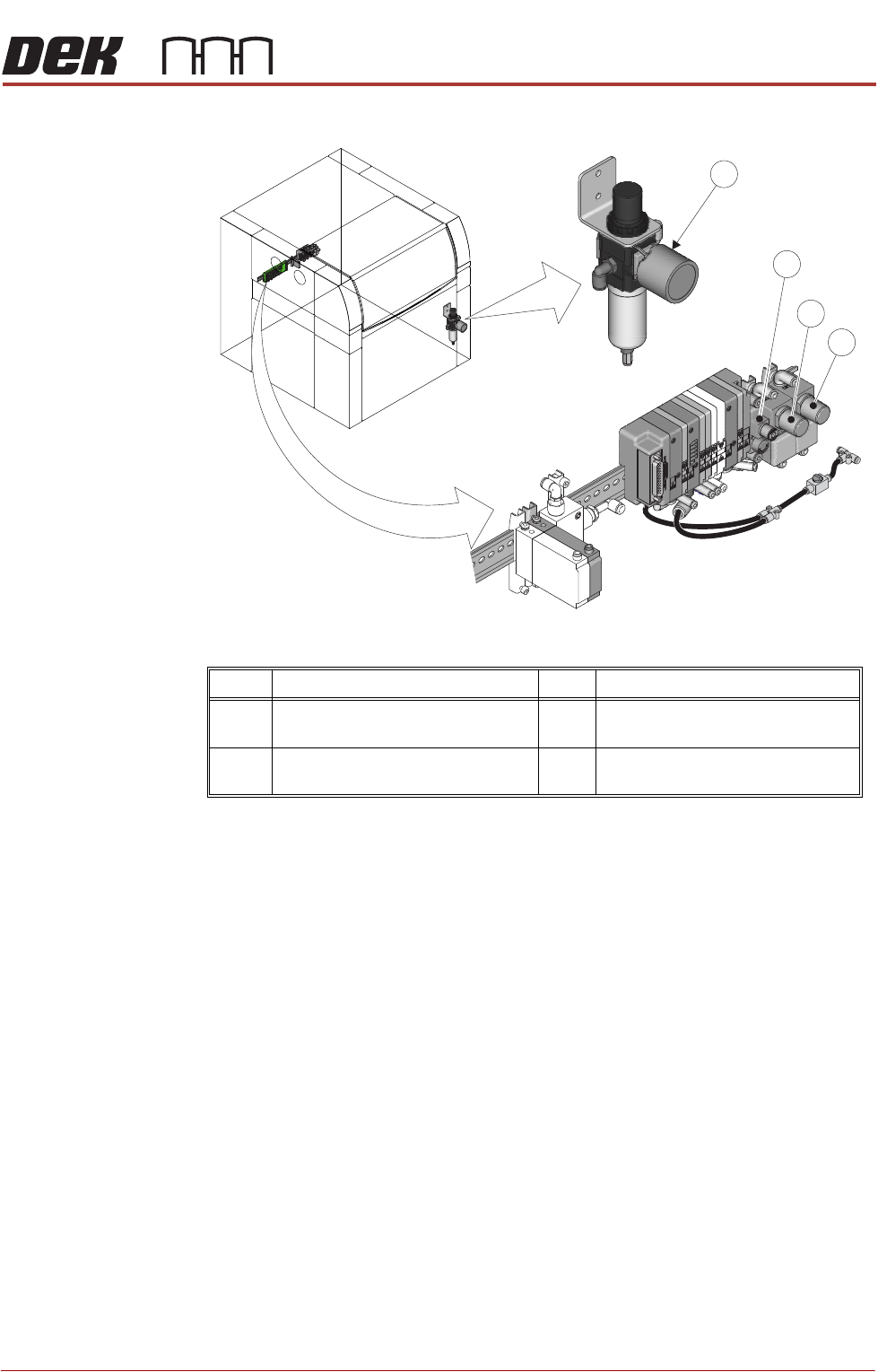
Mains Air Regulator Ensure the mains air regulator is set to 0.6Mpa (6 bar).
1. Gain access to the mains air regulator.
2. Check the reading on the regulator gauge. If the reading is not 0.6Mpa
(6 bar) adjust the regulator control valve accordingly (clockwise increases
pressure, anti-clockwise decreases pressure).
Top Clamp Pressure
Regulators
To check, or adjust the top clamp pressure regulators:
1. Gain access to the regulators on the APC pneumatic manifold.
2. In the machine software, select Maintenance.
3. Select Diagnostics.
4. Use Next or Previous to highlight Rail System.
5. Select Select Module.
6. Use Next or Previous to highlight Cycle OTS Over Top Clamp.
7. Select Run Diagnost.
8. During the cycle procedure, adjust the top clamp pressure regulators as
follows:
Top Clamp Extend Pressure regulator = 0.35Mpa (3.5 bar)
Top Clamp Retract Pressure regulator = 0.38Mpa (3.8 bar)
Item Description Item Description
1 Mains Air Regulator 3 Top Clamp Extend Pressure
Regulator
2 Mid Plate Balance Pressure
Regulator
4 Top Clamp Retract Pressure
Regulator
4
Location of APC Pneumatic Manifold
2
3
1

ALL PURPOSE CLAMPING (APC)
ADJUSTMENTS AND SETTINGS
1.36 All Purpose Clamping (APC) Manual Chapter Issue 1 Nov 16
9. When the cycle procedure has completed, and the regulators are set
correctly, select Exit.
10. Select Exit.
Mid Plate Balance
Pressure Regulator
To check, or adjust the mid plate balance pressure regulator:
1. Gain access to the regulator on the APC pneumatic manifold.
2. Adjust the mid plate balance pressure regulator to 0.1Mpa (1 bar).
3. In the machine software, select Maintenance.
4. Select Diagnostics.
5. Use Next or Previous to highlight Rail System.
6. Select Select Module.
7. Use Next or Previous to highlight the following toggle parameters, and use
Run Diagnost to ensure they are in the correct state:
a. Toggle OTS Mid Plate Down is set to OFF.
b. Toggle OTS Mid Plate Up is set to OFF.
c. Toggle OTS Brake is set to OFF.
8. Use Next or Previous to highlight Toggle OTS Mid Plate Down, and use
Run Diagnost to toggle to ON. Check the mid plate assemblies of the APC
modules for any noticeable upwards/downwards movement.
NOTE
The balance of the mid plate assembly should be checked quickly (within 20
seconds), as the setting is affected by slow pressure variations over time.
9. Toggle Toggle OTS Mid Plate Down to OFF and ON a number of times to
confirm that there is/isn’t any noticeable movement of the mid plate assem
-
bly.
If the mid plate rises, the setting at the balance pressure regulator should
be slightly reduced.
If the mid plate falls, the setting at the balance pressure regulator should be
slightly increased.
10. If any adjustment was made, repeat Steps 8 and 9 to re-check.
11. Use Next or Previous to highlight Toggle OTS Mid Plate Up, and use Run
Diagnost to toggle to ON. Check the mid plate assemblies of the APC
modules for any noticeable upwards/downwards movement.
NOTE
The balance of the mid plate assembly should be checked quickly (within 20
seconds), as the setting is affected by slow pressure variations over time.
12. Toggle Toggle OTS Mid Plate Up to OFF and ON a number of times to
confirm that there is/isn’t any noticeable movement of the mid plate assem
-
bly.
If the mid plate rises, the setting at the balance pressure regulator should
be slightly reduced.
If the mid plate falls, the setting at the balance pressure regulator should be
slightly increased.