APC - 224650 Issue 1.pdf - 第97页
APC SOFTWARE SETUP AN D RECOMMENDED SETTIN GS RECOMMENDED SETTIN GS Chapter Issue 1 Nov 16 All Purpose Clamping (APC) Manual 2.1 CHAPTER 2 APC SOFTW ARE SET UP AND RECOMMENDED SETTINGS RECOMMENDED SETTINGS The following …

ALL PURPOSE CLAMPING (APC)
MAINTENANCE SCHEDULE
1.84 All Purpose Clamping (APC) Manual Chapter Issue 1 Nov 16
Check Snug
operation
To check the snug operation of the APC modules:
1. Navigate to Setup Tooling page.
2. Drive rail to board width as required.
3. Set clamp mode to Snug.
4. Adjust top clamp pressure to 3.5 bar.
5. Adjust snug force to 30N.
6. Set table to Transport Height.
7. Place board onto rails.
8. Toggle board clamps ON.
9. Visually check board has been snugged.
10. Toggle board clamps OFF.
11. Remove board.
12. Toggle board clamps ON.
13. Check snug fail alarm activated.
Check pneumatic
operation
To check pneumatic operation of the APC modules:
1. Navigate to Diagnostics - rails page.
2. Check UP/DOWN:
a. Adjust clamp pressure to 3.5 bar.
b. Toggle mid plate DOWN and UP.
c. Check whether mid plate up and down strokes were successful at 3.5 bar.
d. Repeat exercise at clamp pressure 5 bar.
e. Check whether mid plate up and down strokes were successfult at 5 bar.
3. Check EXTEND/RETRACT:
a. Toggle top plate EXTEND then RETRACT.
b. Check whether top plate extend/retract strokes were successful.
4. Check Z CLAMPS:
a. Toggle Z clamps OFF.
b. Cycle mid plate up and down, check it moves freely with Z clamps OFF.
c. Check whether Z clamps OFF was successful.
d. Toggle Z clamps ON.
e. Cycle mid plate up and down, check it does not move with Z clamps ON.
f. Check whether Z clamps ON was successful.
Check rail board
width setting
To check the rail board width setting, perform the Home Position Rail Width and
Board Guide Setting procedure in the Adjustments and Settings section of this
Chapter.
APC SOFTWARE SETUP AND RECOMMENDED SETTINGS
RECOMMENDED SETTINGS
Chapter Issue 1 Nov 16 All Purpose Clamping (APC) Manual 2.1
CHAPTER 2 APC SOFTWARE SETUP AND RECOMMENDED SETTINGS
RECOMMENDED SETTINGS
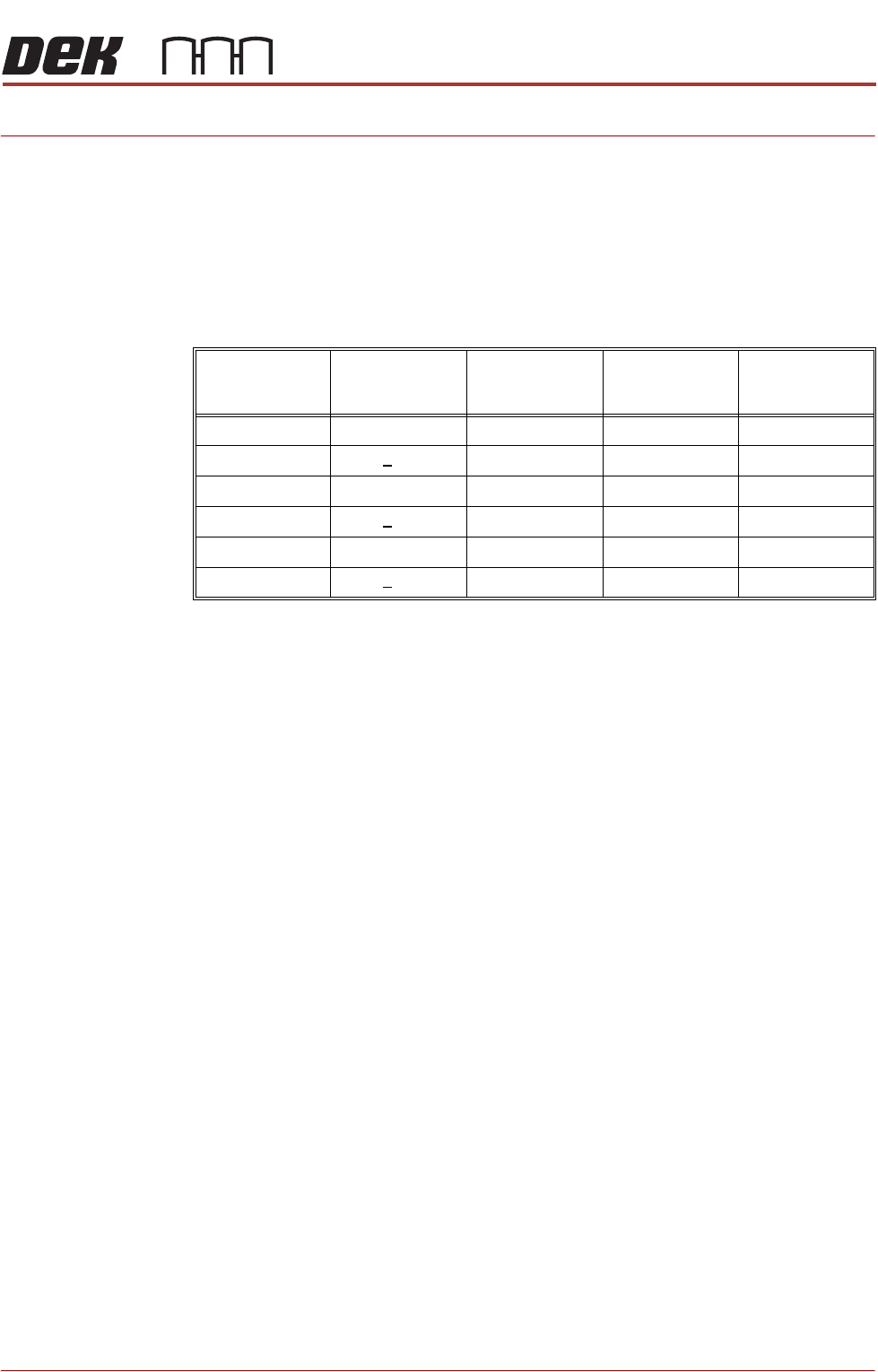
The following table details recommended settings for APC parameters.
NOTE
Recommended settings are parameter settings that have been shown to be
reliable for board lengths shown, but these settings should be treated as useful
starting points to be used - some adjustment may still be required.
Board
Length
(mm)
Board
Thickness
(mm)
Snugging
Force
(Newtons)
Clamp
Pressure
(bar)
OTS
Vacuum
Mode
<150mm <1.6 30 2 Before
<150mm >1.6 35 2.5 Before
150 - 250 <1.6 35 2.5 Before
150 - 250 >1.6 40 3 Before
>250 <1.6 40 2.5 Before
>250 >1.6 45 3 Before
APC SOFTWARE SETUP AND RECOMMENDED SETTINGS
SOFTWARE SETUP PARAMETERS
2.2 All Purpose Clamping (APC) Manual Chapter Issue 1 Nov 16
SOFTWARE SETUP PARAMETERS
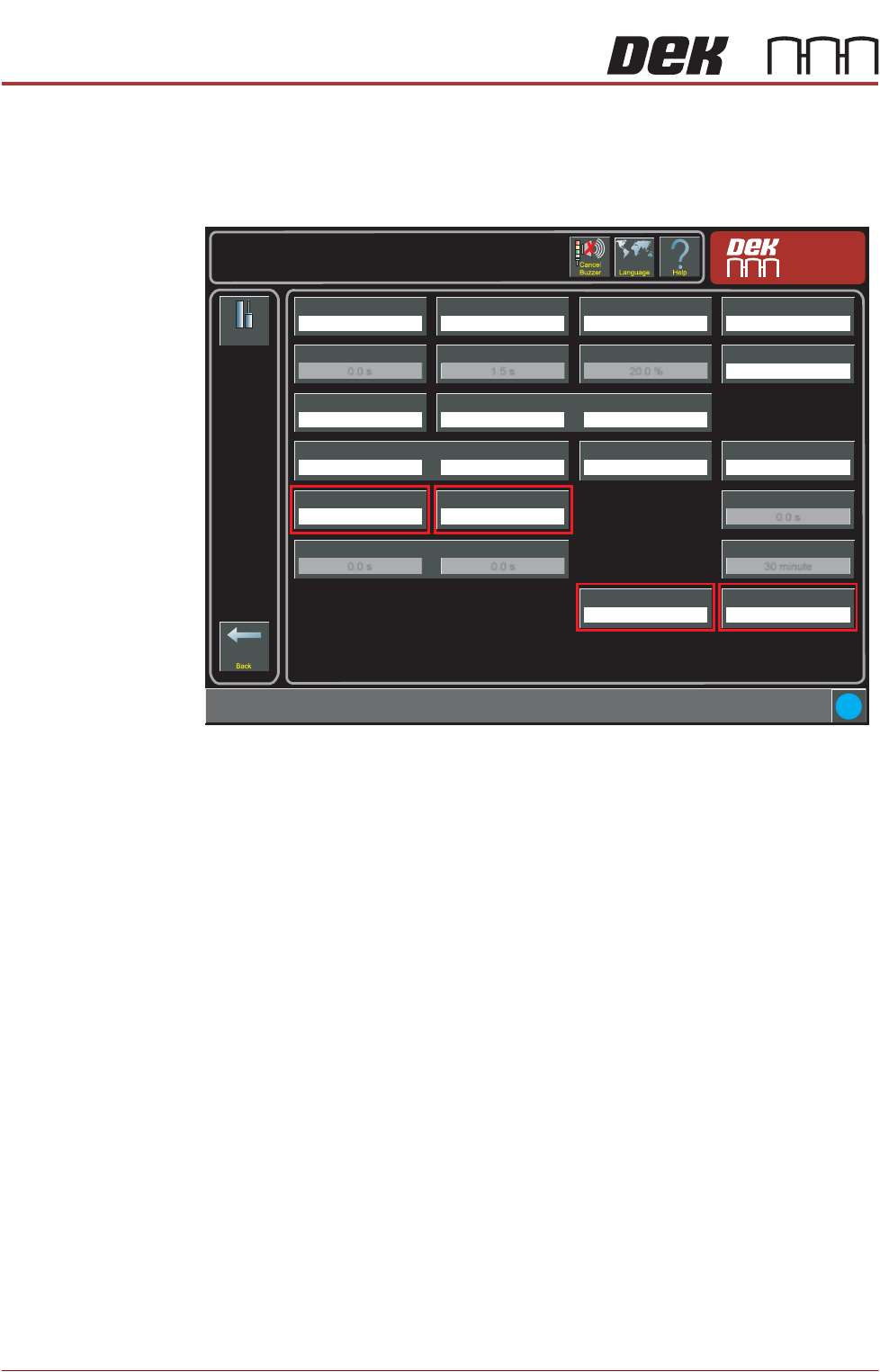
There are four APC related process parameters to be configured; APC Clamp
Mode, Snugging Force, Clamp Pressure and OTS Vacuum Mode. These are all
found on the Setup -> Tooling page.
Setup
Tooling
Tooling Type
Vacuum
Board Stop X
50.0 mm
Setup \ Tooling
Board Stop Y
66.0 mm
Under Clearance
19.0 mm
Right Feed Delay
0.0 s
Vacuum Sensor Delay
1.5 s
Tooling Deviation
20.0 %
Board Run On Period
0.3 s
Print Gap
0.000 mm
Separation Speed
5.0 mm/s
Separation Distance
3.0 mm
Board Length
100.0 mm
Board Width
100.0 mm
Board Thickness
2.0 mm
Board Stop Retract Delay
0.0 s
Snugging Force
20 newtons
Clamp Pressure
3.0 bar
Vacuum Decay Delay
0.0 s
Flatten Vac Delay
0.0 s
Separate Vac Delay
0.0 s
Stop After Idle
30 minute
APC Clamp Mode
Snug
OTS Vacuum Mode
Before
i