APC - 224650 Issue 1.pdf - 第54页
ALL PURPOSE CLAMPING (APC) REPLACEMENT PROCEDURES 1.42 All Purpose Clamping (APC) Manual Chapter Issue 1 Nov 16 22. Use the isolator switch valve to remove t he air supply from the APC modules. 23. Locate the ball spline…

ALL PURPOSE CLAMPING (APC)
REPLACEMENT PROCEDURES
Chapter Issue 1 Nov 16 All Purpose Clamping (APC) Manual 1.41
REPLACEMENT PROCEDURES
Qualification of
Personnel
With the exception of board clamp foil replacement, all replacement procedures
in this section should only be completed by an ASM engineer or a suitably
trained customer engineer.
Prepare for
Replacement
To prepare the machine for all of the APC module replacement procedures:
1. Select Open Cover Commands.
2. Select Carriage To Rear.
3. Select Unload Screen.
4. Open the front printhead cover.
5. Remove the screen from the machine.
6. Close the front printhead cover. Press the System button.
7. Select Back.
8. Select Maintenance.
9. Select Diagnostics.
10. Use Next or Previous to highlight Rising Table.
11. Select Select Module.
12. Use Next or Previous to highlight Raise Table To Print Height.
13. Select Run Diagnost.
14. Select Exit.
15. Use Next or Previous to highlight Rail System.
16. Select Select Module.
17. Use Next or Previous to highlight Set Rail Board Width Calibration.
18. Select Adjust.
19. Use Incr. or Decr. to set the Board Width to a suitable maintenance position
(such as 50mm).
20. Select Exit.
21. Use Next or Previous to highlight the following toggle parameters, and use
Run Diagnost to ensure they are set correctly:
a. Toggle OTS Over Top Clamp is set to OFF.
b. Toggle OTS Mid Plate Down is set to OFF.
c. Toggle OTS Mid Plate Up is set to OFF.
d. Toggle OTS Brake is set to OFF.
ALL PURPOSE CLAMPING (APC)
REPLACEMENT PROCEDURES
1.42 All Purpose Clamping (APC) Manual Chapter Issue 1 Nov 16
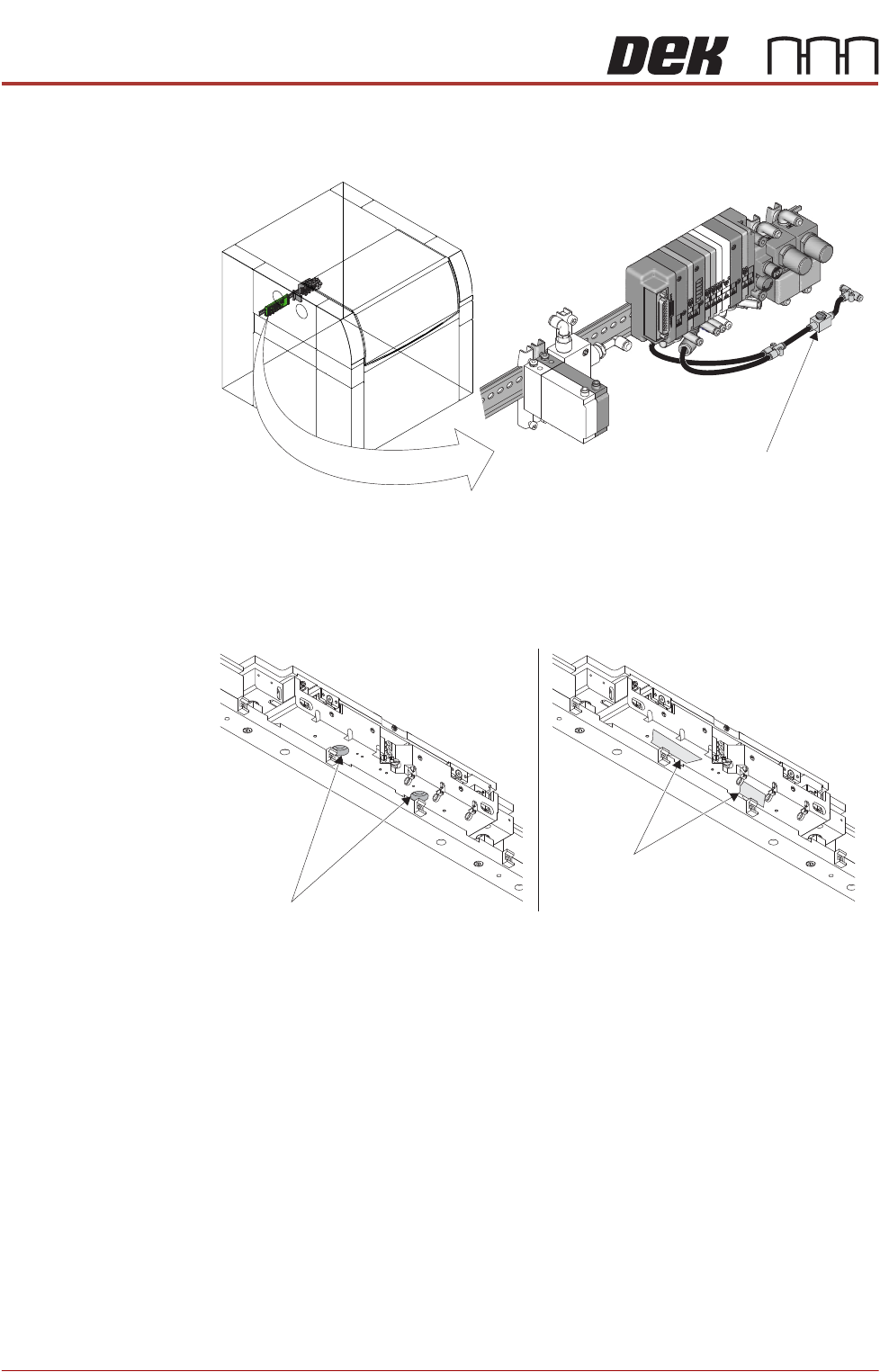
22. Use the isolator switch valve to remove the air supply from the APC
modules.
23. Locate the ball spline bores on the underside of the APC module. To prevent
the possibility of the shafts dropping out in the middle of a replacement
procedure, apply two lengths of masking tape to cover the bores.
After Replacement
Procedures
After any replacement procedure has been carried out (not including board
clamp foils if they are the only replacement), the following Adjustment and
Settings procedures should be carried out:
1. Remove masking tape from the underside of the APC modules.
2. When product width is set to 250mm the distance between the rails (meas-
ured at the snug bar centre) should be between 250.48mm and 250.52mm.
If the distance between the rails is outside these parameters, then carry out
the Home Position Rail Width and Board Guide Setting procedure in the
Adjustments and Settings section of this chapter.
3. Carry out the Board Transit Clearance Check procedure in the Adjustments
and Settings section of this chapter.
Isolator Switch Valve
Location of APC Pneumatic Manifold
View on Underside of APC Module
(Wiring Removed for Clarity)
Ball Spline Bore
(2 positions)
Masking Tape
ALL PURPOSE CLAMPING (APC)
REPLACEMENT PROCEDURES
Chapter Issue 1 Nov 16 All Purpose Clamping (APC) Manual 1.43
Board Clamp Foil Replacement
WARNING
BOARD CLAMPS. EXTREME CARE MUST BE EXERCISED WHEN WORKING IN
THE TOOLING AREA OF THE MACHINE TO AVOID INJURY. THE FOILS ON THE
FRONT AND REAR BOARD CLAMPS ARE VERY SHARP.
Remove 1. Ensure the Prepare for Replacement procedure has been completed.
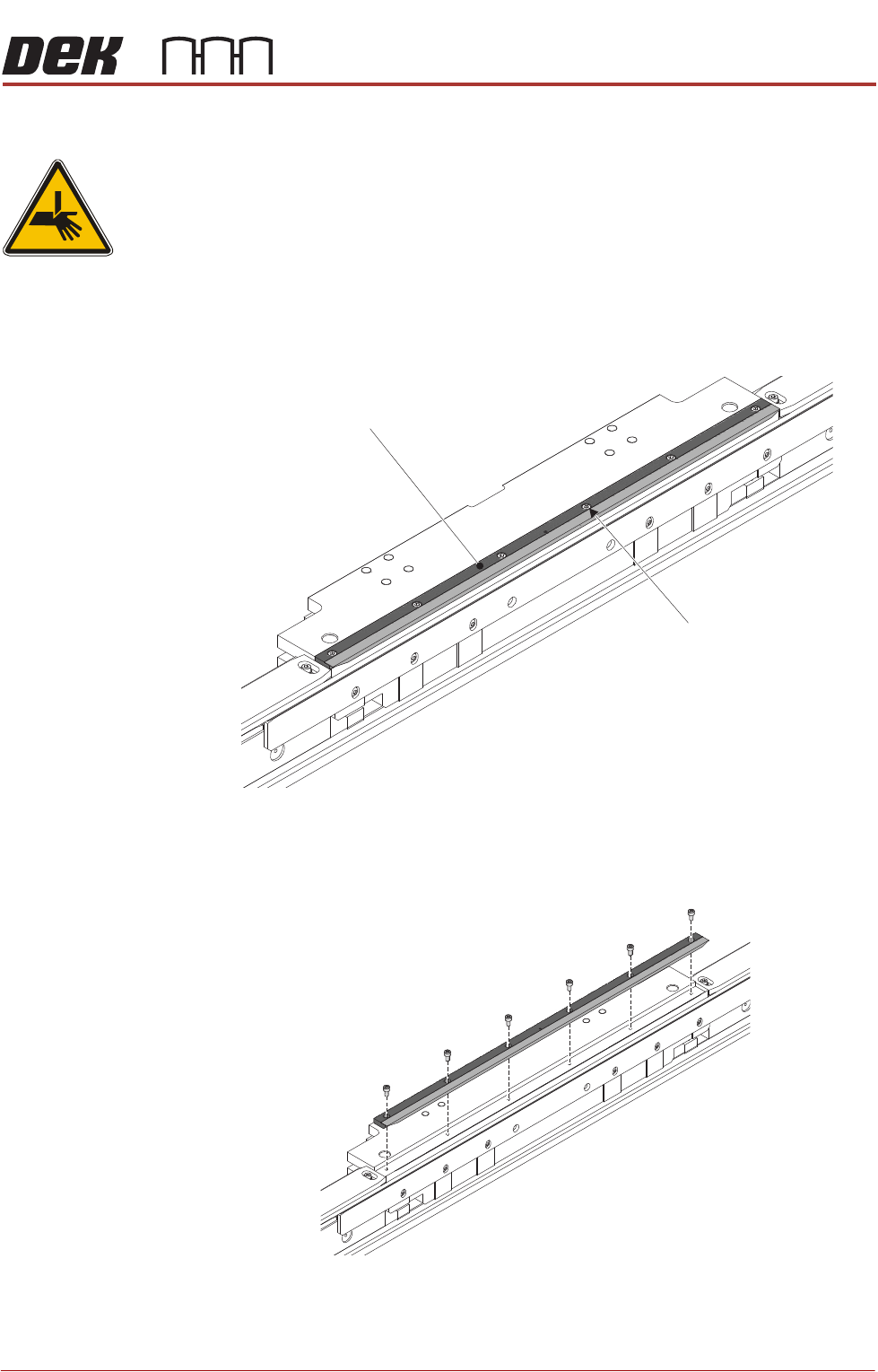
2. Using a 2.5mm Allen key, remove the board clamp foil securing screws and
remove the board clamp foil assembly.
Replace 1. Place the replacement board clamp foil assembly in position on the top
plate, fasten to the APC module using the six off replacement securing
screws supplied with the replacement board clamp foil.
Board Clamp Foil
Board Clamp Foil
Securing Screws
(6 off)
View on Rear APC Module
View on Rear APC Module