APC - 224650 Issue 1.pdf - 第49页
ALL PURPOSE CLAMPING (APC) ADJUSTMENTS AND SETTINGS Chapter Issue 1 Nov 16 All Purpose Clamping (APC) Manual 1.37 13. If any adjustment was made, repeat S teps 9 to 12 t o re-check. T op Clamp Retract (Flow Controller 3A…

ALL PURPOSE CLAMPING (APC)
ADJUSTMENTS AND SETTINGS
1.36 All Purpose Clamping (APC) Manual Chapter Issue 1 Nov 16
9. When the cycle procedure has completed, and the regulators are set
correctly, select Exit.
10. Select Exit.
Mid Plate Balance
Pressure Regulator
To check, or adjust the mid plate balance pressure regulator:
1. Gain access to the regulator on the APC pneumatic manifold.
2. Adjust the mid plate balance pressure regulator to 0.1Mpa (1 bar).
3. In the machine software, select Maintenance.
4. Select Diagnostics.
5. Use Next or Previous to highlight Rail System.
6. Select Select Module.
7. Use Next or Previous to highlight the following toggle parameters, and use
Run Diagnost to ensure they are in the correct state:
a. Toggle OTS Mid Plate Down is set to OFF.
b. Toggle OTS Mid Plate Up is set to OFF.
c. Toggle OTS Brake is set to OFF.
8. Use Next or Previous to highlight Toggle OTS Mid Plate Down, and use
Run Diagnost to toggle to ON. Check the mid plate assemblies of the APC
modules for any noticeable upwards/downwards movement.
NOTE
The balance of the mid plate assembly should be checked quickly (within 20
seconds), as the setting is affected by slow pressure variations over time.
9. Toggle Toggle OTS Mid Plate Down to OFF and ON a number of times to
confirm that there is/isn’t any noticeable movement of the mid plate assem
-
bly.
If the mid plate rises, the setting at the balance pressure regulator should
be slightly reduced.
If the mid plate falls, the setting at the balance pressure regulator should be
slightly increased.
10. If any adjustment was made, repeat Steps 8 and 9 to re-check.
11. Use Next or Previous to highlight Toggle OTS Mid Plate Up, and use Run
Diagnost to toggle to ON. Check the mid plate assemblies of the APC
modules for any noticeable upwards/downwards movement.
NOTE
The balance of the mid plate assembly should be checked quickly (within 20
seconds), as the setting is affected by slow pressure variations over time.
12. Toggle Toggle OTS Mid Plate Up to OFF and ON a number of times to
confirm that there is/isn’t any noticeable movement of the mid plate assem
-
bly.
If the mid plate rises, the setting at the balance pressure regulator should
be slightly reduced.
If the mid plate falls, the setting at the balance pressure regulator should be
slightly increased.
ALL PURPOSE CLAMPING (APC)
ADJUSTMENTS AND SETTINGS
Chapter Issue 1 Nov 16 All Purpose Clamping (APC) Manual 1.37
13. If any adjustment was made, repeat Steps 9 to 12 to re-check.
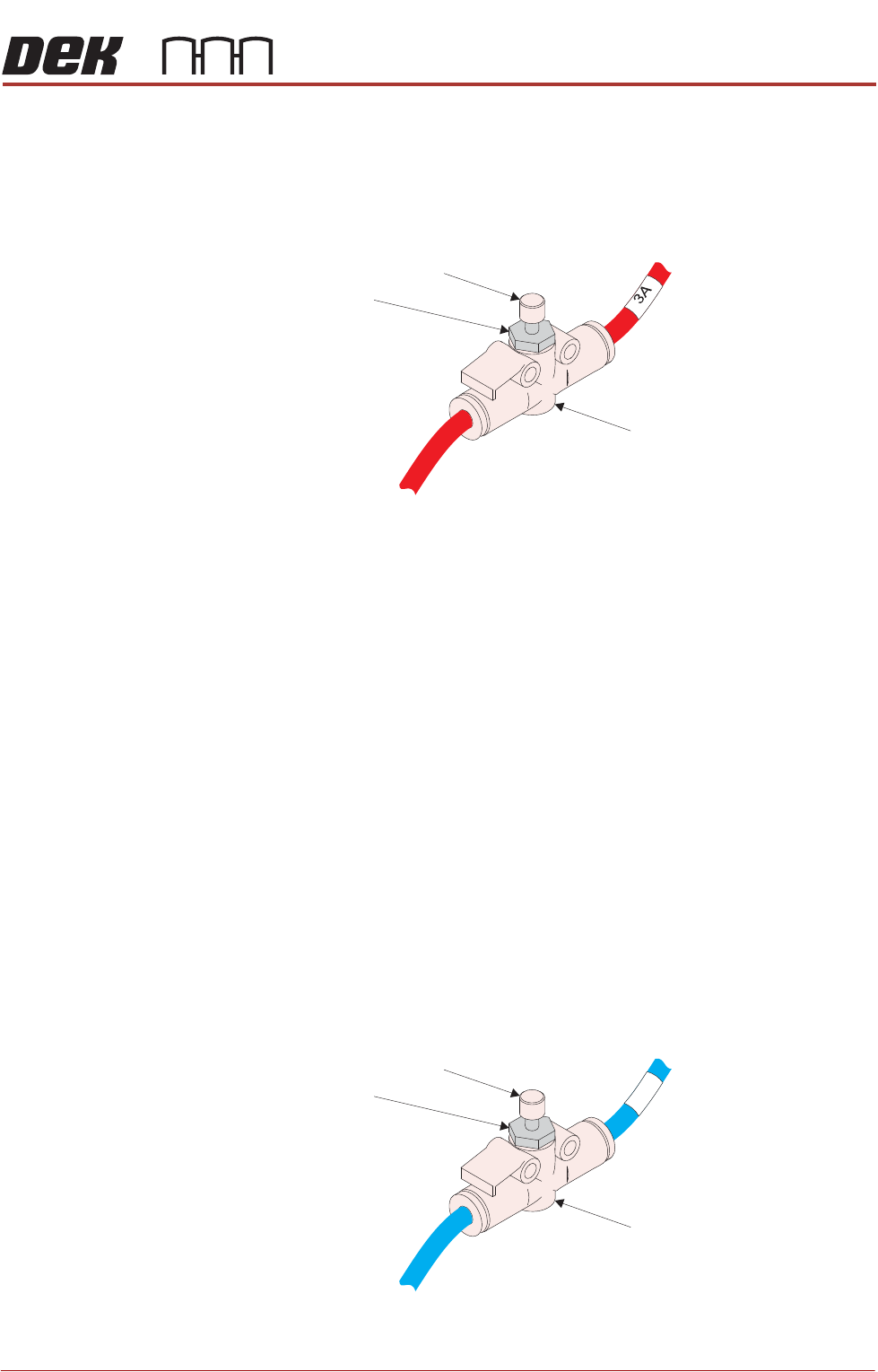
Top Clamp Retract
(Flow Controller 3A)
To set the top clamp retract flow controller:
1. Locate flow controller 3A (red pipe) on the pneumatic loom, found in the right
hand side of the machine where the front and rear pneumatics join together.
2. In the machine software, select Maintenance.
3. Select Diagnostics.
4. Use Next or Previous to highlight Rail System.
5. Select Select Module.
6. Use Next or Previous to highlight Toggle Board Clamps.
7. Select Run Diagnost.
8. Slowly turn the flow controller adjust clockwise, reducing the air flow, until a
“Board Clamp Retract Error” shows in the notification bar of the software.
9. Slowly turn the flow controller adjust anti-clockwise in 1/4 turn increments,
increasing the air flow, stopping as soon as the “Board Clamp Retract Error”
has gone.
10. Turn the flow controller adjust anti-clockwise by an additional 2 full turns.
Tighten the flow controller locknut to prevent accidental adjustment.
Mid Plate Up (Flow
Controller 1A)
To set the mid plate up flow controller:
1. Locate flow controller 1A (blue pipe) on the pneumatic loom, found in the
right hand side of the machine where the front and rear pneumatics join
together.
2. In the machine software, select Maintenance.
Flow Controller
Adjust
Locknut
1A
Flow Controller
Adjust
Locknut
ALL PURPOSE CLAMPING (APC)
ADJUSTMENTS AND SETTINGS
1.38 All Purpose Clamping (APC) Manual Chapter Issue 1 Nov 16
3. Select Diagnostics.
4. Use Next or Previous to highlight Rail System.
5. Select Select Module.
6. Use Next or Previous to highlight Cycle Mid Plate Up and Down.
7. Select Run Diagnost.
8. Focusing on the mid plate up movement, adjust the flow controller to achieve
a controlled upward movement (approximately 1.5 full turns anti-clockwise
from the closed position - should not exceed 2 full turns).
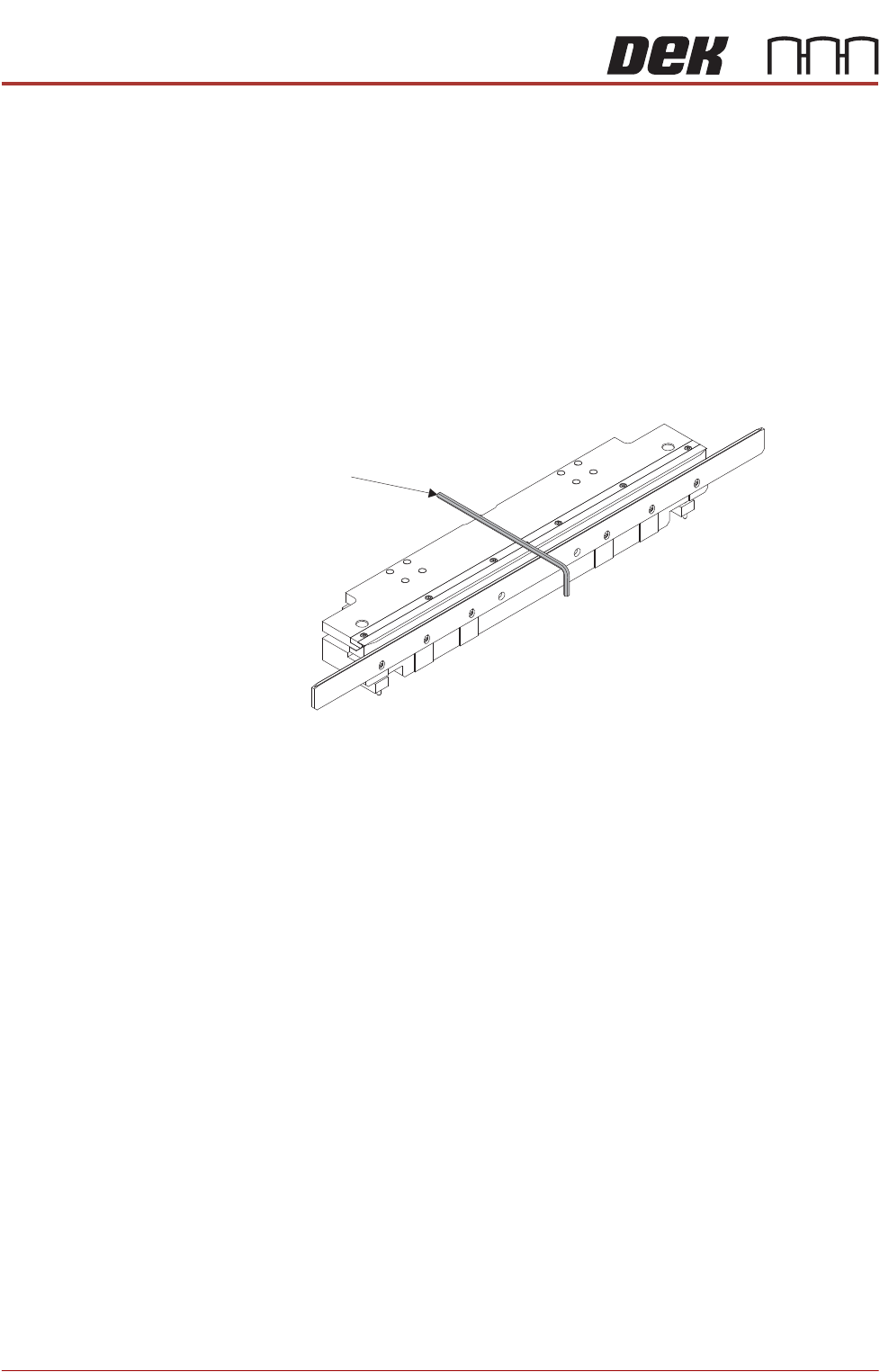
9. When the mid plate cycle has completed, place a 3mm Allen key over the
top of the unit
10. Use Next or Previous to highlight Toggle Board Clamps.
11. Repeatedly toggle board clamps ON, then OFF. Observe the operation of
the clamps as they rise, this should be a smooth movement. There should
be no rattling from the clamp assembly or the Allen key.
12. If the clamp upwards movement is not smooth and/or there is noticeable
rattling repeat Steps 6 to 11.
If the clamp upwards movement is smooth and there is no noticeable rattling
from either the clamp assembly or the Allen key, tighten the flow controller
locknut to prevent accidental adjustment.
Allen Key