F5 SERVICE MAUNAL.pdf - 第310页
9 12-Segment Revolver Head (10000) SIPLACE 80S-20/F4 Service Manual 9.2 Replacing the Valve Adjustment Driv e for the Placement or Reject Circuits Edition 07/97 9 - 14 9.2.5 Replacing the T ooth ed Belt Spare par ts – Sy…
SIPLACE 80S-20/F4 Service Manual 9 12-Segment Revolver Head (10000)
Edition 07/97 9.2 Replacing the Valve Adjustment Drive for the Placement or Reject Circuits
9 - 13
9.2.4 Replacing the O-Ring
Spare parts
– O-ring 2x16 E 70B, from item no. 00320043-01
● Disconnect plug-in connections X10 and X12 from head board C0005.
● Undo the hexagon socket screw (M3 x 25) at the rear of the placement head and carefully pull the turning
station towards the rear and out (see Fig. 9.2.2).
● Carefully remove the toothed belt from the motor pinion by simultaneously turning and pulling at the belt
(see Fig. 9.2.3).
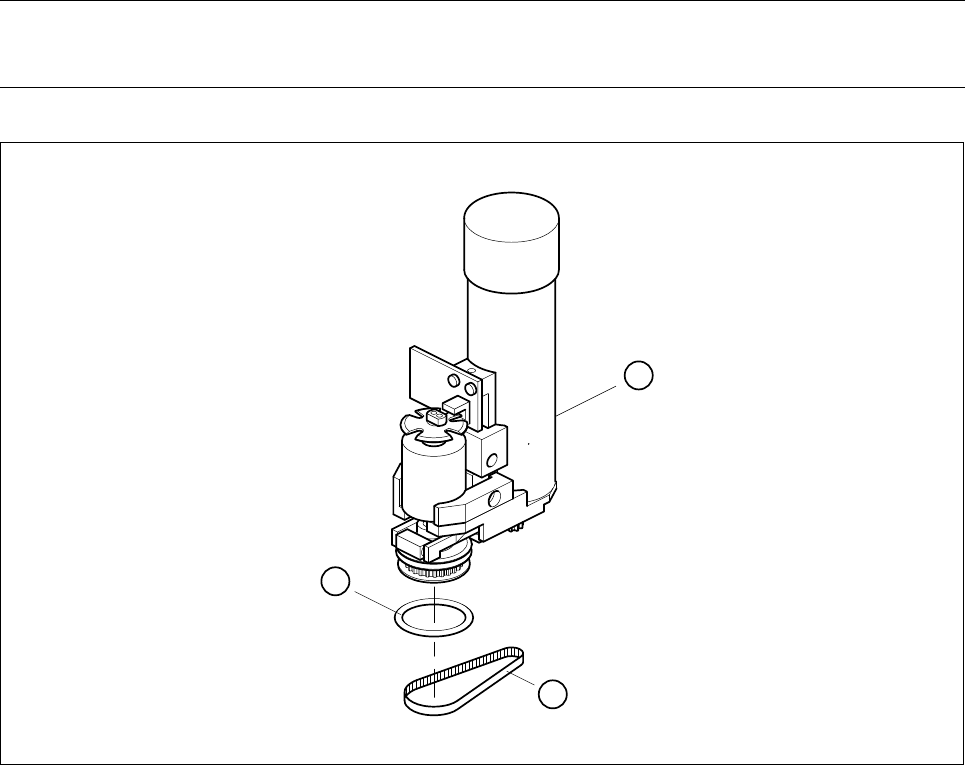
● Now change the o-ring 2x16 (see Fig. 9.2.3).
● To re-install the turning station, proceed in the reverse sequence of operations.
NOTE
No adjustments of settings are required after changing the o-ring.
Fig. 9.2.3 Replacing the o-ring in the turning station
1 Turning station complete
2 O - ring 2x16
3 Toothed belt
2
3
1

9 12-Segment Revolver Head (10000) SIPLACE 80S-20/F4 Service Manual
9.2 Replacing the Valve Adjustment Drive for the Placement or Reject Circuits Edition 07/97
9 - 14
9.2.5 Replacing the Toothed Belt
Spare parts
– Synchroflex toothed belt, 2.5T2/90, from item no. 00320041-01
● Disconnect plug-in connections X10 and X12 from head board C0005.
● Undo the hexagon socket screw (M3 x 25) at the back of the placement head and carefully pull the turning
station towards the rear and out (see Fig. 9.2.2).
● Replace the toothed belt (see Fig. 9.2.3).
● To re-install proceed in the reverse sequence of operation.
NOTE
No adjustments of settings are required after changing the toothed belt.

SIPLACE 80S-20/F4 Service Manual 9 12-Segment Revolver Head (10000)
Edition 07/97 9.3 Replacing the Distributor Board and the Components Camera
9 - 15
9.3 Replacing the Distributor Board and the
Components Camera
9.3.1 Replacing the Distributor Board (Board at the Star Motor)
PLEASE NOTE
This work may only be carried out by Siemens service technicians or by the customer’s appropriately trained
personnel.
Spare parts
Distributor board SP6/12, from item no. 00321215S04
● Disconnect plug-in connections X13 and X14 from head board C0005.
● Undo the hexagon socket screw (M3 x 8).
● Undo the three hexagon spacers M3x7, M3x9 and M3x10 (see Fig. 9.3.1).
● Disconnect plug-in connections X3 to X12 from distributor board Y 0010 (see Fig. 9.3.1).
● Carefully detach the hose from the compressed air sensor.
● When installing, proceed in the reverse sequence of operations.
– No adjustment of settings will be necessary.
9.3.2 Replacing the Components Camera
Spare parts
Components camera 24x24, from item no. 00320549S04
NOTE
The components camera is only replaced as a complete unit.
● Disconnect plug-in connection X3 from board Y0021 (see Fig. 9.3.1).
● Unscrew and remove the four hexagon socket screws (M4x10) and carefully remove the components
camera (see Fig. 9.3.1).
● When re-installing the camera proceed in the reverse sequence of operations
ATTENTION ∆
!
∆
!
When you fit the components camera make sure that the stop faces are clean and that the alignment pins are
seated firmly. Then tighten up the screws.
– Please refer to the Sitest instructions for information on the procedure how to adjust the components cam-
era.