NPM-D3维修手册.pdf - 第172页
NPM-D3 Service Manual 5.4 2-nozzle Head Page 5-44 EJM6D3-MB-05SM-00( 編集中 ).DOC 4. Detach the Z-axis motor (2-M4 bolts). (Figs. 4 and 5) Z モータを取り外します。 ( ボルト 2-M4) (Figs. 4 and 5) 卸下 Z 电机。 ( 螺栓 2-M4) (Figs. 4 and 5) 5. Rem…
NPM-D3
Service Manual
5.4 2-nozzle Head
EJM6D3-MB-05SM-00(
編集中
).DOC Page 5-43
5.4.4 Z-axis Motor Replacement
Z モータ交換
Z 电机的交换
Unit No.
N610069507AA
5.1.1 Head Unit Detaching and
Attaching
ヘッドユニット取り外し
/
取り付け
头装置的拆卸和安装
5.4.4 Z-axis Motor Replacement
Z
モータ交換
Z
电机的交换
Z-axis Motor Detaching
取り外し
拆卸
19.
1. Detach the head unit.
ヘッドユニットを取り外します。
卸下头装置。
‘Head Unit Replacement Procedure’.
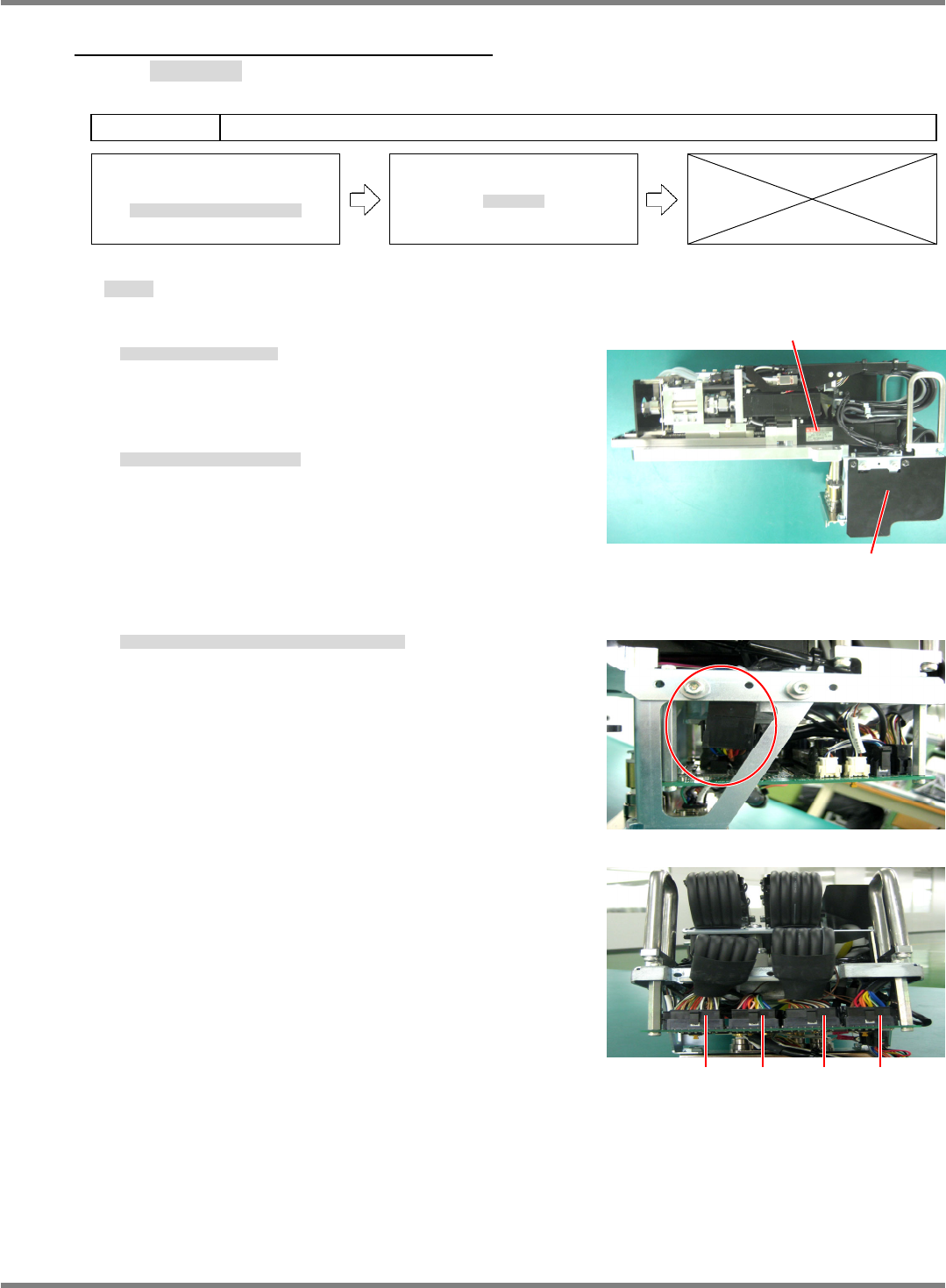
2. Detach the board cover. (Fig. 1)
基板部カバーを取り外します。(Fig. 1)
拆下基板部的盖。(Fig. 1)
3. Disconnect the Z-axis motor connectors (CN1 and CN3). (Figs. 2 and 3)
Z モータのコネクタを抜きます。(CN1 / CN3) (Figs. 2 and 3)
拔出 Z 电机的连接器。(CN1 / CN3) (Figs. 2 and 3)
Z-axis motor
Head board cover
Fig. 1
Fig. 2
Fig. 3
CN4 CN3 CN2 CN1
NPM-D3
Service Manual
5.4 2-nozzle Head
Page 5-44 EJM6D3-MB-05SM-00(
編集中
).DOC
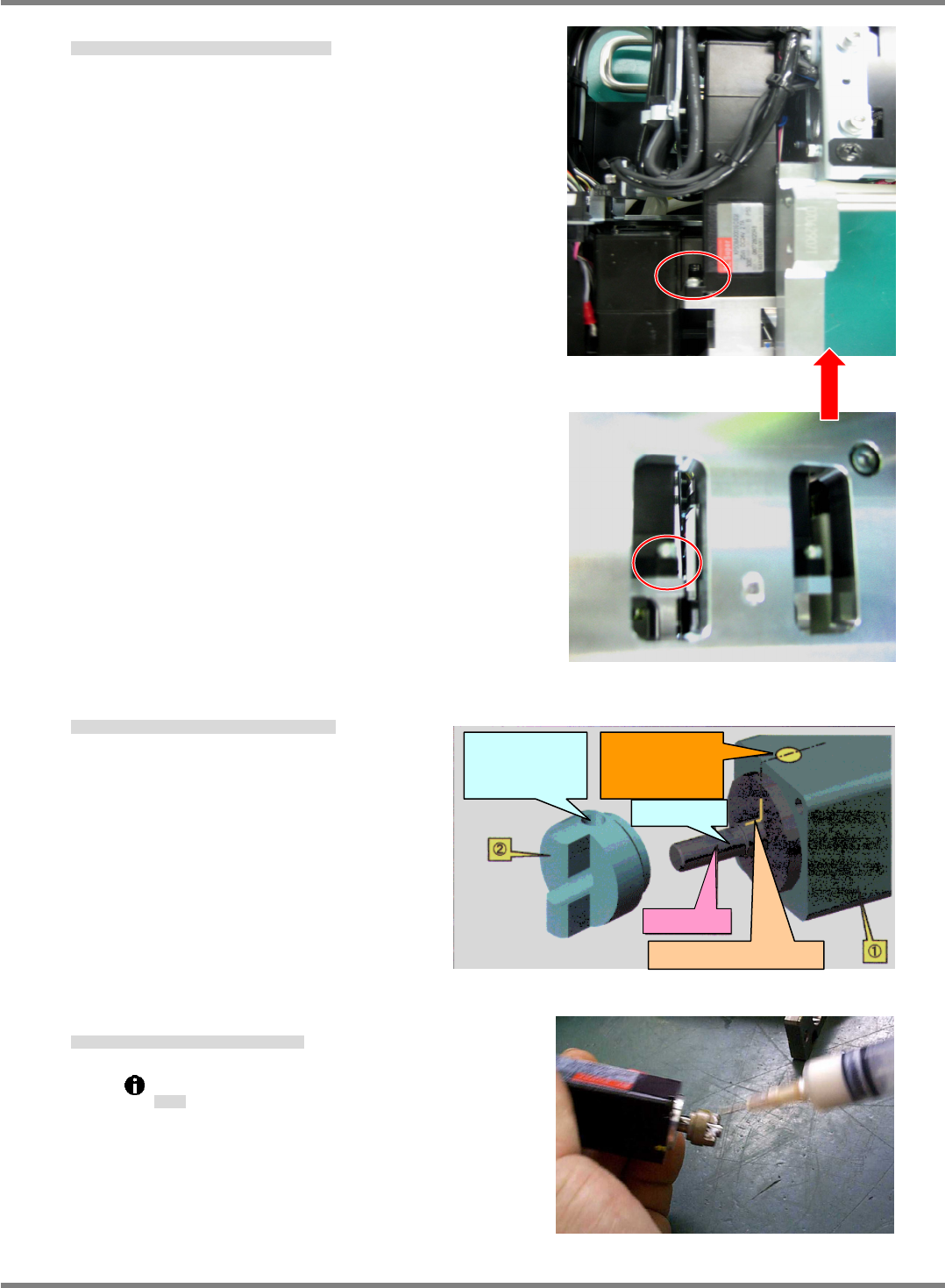
4. Detach the Z-axis motor (2-M4 bolts). (Figs. 4 and 5)
Z モータを取り外します。(ボルト 2-M4) (Figs. 4 and 5)
卸下 Z 电机。(螺栓 2-M4) (Figs. 4 and 5)
5. Remove the setscrew and replace the joint. (Fig. 6)
セットビスを外し、ジョイントを付け替えます。(Fig. 6)
拧下定位螺钉后,换上接头。(Fig. 6)
6. Thinly grease the joint. (Fig. 7)
ジョイント部にグリスを少量塗布します。(Fig. 7)
在连接部涂敷少量的润滑脂。(Fig. 7)
Grease: Panasonic LCG100
グリス
润滑脂
Fig. 7
Fig. 4
One bolt is located on the rear side.
Fig. 5
Fig. 6
Motor shaft
A: Mark by manufacturer
D: Align the hollow
set screw hole of
(2) with the D-cut
of (1).
C: D-cut plane
B: Yellow marking
on the side of (1)
for easy finding of
the position A.
NPM-D3
Service Manual
5.4 2-nozzle Head
EJM6D3-MB-05SM-00(
編集中
).DOC Page 5-45
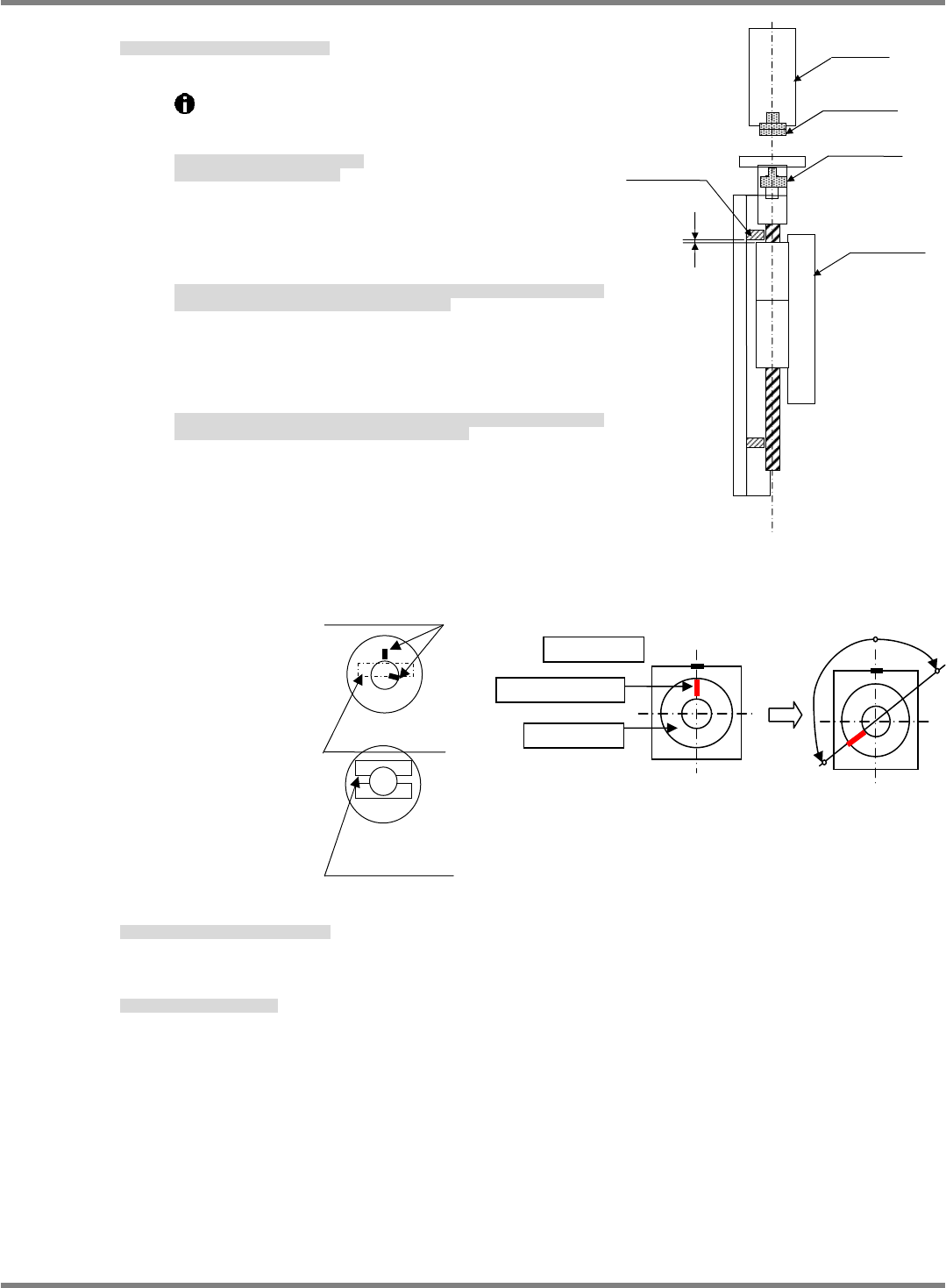
7. Assemble the Z-axis motor and tighten bolts.
Z モータを取り付けて、ボルトを締めます。
组装 Z 电机 / 拧紧螺栓。
①
Move the ball screw to the origin position.
(Upper limit stopper -2 mm)
ボールネジを原点位置まで移動します。
(上限ストッパーから-2 mm が原点)
将滚珠丝杠移动到原点位置。
(上限止动器在-2 mm 的位置为原点)
②
Set the motor and KR unit so that their slotted faces are
similarly oriented. The motor and shaft origin marks
should be separated by 90
or more at this time.
モータと KR ユニットのマイナスドライバ面がほぼ同方向になるように向けます。このとき、
モータの原点マーク同士が、約 90 以上離れていること。
使电机和 KR 装置的一字型螺丝刀面几乎向同一个方面。此时,电机的原点标记应互相分开大
约 90以上。
③
If the marks are right at 90
apart and you are unsure
whether to move the marks to the left or right, turn the
shaft mark clockwise to the mark on the motor.
丁度 90くらいで左右どちらにマークを持っていくか迷うときは、モータ本体の原点マーク
に対してシャフトのマークが時計回り側になるようにします。
在刚 90的位置上犹豫将标记移动到左右的哪一方时,对于电机主体的原点标记,使轴的标记
位于时针方向的一侧。
8. Connect connectors and attach the cover.
コネクタを差込み、カバーを取り付けます。
插入连接器后,安装盖。
9. Attach the head unit.
ヘッドユニットを取り付けます。
安装头装置。
‘Head Unit Replacement Procedure’.
Fig. 8
Joint
Joint
Z-axis motor
KR unit
2 mm
Upper limit
stopper
Origin
Slotted face of joint
Slotted face of joint
Motor origin mark
When viewed from top
○
○
Hollow setscrew
Joint
Marking
×