NPM-D3维修手册.pdf - 第210页
NPM-D3 Service Manual 5.6 2D Inspection Head Page 5-82 EJM6D3-MB-05SM-00( 編集中 ).DOC 5. Plug the camera cable into the CN6 port on the captur e board and tighten the screws (x 2). カメラケーブルをキャプチャボードの CN6 へ差し込み、ネジ (2 か所 ) を締…
NPM-D3
Service Manual
5.6 2D Inspection Head
EJM6D3-MB-05SM-00(
編集中
).DOC Page 5-81
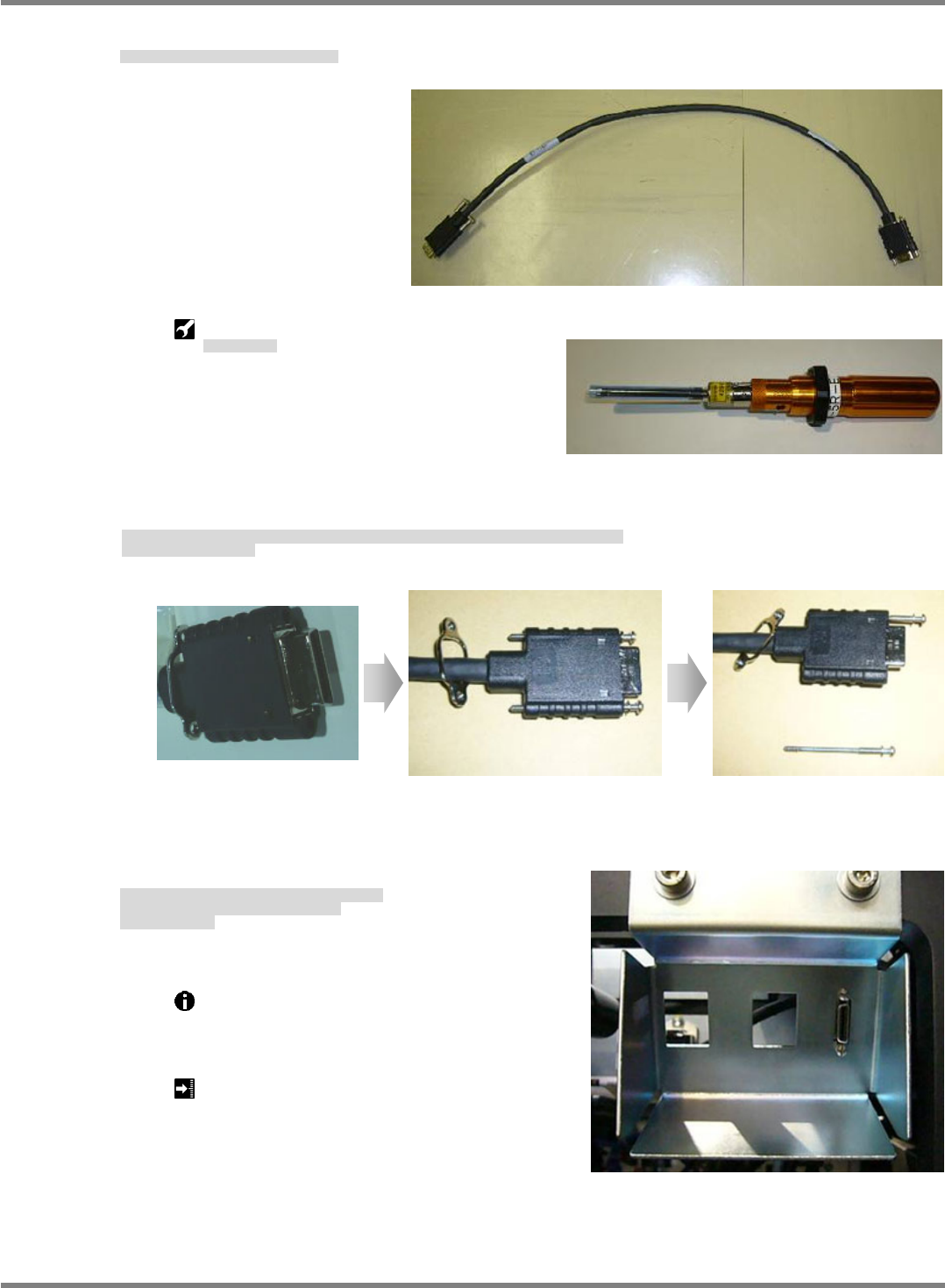
2. Connect the camera cable to the NPM.
カメラケーブルを NPM 本体に取り付けます。
将照相机电缆装到 NPM 主体上。
Torque screwdriver:
トルクドライバ
扭矩螺丝刀
3. Fit the bolts (x 2) included with the camera cable once as shown in Fig. 1, and remove either of them as
shown in Fig. 2. (This is for improving workability in the subsequent process.)
カメラケーブルの付属ボルト(2 個)を Fig.1 のように一旦取り付けた後、Fig.2 のように一方のみ取り外す。
(後工程の作業性向上のため)
将照相机电缆的附属螺栓(2 个)如 Fig.1 所示先暂时装上后,再如 Fig.2 所示仅仅拆下一侧的螺丝。
(这是为了提高后续工序的作业效率)
4. After lightly securing the bolt at the upper side, fit the bolt at the lower side.
Tighten both bolts using a torque screwdriver.
Provide markings in blue.
上側を仮固定後に後、下側に付属ボルトを取り付ける。
トルクドライバで両側のボルトを締め付ける。
青マーキングする。
对上侧进行暂时固定后,对下侧装上附属的螺栓。
用扭矩螺丝刀将两侧的螺栓拧紧。
做上蓝色标记。
Use a torque screwdriver to tighten the bolts to
the specified torque.
ボルトはトルクドライバを使用して規定のトルクで締め付けます。
请用扭矩螺丝刀按照规定的扭矩拧紧螺栓。
Tightening torque: 19 cN
m
締め付けトルク
拧紧扭矩
Fig. 1 Fig. 2
NPM-D3
Service Manual
5.6 2D Inspection Head
Page 5-82 EJM6D3-MB-05SM-00(
編集中
).DOC
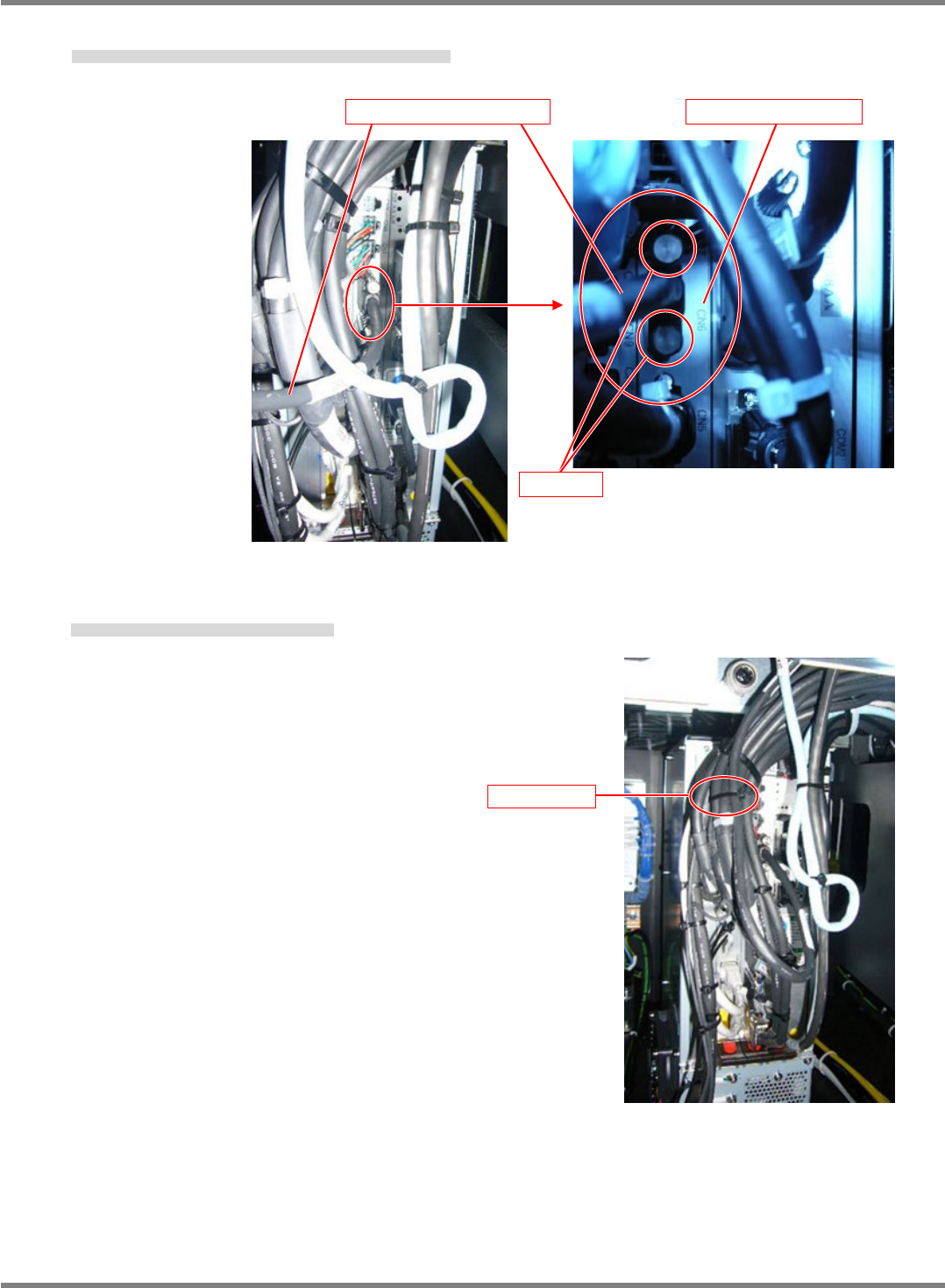
5. Plug the camera cable into the CN6 port on the capture board and tighten the screws (x 2).
カメラケーブルをキャプチャボードの CN6 へ差し込み、ネジ(2 か所)を締める。
将照相机电缆插入捕获板的 CN6,用螺丝(2 处)拧紧。
6. Secure the camera cable with a cable tie (100 mm).
インシュロック(100mm)でカメラケーブルを固定する。
用绝缘绑扎带(100 mm)将照相机电缆固定住。
Capture board / CN6
Camera cable
Screw
Cable tie
NPM-D3
Service Manual
5.6 2D Inspection Head
EJM6D3-MB-05SM-00(
編集中
).DOC Page 5-83
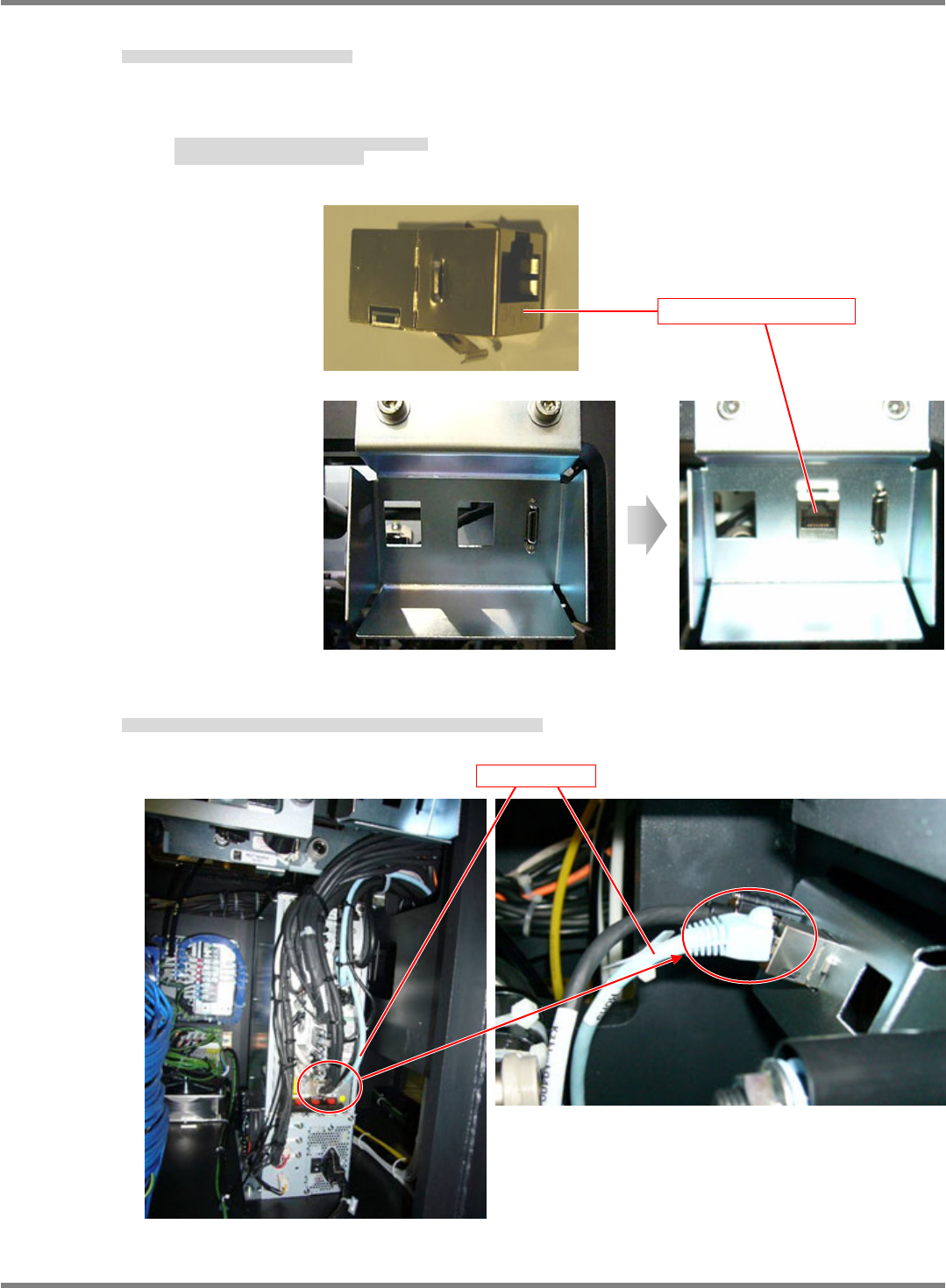
7. Connect the LAN relay connector to the NPM.
LAN 中継コネクタを NPM 本体に取り付けます。
将 LAN 中继连接器装到 NPM 主体上。
Insert the connector from behind the bracket as shown in Fig. 1.
First, hook the spring at the bottom.
図 1 のような状態でブラケットの裏側より挿入する。
先に下側のバネを引っ掛けて挿入する。
按照图 1 的状态从托架的里侧插入。
先挂住下侧的弹簧再插入。
8. Disconnect the LAN cable connected to the CPU board and connect it to the LAN relay connector.
CPU ボードに差し込んでいる LAN ケーブルを抜き、LAN 中継コネクタに差し込みます。
拔出插在 CPU 板上的 LAN 电缆,插入到 LAN 中继连接器中。
Fig. 1
LAN relay connector
LAN cable