NPM-D3维修手册.pdf - 第198页
NPM-D3 Service Manual 5.6 2D Inspection Head Page 5-70 EJM6D3-MB-05SM-00( 編集中 ).DOC 3. Loosen and remove the screw of the cover. (3 po sitions) カバーのネジを緩めて抜きます。 (3 か所 ) 松开罩盖的螺丝后拔出。 ( 3 处) 4. Loosen and remove the knobs. (…
NPM-D3
Service Manual
5.6 2D Inspection Head
EJM6D3-MB-05SM-00(
編集中
).DOC Page 5-69
5.6.2 Removing the Check Box
検査 BOX 取り外し
卸下检查 BOX
30.
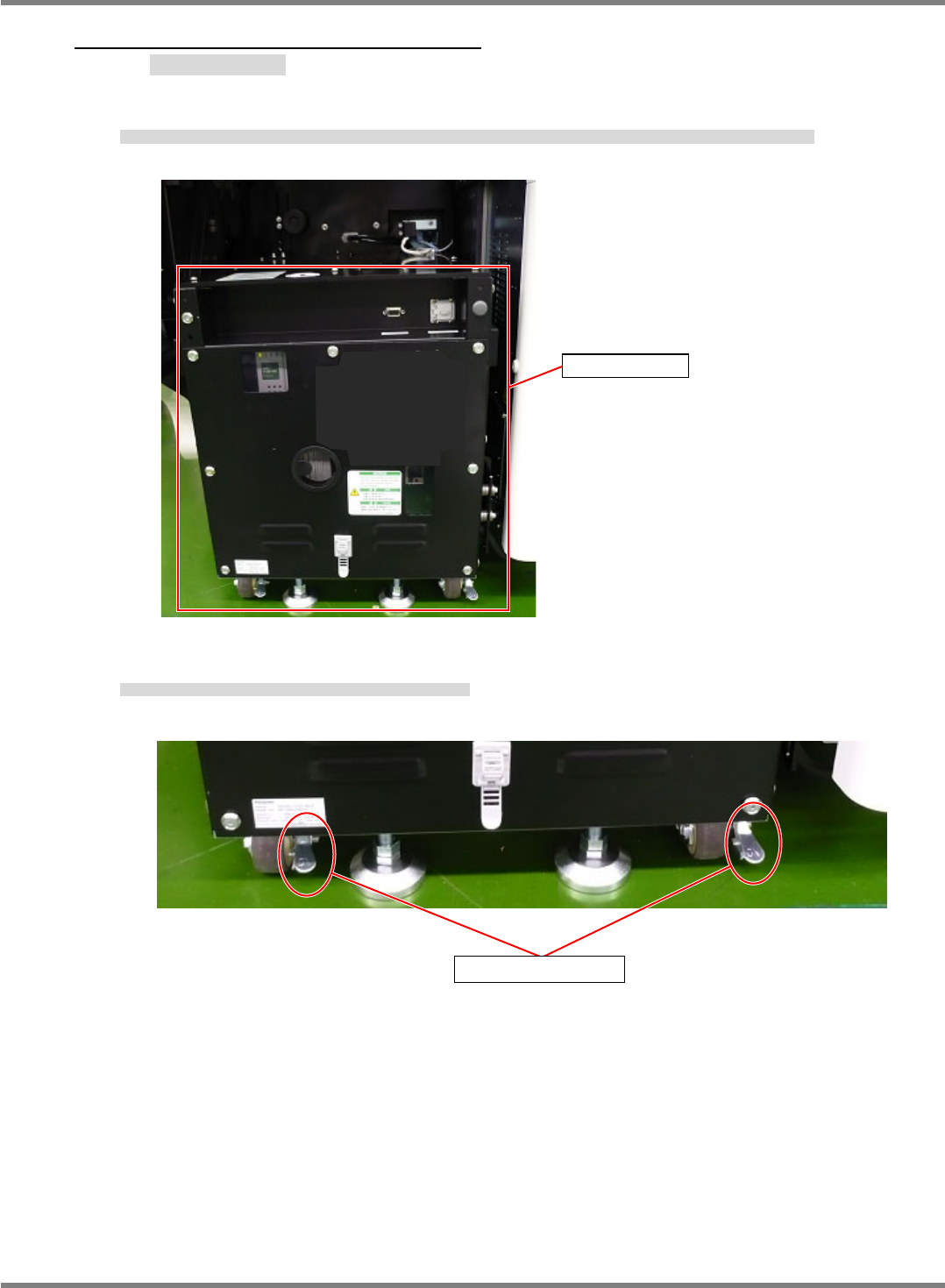
1. Remove the monitor, keyboard, mouse and the LAN cable from the check box if they are connected.
検査 BOX にモニタ、キーボード、マウス、LAN ケーブルが接続されている場合は、モニタ、キーボード、マウス、LAN ケーブルを取り外します。
如检查 BOX 上连接有监视器、键盘、鼠标、LAN 电缆时,请将监视器、键盘、鼠标、LAN 电缆拆下。
2. Check the lock levers of the casters, and make sure they are locked.
キャスターのロックレバーの状態を確認し、OFF の場合は ON にします。
请确认脚轮的锁定杆状态,如是 OFF 时请设为 ON。
Check box
Lock lever
NPM-D3
Service Manual
5.6 2D Inspection Head
Page 5-70 EJM6D3-MB-05SM-00(
編集中
).DOC
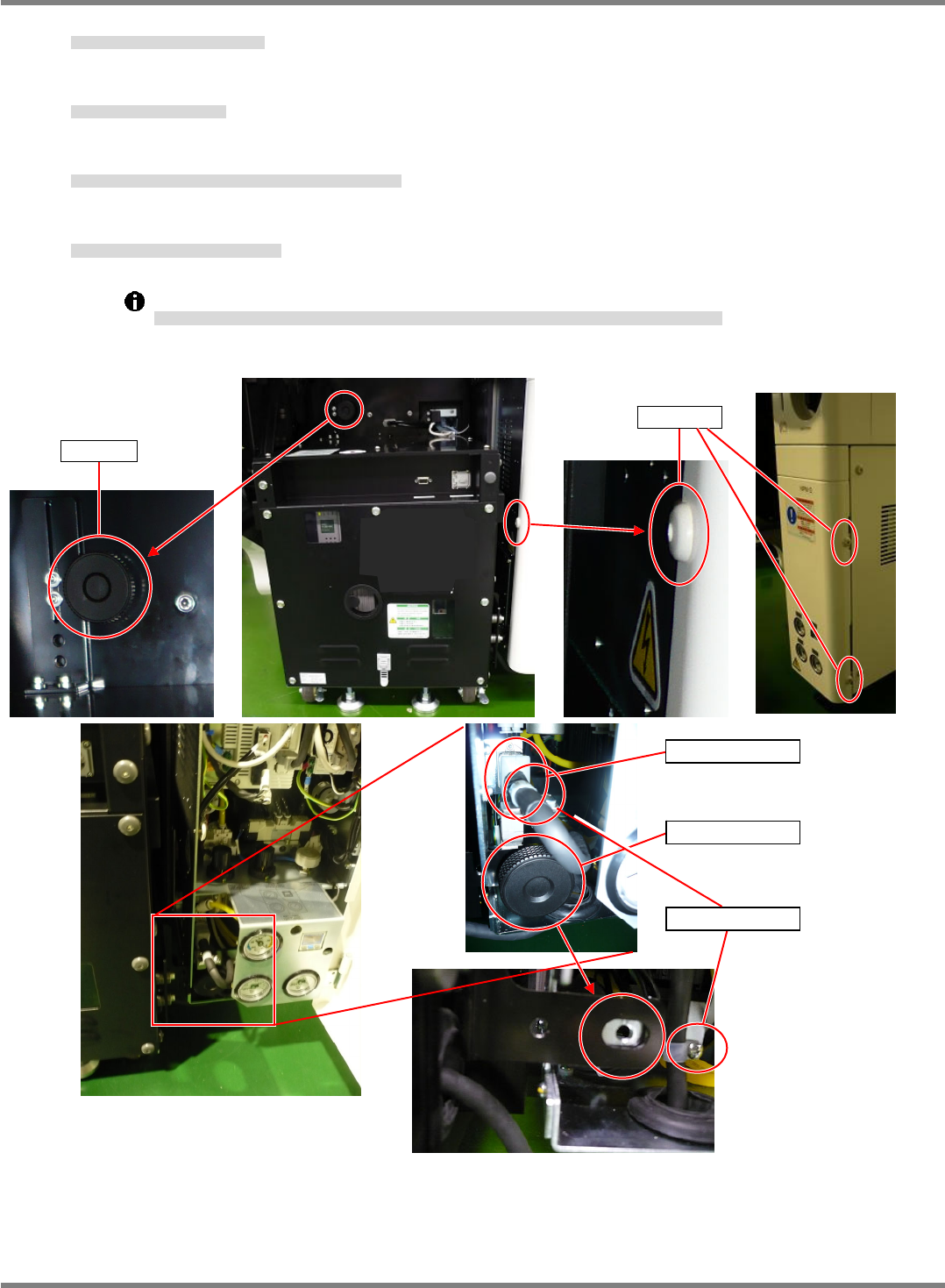
3. Loosen and remove the screw of the cover. (3 positions)
カバーのネジを緩めて抜きます。(3 か所)
松开罩盖的螺丝后拔出。(3 处)
4. Loosen and remove the knobs. (2 positions)
2 か所のノブを緩めて抜きます。
松开 2 处的旋钮后拔出。
5. Loosen and remove the screws of the tie mounts securing the bracket. (2 positions)
取り付けブラケットのタイマウントのネジを緩めて抜きます。(2 か所)
松开安装托架上绑扎带的螺丝后拔出。(2 处)
6. Disconnect the power cable from the connector.
電源ケーブルをコネクタから取り外します。
将电源电缆从连接器上拆下。
After removing the cable from the tie mount, leave the tie mounts on the power cable bracket.
ケーブルをタイマウントから外した後、タイマウントは電源ケーブル取り付けブラケットに取り付けておいてください。
将电缆从绑扎带上拆下后,请将绑扎带装在电源电缆的安装托架上。
Power cable
Tie mount
Knob
Knob
Screw
NPM-D3
Service Manual
5.6 2D Inspection Head
EJM6D3-MB-05SM-00(
編集中
).DOC Page 5-71
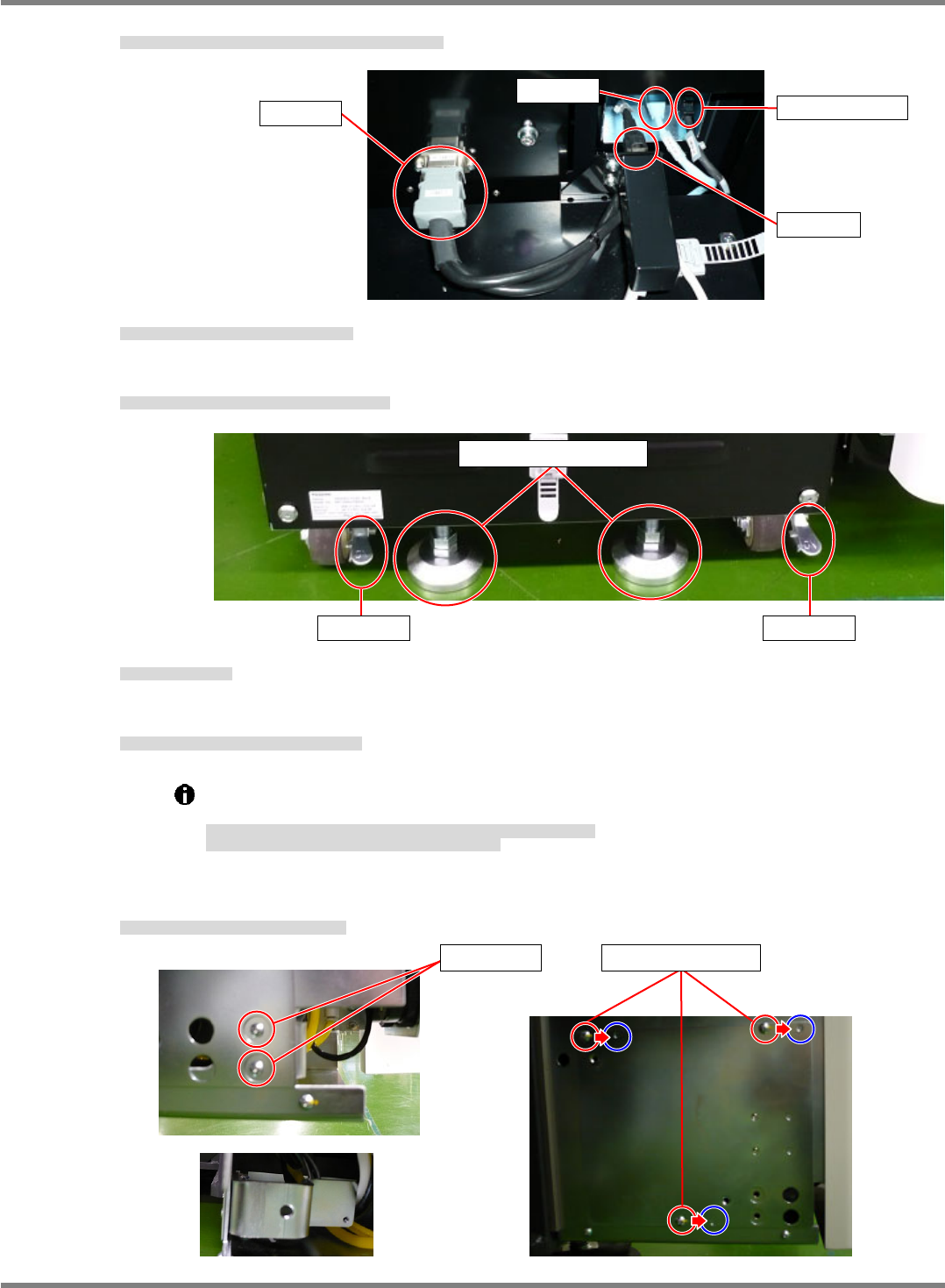
7. Disconnect the cables (LAN1, LAN2, camera link, and RS422).
接続ケーブル (LAN1・LAN2・カメラリンク・RS422) を外します。
拆下连接电缆 (LAN1・LAN2・照相机连接线・RS422)
8. Unlock the lock levers of the casters of the check box.
検査 BOX のキャスターのロックを OFF にする。
将检查 BOX 的脚轮的锁定置于 OFF。
9. Raise the adjuster bolts of the casters of the check box.
検査 BOX のキャスターのアジャスターボルトを上げる。
使检查 BOX 的脚轮的调节螺栓上升。
10. Draw out the check box.
検査 BOX を引き出す。
拉出检查 BOX。
11. Remove the power cable bracket.
電源ケーブル取り付けブラケットを取り外します。
拆下电源电缆的安装托架。
Leave the screws attached to the removed bracket.
Keep the power cable bracket aside.
ネジは取り外した電源ケーブル取り付けブラケットに取り付けておいてください。
電源ケーブル取り付けブラケットを保管しておいてください。
请将螺丝装到拆下的电源电缆安装托架上。
请保管好电源电缆的安装托架。
12. Change the mounting positions of the cover of the NPM.
NPM 本体のカバーの取り付け位置を変更する。
变更 NPM 主体罩盖的安装位置。
LAN2
Camera link
LAN1
RS422
Adjuster bolt
Lock Lock
Screw Mounting position