NPM-D3维修手册.pdf - 第197页
NPM-D3 Service Manual 5.6 2D Inspection Head EJM6D3-MB-05SM-00( 編集中 ).DOC Page 5-69 5.6.2 Removing the Check Box 検査 BO X 取り 外し 卸下检查 BOX 30. 1. Remove the monitor, keyboard, mouse and the LAN c able from th e check box if…
NPM-D3
Service Manual
5.6 2D Inspection Head
Page 5-68 EJM6D3-MB-05SM-00(
編集中
).DOC
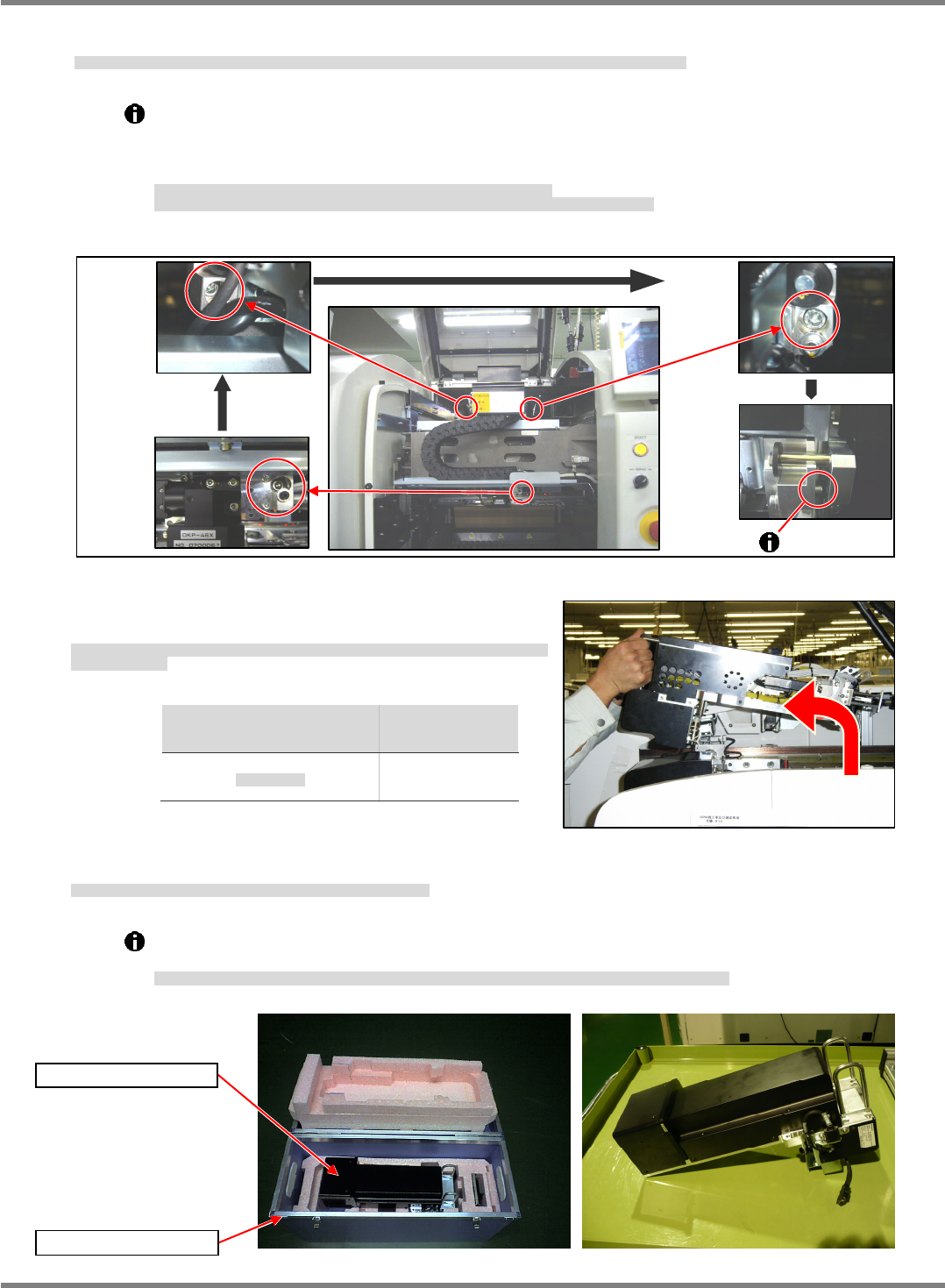
2. Loosen the bolts (3-M6x20) in the order of (1) lower right, (2) upper left, and (3) upper right until threaded
portions of these bolts are completely disengaged. (Fig. 1)
2D 検査ヘッドユニット取り付けボルト(3M620)を右下、左上、右上の順に緩め、ボルトのネジ部を全て抜きます。(Fig. 1)
按照右下、左上、右上的顺序松开 2D 检查头装置的安装螺栓(3M620),将螺栓的螺丝部分全部拔出。(Fig. 1)
The threaded portion of the upper right bolt cannot be disengaged completely if the mounting
surfaces are flush against each other.
Slide the 2D inspection head unit to the far side and make sure the threaded portion of the
bolt has been completely disengaged.
右上のボルトは、取り付け面が密着しているとボルトのネジ部が全て抜けません。
2D 検査ヘッドユニットを奥側にスライドさせ、ボルトのネジ部が完全に抜けたことを確認してください。
右上方的螺栓在安装面贴紧的状态下,螺栓的螺丝部分不能完全拔出。
请将 2D 检查头装置滑动到内侧,并确认螺栓的螺丝部分已经完全被拔出。
3. Hold the handles on the 2D inspection head unit. While
raising the unit, remove it toward you. (Fig. 2)
2D 検査ヘッドユニット上部の取手を持ち、上部に持ち上げながら手前に 2D 検査ヘッドユニットを取
り外します。(Fig. 2)
用手拿住 2D 检查头装置上部的把手,一面向上提一面将 2D 检查头装置向跟前侧取出。(Fig. 2)
Head type
ヘッド種類
头种类
Weight
重量
重量
2D inspection
2D
検査ヘッド
2D
检查头
5.7 k
g
4. Store the removed 2D inspection head unit in the dedicated case A. (Fig. 3)
取り外した 2D 検査ヘッドユニットは、専用ケース A に収納します。(Fig. 3)
请将卸下的 2D 检查头装置收纳到专用的盒中。(Fig. 3)
When setting the unit aside temporarily, place it on a flat surface with the drawer connector
facing down. (Fig. 4)
2D 検査ヘッドユニットを仮置きする場合は、平らな所にドロアコネクタが下になるようにして、置いてください。(Fig. 4)
要暂时放置 2D 检查头装置时,请在平整的地方将抽屉式连接器朝下放置。(Fig. 4)
Fig. 2
Fig. 3
Dedicated case A
2D inspection head
Fig. 1
Lower
right
Upper
left
Upper
right
Fig. 4
NPM-D3
Service Manual
5.6 2D Inspection Head
EJM6D3-MB-05SM-00(
編集中
).DOC Page 5-69
5.6.2 Removing the Check Box
検査 BOX 取り外し
卸下检查 BOX
30.
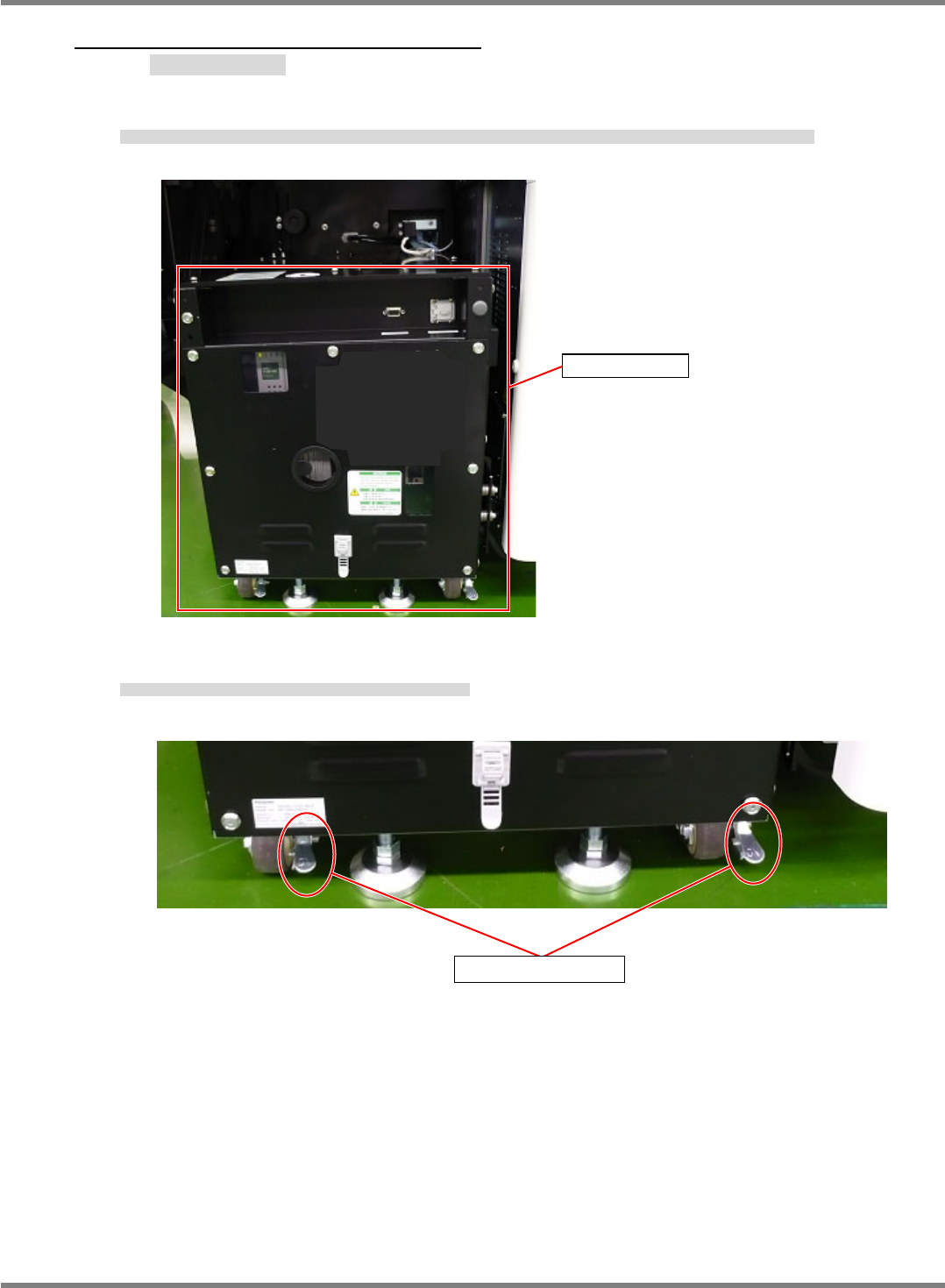
1. Remove the monitor, keyboard, mouse and the LAN cable from the check box if they are connected.
検査 BOX にモニタ、キーボード、マウス、LAN ケーブルが接続されている場合は、モニタ、キーボード、マウス、LAN ケーブルを取り外します。
如检查 BOX 上连接有监视器、键盘、鼠标、LAN 电缆时,请将监视器、键盘、鼠标、LAN 电缆拆下。
2. Check the lock levers of the casters, and make sure they are locked.
キャスターのロックレバーの状態を確認し、OFF の場合は ON にします。
请确认脚轮的锁定杆状态,如是 OFF 时请设为 ON。
Check box
Lock lever
NPM-D3
Service Manual
5.6 2D Inspection Head
Page 5-70 EJM6D3-MB-05SM-00(
編集中
).DOC
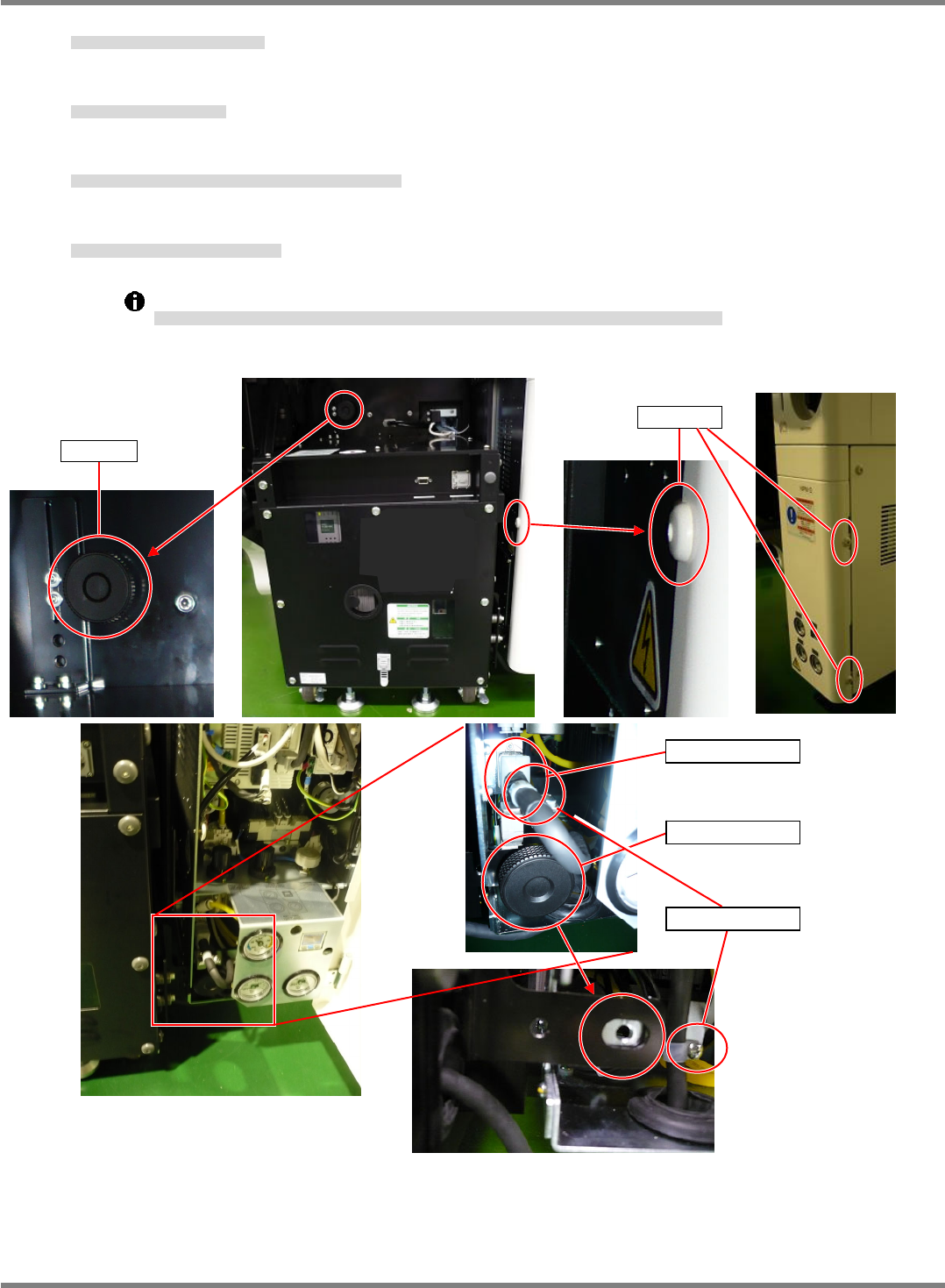
3. Loosen and remove the screw of the cover. (3 positions)
カバーのネジを緩めて抜きます。(3 か所)
松开罩盖的螺丝后拔出。(3 处)
4. Loosen and remove the knobs. (2 positions)
2 か所のノブを緩めて抜きます。
松开 2 处的旋钮后拔出。
5. Loosen and remove the screws of the tie mounts securing the bracket. (2 positions)
取り付けブラケットのタイマウントのネジを緩めて抜きます。(2 か所)
松开安装托架上绑扎带的螺丝后拔出。(2 处)
6. Disconnect the power cable from the connector.
電源ケーブルをコネクタから取り外します。
将电源电缆从连接器上拆下。
After removing the cable from the tie mount, leave the tie mounts on the power cable bracket.
ケーブルをタイマウントから外した後、タイマウントは電源ケーブル取り付けブラケットに取り付けておいてください。
将电缆从绑扎带上拆下后,请将绑扎带装在电源电缆的安装托架上。
Power cable
Tie mount
Knob
Knob
Screw