NPM-D3维修手册.pdf - 第52页
NPM-D3 SERVICE MANUAL 4.2 XY Drive Axes Page 4-14 EJM6D3-MB-04SM-02.DOC 5. Click [Error hi story clear] . After the sc reen changes, click [Clear] . [ エラー履歴クリア ] をクリックし、画面切り替わり後、 [ クリア ] をクリックする。 单击 [ 清除错误履历 ] ,等画面切换后,单击…
NPM-D3
SERVICE MANUAL
4.2 XY Drive Axes
EJM6D3-MB-04SM-02.DOC Page 4-13
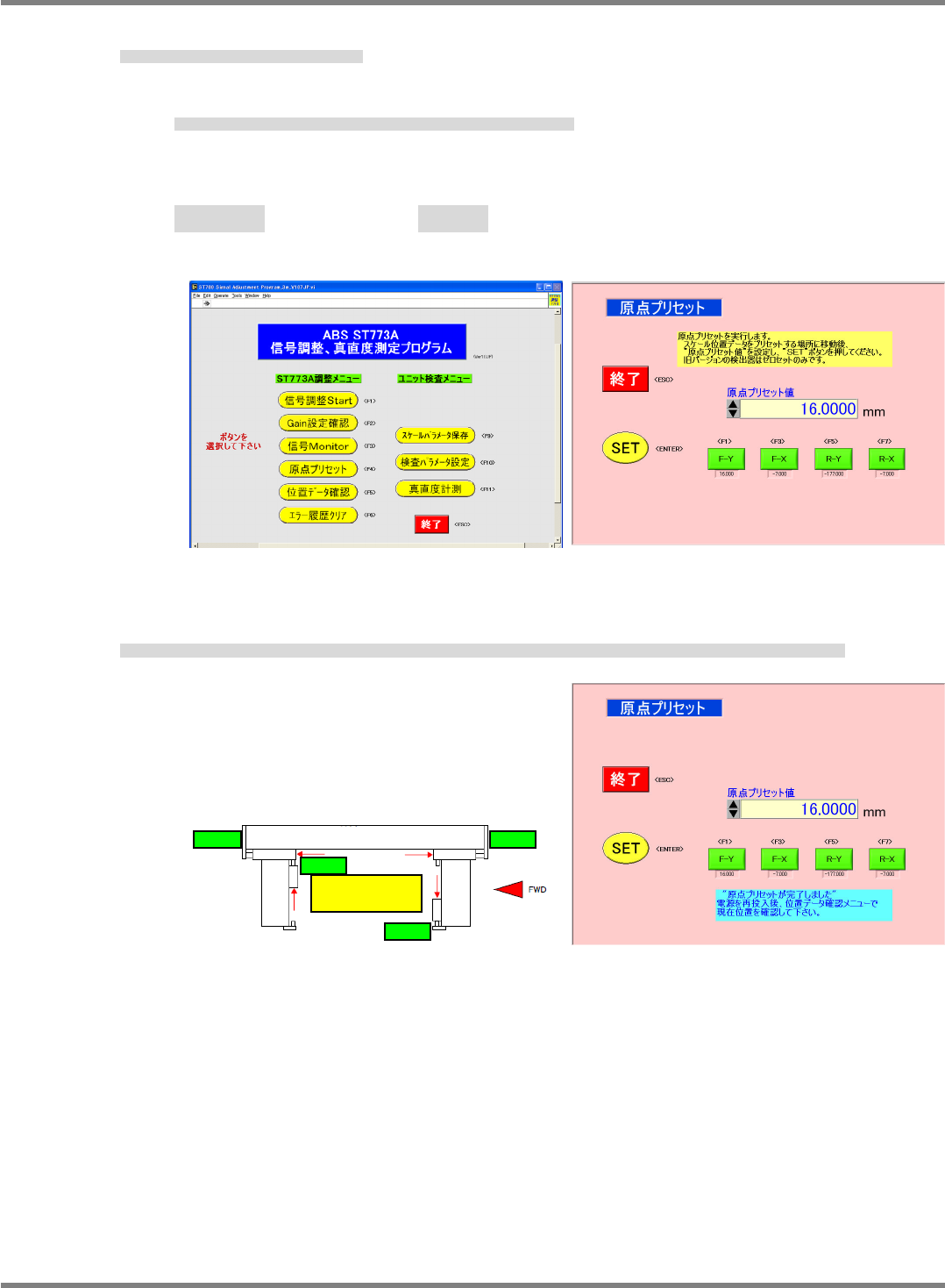
3. Click [Origin preset] and adjust the origin.
[原点プリセット] をクリックし、原点調整を行う。
单击 [原点预调整],进行原点调整。
Pressing an axis button inputs the offset value for the axis in the origin preset field.
軸のボタンを押すと、原点プリセット表示欄に各軸のオフセット値が入力されます。
单击轴的按钮后,在原点预调整显示栏内会输入各轴的偏移量。
Front Y axis F-Y: -25,000 Rear Y axis R-Y: 25,000
Front X axis F-X: -7,000 Rear X axis R-X : -7,000
フロント
Y
軸
F-Y
リア
Y
軸
R-Y
フロント
X
軸
F-X
リア
X
軸
R-X
前面
Y
轴
F-Y
后面
Y
轴
R-Y
前面
X
轴
F-X
后面
X
轴
R-X
4. With the beams flush against the origin stoppers of the target axes, click [SET], the message at right
appears and the menu screen returns.
調整している軸の原点ストッパにビームを押しあてた状態で、[SET] をクリックすると、‘原点プリセットが完了しました’ と表示され、メニューに戻る。
在将臂推靠到正在调整的轴的原点止动器上的状态下单击 [SET] 后,会显示‘原点预调整结束了’ ,并回到菜单画面。
Fig. 5
Fig. 6
Fig. 8 Fig. 7
Y axis
X axis
X axis
Y-R origin Y-F origin
X-F origin
Make sure each beam is
flush against the origin
sto
pp
er.
X-R origin
NPM-D3
SERVICE MANUAL
4.2 XY Drive Axes
Page 4-14 EJM6D3-MB-04SM-02.DOC
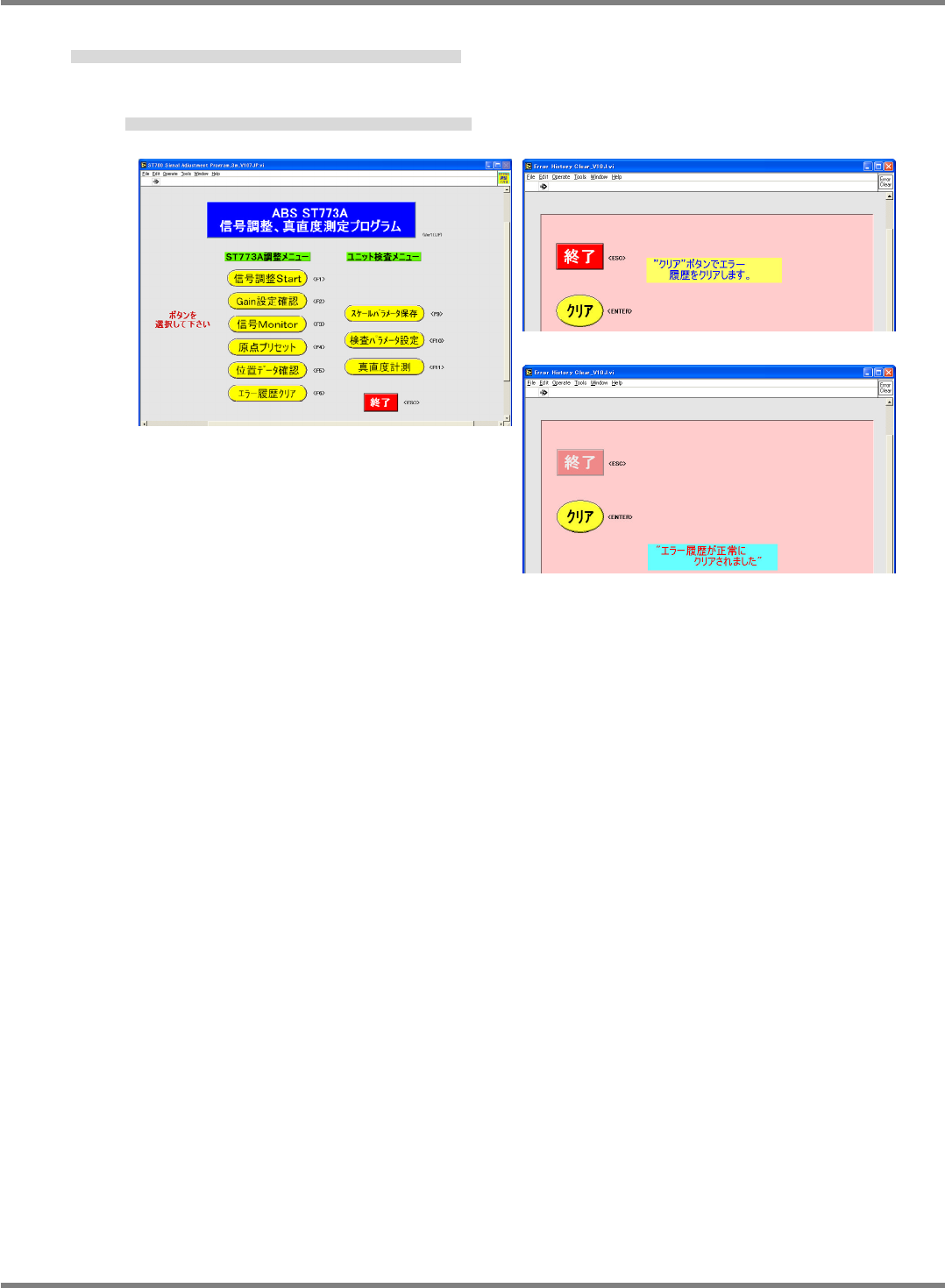
5. Click [Error history clear]. After the screen changes, click [Clear].
[エラー履歴クリア] をクリックし、画面切り替わり後、[クリア] をクリックする。
单击 [清除错误履历] ,等画面切换后,单击 [清除]。
The message in Fig. 11 appears and the menu screen returns.
‘
エラー履歴が正常にクリアされました
’
と表示されメニュー画面に戻る。
会显示
‘错误履历被正常清除了’
并回到菜单画面。
Fig. 11
Fig. 10
Fig. 9
NPM-D3
SERVICE MANUAL
4.2 XY Drive Axes
EJM6D3-MB-04SM-02.DOC Page 4-15
4.2.3 Y-axis Interference Photo-sensor Adjustment
Y 軸干渉 PH の調整
Y 轴干涉 PH 的调整
Unit No.
N610052923AA
4.2.3 Y-axis Interference
Photo-sensor Adjustment
Y
軸干渉
PH
の調整
Y
轴干涉
PH
的调整
Y-axis Interference Photo-sensor Adjustment
Y 軸干渉 PH の調整
Y 轴干涉 PH 的调整
3.
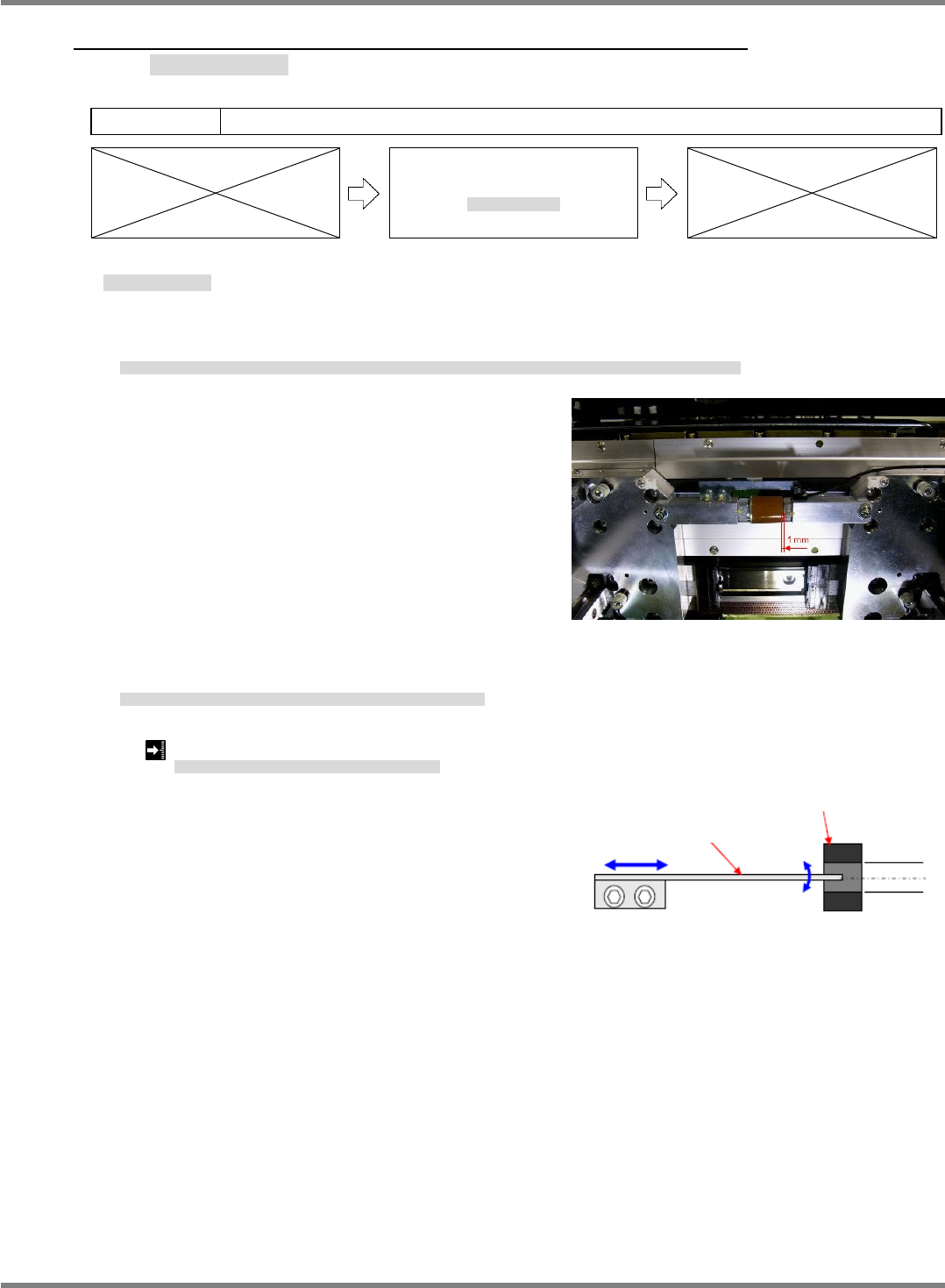
1. Bring the front and rear side beams near to each other by hand so that the clearance between their
respective mechanical stoppers is 1 mm.
FRONT 側ビームと REAR 側のビームを手で近づけ、FRONT 側メカストッパと REAR 側メカストッパのすき間を 1 mm にします。
用手将 FRONT 侧轴和 REAR 侧轴靠近,并使 FRONT 侧的机械止动器和 REAR 侧的机械止动器之间的间隙调整为 1 mm。
2. Adjust the position of the interference sensor dog so that the interference photo-sensor turns ON in this
situation.
このとき、干渉 PH が ON するように干渉センサ DOG の位置を調整します。
此时,为了使干涉 PH 置于 ON,调整干涉传感器 DOG 的位置。
Clearance between front and rear side mechanical stoppers: 1 mm
FRONT
メカストッパと
REAR
メカストッパのすき間
:
FRONT
机械止动器和
REAR
机械止动器之间的间隙
:
Fig. 1
Fig. 2
Y-axis interference dog
Y-axis interference sensor