MDO3000 Programmer Manual.pdf - 第1019页
Status and Events T able 3-3: Oscilloscope operations that can generate OPC (cont.) Command Condition s TEKSecure :TRIGger:A SETLevel Example of Acquiring and Measur ing a Single-Sequence Wa v e f o r m For example, a ty…

Status and Events
NOTE. The *OPC c
ommand form can also be used to cause an SRQ to be
generated upon completion of all pending operations. This requires that the
ESB (Event Status Bit, bit 5) of the SRER (Service Request Enable Regiser) is set,
and the OPC bit (bit 0) of the DESR (Device Event Status Enable Register) and
the ESER (Event Status Enable Register) are set. (The SRER is set/queried using
*SRE. The DESR is set/queried using DESE. The ESER is set/queried using *ESE.)
Only a subset of oscilloscope operations support the Operation Complete function
(OPC):
Table 3-3: Oscilloscope operations that can generate OPC
Command Conditions
ACQuire:STATE <non-zero NR1> | ON |RUN Only when in single s equence acquisition
mode
:AUTOSet < EXECute | UNDo >
CALibrate:INTERNal
CALibrate:INTERNal:STARt
CALibrate:FACtory STARt
CALibrate:FACtory CONTinue
CALibrate:FACtory PREVious
CH<x>:PRObe:AUTOZero EXECute
CH<x>:PRObe:DEGAUss E XECute
DIAg:STATE EXECute
FACtory
HARDCopy
HARDCopy START
MASK:TESt:SRQ:CO M PLetion (1|ON) upon completion of test
MASK:TESt:SRQ:FAILure (1|ON) upon failure of test
:POWer:RIPPle < VERTAUTOset |
VERTDEFault >
RECAll:MASK <file>
RECAll:SETUp (<file as quoted
string>|FACtory)
RECAll:WAVEform <.ISF or .CSV file >,<
REF1|REF2|REF3|REF4 >
:RF:REFLevel AUTO
*RST
SAVe:IMAGe < file as quoted string>
SAVe:SETUp <file as quoted string>
SAVe:WAVEform < source wfm >, (<
REF1|REF2|REF3|REF4 >|< file >)
3-8 MDO4000/B/C, MSO/DPO4000B and MDO3000 Series Oscilloscopes Programmer Manual
Status and Events
Table 3-3: Oscilloscope operations that can generate OPC (cont.)
Command Conditions
TEKSecure
:TRIGger:A SETLevel
Example of Acquiring
and Measur
ing a
Single-Sequence
Waveform
For example, a typical application might involve acquiring a single-sequence
waveform
andthentakingameasurementontheacquiredwaveform. Youcould
use the following command sequence to do this:
/** Set u
p conditi onal acquisit ion **/
ACQUIRE:STATE OFF
SELECT:CH1 ON
HORIZONTAL:RECORDLENGTH 1000
ACQUIRE:MODE SAMPLE
ACQUIRE:STOPAFTER SEQUENCE
/** Ac
quire w aveform data **/
ACQUIRE:STATE ON
/** Set up the measurement parameters **/
MEASUREMENT:IMMED:TYPE AMPLITUDE
MEASUREMENT:IMMED:SOURCE CH
1
/** Tak e amplitude measurement **/
MEA
SUREMENT:MEAS1:VALUE?
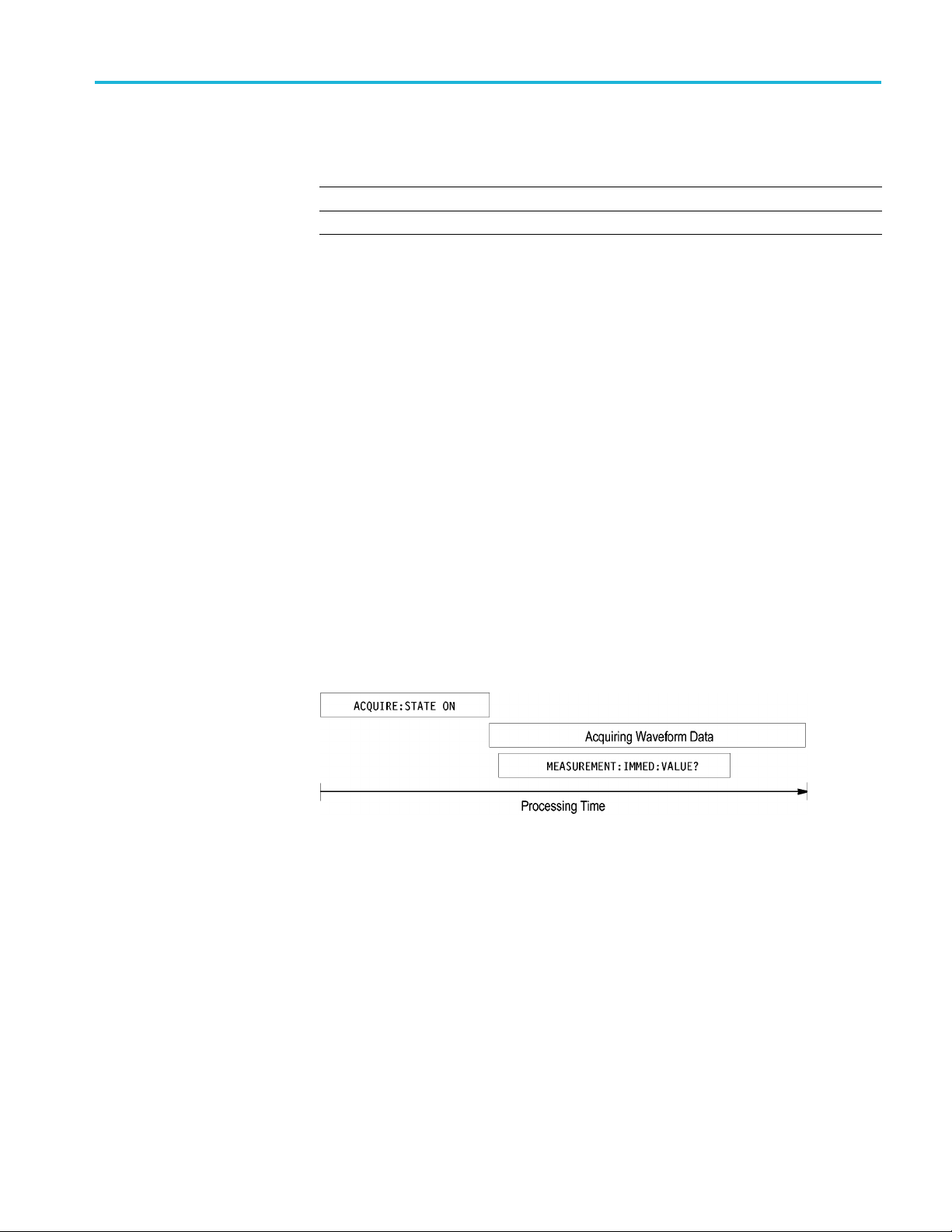
The acquisition of the waveform requires extended processing time. It may not
fin
ish before the oscilloscope takes an amplitude measurement (see the following
figure). This can result in an incorrect amplitude value.
Figure 3-7: Command Processing Without Using Synchronization
To ensure the oscilloscope completes waveform acquisition before taking the
measurement on the acquired data, you can synchronize the program using *WAI,
BUSY, *OPC, and *OPC?.
MDO4000/B/C, MSO/DPO4000B and MDO3000 Series Oscilloscopes Programmer Manual 3-9

Status and Events
Figure 3-8: P rocessing Sequence With Synchronization
Example of Using the *OPC
Command
If the corresponding status registers are enabled, the *OPC command sets the
OPC bit in the Standard Event Status Register (SESR) when an operation is
complete. You achieve synchronization by using this command with either a
serial poll or service request handler.
Serial Poll Method: Enable the OPC bit in the Device Event Status Enable
Register (DESER) and the Event Status Enable Register (ESER) using the DESE
and *ESE
commands.
When the operation is complete, the OPC bit in the Standard Event Status Register
(SESR)
will be enabled and the Event Status Bit (ESB) in the Status Byte Register
will be enabled.
The sa
me command sequence using the *OPC command for synchronization with
serial polling looks like this:
/* Se
t up conditional acquisition */
ACQUIRE:STATE OFF
SELECT:CH1 ON
HORIZONTAL:RECORDLENGTH 1000
ACQUIRE:MODE SAMPLE
ACQUIRE:STOPAFTER SEQUENCE
/*
Enable th e status registers */
DESE 1
*ESE 1
*SRE 0
/* Acqu ire waveform data */
ACQUIRE:STATE ON
/* Set up the measurement parameters */
MEASUREMENT:IMMED:TYPE AMPLITUDE
MEASUREMENT:IMMED:SOURCE CH1
/* Wait until the acquisition is complete before taking the
measurement.*/
*OPC
While s erial poll = 0, keep looping
/* Take amplitude measurement */
MEASUREMENT:IMMED:VALUE?
This technique requires less bus traffic than did looping on BUSY.
3-10 MDO4000/B/C, MSO/DPO4000B and MDO3000 Series Oscilloscopes Programmer Manual