MDO3000 Programmer Manual.pdf - 第38页
Command Syntax A quoted string can include any character defined in the 7-bit ASCII character set. Follow these rules when you use quoted strings: 1. Use the sa me ty pe of quote character to open and close the string. Fo…

Command Syntax
Argument Types
Commands use arguments such as enumeration, numeric, quoted string and block.
Each of these arguments are listed in detail below.
Enumeration
Enter these arguments as unquoted text words. Like key words, enumeration
arguments follow the same convention where the portion indicated in uppercase is
required and that in lowercase is optional.
For example:
SAVe:WAVEform:FILEFormat INTERNal
Numeric
Many osci
lloscope commands require numeric arguments. The syntax shows
the format that the oscilloscope returns in response to a query. This is alsothe
preferred format when sending the command to the oscilloscope, though any of
the formats will be accepted. This documentation represents these arguments as
described below.
Table 2-10: Numeric Arguments
Symbol Meaning
<NR1>
Signed integer value
<NR2> Floating point value w ithout an exponent
<NR3> Floating point value w ith an exponent
<bin>
Signed or unsigned integer in binary format
Most numeric arguments will be automatically forced to a valid setting, by either
rounding or truncating, when an invalid number is input, unless otherwise noted
in
the command description.
Quoted String
Some commands accept or return data in the form of a quoted string, which is
simply a group of ASCII characters enclosed by a single quote (') or double quote
(
"). The following is an example of a quoted string:
"This i s a quote d
string"
. This documentation represents these arguments as follows:
Table 2-11: Quoted String Argument
Symbol Meaning
<QString> Quoted string of ASCII text
MDO4000/B/C, MSO/DPO4000B and MDO3000 Series Oscilloscopes Programmer Manual 2-7

Command Syntax
A quoted string
can include any character defined in the 7-bit ASCII character
set. Follow these rules when you use quoted strings:
1. Use the same ty
pe of quote character to open and close the string. For
example:
"this is a valid string".
2. You can mix q
uotation marks within a string as long as you follow the
previous rule. For example:
"this i s an 'acc eptable' str ing".
3. You c an i ncl
ude a quote character within a string by repeating the quote. For
example:
"here is a "" mark".
4. Strings ca
n have upper or lower case characters.
5. If you use a GPIB network, you cannot terminate a quoted string with the
END messa
ge before the closing delimiter.
6. A carriage return or line feed embedded in a quoted string does not terminate
the stri
ng. The return is treated as another character in the string.
7. The maximum length of a quoted string returned from a query is 1000
charac
ters.
Here are some invalid strings:
"Invalid string argument' (quotes are not of the same type)
"test<EOI>" (termination character is embedded in the string)
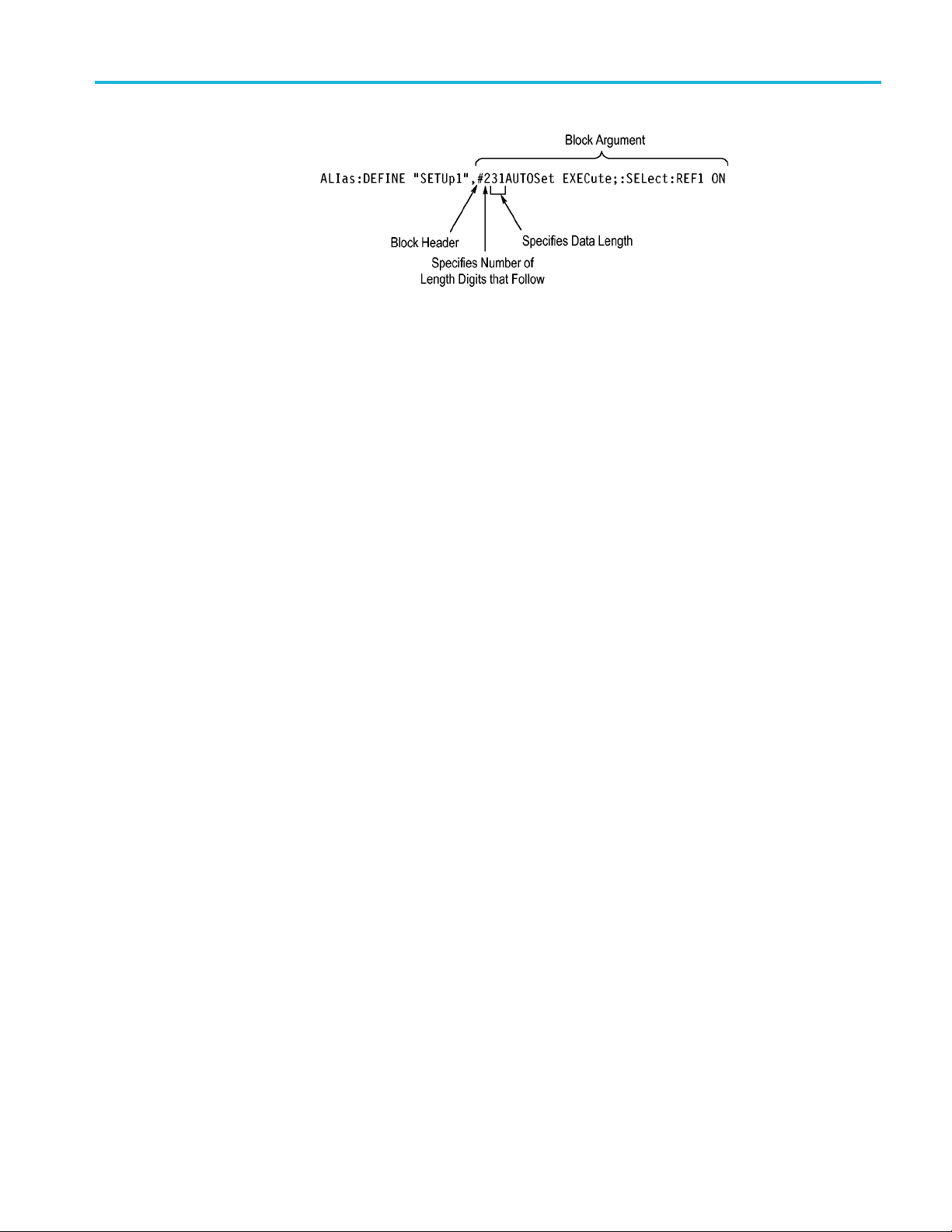
Block
Several oscilloscope commands use a block argument form, as defined in the
table below.
Table 2-12: Block Argument
Symbol Meaning
<NZDig>
A nonzero digit character in the range of 1–9
<Dig>
A digit character, in the range of 0–9
<DChar> A character with the hexadecimal equivalent of 00 through FF (0
through 255 decimal)
<Block>
A block of data bytes defined as: <Block> ::=
{#<NZDig><Dig>[<Dig>...][<DChar>...] |#0[<DChar>...]<term inator>}
<NZDig> specifies the number of <Dig> elements that follow. Taken together,
the <NZDig> and <Dig> elements form a decimal integer that specifies how
many <DChar> elements follow.
2-8 MDO4000/B/C, MSO/DPO4000B and MDO3000 Series Oscilloscopes Programmer Manual
Command Syntax
MDO4000/B/C, MSO/DPO4000B and MDO3000 Series Oscilloscopes Programmer Manual 2-9