MDO3000 Programmer Manual.pdf - 第20页
Getting Started T o change the Ethernet settings on your oscilloscope, do the following: 1. On the front panel, push Utility . 2. Push Utility Page . 3. Select I/O with the Multipurpose knob. 4. Push Network C onfiguratio…

Getting Started
Table 1-1: Updates to the MDO3000 and MDO4000C Series Oscilloscopes (cont.)
Feature Use these comm ands
Additional RF Spectrogram and Spectrum Trace commands RF:SPECTRogram
RF:SPECTRogram:SLICETIMe?
RF:SPECTRogram:TIMe?
RF:SPECTRUMTrace
Ability to save RF baseband I & Q data to a M atlab level 5
file or .TIQ file
SAVe:WAVEform:FILE Format:RF_BB_IQ
Table 1-2: Updates to the MDO3000 and MDO4000C Series Oscilloscopes
Feature Use these commands
System reboot REBOOT
CANFDbusconfiguration CONFIGuration:BUSWAVEFORMS:CANFD?
BUS:B<x>:CAN:FD:STANDard
BUS:B<
x>:CAN:FD:BITRate
BUS:B<x>:CAN:STANDard
BUS:B<x>:DISplay:FORMat
Can F D search criteria SEARCH:SEARCH<x>:TRIGger:A:BUS:B<x>:CAN:CONDition
SEARC
H:SEARCH<x>:TRIGger:A:BUS:B<x>:CAN:DATa:OFFSet
SEARCH:SEARCH<x>:TRIGger:A:BUS:B<x>:CAN:FD:BRSBIT
SEARCH:SEARC H<x >:T R IGger:A:BUS:B<x>:CAN:FD:ESIBIT
CAN FD trigger TRIGger:A:BUS :B<x>:CAN:CONDition
TRI
Gger:A:BUS:B<x>:CAN:D ATa:OFFSet
TRIGger:A:BUS :B<x>:CAN:FD:BRSBIT
TRIGger:A:BUS :B<x>:CAN:FD:ESIBIT
SettingUpRemoteCommunicationsHardware
Yo
u can remotely control communications between your oscilloscope and a PC
via Ethernet, USB, or GPIB cables.
Ethernet
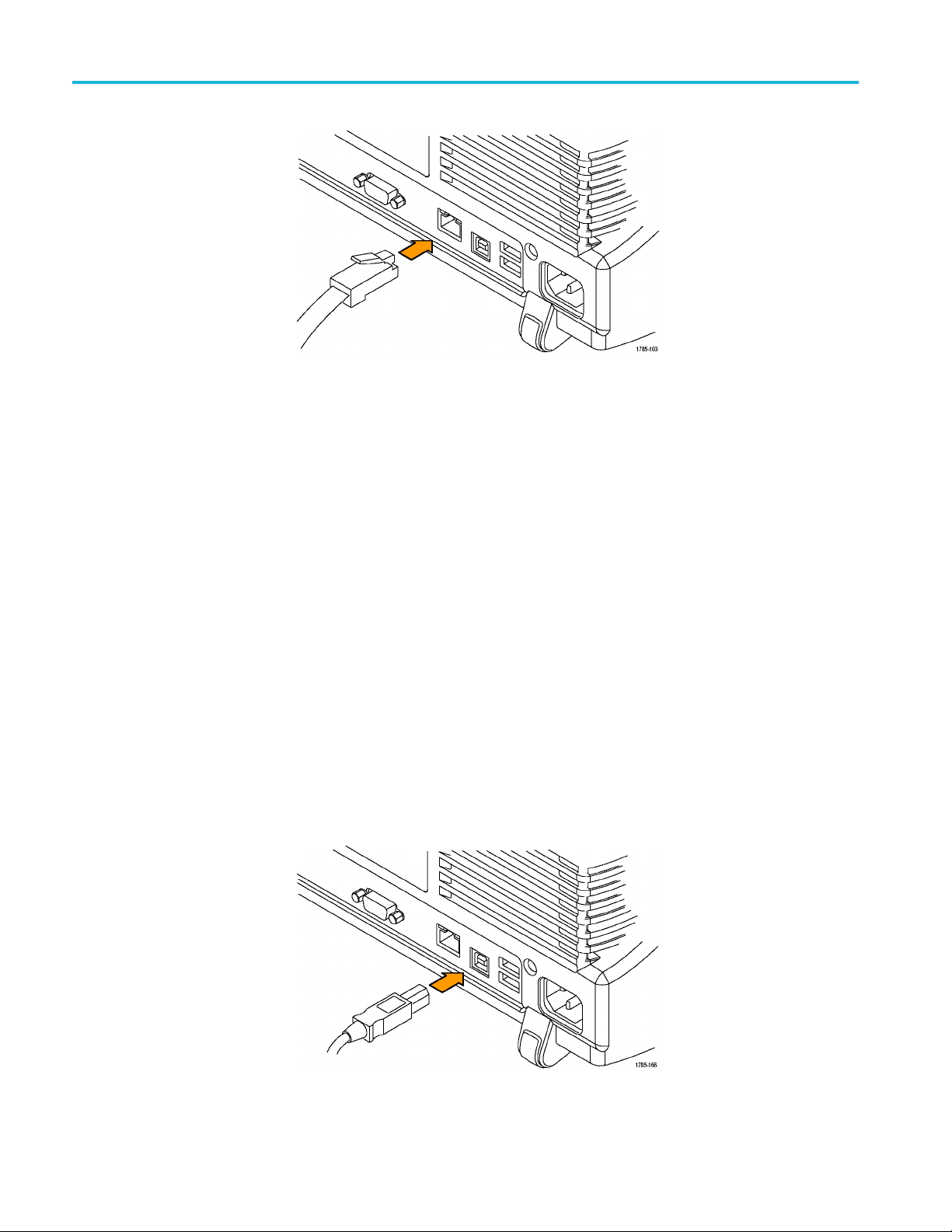
If you are using Ethernet, start by connecting an appropriate Ethernet cable to the
Ethernet port (RJ-45 connector) on the rear panel of your oscilloscope. This
connects the oscilloscope to a 10BASE-T/100BASE-TX/1000BASE-T local area
network.
MDO4000/B/C, MSO/DPO4000B and MDO3000 Series Oscilloscopes Programmer Manual 1-7
Getting Started
To change the Ethernet settings on your oscilloscope, do the following:
1. On the front panel, push Utility.
2. Push Utility Page.
3. Select I/O with the Multipurpose knob.
4. Push Network Configuration.
5. On the side menu, if you are on a DHCP Ethernet network and using a through
cable, push Automatic (DHCP & Auto-IP).
6. If you are using a cross-over cable, push Manual, and press Set IP Addresses
Manually to set a hard coded TCP/IP address.
USB
If you are using USB, start by connecting the appropriate USB cable to the USB
2.0 high-speed (HS) device port on the rear panel of your oscilloscope. This
port requires that the cable connected from the port to the host computer meets
the USB 2.0 specification for high speed connections. Typically, such cables
should be 3 feet or shorter in length, but this is determined by the quality ofthe
cable and, with higher quality cables, this length can be extended. (It is also
dependent upon the drive capability of the host USB port to which the instrument
is connected.) The use of high quality short cables is recommended to avoid USB
connection problems.
1-8 MDO4000/B/C, MSO/DPO4000B and MDO3000 Series Oscilloscopes Programmer Manual

Getting Started
With USB, the sy
stem automatically configures itself. To verify that the USB is
enabled:
1. On the front pa
nel, push Utility.
2. Push Utility Page.
3. Select I/O with the Multipurpose knob.
4. Push USB, and verify that USB is enabled.
5. If USB is disabled, push Connect to Computer on the side menu.
After connection, the host, with appropriate software, can list the oscilloscope as a
USB device with the following parameters: (See Table 1-3.)
Table 1-3: USB Device Parameters
Parameter Value
Manufacturer ID 0x0699 (decimal 1689)
Product ID
The product id varies by model number as
follows:
(You can send the
USBTMC:PRODUCTID:HEXadecimal?
query to read the value)
DPO4104B 0x0405 (decimal 1029)
DPO4054B 0x0406 (decimal 1030)
DPO4034B 0x0407 (decimal 1031)
MSO4104B 0x0409 (decimal 1033)
MSO4054B 0x040A (decimal 1034)
MSO4034B 0x040B (decimal 1035)
MDO4104-6 0x040C (decimal 1036)
MDO4104-3 0x040D (decimal 1037)
MDO4054-6 0x040E (decimal 1038)
MDO4054-3 0x040F (decimal 1039)
DPO4102B 0x0417 (decimal 1047)
DPO4102B-L 0x0418 (decimal 1048)
DPO4104B-L 0x0419 (decimal 1049)
MSO4102B 0x041A (decimal 1050)
MSO4102B-L 0x041B (decimal 1051)
MSO4104B-L 0x041C (decimal 1052)
DPO4014B 0x0426 (decimal 1062)
MSO4014B 0x0428 (decimal 1064)
MDO4014-3 0x042a (decimal 1066)
MDO4034-3 0x042e (decimal 1070)
MDO3000 (all) 0x408 (decimal 1032)
MDO4000C (all) 0x0456 (decimal 1110)
Serial number Serial number
Manufacturer description
“Tektronix”
Interface description “USBTMC-USB488”
MDO4000/B/C, MSO/DPO4000B and MDO3000 Series Oscilloscopes Programmer Manual 1-9