SIPLACE D4-D4i 工程师手册_EN.pdf - 第108页
Service Work Component Handling 4.3.2 Cutter 108 Service Manual SIPLACE D4/D4i ► Calibrate the nozzle changer. ► Load the SITEST program and a ctua te the cutting strokes (see Op erating Manual "SITEST Pro - gram&qu…
Service Work
4.3.2 Cutter Component Handling
Service Manual SIPLACE D4/D4i 107
4.3.2.13
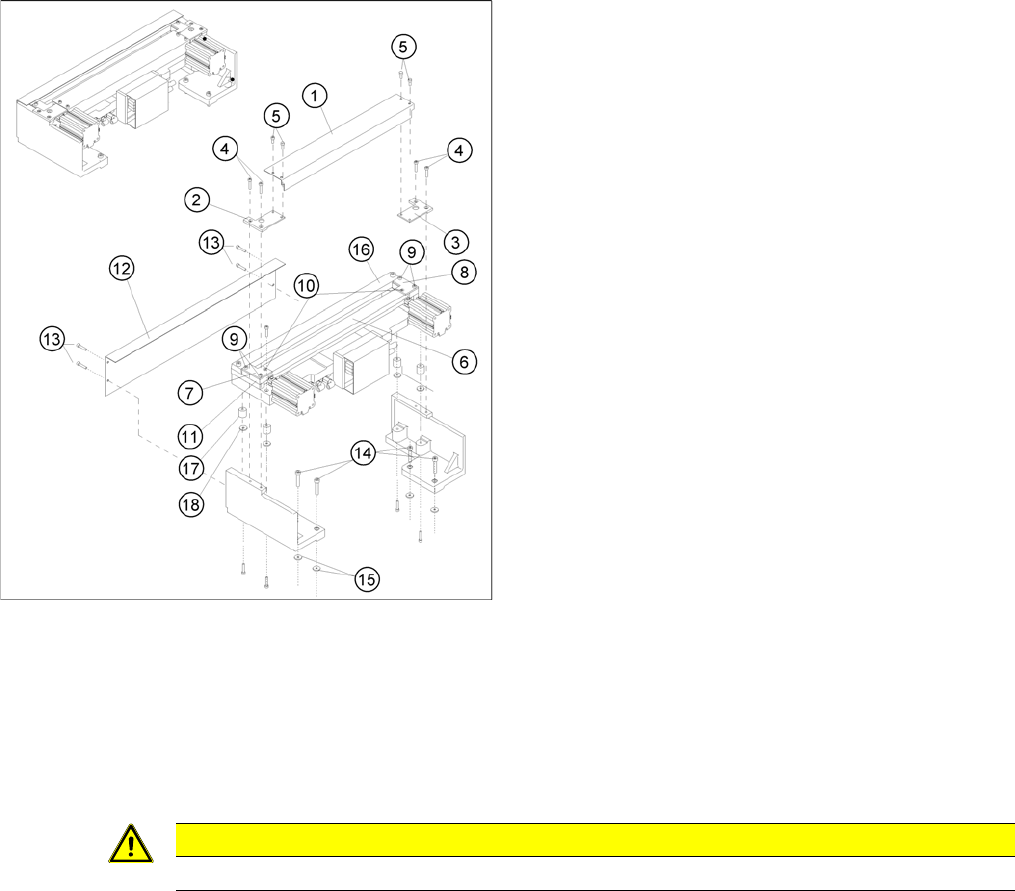
4.3.2.13 Exchanging Baffles and / or Reject Box (Profile)
Exchanging Baffles and / or Reject Box (Profile)
See also
4.3.2.14 Final Steps [ ➙ 107]
6.4.3 Check the gap between the empty-tape baffle, inside and the leading edge of the tape deflec-
tor. [ ➙ 223]
4.3.2.14
4.3.2.14 Final Steps
Final Steps
► Make certain that each of the cables running out of the left and right of the control board box is again
fastened to the fixing pedestal with cable tie.
⇨ Make sure that there is no strain on the cables.
► If necessary, check the gap between the leading edge of the tape deflector and the empty-tape baf-
fle, inside.
► Where applicable, mount the tape chute into the machine.
► From below, mount the stop buffer assembly on the machine base (two M8 socket hex head cap
screws on left and right).
► If the nozzle changer is removed, stop the nozzle changer over the installation position and and
make the electrical and pneumatic connections.
► Fit the nozzle changer.
► Turn the compressed air back on at the main switch of the compressed air unit.
► Move the changeover table back into the machine and connect it.
► Remove the "empty-tape duct assembly".(See
"4.3.2.12 Exchanging the Empty-Tape Duct Assem-
bly" [ ➙ 106].)
► Loosen the self-tapping M4 screws on the baffle or
reject container to be dismantled (13 to 18).
► Insert the new baffle inside/outside and /or the new
reject container and fasten it with the self-tapping
screws (13 to 18).
► Fit the empty-tape duct assembly and check the gap
between the empty-tape baffle, inside and the leading
edge of the tape deflector.
► Perform the appropriate “Final Steps”.
CAUTION
Tighten the screws to the correct torque.

Service Work
Component Handling 4.3.2 Cutter
108 Service Manual SIPLACE D4/D4i
► Calibrate the nozzle changer.
► Load the SITEST program and actuate the cutting strokes (see Operating Manual "SITEST Pro-
gram").
► If the nozzle changer was removed:
► Use the SITEST program to calculate the position of the nozzle changer.
► Exit the SITEST program.
► Perform a visual check to make certain that all empty-tape ends are correctly guided downward in
the empty-tape duct.
See also
4.3.2.4.1 Tightening Torques for Cutter Screws [ ➙ 83]
6.4.3 Check the gap between the empty-tape baffle, inside and the leading edge of the tape deflec-
tor. [ ➙ 223]
DANGER
► The SITEST program may only be started by personnel who have been trained in its use
by Siemens and are therefore authorized to do so.
► When the SITEST program is used, additional, higher risk of an accident exists aside from
the generally higher danger posed by the blades of the cutter.
Service Work
4.3.2 Cutter PCB conveyor system
Service Manual SIPLACE D4/D4i 109
4.4
4.4 PCB conveyor system
PCB conveyor system
There are two types of PCB conveyor systems for the D/Di-series.
1. Modular PCB conveyor system with automatic width adjustment unit
Modular conveyor, movable rail
WARNING
Nonobservance of these safety instructions may cause injury to personnel and damage to the
machine!
The service work described in this manual may only be performed by specially trained service
technicians, with appropriate qualifications and expertise.
► Please observe the safety instructions in the Operating Manual for all service work!