SIPLACE D4-D4i 工程师手册_EN.pdf - 第225页
Settings 6.5.1 Adjusting the Tension of the Conveyor T oothed Belt Conveyor Service Manual SIPLACE D4/D4i 225 Measuring and setting the belt te n sion for the width adjustment 1 Adjustment unit 4 Toothed drive belt for a…
Settings
Conveyor 6.5.1 Adjusting the Tension of the Conveyor Toothed Belt
224 Service Manual SIPLACE D4/D4i
6.5
6.5 Conveyor
Conveyor
6.5.1
6.5.1 Adjusting the Tension of the Conveyor Toothed Belt
Adjusting the Tension of the Conveyor Toothed Belt
NOTICE
Measuring at strand center
The belt tension is measured at the strand center (i.e. the longest distance between the two
deflection pulleys).
Measuring and setting the tension of the conveyor
toothed belt
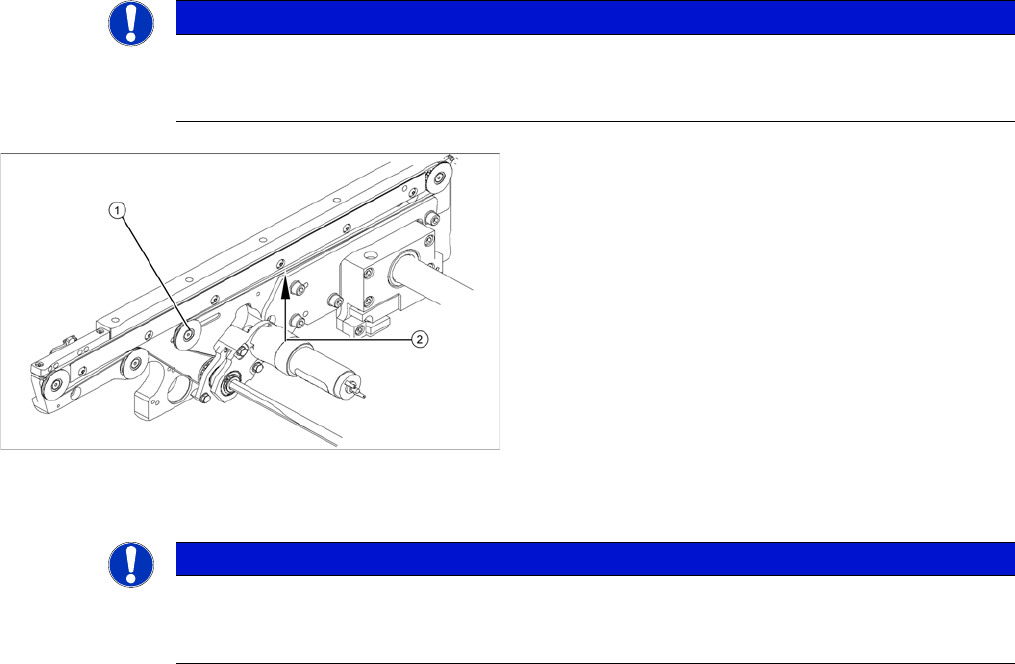
1. Deflection pulley with slot
2. Measuring point of the belt tension measuring device
► Each conveyor section contains a deflection pulley
(1), that can be moved. The tension of the conveyor
toothed belt can be adjusted by moving this deflection
pulley.
► Position the measuring point of the belt tension de-
vice at the strand center (i.e. the longest distance be-
tween the two deflection pulleys) of the conveyor
toothed belt.
► Set the tension of the conveyor toothed belt accord-
ing to the following values.
NOTICE
Different frequencies
The tension frequencies per area may vary according to the different belt guides. The belt ten-
sion always remains the same.
Settings
6.5.1 Adjusting the Tension of the Conveyor Toothed Belt Conveyor
Service Manual SIPLACE D4/D4i 225
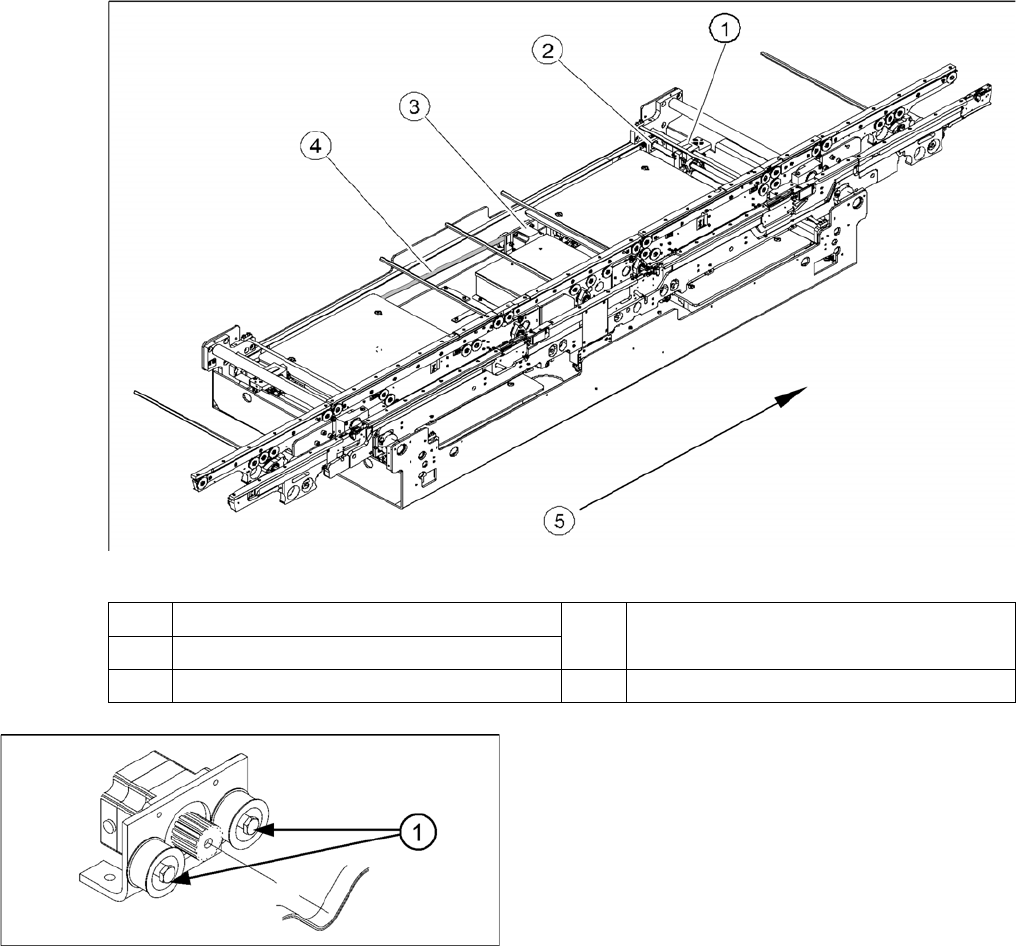
Measuring and setting the belt tension for the width adjustment
1 Adjustment unit 4 Toothed drive belt for adjusting the width /
measuring the belt tension
2 Spindle with toothed wheel
3 Width adjustment stepping motor 5 Transport direction
Width adjustment motor
The belt is tensioned by means of cams on the idler pul-
leys. The idler pulleys are located on the left and right of
the motor.
1. Loosen the cam shaft on the idler pulley and set the
belt tension.
Settings
Conveyor 6.5.2 Setting the fixed conveyor side (single and dual conveyor)
226 Service Manual SIPLACE D4/D4i
6.5.1.1
6.5.1.1 Measuring Points and Belt Tensions for D4 Conveyor
Measuring Points and Belt Tensions for D4 Conveyor
6.5.2
6.5.2 Setting the fixed conveyor side (single and dual conveyor)
Setting the fixed conveyor side (single and dual conveyor)
6.5.2.1
6.5.2.1 General Notes
General Notes
▪ The fixed conveyor edge can be set in SITEST if required.
▪ If the position taught for the fixed conveyor edge is saved, these values will be used for the function
Move all conveyor edges to standard position.
The default values will be overwritten and will need to be retaught.
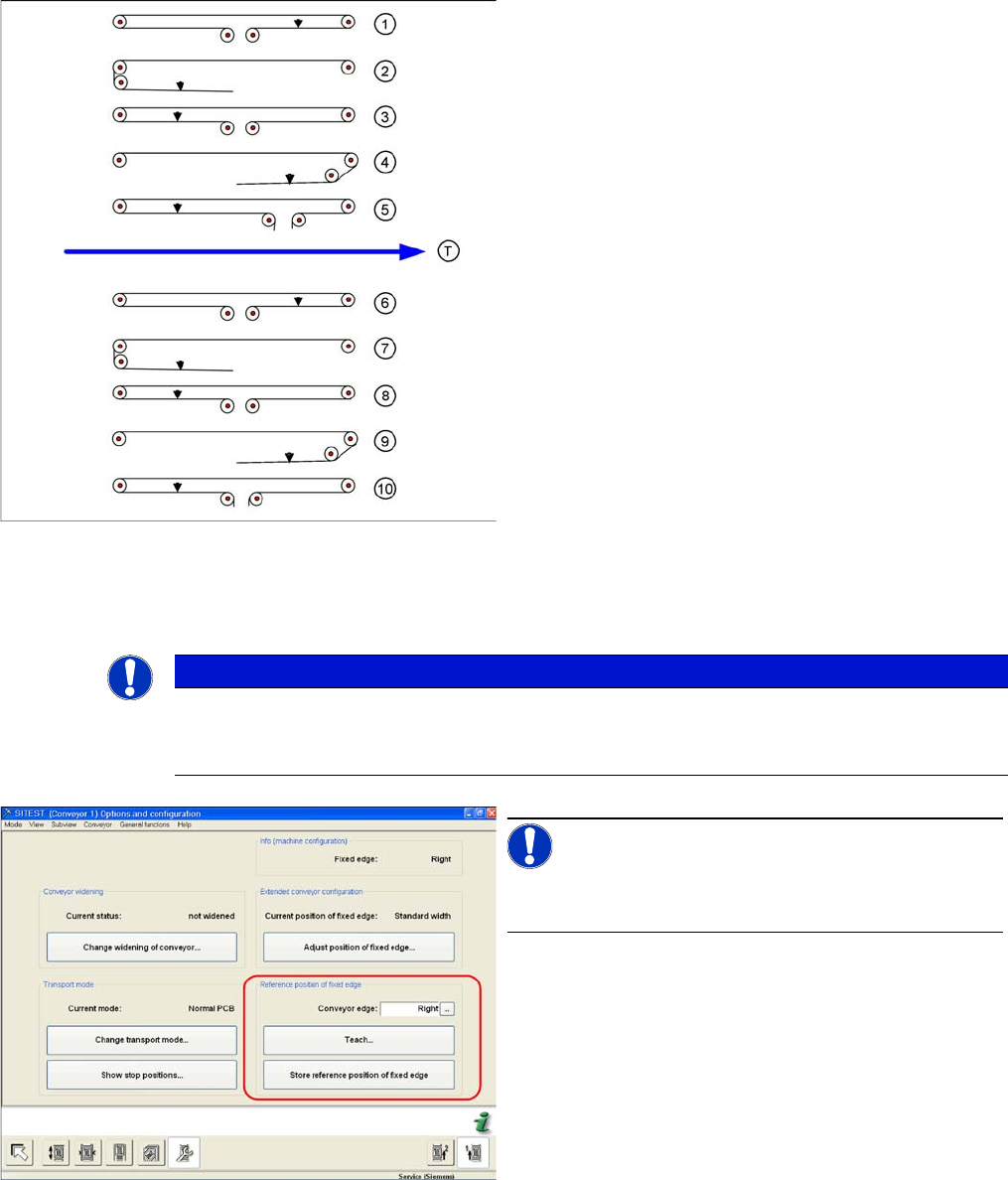
Legend
Measuring points (arrows) and measuring values for con-
veyor belt tensions:
Single conveyor or dual conveyor lane 1
1. Input conveyor: 90 +/- 9 Hz
2. Processing area 1: 72 +/- 7 Hz
3. Intermediate conveyor: 144 +/- 14 Hz
4. Processing area 2: 90 +/- 9 Hz
5. Output conveyor: 90 +/- 9 Hz
Dual conveyor lane 2
1. Input conveyor: 90 +/- 9 Hz
2. Processing area 1: 72 +/- 7 Hz
3. Intermediate conveyor: 115 +/- 12 Hz
4. Processing area 2: 90 +/- 9 Hz
5. Output conveyor: 90 +/- 9 Hz
Width adjustment
▪ Width adjustment Limit switch, 24 +/- 2 Hz
NOTICE
Widened or extra wide conveyor mode
If you want to change the conveyor mode from "widened" to "extra wide" (or vice versa), you
need to first move the conveyor into standard mode.
SITEST "Set fixed conveyor edge"
NOTICE!
This menu is protected with the SIPLACE service pass-
word.