SIPLACE D4-D4i 工程师手册_EN.pdf - 第31页
Overview 3.2.4 Computer Unit Electrical System Service Manual SIPLACE D4/D4i 31 3.2.3.5 3 . 2 . 3 . 5 O v e r v ie w o f S e t t in g s Overview of Settings 3.2.4 3 . 2 . 4 C o m p u t e r U n it Computer Unit Computer u…
Overview
Electrical System 3.2.3 Distributors in Sectors 1-4
30 Service Manual SIPLACE D4/D4i
3.2.3.4
3.2.3.4 Distributors in Sector 4
Distributors in Sector 4
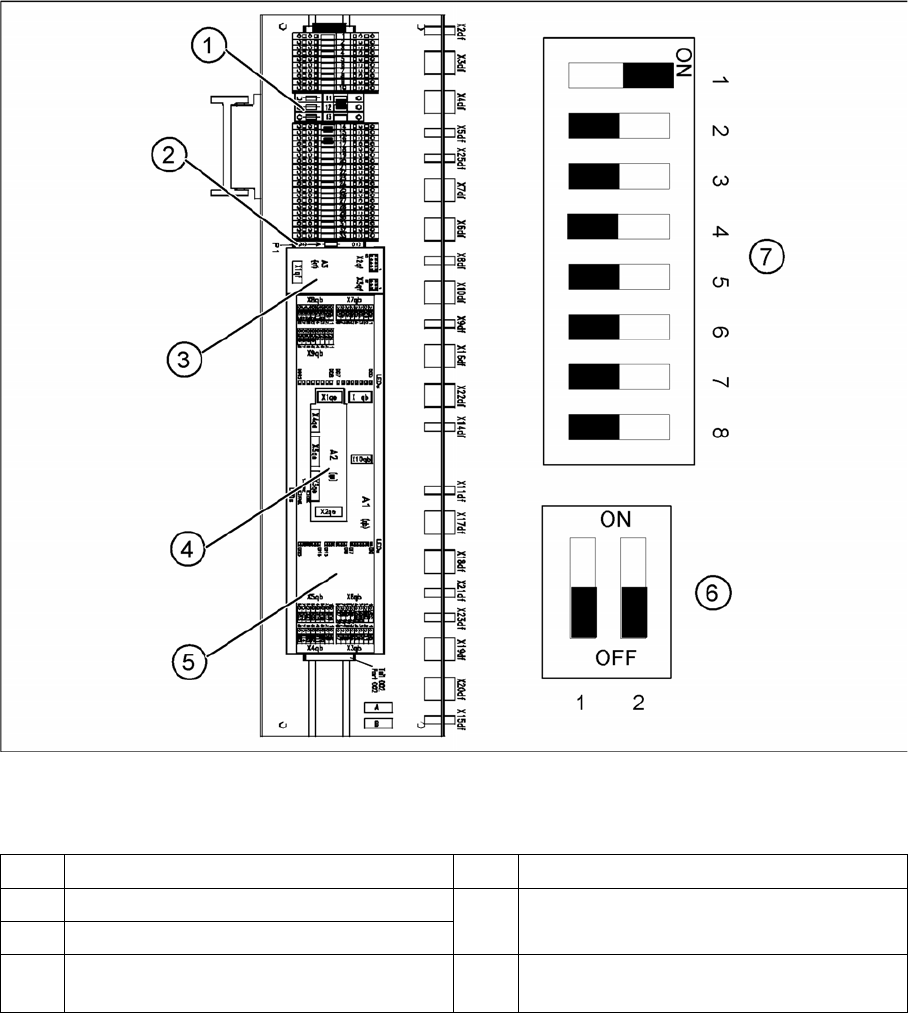
Overview - distributors in sector 4
Legend
1 Fine fuse 5x20 MT 3.15 A [00302999-xx] 5 CAN I/O module 2 [00355051-xx]
2 Resistor R1 6 DIP switch for CAN Bus terminator for CO
table in Sector 4
3 CAN interface [03032364-xx]
4 CAN bus terminator board for changeover
table [03046863-xx]
7 DIP switch for configuration of CAN I/O
module in sector 4
Overview
3.2.4 Computer Unit Electrical System
Service Manual SIPLACE D4/D4i 31
3.2.3.5
3.2.3.5 Overview of Settings
Overview of Settings
3.2.4
3.2.4 Computer Unit
Computer Unit
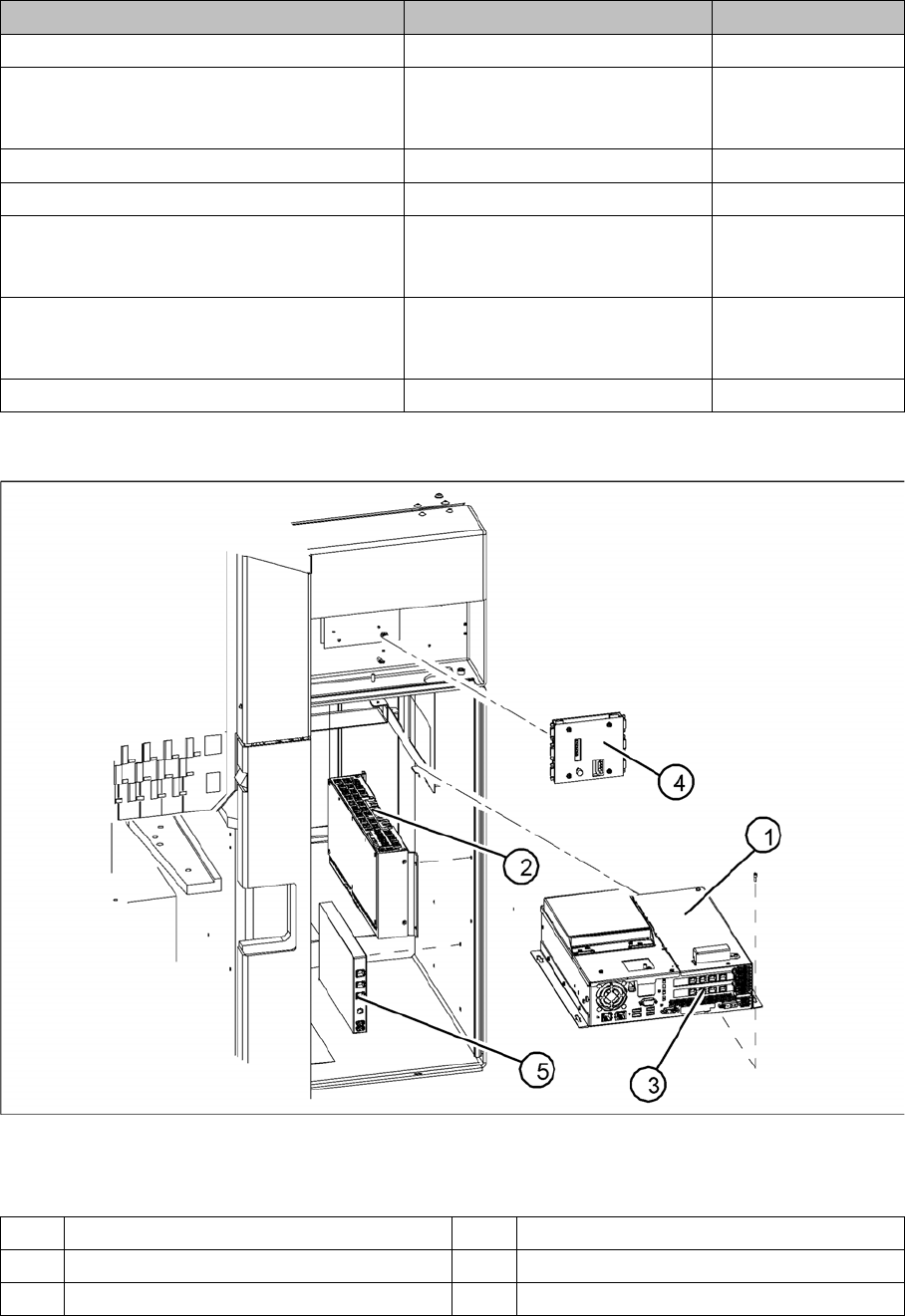
Computer unit
Legend
Description Setting Settings
Vision DC/DC converter replaced No settings required
CAN Bus board - CO table terminator re-
placed
Configuration of DIP switch See "3.2.3 Distribu-
tors in Sectors 1-4"
[ ➙ 27]
Fine fuse 5x20 MT 3.15 A replaced No settings required
Relay RS30 24 V replaced No settings required
CAN interface replaced Configuration of DIP switch See "3.2.3 Distribu-
tors in Sectors 1-4"
[ ➙ 27]
CAN I/O module 2 replaced Configuration of DIP switch See "3.2.3 Distribu-
tors in Sectors 1-4"
[ ➙ 27]
Resistor R1 replaced No settings required
1 Control computer [0302341-xx] 4 Video multicoupler [03040316-xx]
2 Machine controller [03047697-01] 5 USB hub 2.0 [03032344-01]
3 Hotlink interface [03032343-xx]
Overview
Electrical System 3.2.5 Axis Unit
32 Service Manual SIPLACE D4/D4i
3.2.4.1
3.2.4.1 Overview of Settings
Overview of Settings
3.2.5
3.2.5 Axis Unit
Axis Unit
3.2.5.1
3.2.5.1 Overview of Settings
Overview of Settings
Description Setting Comments
Control computer replaced No settings required Backup of machine data
Install software according to respective
installation guide.
Video multiplexer replaced No settings required
Hotlink interface replaced No settings required Make sure that card engages correctly
in the slot.
USB hub 2.0 replaced No settings required
Machine controller replaced No settings required
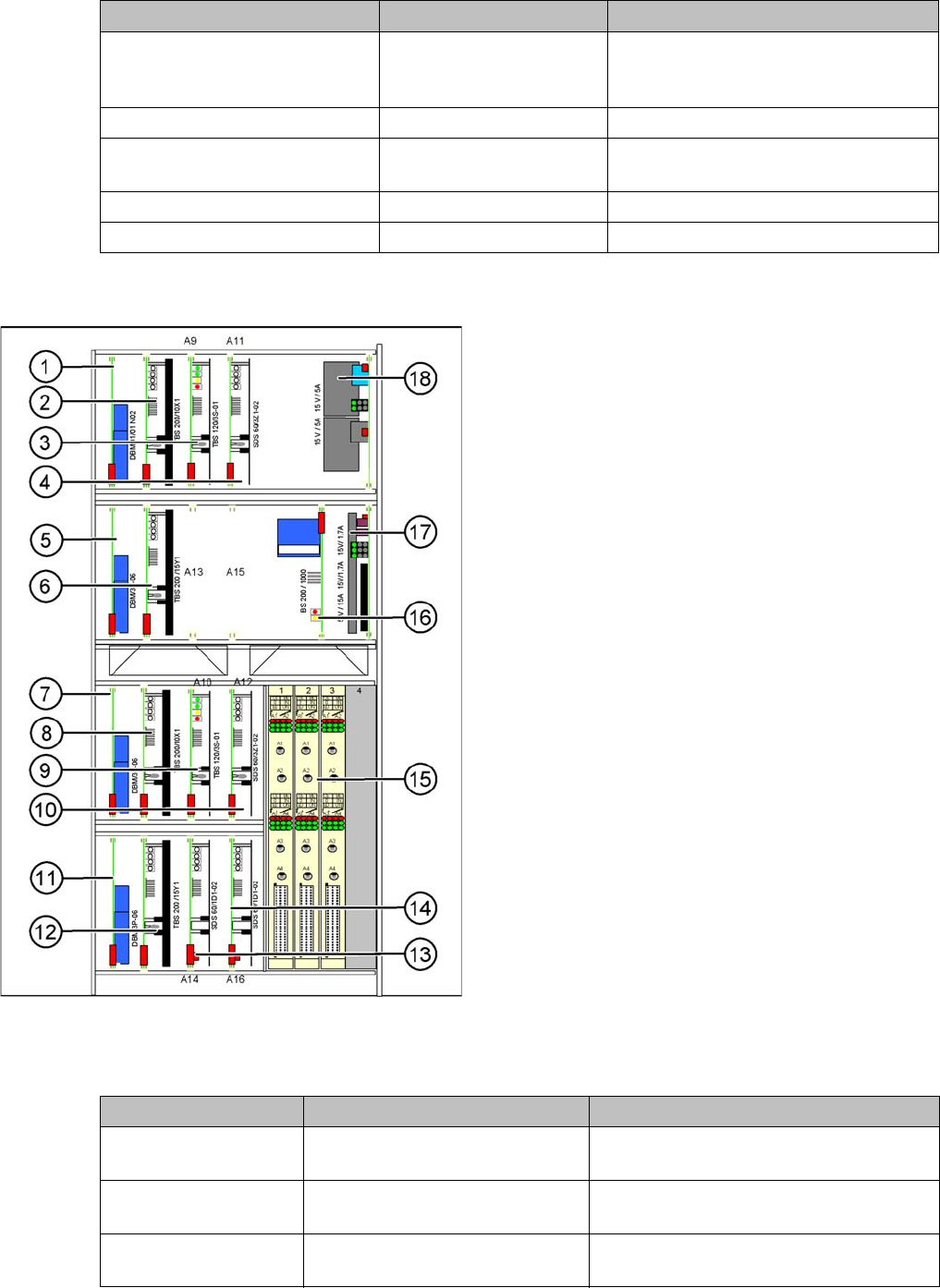
XXX Axis unit location 1/4
Legend
1. X-axis brake board (gantry 1/2)
2. X-axis servo card (gantry 1/2)
3. Star axis servo card (gantry 1/2)
4. Z-axis servo card (gantry 1/2)
5. Y-axis brake board (gantry 1/2)
6. Y-axis servo card (gantry 1/2)
7. X-axis brake board (gantry 3/4)
8. X-axis servo card (gantry 3/4)
9. Star axis servo card (gantry 3/4)
10. Z-axis servo card (gantry 3/4)
11. Y-axis brake board (gantry 3/4)
12. Y-axis servo card (gantry 3/4)
13. DP axis servo card (gantry 1/2)
14. DP axis servo card (gantry 3/4)
15. 3 axis cards A364
16. Ballast circuit (only for axis unit at location 2/3)
17. Power supply 5V/15A, 2x15V/5A
18. Power supply 15V/5A
Description Setting Settings
Complete axis unit re-
placed
Set the DIP switch for the relevant
location
At placement area 1+4 (OFF/OFF)
At placement area 2+3 (ON/ON)
Axis card A 364 Install firmware for the relevant
axis
See section.
Servo cards No settings required Servo card for the relevant axis has been
preset.