SIPLACE D4-D4i 工程师手册_EN.pdf - 第158页
Service Work C&P12 Placement Head 4.5.9 Replacing the Valve Positioning Drive for the Reject Circuit [00367768-xx] 158 Service Manual SIPLACE D4/D4i Removal Installation Legend 1. Valve pos itioning drive fo r the pl…
Service Work
4.5.9 Replacing the Valve Positioning Drive for the Reject Circuit [00367768-xx] C&P12 Placement Head
Service Manual SIPLACE D4/D4i 157
4.5.9
4.5.9 Replacing the Valve Positioning Drive for the Reject Circuit [00367768-xx]
Replacing the Valve Positioning Drive for the Reject Circuit [00367768-xx]
Tools and equipment
▪ Standard tool
▪ Used up to version 2: distance gauge 0.2 mm [00325445-01]
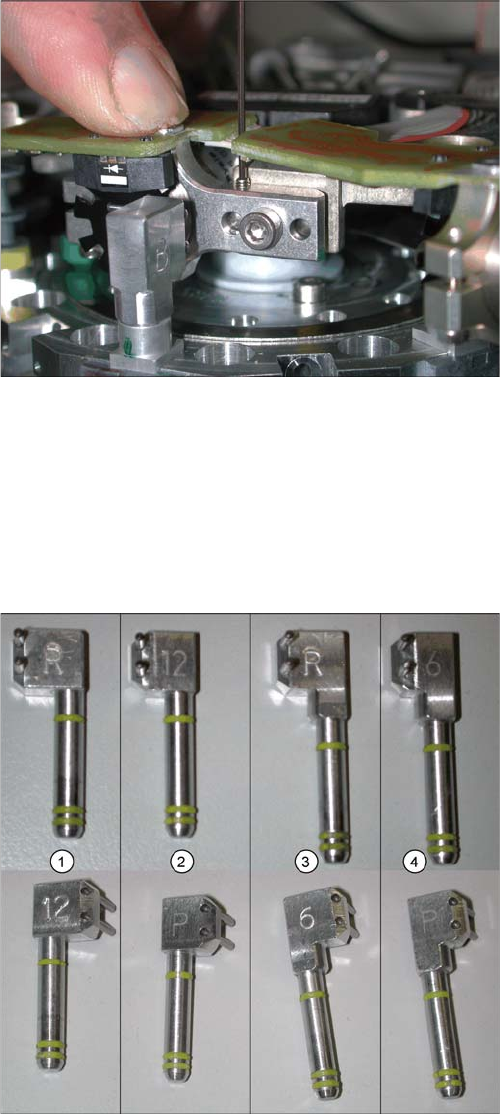
▪ Available from version 3, valid for all versions: adjustment valve plunger
► Now tighten the locking threaded pin with an Allen
key of size 0.89 mm. Press the valve positioning
drive against it. Do not tighten excessively as this
could push the valve positioning drive "backwards".
► Remove the adjustment plunger by turning the place-
ment star back and then rotating the adjustment
plunger out of the valve housing.
C&P6/12 adjustment valve plunger
Legend
1. Adjustment valve plunger for reject circuit C&P12
[03064290-01]
2. Adjustment valve plunger for placement circuit
C&P12 [03068816-01]
3. Adjustment valve plunger for reject circuit C&P6
[03068854-01]
4. Adjustment valve plunger for placement circuit C&P6
[03065628-01]
The labeling on the plungers has the following meaning:
▪ 6 = C&P6
▪ 12 = C&P12
▪ P = placement circuit
▪ R = reject circuit
Service Work
C&P12 Placement Head 4.5.9 Replacing the Valve Positioning Drive for the Reject Circuit [00367768-xx]
158 Service Manual SIPLACE D4/D4i
Removal
Installation
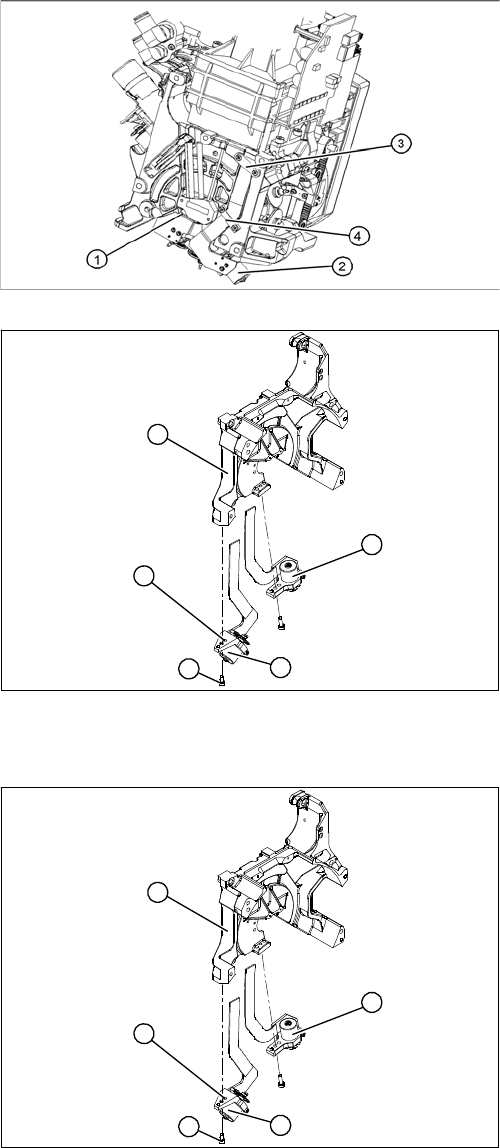
Legend
1. Valve positioning drive for the placement circuit
[00368075-xx]
2. Valve positioning drive for the reject circuit
[00367768-xx]
3. Flat ribbon cable clamp
4. Flat ribbon cable clamp
► Dismantle the C&P head.
► Loosen the two M2x6 Phillips screws on the flat rib-
bon cable clamp (3) and (4).
Legend
1. Valve positioning drive for the placement circuit
[00368075-xx]
2. Valve positioning drive for the reject circuit
[00367768-xx]
► Loosen the fastening screw (4).
► Carefully remove the valve positioning drive (2).
5
1
4
3
2
► Insert the valve positioning drive. Make sure that it is
seated correctly on the parallel pins (5).
► Loosely screw in the hexagon socket-head screw (4)
► Use the cable clamps to fix the ribbon cable in posi-
tion. Make sure that the ribbon cables are not
pinched.
5
1
4
3
2
Service Work
4.5.9 Replacing the Valve Positioning Drive for the Reject Circuit [00367768-xx] C&P12 Placement Head
Service Manual SIPLACE D4/D4i 159
See also
6.3.1 Calibrating the C&P Head and Cameras [ ➙ 206]
4.5.9.1
4.5.9.1 New Valve Positioning Drives (From Version 03)
New Valve Positioning Drives (From Version 03)
4.5.9.2
4.5.9.2 Mechanical Adjustment (Up To Version 02)
Mechanical Adjustment (Up To Version 02)
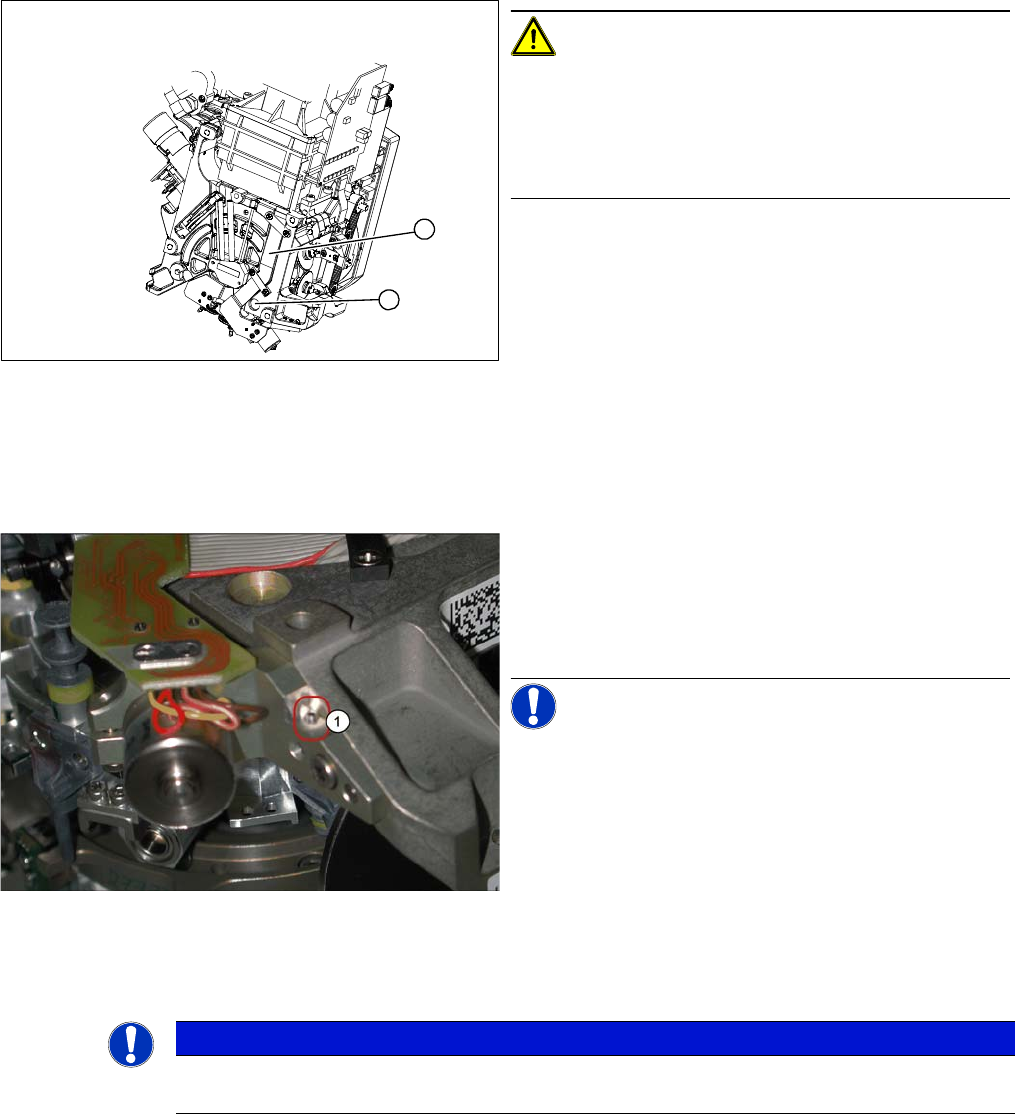
CAUTION! Check how the cables are run!
Check that the ribbon cables are laid correctly (1).
The flat ribbon cable for the two valve positioning units
must be run outside the holes (2). otherwise it will be
damaged when the C&P head is fitted onto the head
plate.
1
2
New valve positioning drive holder for the reject position
(DLM2/3) with position locking function
These valve positioning drives replace the previous ver-
sions on the DLM2/3 placement head.
For precise alignment and adjustment of the drives, use
the new tool which replaces the distance gauge 0.2 mm
[00325445-01].
NOTICE! This holder also fits the valve position-
ing drive on the placement and reject position of the
DLM1 placement head. A second 1.4 mm thread (1) is
provided on the opposite side for this purpose.
NOTICE
Instead of using the adjustment valve plungers, the DLM1 and DLM2 heads can also be set
with the distance gauge.