SIPLACE D4-D4i 工程师手册_EN.pdf - 第22页
Overview Electrical System 3.2.2 Power Supply Unit 22 Service Manual SIPLACE D4/D4i 3.2.2 3 . 2 . 2 P o w e r S u p p ly U n it Power Supply Unit Power supply unit The power supply unit is located in the left of the cent…
Overview
3.2.1 Position of the modules Electrical System
Service Manual SIPLACE D4/D4i 21
3.2
3.2 Electrical System
Electrical System
3.2.1
3.2.1 Position of the modules
Position of the modules
Position of the modules
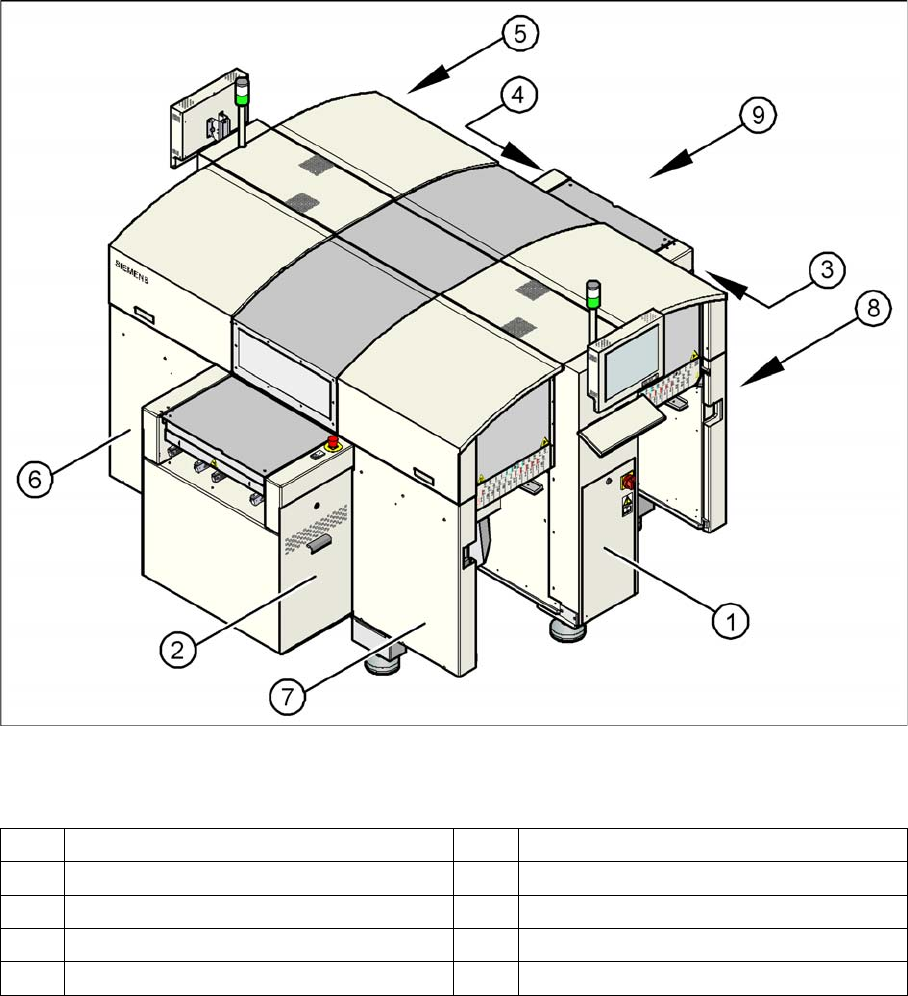
Legend
1 Power supply unit 6 Sector 2
2 Axis unit for placement areas 2 + 3 7 Sector 3
3 Computer unit 8 Sector 4
4 Axis unit for placement areas 1 + 4 9 Transport direction
5Sector1
Overview
Electrical System 3.2.2 Power Supply Unit
22 Service Manual SIPLACE D4/D4i
3.2.2
3.2.2 Power Supply Unit
Power Supply Unit
Power supply unit
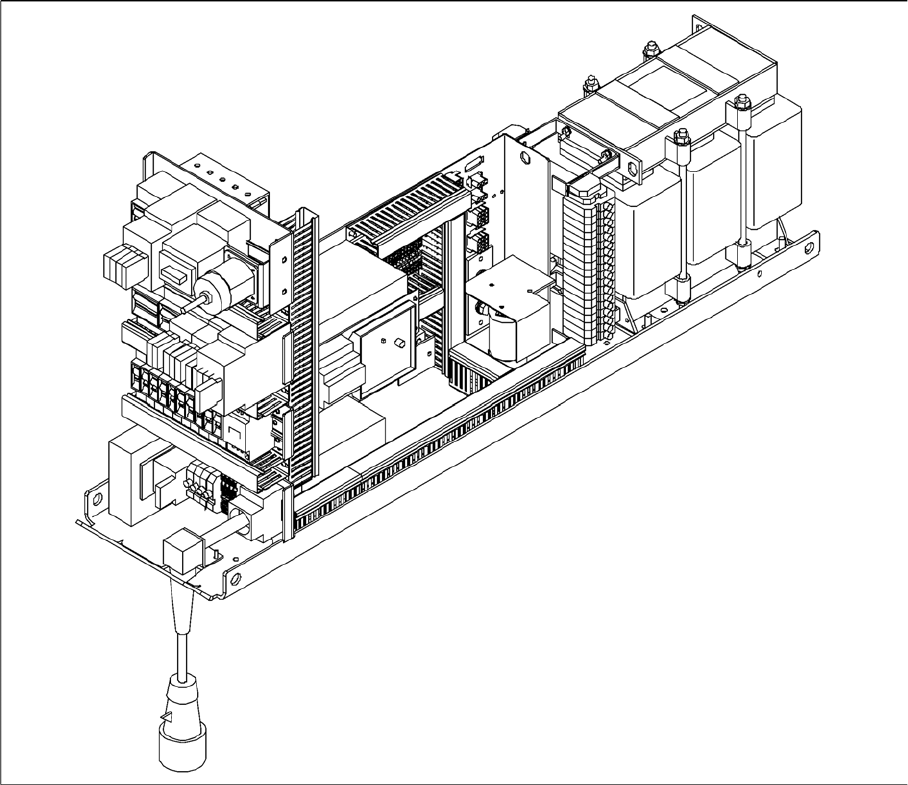
The power supply unit is located in the left of the central machine section. A lockable door prevents ac-
cess to the unit.
3.2.2.1
3.2.2.1 Supply Voltages
Supply Voltages
The power supply unit provides the following supply voltages:
▪ 200 V for the servo amplifier of the X and Y axes in the axis unit
▪ 100 V- / 4 V- for the servo amplifier of the star in the axis unit
▪ 30 V for the servo amplifier of the Z and DP axes in the axis unit
▪ 52 V- for the DC/DC converter in the distributor of sector 1
▪ 40 V for the changeover tables and the PCB handling system
▪ 8 V for the changeover tables
▪ 3 x 230 VAC for the lifting table motors of the single or dual conveyor (option)
▪ 230 VAC for the UPS for the station computer and monitors
Overview
3.2.2 Power Supply Unit Electrical System
Service Manual SIPLACE D4/D4i 23
3.2.2.2
3.2.2.2 Description of the power supply functions
Description of the power supply functions
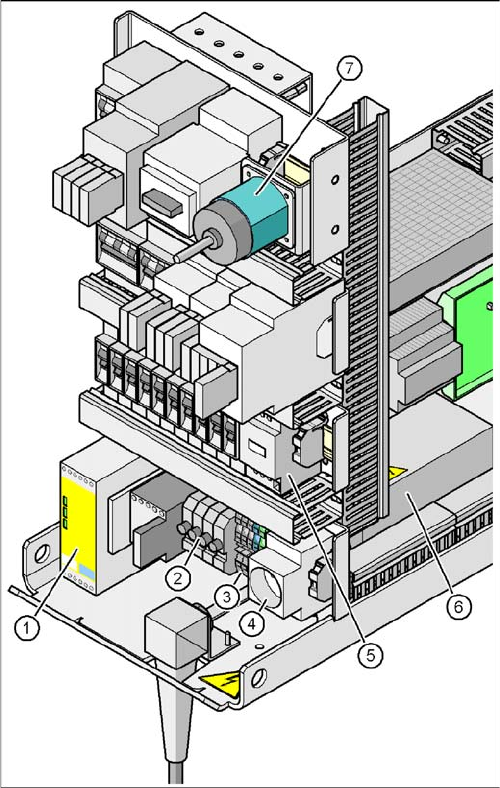
Position of Protective Contactor Combination and Service Socket
Protective contactor combination 3TK2825
The protective contactor combination is contained in the power supply unit. It is used to monitor the
EMERGENCY STOP circuits and safety equipment.
There are three conditions that must be fulfilled in order to activate the protective contactor combination:
▪ The "software enable" signal must have been sent.
▪ The EMERGENCY STOP loop must be closed.
▪ The start button must have been pressed.
The front side of the protective contactor combination has three green LEDs for displaying the opera-
tional mode:
▪ The "Power" LED indicates that voltage is present.
▪ The "Channel 1" and "Channel 2" LEDs light up if the start button has been pressed, the EMERGEN-
CY STOP loop is closed and the signaling circuit is not signaling a fault status.
Position of protective contactor combination and service
socket
Legend
1. Protective contactor combination K1
2. Fuses FU, FV, FW, FBU
3. Infeed terminal X1
4. BU1 service socket
5. Z2 reactor
6. Main power filter Z1
7. S1 main power switch