SIPLACE D4-D4i 工程师手册_EN.pdf - 第86页
Service Work Component Handling 4.3.2 Cutter 86 Service Manual SIPLACE D4/D4i CAUTION! Tighten the sc rews to the correct torque. ► If t here were di sks or plates in serted bet ween the contact surface of the cutter on …
Service Work
4.3.2 Cutter Component Handling
Service Manual SIPLACE D4/D4i 85
Installing the Cutter
► Make sure that the following warning signs are on the cover plate over the moveable blade (see op-
erating manual) and, if they are not, attach them:
⇨ Adhesive Label with text " Disconnect machine from line voltage and....",
⇨ Adhesive Label: Triangle warning symbol "Hand injury".
WARNING! The area under the cutter must be
clear.
(e.g., do not place your feet under it either).
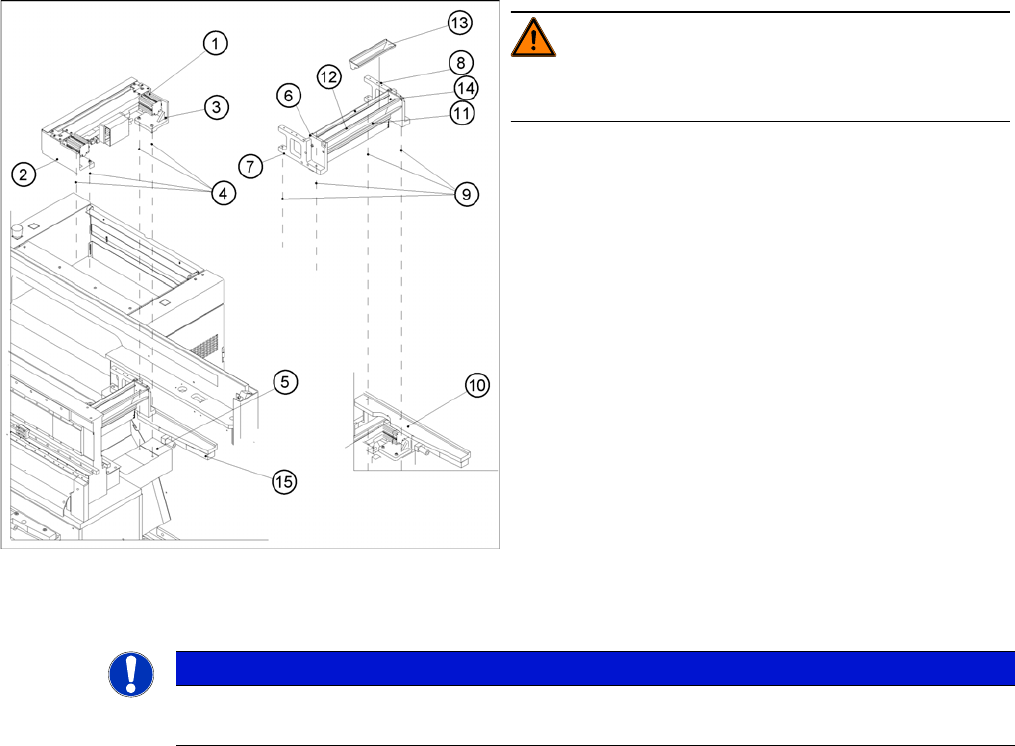
► Loosen the screws fastening the cutter to the ma-
chine base
2 M6x25 screws each (4), on the left (2) and right cut-
ter holders (3).
⇨ In exceptional cases, disks or plates may have
been installed between the contact surface of the
cutter on the machine base and the cutter itself.
-> Save these disks / plates and re-install them lat-
er.
► Securely hold the cutter tight at both ends.
► Pull the cutter out away from the contact surfaces (on
the machine base) towards the outside of the ma-
chine (towards your body).
► Set the cutter down such that it does not pose a risk
of injury to uninvolved personnel either. Put it in its
own crate / container immediately.
NOTICE
► If you are installing a new cutter, remove any excess oil or lubrication grease, before instal-
lation.
Service Work
Component Handling 4.3.2 Cutter
86 Service Manual SIPLACE D4/D4i
CAUTION! Tighten the screws to the correct
torque.
► If there were disks or plates inserted between the
contact surface of the cutter on the machine base and
the cutter itself, re-install them now.
⇨ The cutter must be shimmed to the same height at
all 4 contact points.
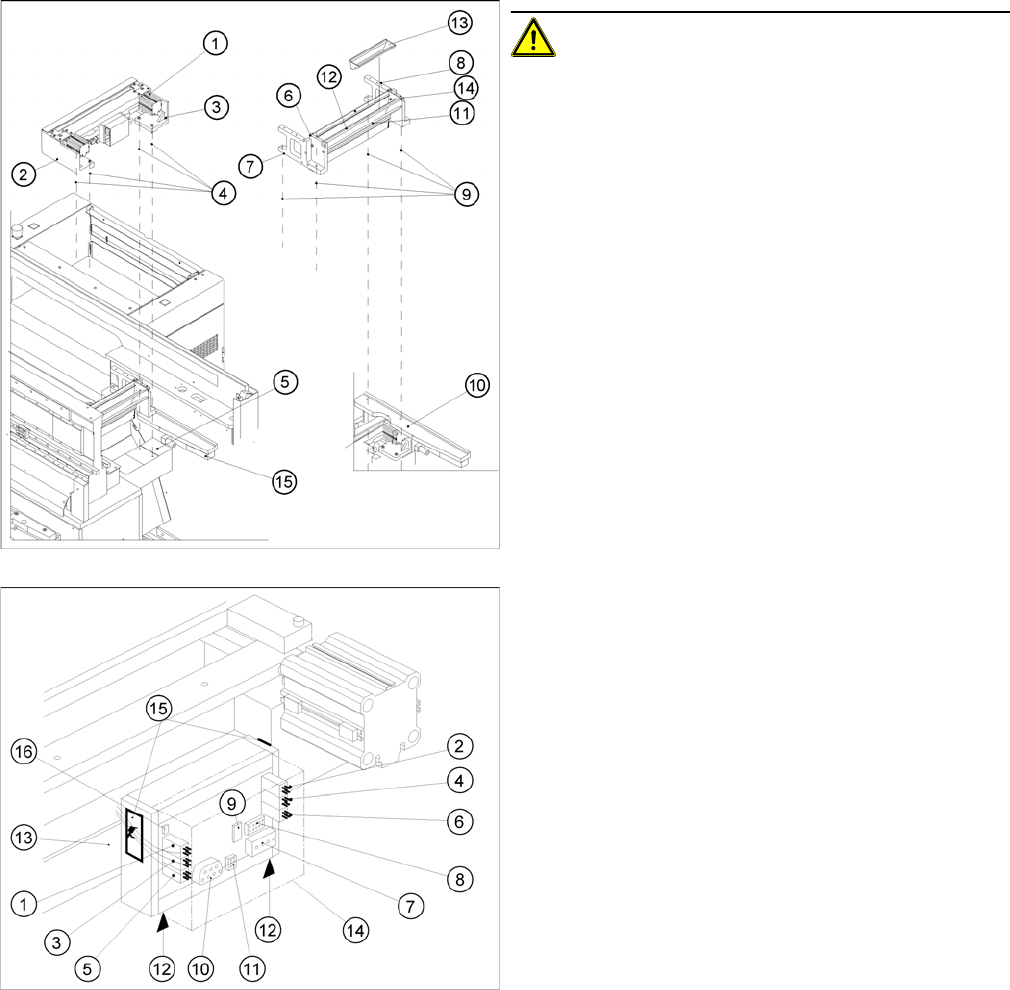
► In the reverse order to disassembly, place the new
pneumatic cutter on the contact surfaces of the ma-
chine base and push it in to the fixture position.
► To avoid dropping the cutter, insert all 4 M6 screws
(4) into the holes now:
► Pull the cutter as far as possible away from the PCB
conveyor for the time being.
► Snug up the screws somewhat for the time being.
► Remove the cover (14) from the control board of the
new cutter.
► Plug the press-fit connection of the power supply and
the drive into the control board (11, 10).
► Use a cable tie to fasten the cables running to the ca-
ble duct to the fixing pedestal on the control board
box.
⇨ Make sure that there is no strain on the cable/
press-fit connections
Service Work
4.3.2 Cutter Component Handling
Service Manual SIPLACE D4/D4i 87
See also
4.3.2.4.1 Tightening Torques for Cutter Screws [ ➙ 83]
6.4.3 Check the gap between the empty-tape baffle, inside and the leading edge of the tape deflec-
tor. [ ➙ 223]
4.3.2.4 Overview of Cutter [ ➙ 82]
3.4.2.2 Overview: Mechanical Construction [ ➙ 38]
4.3.2.6
4.3.2.6 Turning the Stationary and Moveable Blade by 180 °
Turning the Stationary and Moveable Blade by 180 °
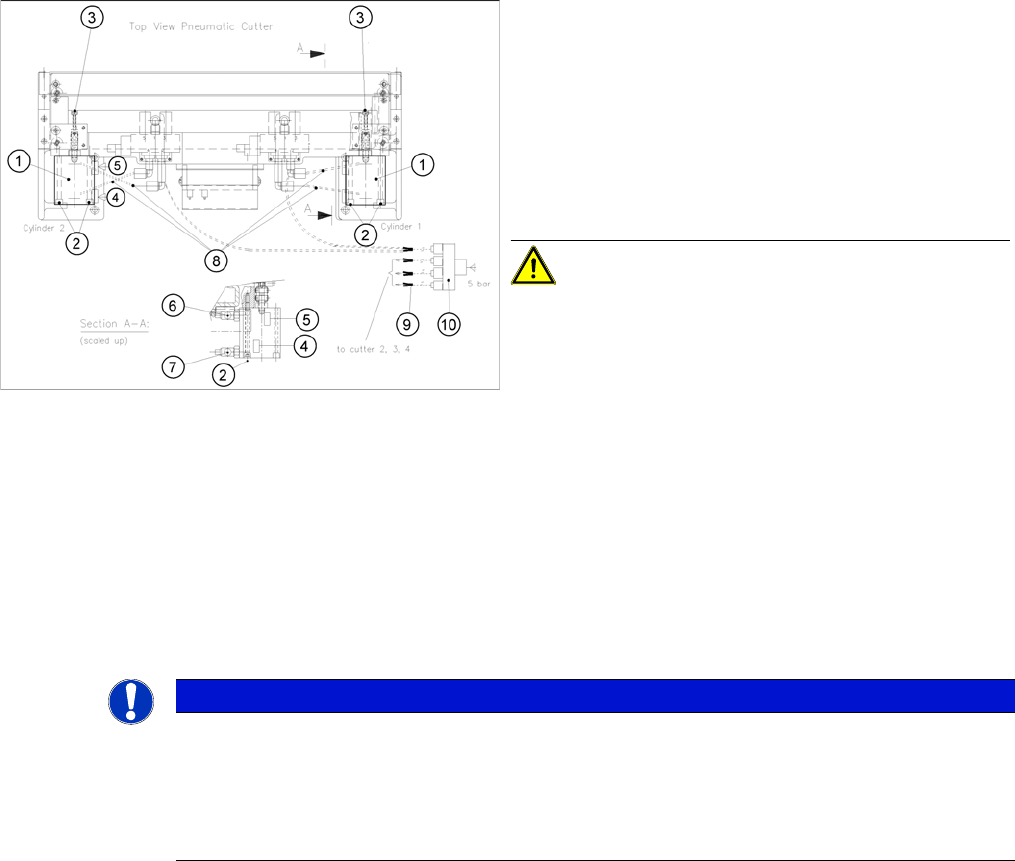
► Plug the compressed air connection to the machine
into the Y socket union (9) (in the cable duct).
► Place the cover back on the control board and the ca-
ble duct.
► Fit the empty-tape duct assembly and check the gap
between the empty-tape baffle, inside and the leading
edge of the tape deflector.
► In this position tighten all 4 screws crosswise.
CAUTION! Tighten the screws to the correct
torque.
► Perform the appropriate “Final Steps”.
NOTICE
The movable blade has a cutting edge on both sides.
If one cutting edge becomes worn, the blade can still be used by turning it 180° on its vertical
axis and reinstalling it.
At the same time, the stationary blade must also be turned 180° on its vertical axis and installed.
If both edges are already blunt, replace the blades.