SIPLACE D4-D4i 工程师手册_EN.pdf - 第126页
Service Work PCB conveyor system 4.4.9 Replaci ng the Complete Lifting Tab le C ylinder [00358703] 126 Service Manual SIPLACE D4/D4i Removal Installation ► Loosen the screw fastenin g the lifting table plate and remove t…
Service Work
4.4.9 Replacing the Complete Lifting Table Cylinder [00358703] PCB conveyor system
Service Manual SIPLACE D4/D4i 125
Removal/Installation
4.4.9
4.4.9 Replacing the Complete Lifting Table Cylinder [00358703]
Replacing the Complete Lifting Table Cylinder [00358703]
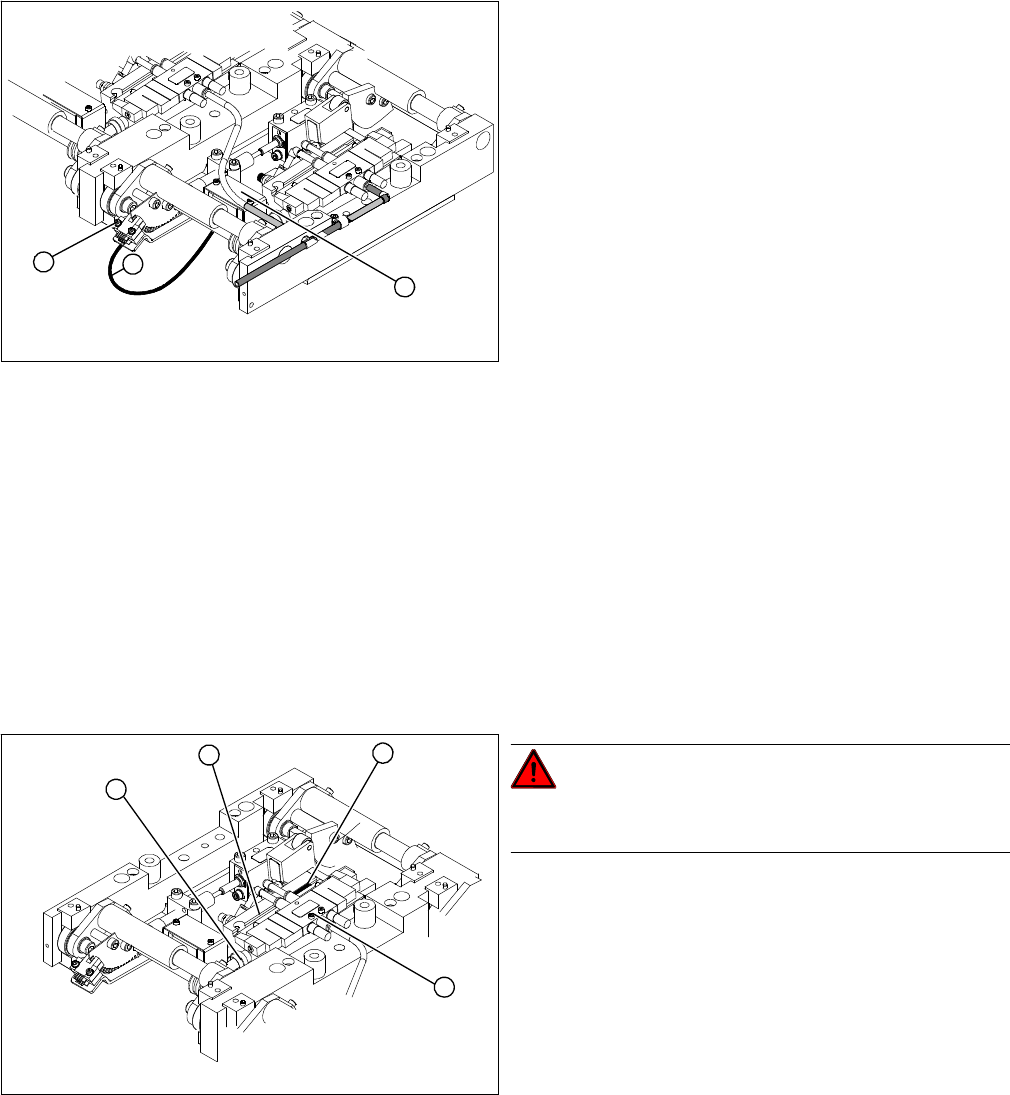
Overview
Legend
1. Connection cable for the conversion board of the lift-
ing table
2. 2 x fork light barrier (position measuring system,
tracks A + B)
3. Conversion board of the lifting table (under the cover)
► Move the PCB conveyor to the position which gives
you best access to the lifting table.
► Move the Y gantries into the area outside the PCB
conveyor.
► Switch off the machine and secure it to prevent unau-
thorized reactivation.
► Loosen the screw fastening the lifting table plate and
remove the lifting table plate from the lifting table unit.
► Loosen the two screws (2) fastening the fork light bar-
rier.
► Remove the cover from the conversion board of the
lifting table (3).
► Unplug the lifting table conversion board.
► Fit the new fork light barrier and reconnect to the
electrical system.
1
3
2
DANGER! Press the EMERGENCY STOP!
Before performing adjustment work you must ensure that
the lifting table has been secured against movement.
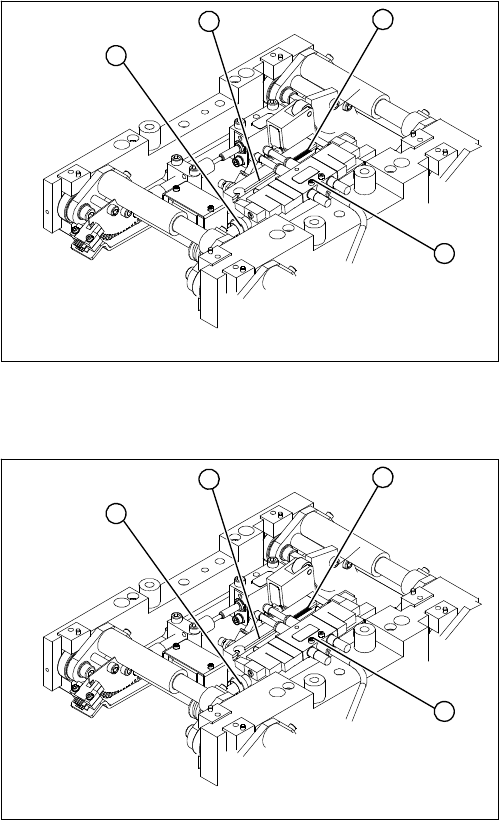
Legend
1. End position proximity switch
2. Lifting table cylinder
3. Piston rod with locknut
4. Solenoid valve
► Move the PCB conveyor to the position which gives
you best access to the lifting table.
► Move the Y gantries into the area outside the PCB
conveyor.
► Switch off the machine and secure it to prevent unau-
thorized reactivation.
► Switch off the compressed air supply.
4
1
3
2
Service Work
PCB conveyor system 4.4.9 Replacing the Complete Lifting Table Cylinder [00358703]
126 Service Manual SIPLACE D4/D4i
Removal
Installation
► Loosen the screw fastening the lifting table plate and
remove the lifting table plate from the lifting table unit.
► Loosen the fastening screws for the solenoid valve
(4) and remove it from the lifting table cylinder.
► Loosen the grub screw at the end position proximity
switch (1) and push the end position proximity switch
out of the lifting table cylinder guide rail (2).
► Loosen the locknut on the piston rod (3) and twist the
piston rod out until it releases itself from the actuator.
► Loosen and remove the two screws fastening the lift-
ing table cylinder (2).
4
1
3
2
► Insert and fasten the new lifting table cylinder (2) and
install the piston rod (3).
► Move the lifting table by hand to its end position.
► Switch the machine on.
► Push the end position proximity switch (1) into the
guide rail until the LED lights up.
► Fix this position with the grub screw.
► Install the solenoid valve (4) and the lifting table plate.
► Check the speed of the lifting table and correct where
necessary.
4
1
3
2
Service Work
4.4.10 Replacing the Lifting Table Stabilizer (Stabilizer Unit) [00358684-xx] PCB conveyor system
Service Manual SIPLACE D4/D4i 127
4.4.10
4.4.10 Replacing the Lifting Table Stabilizer (Stabilizer Unit) [00358684-xx]
Replacing the Lifting Table Stabilizer (Stabilizer Unit) [00358684-xx]
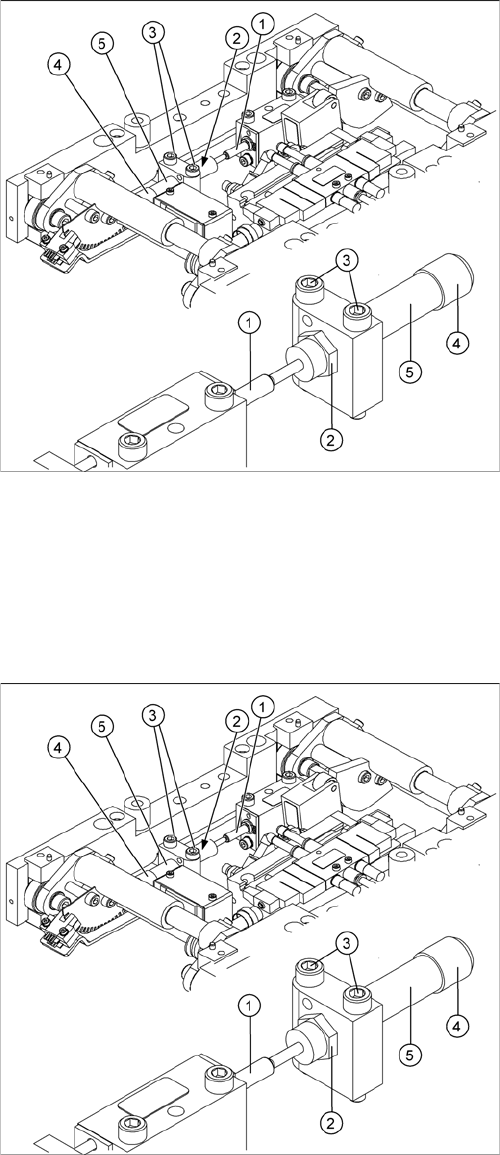
Overview
Tools and equipment required
▪ Torque wrench with plug-in ratchet [00386175-xx]
▪ Plug-in wrench 16 mm [00386177-xx]
Removal
1. Actuator
2. Locknut
3. Fastening screws
4. Handle
5. Stabilizer [00358684-xx]
The stabilizer enables the lifting table to be moved gently
upwards. It prevents the PCBs from being clamped in
with too much impact.
The stabilizer consists of the shock absorber [00367737-
xx] and the damping block [00367782-xx].
► Move the PCB conveyor to the position which gives
you best access to the lifting table.
► Move the Y gantries into the area outside the PCB
conveyor.
► Switch off the machine and secure it to prevent unau-
thorized reactivation.
► Loosen the screws fastening the lifting table plate and
remove the lifting table plate from the lifting table unit.
► Loosen the two screws (3) holding the stabilizer (5).
► Undo the locknut (2) and take the stabilizer by its han-
dle (4), twisting it out of the mounting block.