SIPLACE D4-D4i 工程师手册_EN.pdf - 第164页
Service Work C&P12 Placement Head 4.5.11 Replacing the Z Axis Drive 164 Service Manual SIPLACE D4/D4i 4.5.11 4 . 5 . 1 1 R e p la c in g t h e Z A x is D r iv e Replacing the Z Axis Drive Parts, equipment and tools ▪…
Service Work
4.5.10 Replacing the Light Barrier "Z Axis Up" [03053294-xx] C&P12 Placement Head
Service Manual SIPLACE D4/D4i 163
4.5.10
4.5.10 Replacing the Light Barrier "Z Axis Up" [03053294-xx]
Replacing the Light Barrier "Z Axis Up" [03053294-xx]
Removal
Installation
Legend
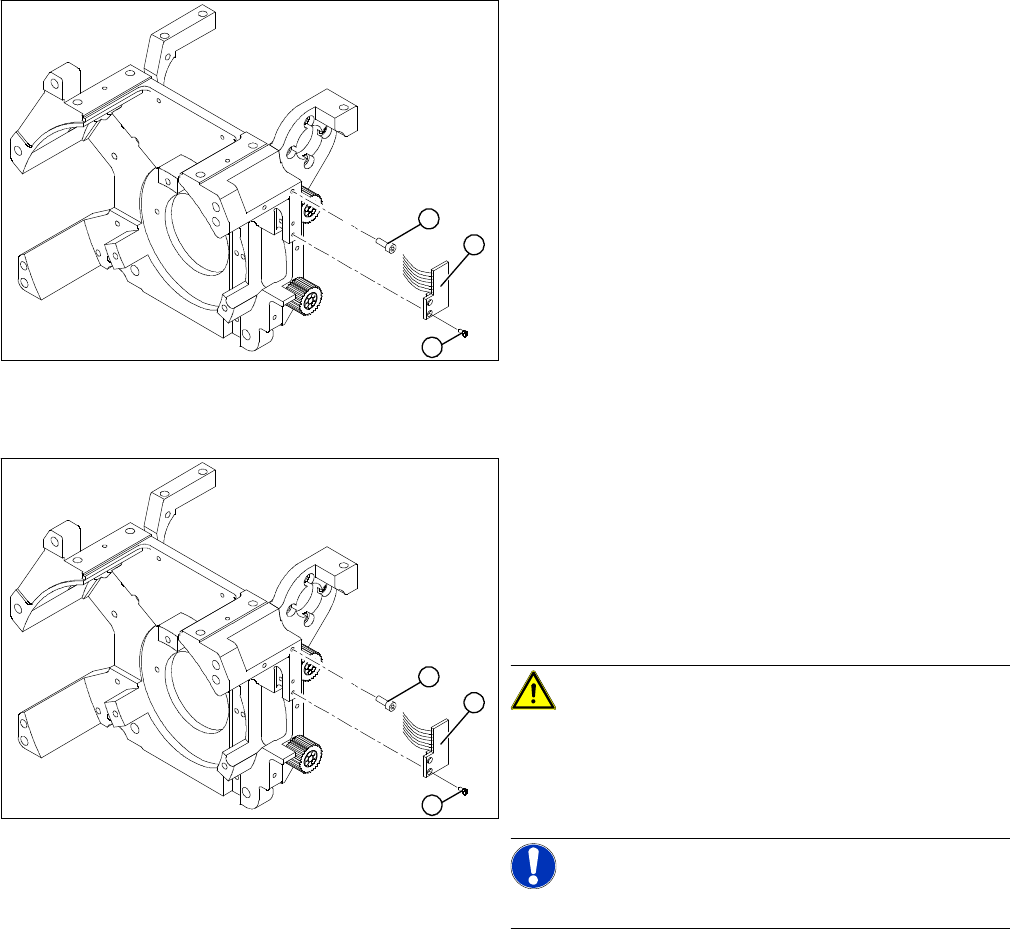
1. 2 x M2.0x4 hexagon socket-head screws
2. 2 Phillips screws
3. Light barrier board "Z axis up"
► Switch off the machine and secure it to prevent unau-
thorized reactivation.
► Remove the plug from the slot on the intermediate
distributor.
► Undo the two M2.0x4 hexagon socket-head screws
(1) and remove the ribbon cable clamp.
► Loosen the two M1.6x3 Phillips screws (2).
► Remove the light barrier "Z axis up"(3) with its cable.
1
3
2
► Use the two M1.6x3 Phillips screws (2) to fix the "Z
axis up" light barrier board (3). Move the board as far
upwards as the screws will tolerate.
► Connect the ribbon cable plug to the slot on the inter-
mediate distributor.
► Use the flat ribbon cable clamp and the two hexagon
socket-head screws (1) to fix the flat ribbon cables.
CAUTION! Check how the cables are run!
Make sure that the flat ribbon cable is not pinched in the
guide channel.Make sure that you push the folded part of
the flat ribbon cable for the "Z axis up" light barrier back
under the illumination board.
NOTICE! Shortened cable
A new version is available with a shortened flat ribbon.
1
3
2
Service Work
C&P12 Placement Head 4.5.11 Replacing the Z Axis Drive
164 Service Manual SIPLACE D4/D4i
4.5.11
4.5.11 Replacing the Z Axis Drive
Replacing the Z Axis Drive
Parts, equipment and tools
▪ Z motor with interference suppression board DLM1, DLM2, DLM3 [03038908-xx]
▪ Z motor with interference suppression board DLM4 [03083864-xx]
Removal
Installation
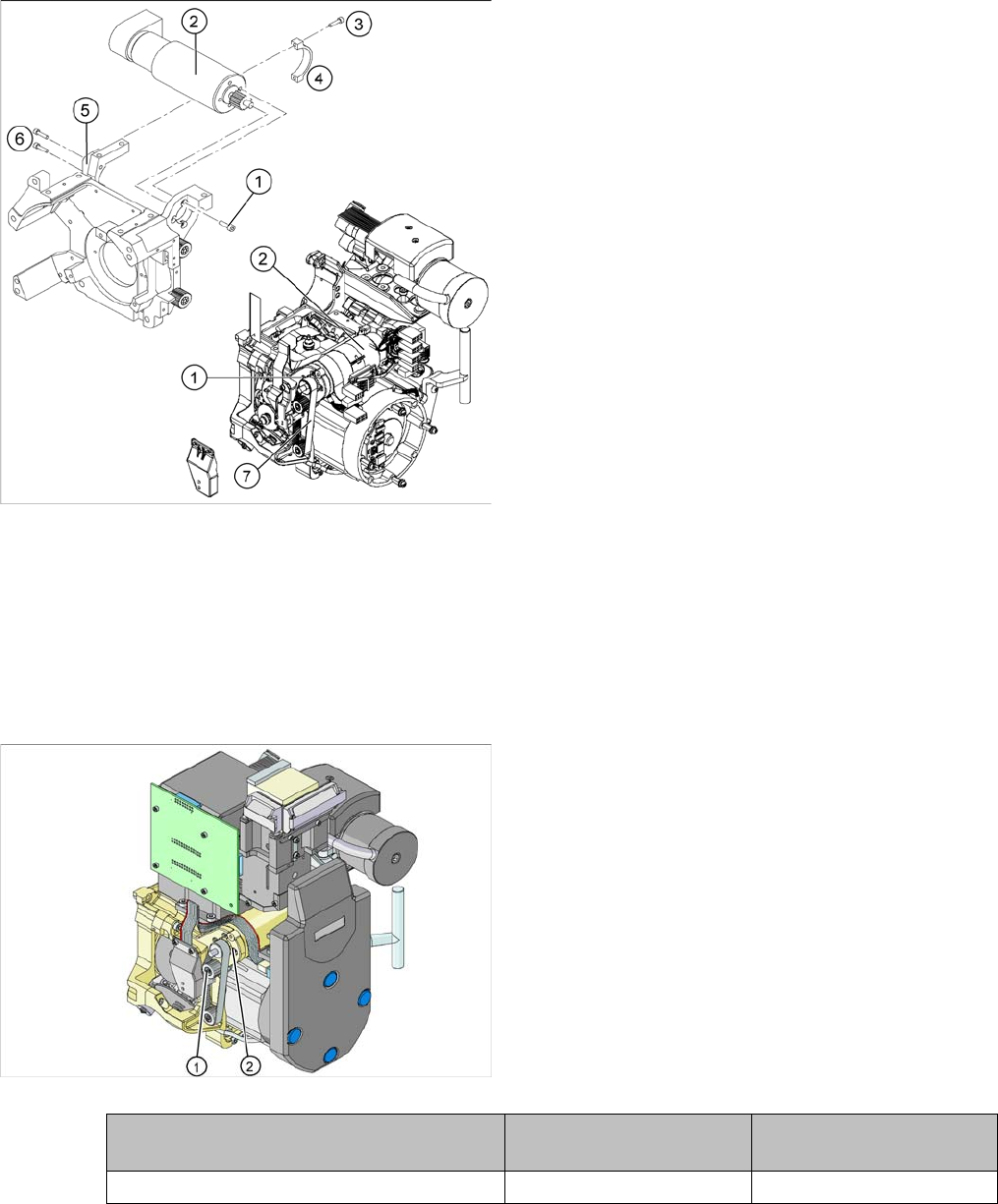
1. 4 x M3x5 hexagon socket-head screws with locking
varnish
2. Z axis drive
3. 2 x M2.5x12 hexagon socket-head screws
4. Motor clamp upper part /DLM3
5. Motor clamp/DLM3 (do not confuse this with the as-
sembly clamp for the Z motor tacho interference sup-
pression board)
6. 2 x M3x14 hexagon socket-head screws
7. Toothed belt
► Switch off the machine and secure it to prevent unau-
thorized reactivation.
► Remove the plugs (motor tacho and incremental en-
coder) from the sockets on the intermediate distribu-
tor.
► Loosen the four M3x5 hexagon socket-head screws
which have been fixed with locking varnish (1).
► First loosen the upper M2.5x12 hexagon socket-head
screw (3) of the motor clamp fitting 2 (4), then the low-
er one.
► Loosen the two M3x14 hexagon socket-head screws
(6) on the motor clamp fitting (5).
► Carefully remove the Z axis drive (2) together with the
cables.
► Insert the Z axis drive (2).
► Make sure that the teeth of the toothed belt (7) en-
gage in the teeth of the motor pinion (1).
► Use the four M3x5 hexagon socket-head screws to fit
the Z axis drive.
► Tension the Z axis toothed belt by moving the Z axis
drive unit upwards and fix the motor with at least one
screw.
► Check the toothed belt tension with the belt tension
measuring device.
Frequency in Hz Before continuous opera-
tion run
After continuous operation
run
Toothed belt T2 / DLM3 on the Z axis 280 +/- 10 280 +/- 10
Service Work
4.5.12 Replacing the Z Axis Toothed Belt [00334936-xx] C&P12 Placement Head
Service Manual SIPLACE D4/D4i 165
See also
6.3.6 Setting the Z axis Belt Tension [ ➙ 211]
4.5.12
4.5.12 Replacing the Z Axis Toothed Belt [00334936-xx]
Replacing the Z Axis Toothed Belt [00334936-xx]
Removal
► Tighten the two M3x14 hexagon socket-head screws
(6) to fix the motor clamp (5).
► Fix the motor clamp upper part (4) with the two
M2.5x12 hexagon socket-head screws (3).
► Now tighten the hexagon socket-head screws on the
Z axis drive unit and the motor clamp.
► Check the Z axis top stop with the setting gauge.
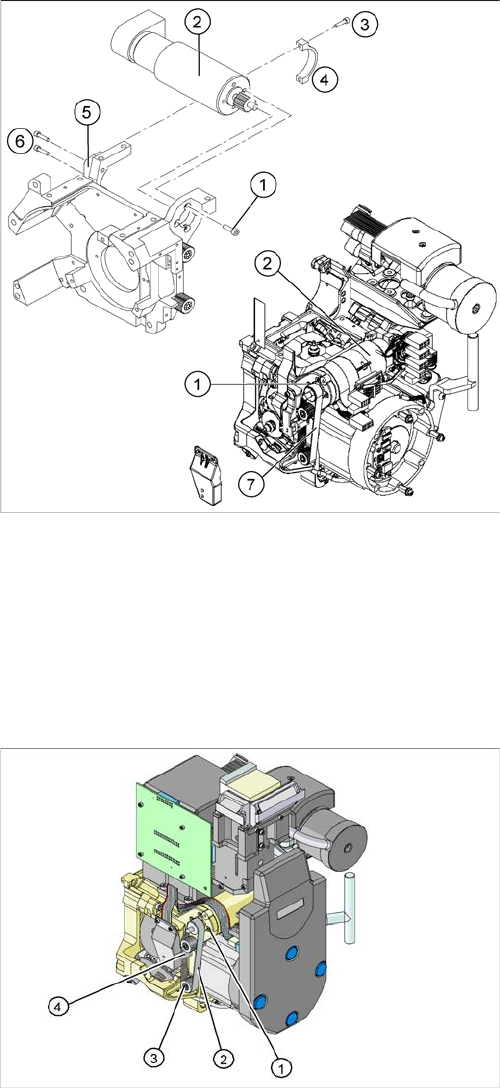
1. Z axis drive
2. Z axis toothed belt
3. 2 x deflection wheel / DLM3
4. Tension jack (Z axis clamping device)
► Switch off the machine and secure it to prevent unau-
thorized reactivation.
► Loosen the two screws fastening the tension jack (3).