SIPLACE D4-D4i 工程师手册_EN.pdf - 第184页
Service Work C&P12 Placement Head 4.5.22 Press Fit Connections wit h Fixture C lips on the Vision Board (D Series) 184 Service Manual SIPLACE D4/D4i 4.5.21.3 4 . 5 . 2 1 . 3 C o m p o n e n t S e n s o r C a b le R o…
Service Work
4.5.21 Checking the Cable Routing C&P12 Placement Head
Service Manual SIPLACE D4/D4i 183
4.5.21.2
4.5.21.2 X Gantry Cable Routing
X Gantry Cable Routing
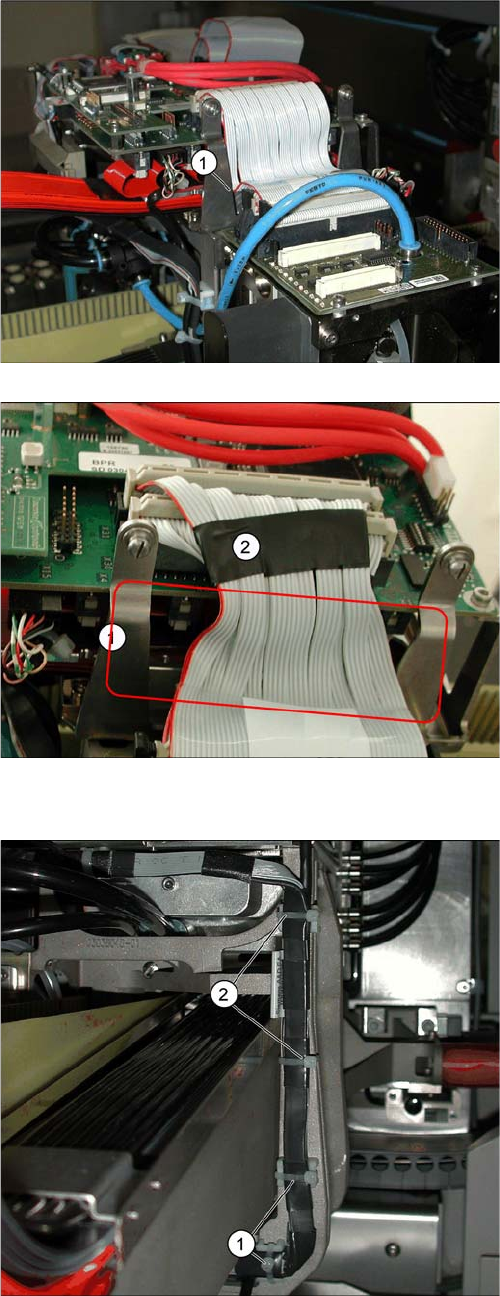
Avoid damage from old supporting plates
▪ Old supporting plates have a gap which is too narrow
for the flat ribbon cable. This could lead to the flat rib-
bon cable insulation being damaged.
▪ If the flat ribbon cable rubs against the supporting
plate, see item (1), either replace the supporting plate
or reduce the width of the flat ribbon cable according-
ly in the vicinity of the gap (2).
Reducing the width of the flat ribbon cable
▪ The width of the flat ribbon cable can be reduced
around the gap (1) by using a wide heat-shrinkable
sleeve or insulating tape (2).
▪ If the flat ribbon cable is damaged, replace it.
Use the "Cable /S-D placement head" [03047845-xx]
for this.
Avoid damage from the Y gantry.
Make sure that the X gantry cables do not touch the Y
gantry.
4 cables ties (1), (2) protect the cables from damage
caused by the Y gantry.
Always use small cable ties, which do not rub against the
gantry.
Service Work
C&P12 Placement Head 4.5.22 Press Fit Connections with Fixture Clips on the Vision Board (D Series)
184 Service Manual SIPLACE D4/D4i
4.5.21.3
4.5.21.3 Component Sensor Cable Routing
Component Sensor Cable Routing
4.5.21.4
4.5.21.4 Running the Valve Positioning Drive Cables
Running the Valve Positioning Drive Cables
4.5.22
4.5.22 Press Fit Connections with Fixture Clips on the Vision Board (D Series)
Press Fit Connections with Fixture Clips on the Vision Board (D Series)
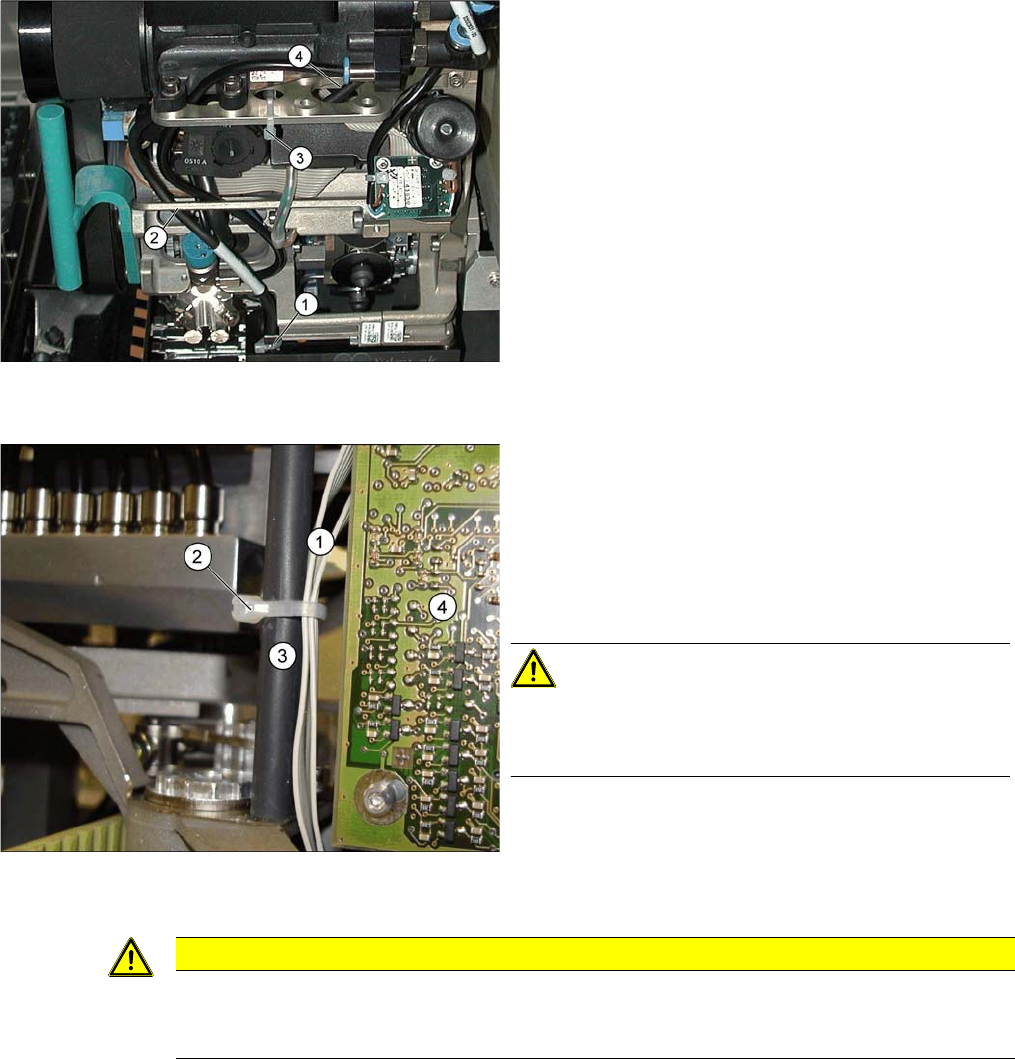
Avoid loose cables.
The connection cables for the component sensor must be
fixed with a cable tie near to the press-fit connection, as
shown at (1).
The cable is run through the frame openings (2) and (4).
The cable is held by a cable tie at (3).
Avoid loose cables.
The diagram shows the board support to the side of the
placement head and the illumination board (4) on the
component camera.
The connection cables for the valve positioning drives (1)
of the reject and placement circuits need to be fixed at the
bolt of the board holder (3) with a cable tie (2).
CAUTION! Wrap insulating tape around bare
bolts
If the bolts are not already covered with a plastic hose, as
shown here, wrap insulating tape around the fixture point.
CAUTION
Do not damage the fixture clips!
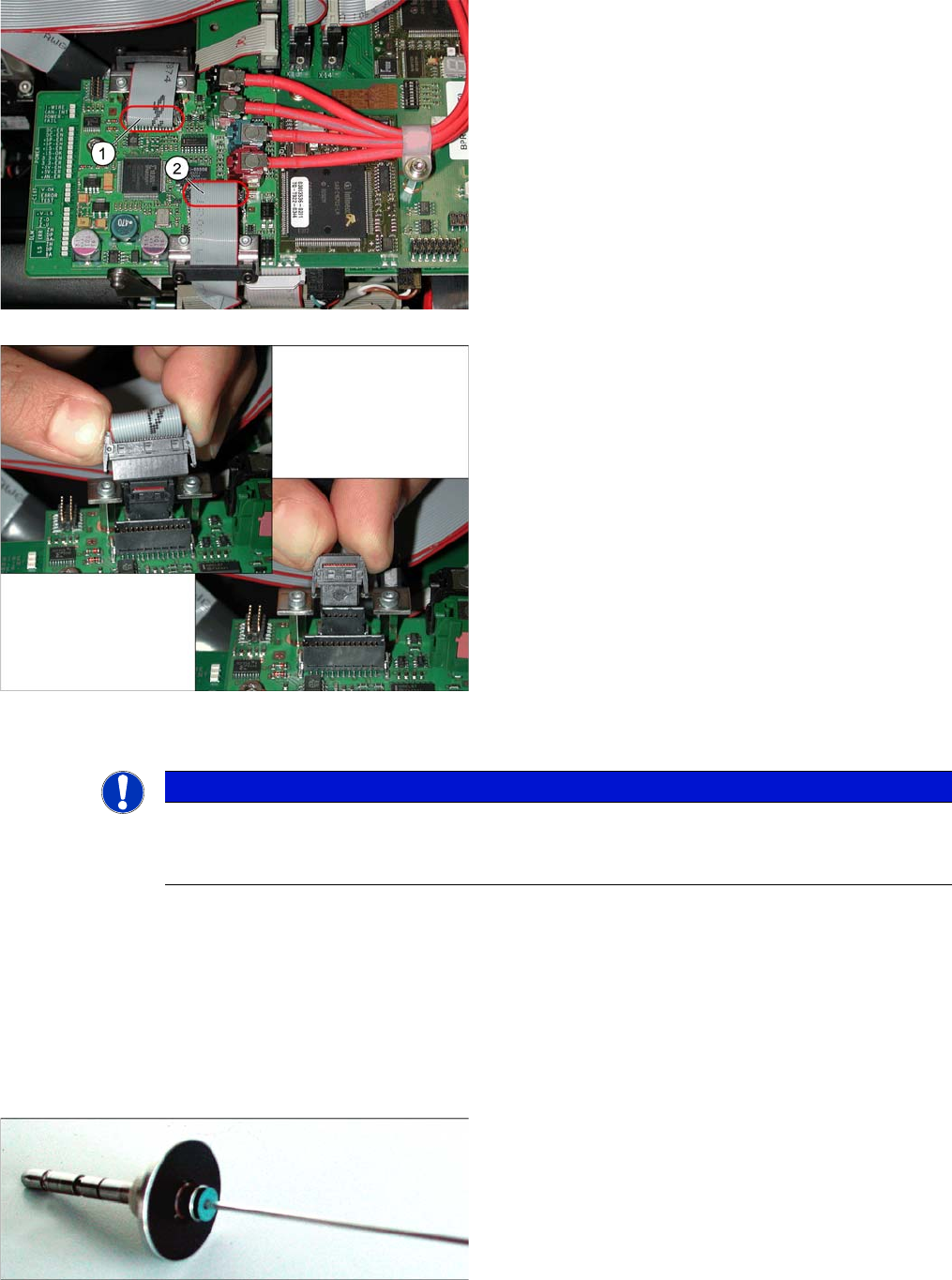
To disconnect the component and PCB camera connections, you need to open the fixture clips
by applying pressure to the side of the connector.
Service Work
4.5.23 Replacing the Raceway (Circular Arc Guide) C&P12 Placement Head
Service Manual SIPLACE D4/D4i 185
4.5.23
4.5.23 Replacing the Raceway (Circular Arc Guide)
Replacing the Raceway (Circular Arc Guide)
4.5.24
4.5.24 Replacing the Membrane (Vacuum Plate) on the Sleeve [03037984-xx]
Replacing the Membrane (Vacuum Plate) on the Sleeve [03037984-xx]
The sealing membrane on the sleeves ensures sufficient vacuum by sealing the tip of the nozzle (serves
as the air inlet) in the sleeve.
Tools and equipment
▪ Standard tool
▪ Spare part: membrane (vacuum plate) [03037984-xx]
The adjacent diagram shows the press-fit connections for
the component camera (1) and the PCB camera (2) on
the Vision board of the SIPLACE D1/D2. Each of the two
positions has two connectors of different sizes with fixture
clips.
➢ To release the press-fit connections, press the con-
nector sides together at the top, with your thumb and
index finger.
► The fixture clips will open and the connector can be
pulled up and off.
⇨ The adjacent diagram shows the two press-fit con-
nections arranged one above the other, for the
Vision
signals
(small connector) and
illumination control
(large connector) after disconnection of the connec-
tors.
NOTICE
SIPLACE Service
This service task may only be performed by specially trained SIPLACE service technicians. The
procedure is described in a separate manual.
Blue membrane for the sleeve with ball fixing C&P6/12
(old version [00354244-xx])