SIPLACE D4-D4i 工程师手册_EN.pdf - 第121页
Service Work 4.4.5 Replacing the Conveyor Toothed Belt [00359917-xx] PCB conveyor system Service Manual SIPLACE D4/D4i 121 Installation ► Tighten the fastening screws. ► Adjust the belt tension. 4.4.5.1 4 . 4 . 5 . 1 A d…
Service Work
PCB conveyor system 4.4.5 Replacing the Conveyor Toothed Belt [00359917-xx]
120 Service Manual SIPLACE D4/D4i
Removal
► Move the PCB conveyor to the position which gives you best access to the conveyor belt
► Move the Y gantries into the area outside the PCB conveyor.
► Switch off the machine and secure it to prevent unauthorized reactivation.
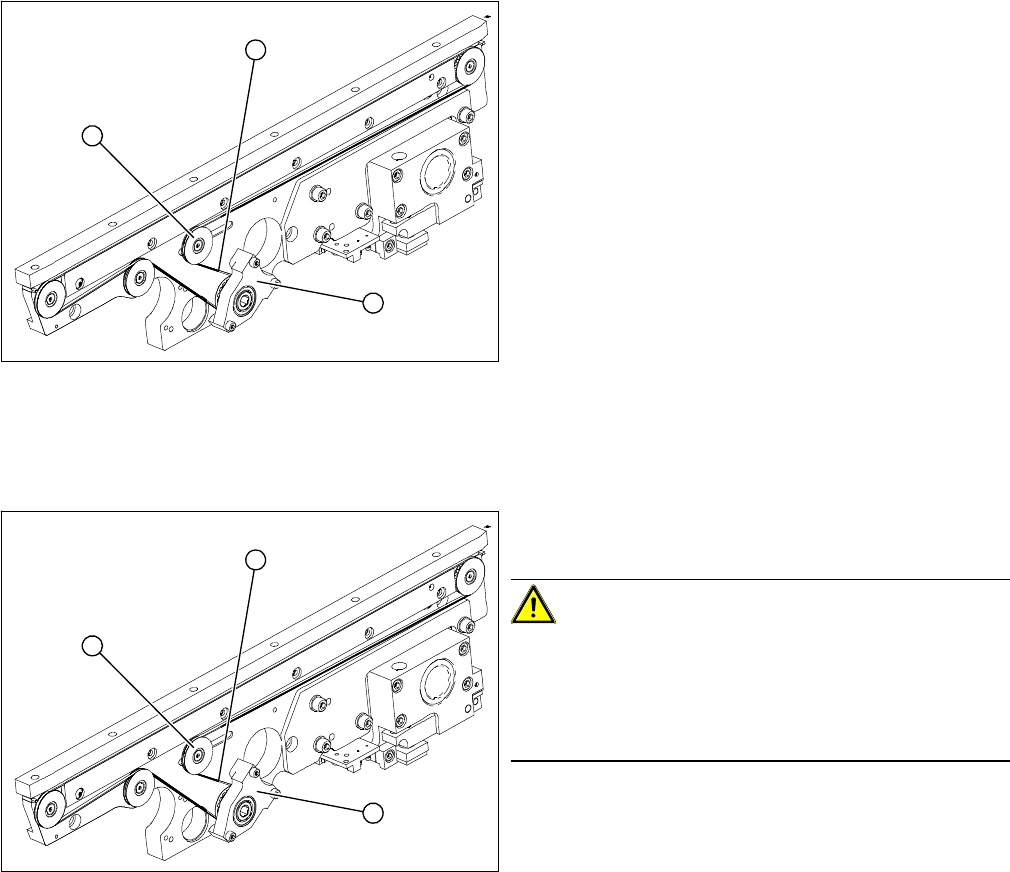
Legend
1. Tape drive (mount)
2. Deflection pulley with slot
3. Conveyor toothed belt
The way in which the conveyor toothed belt is run around
the deflection pulley depends upon the transport area
concerned. Please observe this belt guidance during as-
sembly and disassembly. Please also bear in mind the
following differences during assembly and disassembly:
▪ The drive unit is installed at an angle (tilted), accord-
ing to the requirements of the installation site.
▪ Respective to conveyor edge, either the tape drive
(mount) or the drive unit with DC geared motor is
mounted.
1
3
2
► Loosen the deflection pulley (2) with the slot and re-
lieve the tension on the conveyor toothed belt (3).
CAUTION! The deflection pulleys have been as-
sembled with sliding nuts.
The screw for the deflection pulley should only be loos-
ened! If the screw is removed, the sliding nut will fall be-
hind the conveyor cheek side cover. You then need to
dismantle the cover to retrieve the nut.
► If the drive unit is installed, remove it.
► If the tape drive (hexagon shaft guided block) (1) is in-
stalled, remove the 3 fastening screws.
► Carefully pull off the tape drive (hexagon shaft guided
block) (1) or drive unit, while also gently unthreading
the conveyor toothed belt (3) through the opening in
the conveyor side.
1
3
2
Service Work
4.4.5 Replacing the Conveyor Toothed Belt [00359917-xx] PCB conveyor system
Service Manual SIPLACE D4/D4i 121
Installation
► Tighten the fastening screws.
► Adjust the belt tension.
4.4.5.1
4.4.5.1 Adjusting the Tension of the Conveyor Toothed Belt
Adjusting the Tension of the Conveyor Toothed Belt
CAUTION! Do not damage the toothed belt!
The toothed belts must not be stretched or kinked!
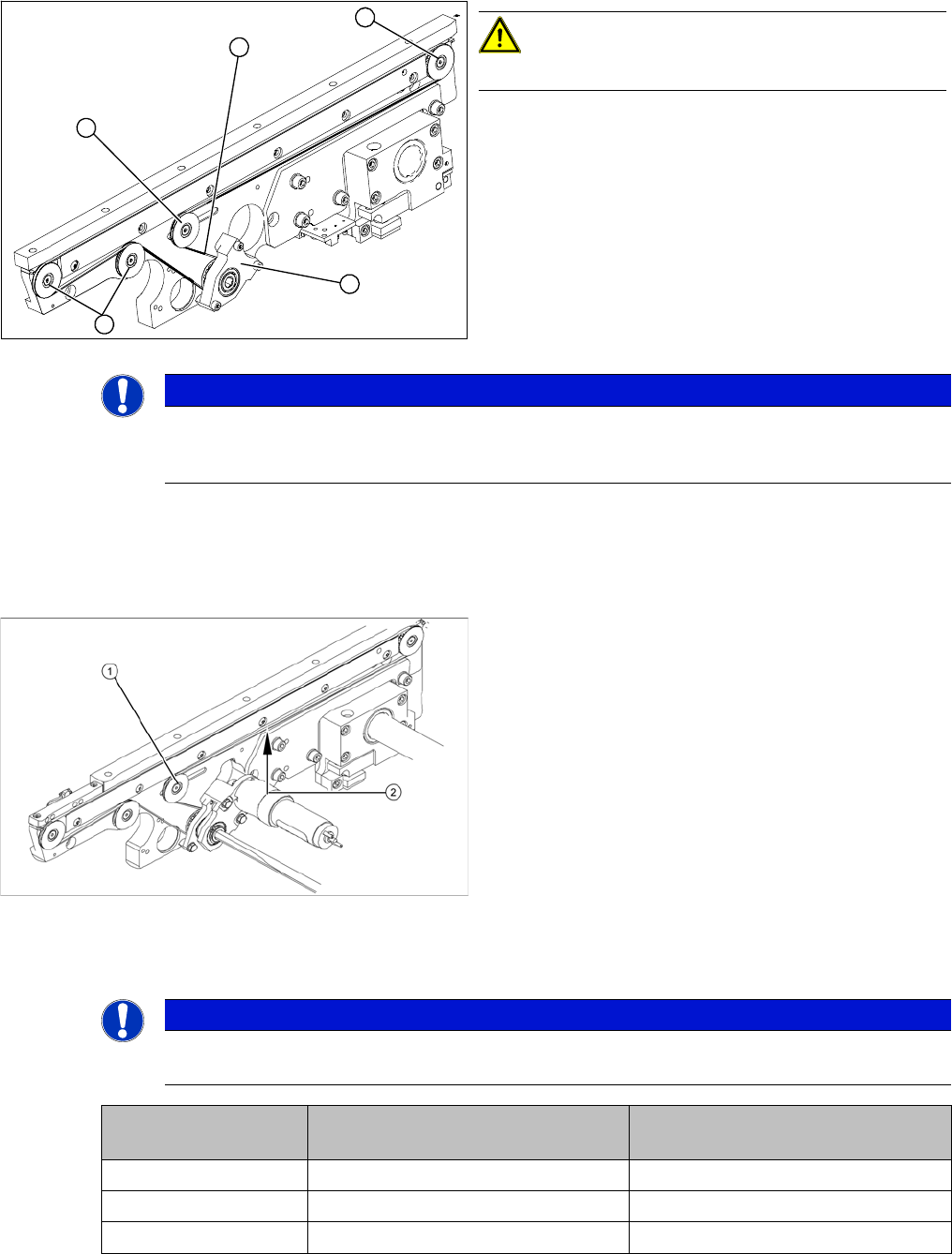
► Feed the new conveyor toothed belt (2) into the drive
unit and weave it round the deflection pulleys (3).
► Insert the tape drive (mount) or drive unit (1) with the
conveyor toothed belt (2) and fasten.
3
3
1
3
2
NOTICE
When replacing the belt on the passive side (tape drive without drive unit), set the track width
to 50 mm. The tape drive must be aligned towards the active side, allowing smooth axial move-
ment of the hexagonal shafts.
Legend
1. Deflection pulley with slot
2. Measuring point of the belt tension measuring device
(strand center )
► The deflection pulley, around which the conveyor
toothed belt is run, is fastened at a slot. The tension
of the conveyor toothed belt can be adjusted via this
deflection pulley.
► Position the measuring point of the belt tension de-
vice at the strand center (i.e. the longest distance be-
tween the two deflection pulleys) of the conveyor
toothed belt.
► Set the tension of the drive toothed belt according to
the following values.
NOTICE
The tension frequencies per area may vary according to the different belt guides. The belt ten-
sion always remains the same.
Belt tension For conveyor lane 1
(single and dual conveyor)
Conveyor lane 2
(dual conveyor)
Input conveyor 90 Hz +/- 9 Hz 90 Hz +/- 9 Hz
Placement area 1 72 Hz +/- 7 Hz 72 Hz +/- 7 Hz
Intermediate conveyor 144 Hz +/- 14 Hz 115 Hz +/- 12 Hz
Service Work
PCB conveyor system 4.4.6 Replacing the Lifting Table Unit [00358653]
122 Service Manual SIPLACE D4/D4i
4.4.6
4.4.6 Replacing the Lifting Table Unit [00358653]
Replacing the Lifting Table Unit [00358653]
Parts
▪ Lifting table unit for single conveyors [00358653-xx]
▪ Lifting table unit for dual conveyors [00358654-xx]
Removal
Placement area 2 90 Hz +/- 97 Hz 90 Hz +/- 9 Hz
Output conveyor 90 Hz +/- 9 Hz 90 Hz +/- 9 Hz
Width adjustment 24 Hz +/- 2 Hz
Belt tension For conveyor lane 1
(single and dual conveyor)
Conveyor lane 2
(dual conveyor)
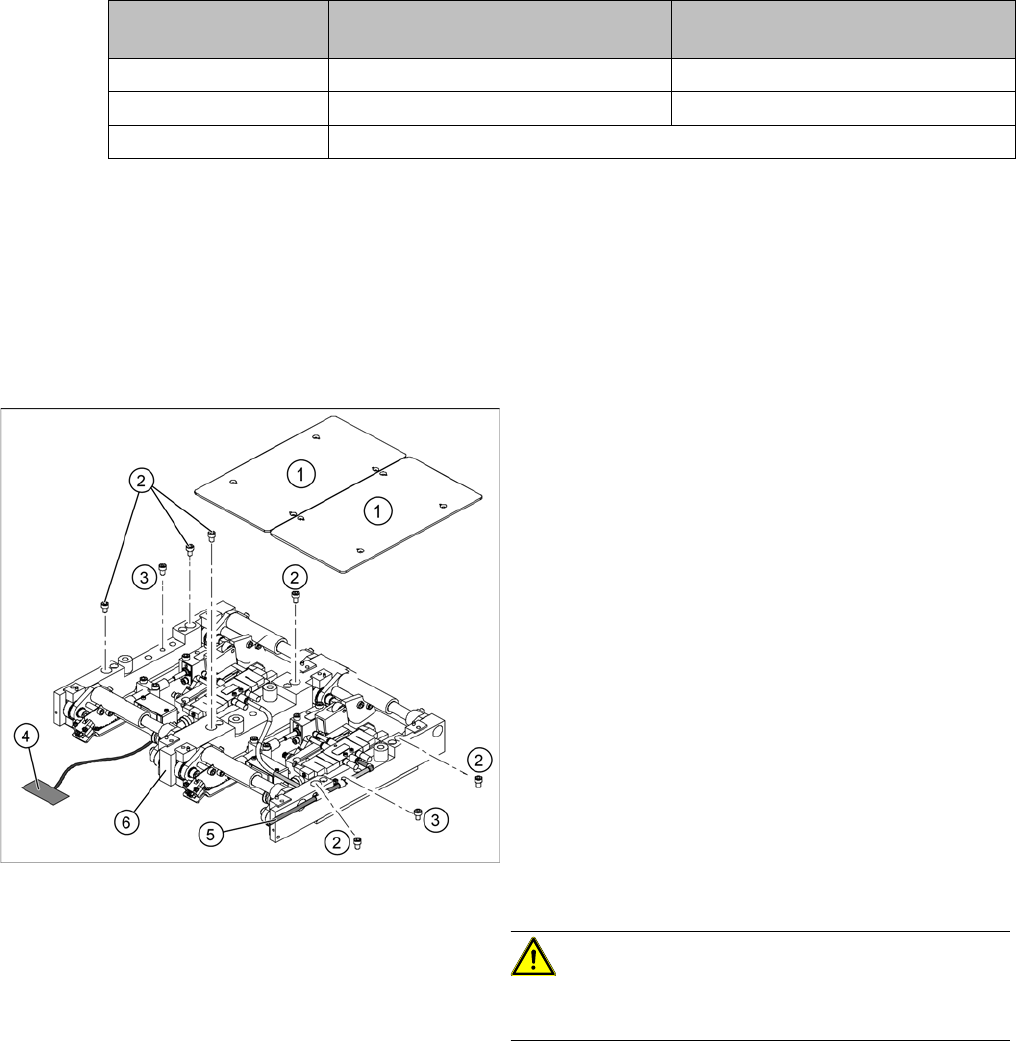
Legend
1. Fastening screws for the lifting table plate
2. 6 x fastening screws for the lifting table
(M8 x 100)
3. 2 x fastening screws for the lifting table
(M6 x 50)
► Move the PCB conveyor to a suitable position from
which you have best access to the lifting table unit.
► Loosen the screw fastening the lifting table plate (1)
and remove the lifting table plate from the lifting table
unit.
► Loosen the screws (2) and (3) fastening the lifting ta-
ble unit.
► Remove the cover on the conveyor conversion board
and unplug the connection cable (4) from the lifting
table unit.
► Unplug the compressed air connection (5).
► Carefully lift the lifting table (6) off the locating pins.
CAUTION! Heavy machine part!
When removing the lifting table, remember it is heavy
(17.5 kg).