SIPLACE D4-D4i 工程师手册_EN.pdf - 第143页
Service Work 4.5.2 Removal/Installation of Head Front Part C&P12 Placement Head Service Manual SIPLACE D4/D4i 143 4.5.2 4 . 5 . 2 R e m o v a l/ I n s t a lla t io n o f H e a d F r o n t P a r t Removal/Installation…
Service Work
C&P12 Placement Head 4.5.1 Replacing the C&P12 Head (D4)
142 Service Manual SIPLACE D4/D4i
Removal
Installation
See also
6.3.1 Calibrating the C&P Head and Cameras [ ➙ 206]
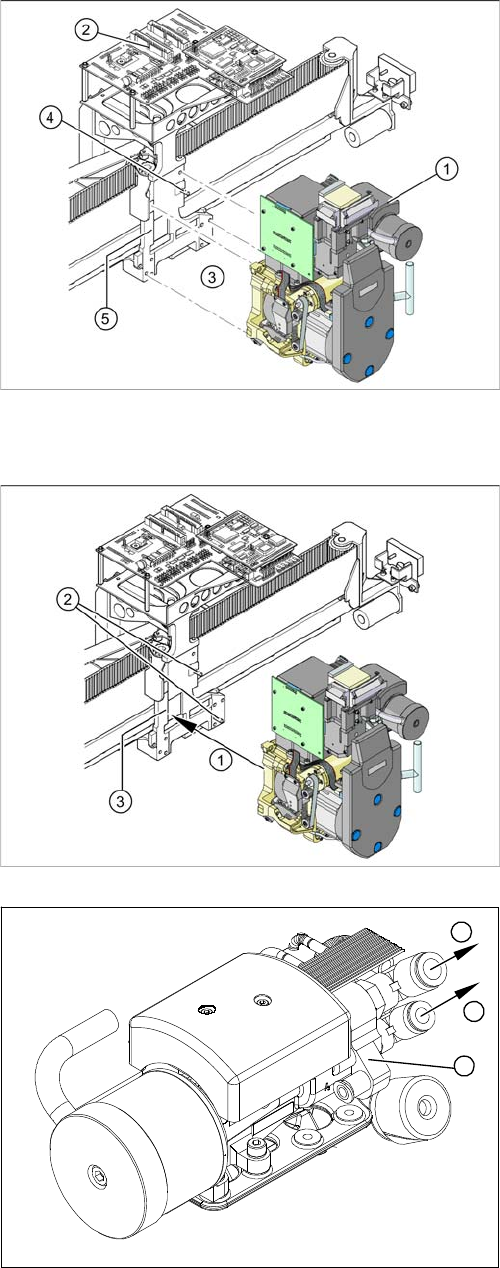
► Remove the compressed air hoses from the pneu-
matic coupling of the pneumatic distributor (1).
► Loosen the press-fit connection to the head board (2)
from the C&P head.
► Loosen the 4 screws (3) fastening the C&P head.
► Carefully pull the C&P head off the parallel pins (4) on
the head mount (5) and remove the head from the
machine.
► Carefully move the C&P head towards the head plate
(3).
► Make sure that the parallel pins (2) on the head
mount slide into the holes drilled into the back part of
the C&P head.
► Carefully push the C&P head towards the head plate
until it lies flat against it.
► Fix the C&P head with the 4 screws provided (1).
► Connect the compressed air hoses (1) to the pneu-
matic coupling on the pneumatic distributor (2).
► Reconnect to the electricity system.
► Use the SITEST program to calibrate the C&P head.
1
1
2
Service Work
4.5.2 Removal/Installation of Head Front Part C&P12 Placement Head
Service Manual SIPLACE D4/D4i 143
4.5.2
4.5.2 Removal/Installation of Head Front Part
Removal/Installation of Head Front Part
Parts, equipment and tools
▪ Set of Allen keys
▪ Torx Allen screwdriver TX8 [03080081-xx]
▪ Calibration tool version 3 [03010565-xx]
▪ Assembling instruction for "component sensor" [00193356-xx], if necessary
Removal
NOTICE
Avoid confusing the front and back sections of different heads.
The front and back parts of each specific head belong together.
► Make sure that the front and back part of the head always have the same serial number.
Do not confuse these parts with parts from other heads, which have different serial num-
bers.
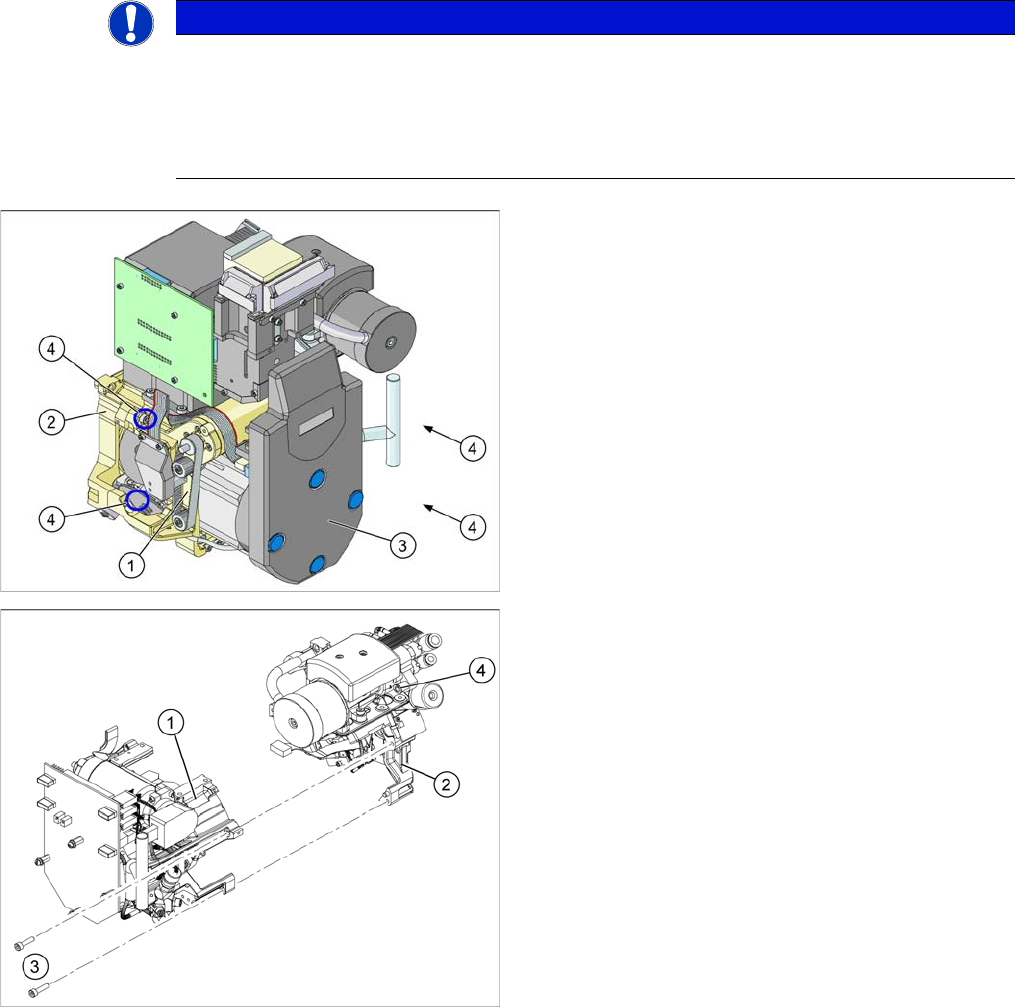
1. Front part
2. Back part
3. Intermediate distributor (under the cover)
4. 4x fastening screws for the front part of the head
1. Front part
2. Back part
3. Fastening screws for the front part of the head (total
of 4 screws)
4. Compressed air hose for air blast.
Service Work
C&P12 Placement Head 4.5.2 Removal/Installation of Head Front Part
144 Service Manual SIPLACE D4/D4i
► Switch off the machine and secure it to prevent unauthorized reactivation.
► X series/SX4/DX4: Unplug the connection cable from the sockets in the head adapter and Vision dig-
ital.
► DX1/DX2: Unplug the connection cable from the sockets in the base adapter and Vision digital..
► Remove the compressed air hose for the air blast.
► DLM3 only: If required, loosen the screws fastening the C&P12 component sensor option. Observe
the assembly instructions "component sensor" [00193356-xx].
► Loosen the four screws fastening the front part of the head.
► Pull the front part of the C&P head off the parallel pins on the back part and place it on a clean, soft
and ESD-proof surface.
► You will find the vacuum distributor block loose (unconnected) on the back part of the machine. Re-
move this vacuum distributor block.
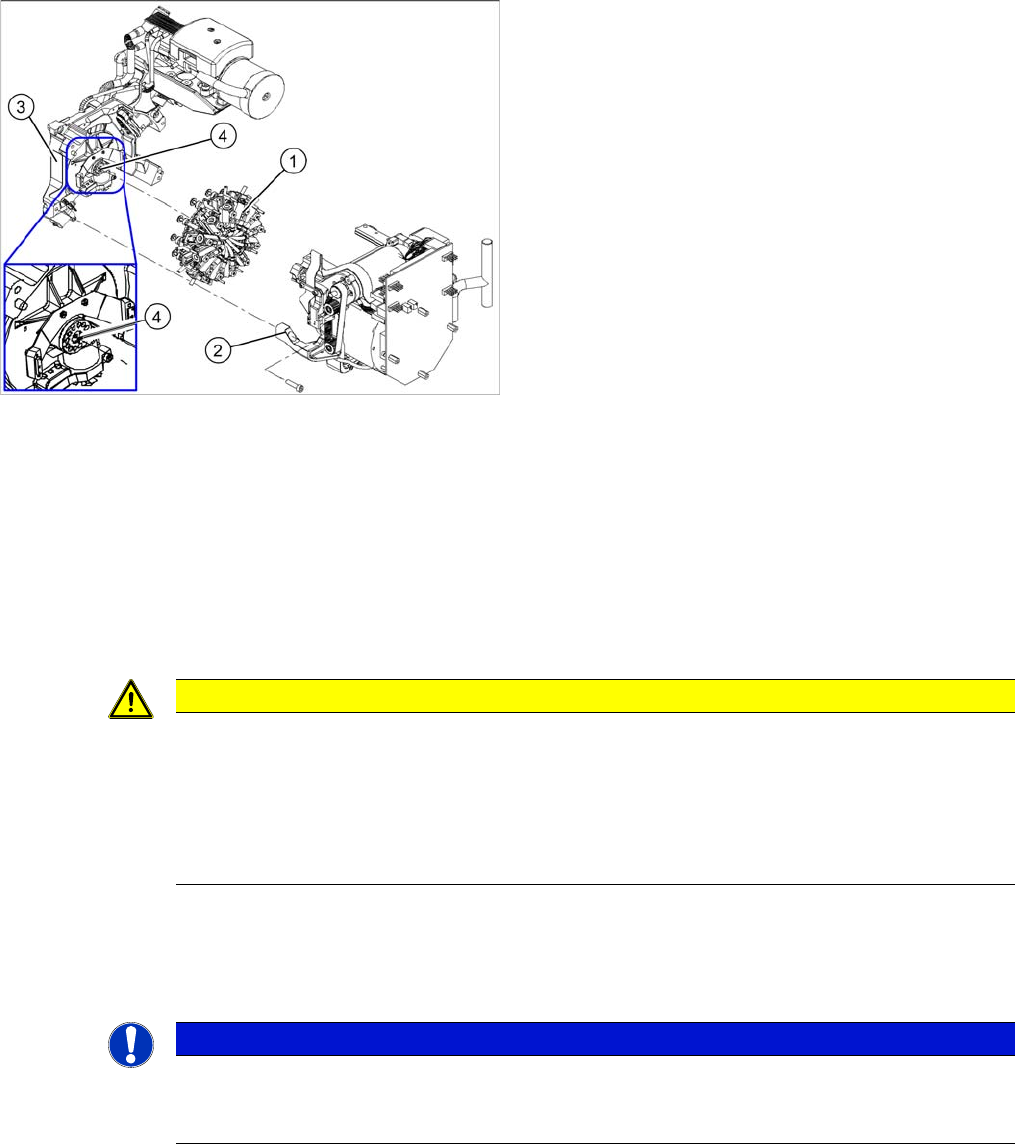
1. Star
2. Front part
3. Back part
4. Vacuum distributor block
CAUTION
Keep hold of the placement head and make sure the star position is correct!
► When you undo the last screw, hold the C&P head so that it does not accidentally drop off
the back part.
► When you remove the front part of the C&P head, make sure that the star is rotated roughly
30° or 15° out of the vertical sleeve position. If not, the valve plunger will remain attached
to the valve adjustment drive.
NOTICE
Vacuum distributor block
The vacuum distributor block is normally clamped between the front and back parts of the ma-
chine and transmits the vacuum for the holding circuit.