00193688-06_Installation SIPLACE Explorer2.1_EN.pdf - 第124页
5 Uninstallation Installation and Configuration Guide SIPLACE Explorer 5.4 Remo ve Edition 08/2006 EN 124 The uninstallation proce ss will be performed. The Setup S t atus dialog box will show the uninsta llation status.…
Installation and Configuration Guide SIPLACE Explorer 5 Uninstallation
Edition 08/2006 EN 5.4 Remove
123
5.4 Remove
5
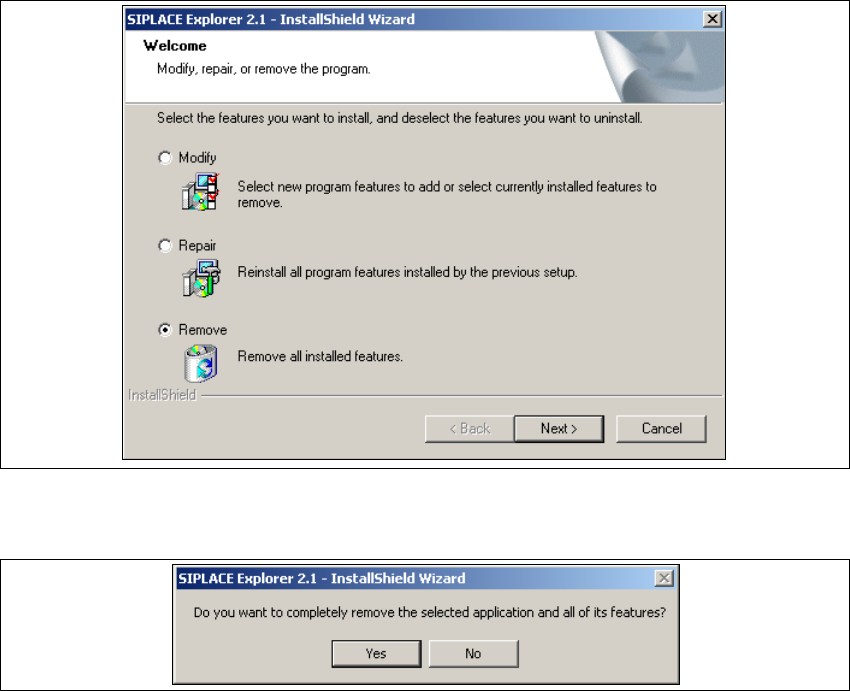
Fig. 5 - 9 SIPLACE Explorer 2.1 - install shield wizard
→ Click on Remove and then on Next to continue.
5
Fig. 5 - 10 Uninstallation query: confirm deletion of file
→ Confirm deletion with Yes.
5 Uninstallation Installation and Configuration Guide SIPLACE Explorer
5.4 Remove Edition 08/2006 EN
124
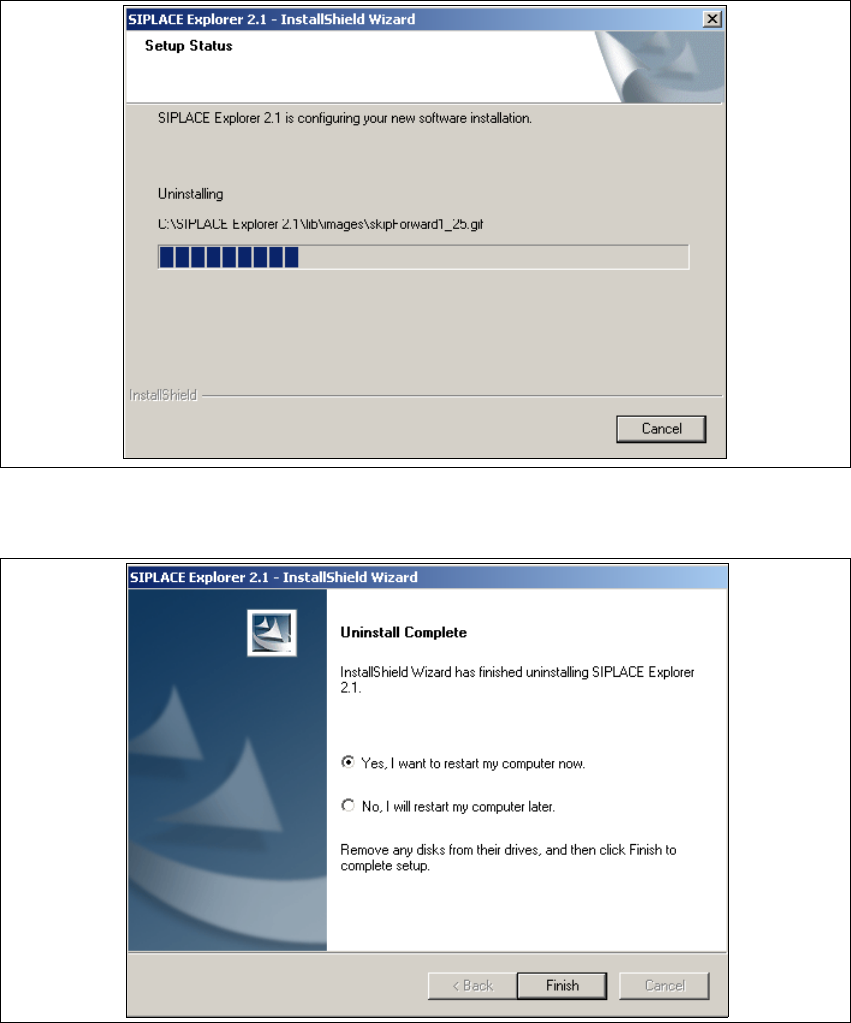
The uninstallation process will be performed. The Setup Status dialog box will show the
uninstallation status. 5
5
Fig. 5 - 11 Uninstallation process
→ SIPLACE Explorer V2.1 uninstallation has been completed.
5
Fig. 5 - 12 Uninstallation completed
→ Click on Finish to close the SIPLACE Explorer 2.1 - InstallShield Wizard.
→ After you have rebooted your computer, SIPLACE Explorer 2.1 will no longer be available.

Installation and Configuration Guide Index
SIPLACE Explorer Edition 11/2006 EN
125
Index
A
Access Factory Website
. . . . . . . . . . . . . 103, 111
Add Equipment
. . . . . . . . . . . . . . . . . . . . . . . . . .75
Add Line
. . . . . . . . . . . . . . . . . . . . . . . . . . . . . . .98
Add User
. . . . . . . . . . . . . . . . . . . . . . . . . . . . . .104
Administrator Privileges
. . . . . . 24, 29, 37, 48, 51
Adobe Reader 6.0
. . . . . . . . . . . . . . . . . . . . . . . .23
Apache Tomcat 5.0
. . . . . . . . . . . . . . . . . . . . . . .67
Apache Tomcat Setup
. . . . . . . . . . . . . . . . . . . .41
Application Features Loading
. . . . . . . . . . . . . . .92
Application Wizard
. . . . . . . . . . . . . . . . . . . . . . .88
Application Wizard, Application Features Loading
.
92
Application Wizard, Configuring the Production Line
. . . . . . . . . . . . . . . . . . . . . . . . . . . . . . . . . . . .92
Application Wizard, Starting
. . . . . . . . . . . . . . . .88
Archiving Schedule
. . . . . . . . . . . . . . . . . . 83, 109
Available For
. . . . . . . . . . . . . . . . . . . . . . . . . . . .77
B
Backflush
. . . . . . . . . . . . . . . . . . . . . . . . . . 23, 51
Bundled Web Server Installation
. . . . . . . . . 22, 37
C
Calendar
. . . . . . . . . . . . . . . . . . . . . . . . . . . . . . .78
Changing Tomcat Port Number
. . . . . . . . . . . . .66
Choose Destination Location, SIPLACE Explorer
Setup
. . . . . . . . . . . . . . . . . . . . . . . . . . . . . .33
Choose Folder’ Dialog Box, SIPLACE Explorer Set-
up
. . . . . . . . . . . . . . . . . . . . . . . . . . . . . . . . .33
Client LAN
. . . . . . . . . . . . . . . . . . . . . . . . . . . . . .13
Configuration
. . . . . . . . . . . . . . . . . . . . . . . . . . . .69
Configuration of the System Database
. . . . . . .113
Configuration Type
. . . . . . . . . . . . . . . . . . . . . . .91
Configurations
. . . . . . . . . . . . . . . . . . . . . . . . . . .13
Configure Production Line
. . . . . . . . . . . . . . . . .75
Configure System Database
. . . . . . . . . . . . . . . .80
Configuring the Production Line, Application Wizard
. . . . . . . . . . . . . . . . . . . . . . . . . . . . . . . . . . . .92
Configuring Your Web Server
. . . . . . . . . . . . . . .59
Connect to the MS SQL Server
. . . . . . . . . . . .113
Connection to Database
. . . . . . . . . . . . . . . 80, 94
Creation of Custom Applications
. . . . . . . . . . . . .69
Custom
. . . . . . . . . . . . . . . . . . . . . . . . . . . . . . . 91
D
Database Backup
. . . . . . . . . . . . . . . . . . . 84, 110
Database Connection Wizard
. . . . . . . . . 111, 113
Database Settings
. . . . . . . . . . . . . . . . . . . . . . 111
DB Administrator
. . . . . . . . . . . . . . . . . . . . 83, 109
DB Administrator Login
. . . . . . . . . . . . . . . 83, 108
DB Error
. . . . . . . . . . . . . . . . . . . . . . . . . . . . . . 94
DB error
. . . . . . . . . . . . . . . . . . . . . . . . . . . . . . . 80
DB Maintenance
. . . . . . . . . . . . . . . . . . . . 83, 108
DE Windows Start Menu
. . . . . . . . . . . . . . . . . . 57
Default Maintenance Schedule
. . . . . . . . . 83, 109
Default User Rights
. . . . . . . . . . . . . . . . . . . . . 105
Default Web Server
. . . . . . . . . . . . . . . . . . . . . . 66
Deinstallation
. . . . . . . . . . . . . . . . . . . . . . . . . . 117
Deinstallation Process
. . . . . . . . . . . . . . . . . . . 124
Development Environment
. . . . . . . . . . . . . . . . 21
Development Environment, Installation Option
. 34
E
Edit Logbook Entries
. . . . . . . . . . . . . . . . . . . . 103
F
Factory - Load Settings From
. . . . . . . . . . . . . . 94
Factory Calendar
. . . . . . . . . . . . . . . . . . . . . . . 101
Factory Configuration Utility
. . . . . . . . . . . . 21, 93
Factory Configuration Utility - Add Production Lines
. . . . . . . . . . . . . . . . . . . . . . . . . . . . . . . . . . . 99
Factory Configuration Utility - DB Maintenance
108
Factory Configuration Utility - Factory Calendar
. .
101
Factory Configuration Utility - Production Lines
98
Factory Configuration Utility - reports
. . . . . . . 102
Factory Configuration Utility - SMTP Server
. . 107
Factory Configuration Utility - User Details
. . . 105
Factory Configuration Utility - Users
. . . . . . . . 104
Factory Configuration Utility Windows Start Menu
58
Factory Configuration Utility, Installation Option
34
Factory Configuration Utility, Starting
. . . . . . . . 93
Factory Database
. . . . . . . . . . . . . . . . . . . . . . 108
Factory Host
. . . . . . . . . . . . . . . . . . . . . . . . . . . 97
Factory Website
. . . . . . . . . . . . . . . . . . . . . . . . 14
Firewall
. . . . . . . . . . . . . . . . . . . . . . . . . . . . . . . 59