00193688-06_Installation SIPLACE Explorer2.1_EN.pdf - 第16页
2 System Components and Configurations Installation and Configuration Guide SIPLACE Explorer 2.3 Standard Installation of SI PLACE Explorer Edition 11/2006 EN 16 2.3.1 Factory Layout Central Inst allation (CI) The Factor…
Installation and Configuration Guide SIPLACE Explorer 2 System Components and Configurations
Edition 11/2006 EN 2.3 Standard Installation of SIPLACE Explorer
15
– SIPLACE Explorer:
Siplace Explorer imports the data from the OIS and SIS, stores it in the Siplace Explorer
database and makes it available to the user.
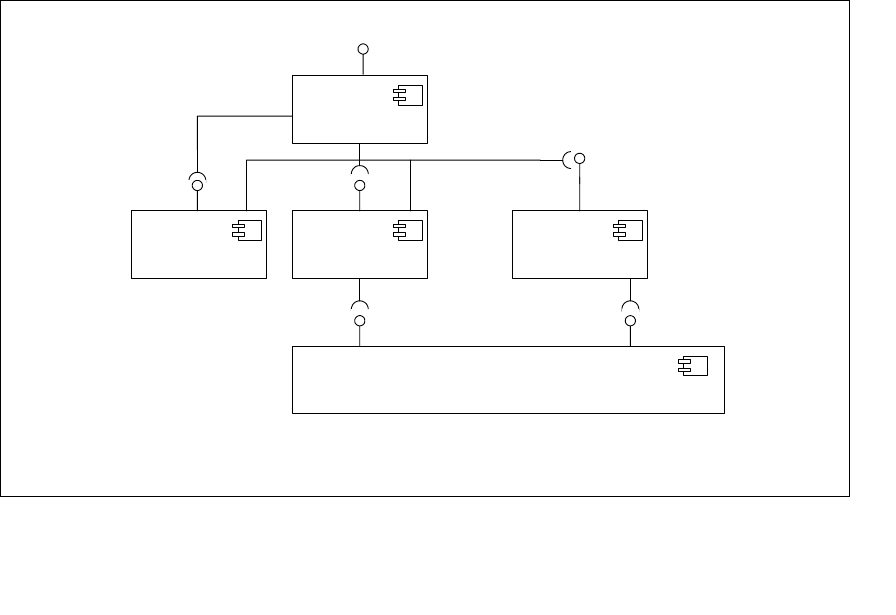
The following overview illustrates the necessary software components in the SIPLACE LAN: 2
2
Fig. 2.2 - 1 Software components in SIPLACE LAN
2.3 Standard Installation of SIPLACE Explorer
SIPLACE Explorer V2.1 provides various installation variants for the different components. This
section explains the following installation variants. 2
– Factory Layout Cl (see page 16)
– Factory Layout Dl (see page 18)
– Single Line Layout (see page 20)
We recommend that you use one of these installation variants for your system. 2
Station-SW
<<Component>>
IDownload
SIPLACE Pro
<<Component>>
SPI
IOIS
OIS
<<Component>>
SIPLACE Explorer
<<Component>>
SIS
<<Component>>
SIS DB-View
OIS DB-View
IBackflushOption

2 System Components and Configurations Installation and Configuration Guide SIPLACE Explorer
2.3 Standard Installation of SIPLACE Explorer Edition 11/2006 EN
16
2.3.1 Factory Layout Central Installation (CI)
The Factory Layout Cl supports so-called"Mixed Lines" i.e. different station software platforms
within the same production line. The production line operation is controlled via a central SIPLACE
Pro with the relevant OIS/SIS installations. 2
SIPLACE Pro is installed on the SIPLACE line server and on the factory server and OIS/SIS on
the SIPLACE line server. 2
In this installation variant, SIPLACE Explorer V2.1 is always installed on a separate SIPLACE Ex-
plorer server. All SIPLACE Explorer components are installed on this server.This enables the ad-
ministration and any updates of SIPLACE Explorer to be realized at one central point. 2
The data to be monitored for all corresponding production lines are collected on the SIPLACE Ex-
plorer server. 2
NOTE
This computer can monitor data from up to 5 applications, with up to 20 machines. 2
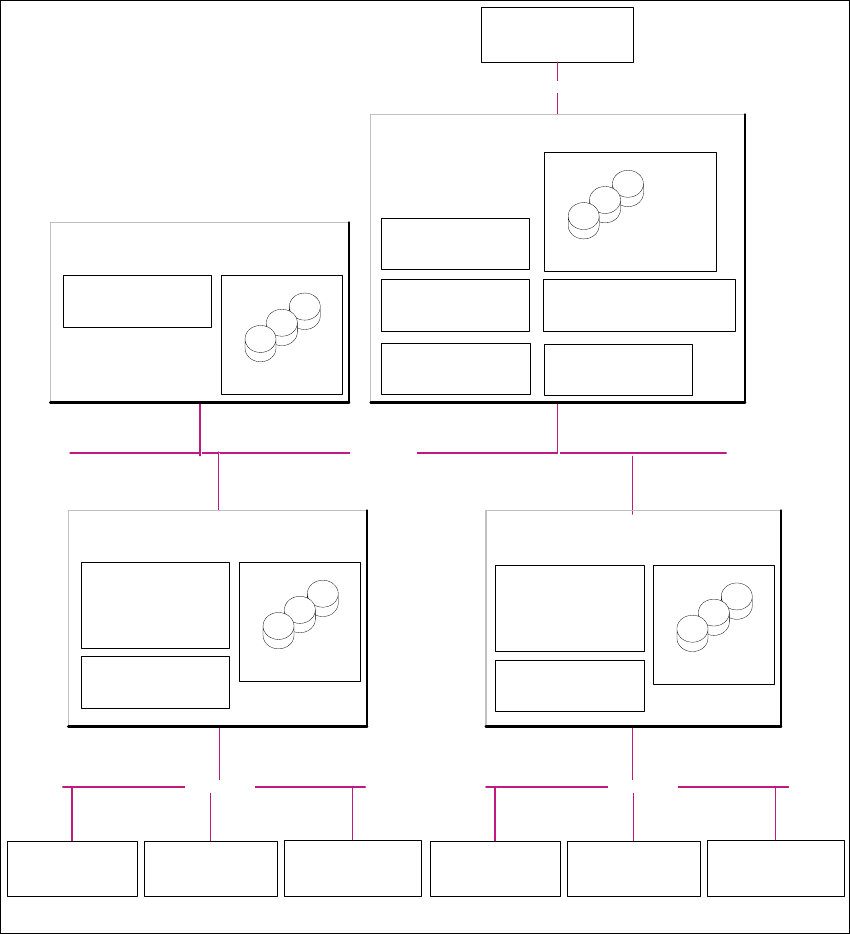
The following overview shows an example of the "Factory Layout Cl" installation: 2
Installation and Configuration Guide SIPLACE Explorer 2 System Components and Configurations
Edition 11/2006 EN 2.3 Standard Installation of SIPLACE Explorer
17
2
Fig. 2.3 - 1 Installation Variants: Factory Layout Cl
Customer LAN
SIPLACE LAN
Station Computer:
- OIS Client
- SW Software, platform I
Multi Line "A"
- Line Control Server /GUI
- SIPLACE Pro Desk
- OIS Server/ OIS Client
-SIS Server
SIPLACE Explorer
Webpages :
- MS internet Explorer
- OIS DB
- SIS DB
SIPLACE Line Server
(already existing)
Station Computer:
- OIS Client
- SW Software, platform II
- Line Control Server /GUI
- SIPLACE Pro Desk
- OIS Server/ OIS Client
- SIS Server
SIPLACE Explorer
Webpages :
- MS internet Explorer
SIPLACE Line Server
(already existing)
SIPLACE Explorer
Webpages :
- MS internet Explorer
SIPLACE Explorer Server
SIPLACE Explorer
Factory Host
SIPLACE Explorer
Runtime Environment
SIPLACE Explorer Webserver:
-Tomcat
- Java 2SE
Report Generation :
-MSXM
- Excel
SQL Server
- OIS DB
- SIS DB
SQL Server
- SIPLACE Explorer DB
- SIPLACE Explorer Factory DB
SQL Server
- SIPLACE Pro Server
- SIPLACE Pro Desk
- SIPLACE Pro DB
Factory Server
(already existing)
SQL Server
Customer Computer
SIPLACE Explorer Websites:
- MS Internet Explorer
Customer LAN
Station Computer:
- OIS Client
- SW Software, platform III
SIPLACE LAN
Station Computer:
- OIS Client
- SW Software, platform I
Multi Line "B"
Station Computer:
- OIS Client
- SW Software, platform II
Station Computer:
- OIS Client
- SW Software, platform III