00193688-06_Installation SIPLACE Explorer2.1_EN.pdf - 第13页
Installation and Configuration Guide SIPLACE Ex plorer 2 System Components and Configurations Edition 11/2006 EN 2.1 Overview of System Components 13 2 System Component s and Configurations 2.1 Overview of System Compone…
1 Introduction Installation and Configuration Guide SIPLACE Explorer
1.3 Additional Remarks Edition 11/2006 EN
12
– The page Production Summary will not update the values in the column Lot Progress of
the table Lot Progress, if the last station in the production line does not have any place-
ment contents for the recipe currently defined. In this case, the last station will conveyor the
boards through without placement. The column Lot Progress will continue to show the
name of the last recipe which had placement contents at the last station.
– Machine Navigator:
OLE value will not be shown (N/A).
– OLE / OEE Overview:
Overall Line Efficiency diagram: Values for OLE, performance and availability will not be
shown correctly.
Overall Equipment Efficiency by station diagram: station data is not shown correctly for
stations which do not place boards.
– OEE Analysis:
Table: values for performance and availability will not be shown correctly for lines and sta-
tions which do not place boards.
Overall Equipment Efficiency diagram - comparison diagram: Values for OLE, perfor-
mance and availability will not be shown correctly for the line.
– Factory Overview:
The following values will not be shown correctly or will not be updated:
OLE, Current Recipe/ Job, Last Recipe Change, Completed, Lot Progress, Average Takt
Time.
Installation and Configuration Guide SIPLACE Explorer 2 System Components and Configurations
Edition 11/2006 EN 2.1 Overview of System Components
13
2 System Components and
Configurations
2.1 Overview of System Components
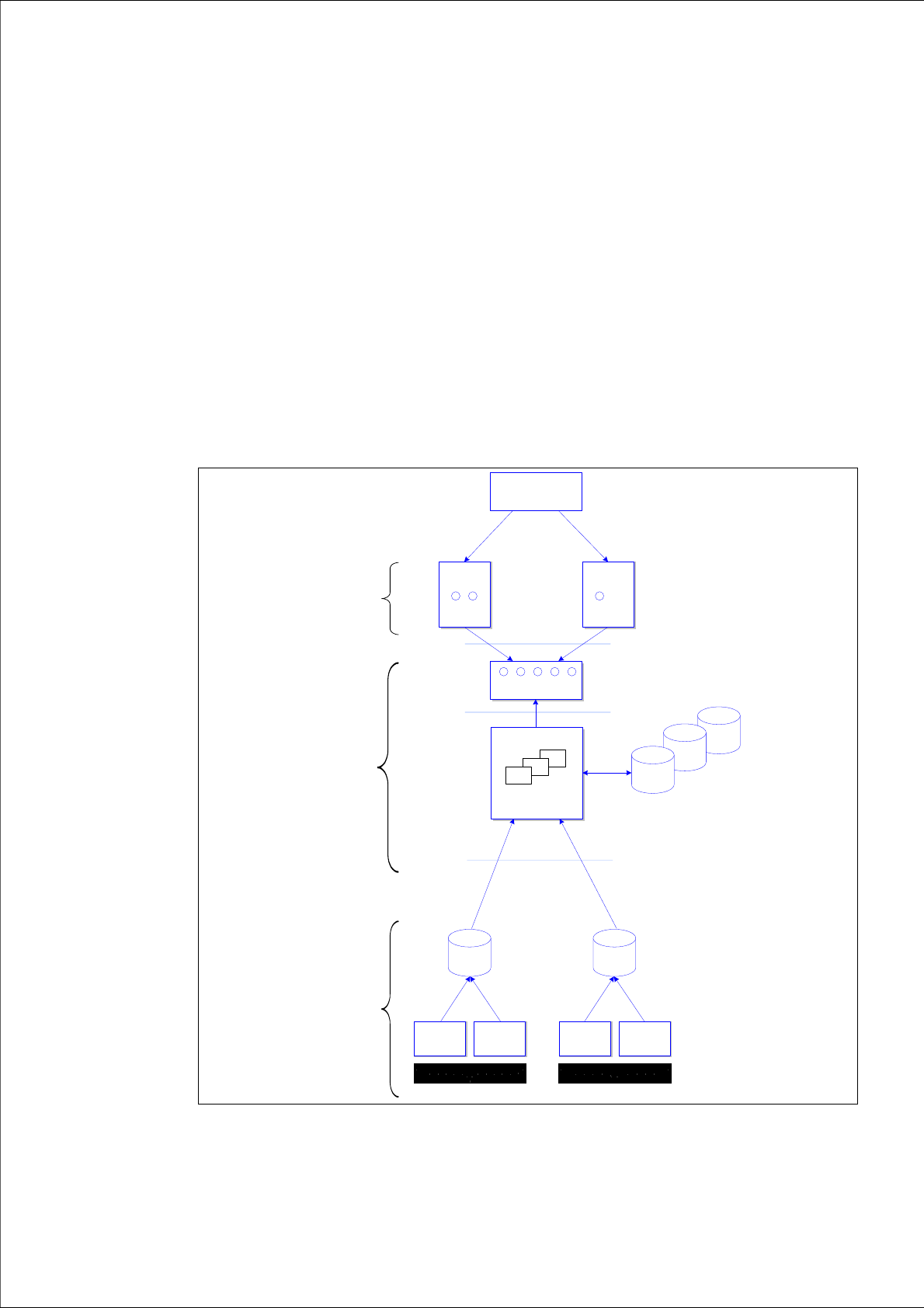
SIPLACE Explorer can either be installed in SIPLACE LAN or distributed via SIPLACE and client
LANs. Users not wishing to install the complete SIPLACE Explorer program on one computer can
distribute the individual components among several computers. 2
The SIPLACE Explorer architecture is displayed in the following diagram: 2
2
Fig. 2.1 - 1 SIPLACE Explorer architecture
System
DB
System
DB
Web
Browser
applets
SMA / Line 1
...
Web
Browser
applets
SMA / Line 5
servlets, JSP
Tomcat Web Server
SIPLACE Explorer Host
SIPLACE Explorer
Applications 1.. 5
Web Clients
Software
Architecture
One or several Servers
SIPLACE
Sta tio n 1
SIPLACE
Station N
SIPLACE
St at io n 1
SIPLACE
Station N
Production Line 1 Production Line 5
...
OIS/SIS
DB
OIS/SIS
DB
...
SIPLACE OIS / SIS
compliant machines
Line 1 ... 5
System
DB
Factory Website
"Single Entry Point"
2 System Components and Configurations Installation and Configuration Guide SIPLACE Explorer
2.2 SIPLACE Explorer in the SIPLACE Software Environment Edition 11/2006 EN
14
With SIPLACE Explorer "Runtime Environment", you can monitor multiple production lines at the
same time. The computer on which SIPLACE Explorer Runtime Environment is installed is known
as the SIPLACE Explorer host. This host can simultaneously monitor up to five production lines
with up to 20 stations. If you have also installed Factory Configuration Utility, you can configure
factory reports. 2
Another benefit is the creation of a special factory website for the monitoring of multiple production
lines at a particular factory. This special factory website provides a "single entry point" for all line
applications currently in use. 2
SIPLACE Explorer V2.1 supports central organization of User Management via the Factory Con-
figuration Utility. This includes administration of all users with certain rights at line level. If central
organization of User Management is not used, only two standard users will be available at line
level: administrator and operator. Other users can not be created at line level. 2
2.2 SIPLACE Explorer in the SIPLACE Software
Environment
The SIPLACE software environment with SIPLACE Explorer consists of the following software
components: 2
– SIPLACE Pro:
SIPLACE Pro controls the entire operation of the production lines e.g. all placement pro-
grams; all management and configuration of production lines and stations, plus the creation
of setups.
SIPLACE Pro is the source of all product and line definition data. 2
– Stations software:
The station SW supplies SIPLACE Explorer with consumption data, error data and machine
status data, via the OIS interface.
The station SW is the source of all operational data. 2
– Operator Information System (OIS):
The OIS stores consumption data, error data and machine status data. The OIS receives
this data from the station SW, stores it in the OIS database and makes it available to SI-
PLACE Explorer via the OIS database view.
– Setup Information System (SIS):
The SIS stores setup data. The SIS receives this data from SIPLACE Pro, stores it in the
SIS database and makes it available to SIPLACE Explorer via the SIS database view.