00193688-06_Installation SIPLACE Explorer2.1_EN.pdf - 第20页
2 System Components and Configurations Installation and Configuration Guide SIPLACE Explorer 2.3 Standard Installation of SI PLACE Explorer Edition 11/2006 EN 20 2.3.3 Single Line Layout The Single L ine Layout installat…
Installation and Configuration Guide SIPLACE Explorer 2 System Components and Configurations
Edition 11/2006 EN 2.3 Standard Installation of SIPLACE Explorer
19
2
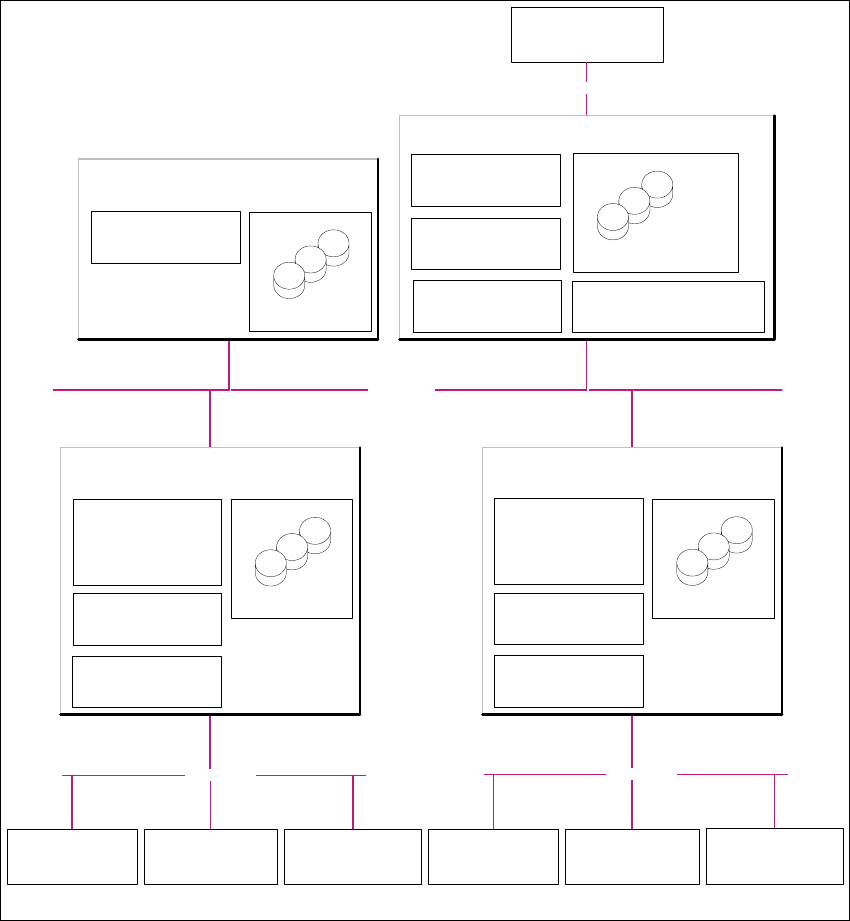
Fig. 2.3 - 2 Installation Variants: Factory Layout Dl
Customer LAN
- Line Control Server /GUI
- SIPLACE Pro Desk
- OIS Server/ OIS Client
-SIS Server
SIPLACE Explorer
Webpages:
- MS internet Explorer
-OIS DB
-SIS DB
SIPLACE Line Server
(already existing)
SIPLACE Explorer
Webpages:
- MS internet Explorer
SIPLACE Explorer Server
SIPLACE Explorer
Factory Host
SIPLACE Explorer Webserver:
-Tomcat
- Java 2SE
Report Generation :
-MSXM
-Excel
SQL Server
- SIPLACE Explorer DB
- SIPLACE Explorer Factory DB
SQL Server
- SIPLACE Pro Server
- SIPLACE Pro Desk
- SIPLACE Pro DB
Factory- Server
(already existing)
SQL Server
Customer Computer
SIPLACE Explorer Websites:
- MS Internet Explorer
Customer LAN
SIPLACE Explorer
Runtime Environment
SIPLACE LAN
Station Computer:
- OIS Client
- SW Software, platform I
Multi Line "A"
Station Computer:
- OIS Client
- SW Software, platform II
Station Computer:
- OIS Client
- SW Software, platform III
- Line Control Server /GUI
- SIPLACE Pro Desk
- OIS Server/ OIS Client
- SIS Server
SIPLACE Explorer
Webpages:
- MS internet Explorer
- OIS DB
- SIS DB
SIPLACE Line Server
(already existing)
SQL Server
SIPLACE Explorer
Runtime Environment
SIPLACE LAN
Station Computer:
- OIS Client
- SW Software, platform I
Multi Line "B"
Station Computer:
- OIS Client
- SW Software, platform II
Station Computer:
- OIS Client
- SW Software, platform III
2 System Components and Configurations Installation and Configuration Guide SIPLACE Explorer
2.3 Standard Installation of SIPLACE Explorer Edition 11/2006 EN
20
2.3.3 Single Line Layout
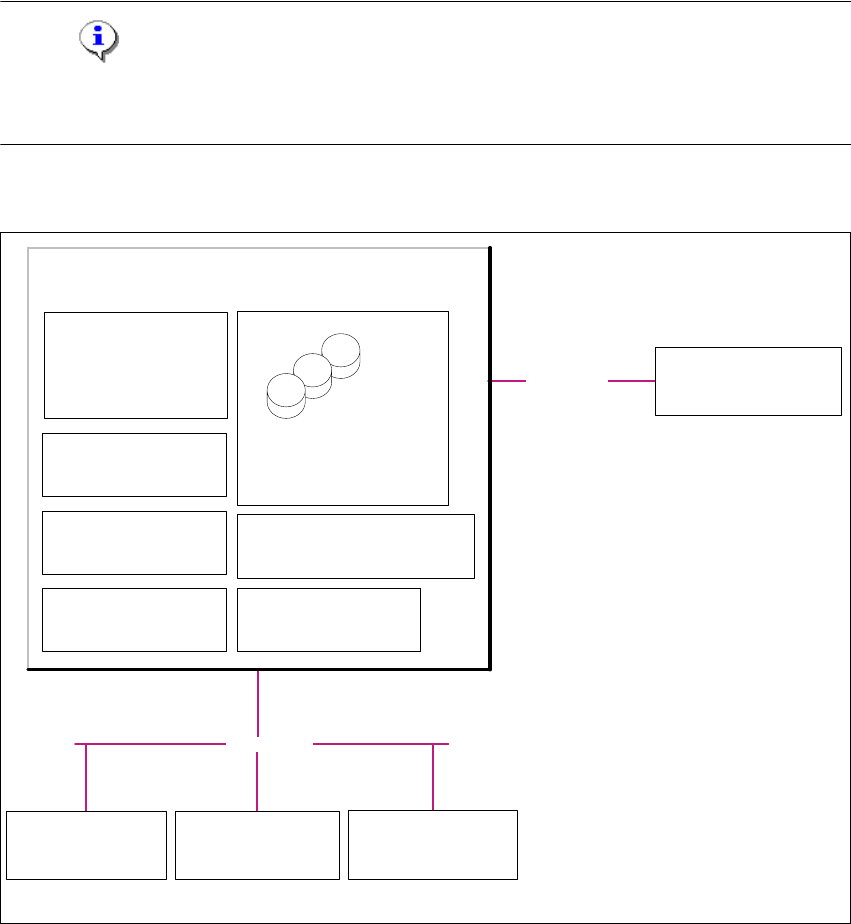
The Single Line Layout installation variant supports exactly one multi line. 2
SIPLACE Explorer is installed on the existing SIPLACE line server, with all system components.
SIPLACE Pro and OIS/SIS are also installed on this SIPLACE line server. 2
NOTE
Please note that this installation variant only allows you to monitor one application with up to 7
machines- 2
The following overview shows an example of the "Single Line Layout" installation: 2
2
Fig. 2.3 - 3 Installation Variants: Single Line Layout
2
2
Customer LAN
- SIPLACE Pro Server
- SIPLACE Pro Desk
- Line Control Server /GUI
- OIS Server / OIS Client
- SIS Server
SIPLACE Explorer
Webpages:
- MS internet Explorer
- SIPLACE Pro DB
- SIPLACE Explorer DB
- SIPLACE Explorer Factory DB
- OIS DB
- SIS DB
SIPLACE Line Server
(already existing)
SIPLACE Explorer
Factory Host
SIPLACE Explorer Webserver:
-Tomcat
- Java 2SE
Report Generation :
- MSXM
- Excel
SQL Server
Customer Computer
SIPLACE Explorer Websites:
- MS Internet Explorer
SIPLACE Explorer
Runtime Environment
SIPLACE LAN
Station Computer:
- OIS Client
- SW Software, platform I
Multi Line
Station Computer:
- OIS Client
- SW Software, platform II
Station Computer:
- OIS Client
- SW Software, platform III

Installation and Configuration Guide SIPLACE Explorer 3 Installing SIPLACE Explorer
Edition 11/2006 EN 3.1 Initial Installation of SIPLACE Explorer 2.1
21
3 Installing SIPLACE Explorer
There are two different types of installation for SIPLACE Explorer 2.1: 3
– Initial installation of SIPLACE Explorer 2.1
Choose this option if you do not yet have a version of SIPLACE Explorer installed on your
system. Follow the instructions at “Initial Installation of SIPLACE Explorer 2.1” on page 21.
– Update installation of SIPLACE Explorer 2.1. Choose this option if you already have an
executable version of SIPLACE Explorer 1.2, 2.0 or 2.0 SP1 installed on your system.
Follow the instructions at “Update Installation of SIPLACE Explorer 2.1” on page 51.
NOTE
To ensure a reliable data quality from SIPLACE Explorer, make sure that the versions of all
supported data sources match the version of SIPLACE Explorer installed. This means, that your
initial or upgrade installation of SIPLACE Explorer may require you to also update the supported
data sources. 3
3.1 Initial Installation of SIPLACE Explorer 2.1
Please select one of the following installation procedures: 3
– SIPLACE Explorer 2.1 (see page 29)
There are three different installation options for SIPLACE Explorer V2.1: 3
– SIPLACE Explorer V.2.1 Runtime Environment
– SIPLACE Explorer V.2.1 Factory Configuration Utility
– SIPLACE Explorer V.2.1 Development Environment
WARNING
Do not install "SIPLACE Explorer V.2.1 Runtime Environment" and "SIPLACE Explorer V.2.1
Development Environment" on the same computer. These two options will not run parallel to
one another. Before working with these options in succession, make sure you know the steps
for starting/terminating the respective option and observe these. 3