00193688-06_Installation SIPLACE Explorer2.1_EN.pdf - 第89页
Installation and Configuration Guide SIPLACE Explorer 4 Configuration Edition 11/2006 EN 4.1 Standard Monitoring Application (SMA) 89 → In order to open the application wizard you must select File → Ne w Project from the…
4 Configuration Installation and Configuration Guide SIPLACE Explorer
4.1 Standard Monitoring Application (SMA) Edition 11/2006 EN
88
4.1.2 Development Environment: Creating an SMA with the Application Wizard
In order to create an SMA with the application wizard, you must have SIPLACE Explorer
Development Environment installed on your computer. SMA creation consists of the following
steps: 4
– Application wizard (wizard with 8 steps)
– Establishing a connection to the database (wizard with 3 steps)
4.1.2.1 Starting the Application Wizard
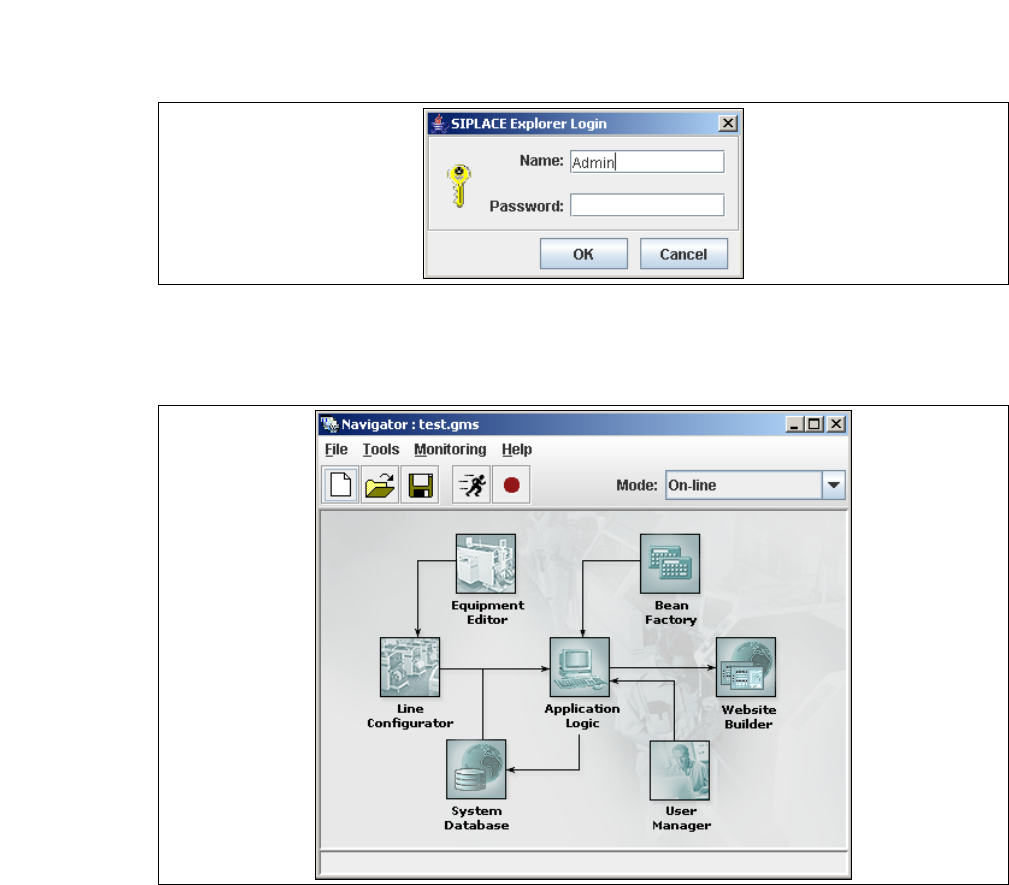
→ Start the SIPLACE Explorer Developer Studio by selecting Programs → SIPLACE Explorer
2.1 → Development Environment → SE Developer Studio from the menu in Windows. The
login dialog will appear:
4
Fig. 4 - 22 Login
→ Register yourself as Admin with an empty password and click on the OK button. The SIPLACE
Explorer navigator will appear.
4
Fig. 4 - 23 SIPLACE Explorer navigator
Installation and Configuration Guide SIPLACE Explorer 4 Configuration
Edition 11/2006 EN 4.1 Standard Monitoring Application (SMA)
89
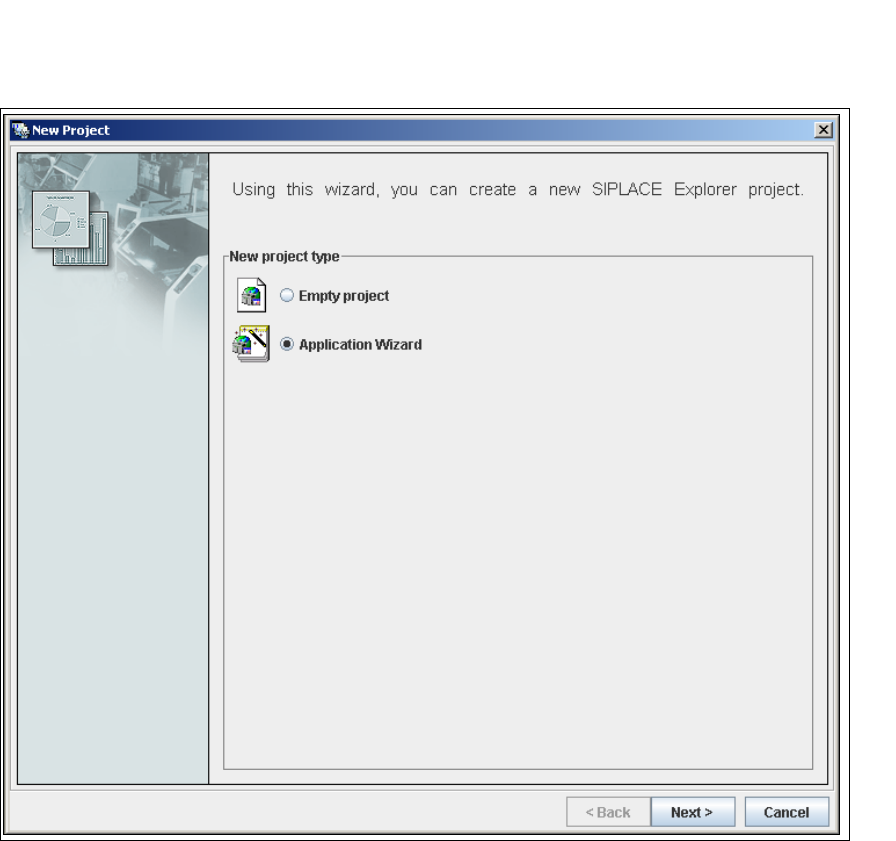
→ In order to open the application wizard
you must select File → New Project from the menu or click on the corresponding button in the
SIPLACE Explorer navigator toolbar.
→ The New Project dialog box will open.
4
Fig. 4 - 24 'New project' dialog box
→ There are two ways to create an SMA:
– Select Empty Project to build your application from scratch or
– Application Wizard to customize and configure a prebuilt application.
→ In this section we will discuss the second option.
→ Once you have selected Application Wizard and clicked Next, you will be presented with an
eight-step wizard that will help you to create SIPLACE Explorer customized for your production
line.
4 Configuration Installation and Configuration Guide SIPLACE Explorer
4.1 Standard Monitoring Application (SMA) Edition 11/2006 EN
90
NOTE
Follow these steps and note that you may skip steps 5-8 and do the required configurations
later. 4
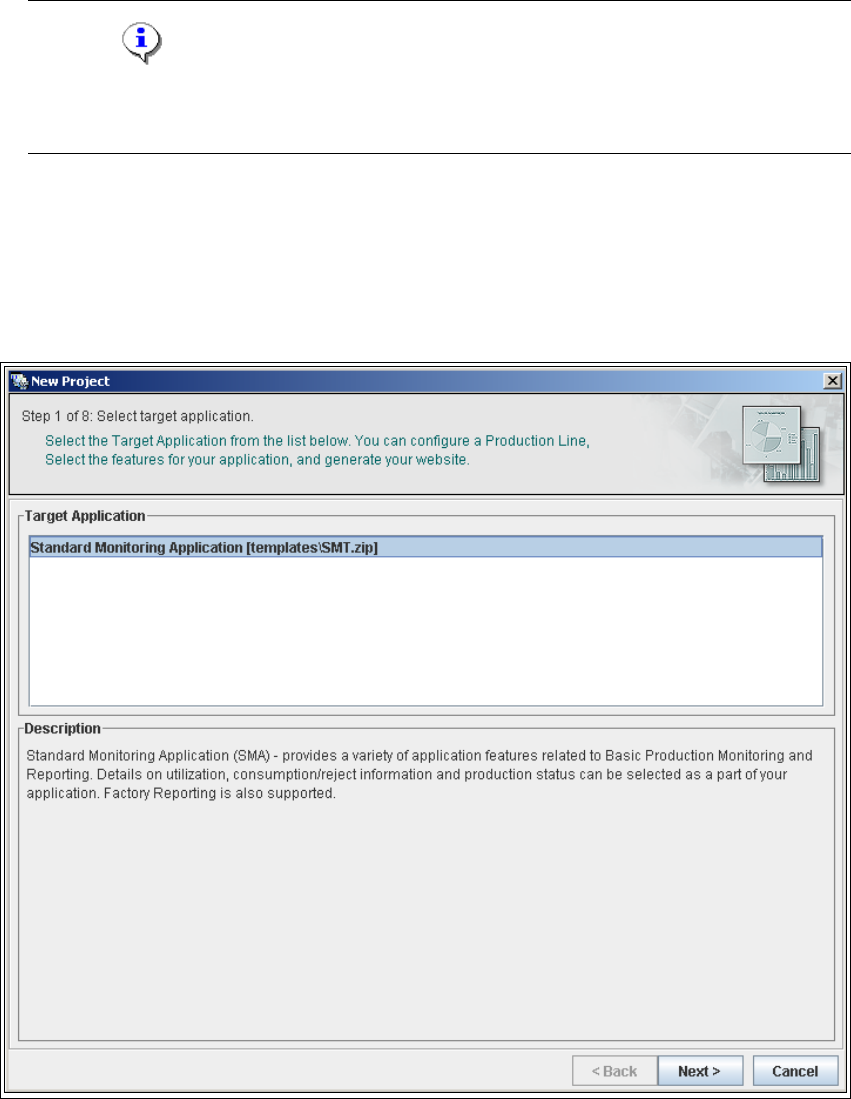
4.1.2.2 Step 1- Select Target Application
→ Select the required target application (this defines a set of templates needed to create a
customized application). The description field provides an explanation of the target application
concerned, helping you to make your selection from the list of Target Applications.
4
Fig. 4 - 25 Step 1: Select target application
→ Once you have selected the desired application click on the Next button to continue with the
next step.