4H4CEPM.pdf - 第26页
Page 16 ∗ FeederSpeed Select the feeding speed of the feeders. Normal : The standard feeding time set for each feeder is used. 2Times : The twofold value of the standard feeding time set for each feeder is used. Low : Th…
Page 15
301
CM
Chip Data
4H4C-E-PMA01-A02-01
∗ VSensorCheck
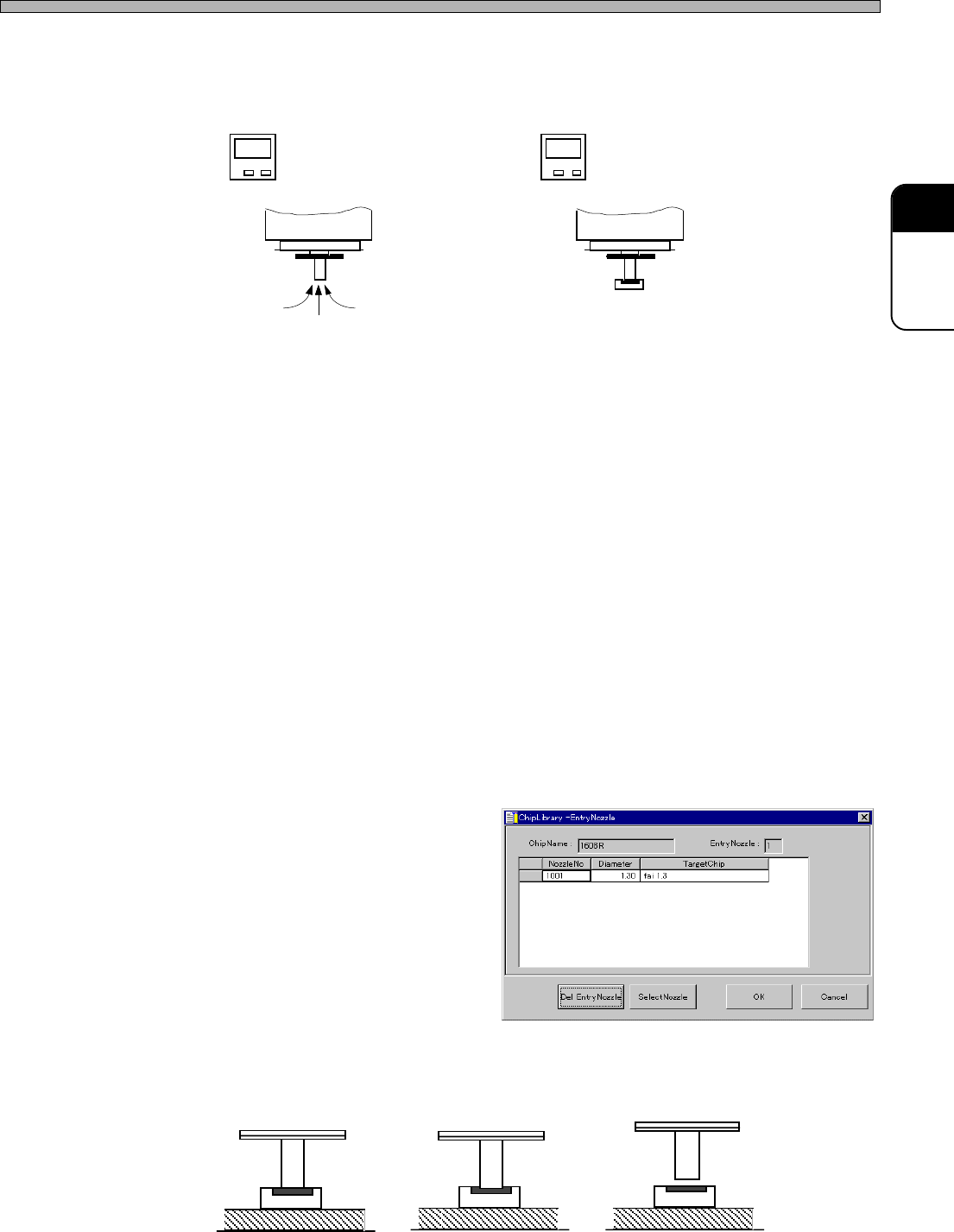
Whether a chip was picked up or not is judged by comparing the vacuum pressure at when it is not
picked up with that at when it is picked up.
Set whether or not to let the “Vacuum sensor check” in the “ChipData Detail” window perform this
judgment.
OFF : Judgment Disabled
ON : Judgment Enabled
(1) Case that setting “OFF” is recommended
In almost cases, set it to ON. But in the following cases, set it to OFF.
a. In the case that 1001 nozzle is used
This nozzle is thin, so the vacuum pressure at when a chip is not picked up is high, resulting in a
very narrow difference in pressure.
b. In the case that the chips which cause air leakage frequently such as horizontal cylindri-
cal chips, semi-fixed resistor, etc. are picked up
Even when the chip has been picked up, the vacuum pressure is not high due to air leakage. So
the difference in comparison is very small.
(2) Case that setting “ON” is recommended
a. If the shadow shape of a nozzle is similar to that of a chip
The machine may wrongly judge that recognition is OK in spite of chip pick-up error, eventually
the chip may not be mounted. So, in this case, be sure to set “ON”.
b. If using a 1003 square nozzle
Particularly, when using a 1003 square nozzle against a square chip, the machine may mis-
judge. So, in this case, be sure to set “ON”.
6. MountParameter
∗ ChipLibrary-EntryNozzle
Specify the nozzles used to pick up
and mount chips.
∗ ChipCnt
Enter the number of chips on tape reel.
∗ MountGap
Enter the height of nozzle for when a chip is mounted.
When 0 is set, the chip is mounted at the height that it touches board. When a plus (+) value is set,
it is mounted at the height that it is pushed into board. When a minus (-) value is set, it is mounted
at the height that it does not touch board.
444C-626E
Mount gap = 0
Mount gap = 0.5
Mount gap = -0.1
Not Picked Up
→ Vacuum Pressure Low
Picked Up
→ Vacuum Pressure High
Low
High
4H4C-EPt-EdCl-004

Page 16
∗ FeederSpeed
Select the feeding speed of the feeders.
Normal : The standard feeding time set for each feeder is used.
2Times : The twofold value of the standard feeding time set for each feeder is used.
Low : The low-speed cylinder drive feeds the tape. (Option)
7. Extension
Used to edit the detailed data of the chips with pins.
QFP : You can edit QFP chips.
BGA ext : You can edit BGA chips.
8. Recog
REF : Choose a chip recognition number.
9. SelectStandardChip
[SelectStandardChip] window opens.
10. Copy To Library
Data are copied to the custom library.
4H4C-E-PMA01-A02-01
Chip Data
Page 17
301
CM
3-2 Editing Chip Data
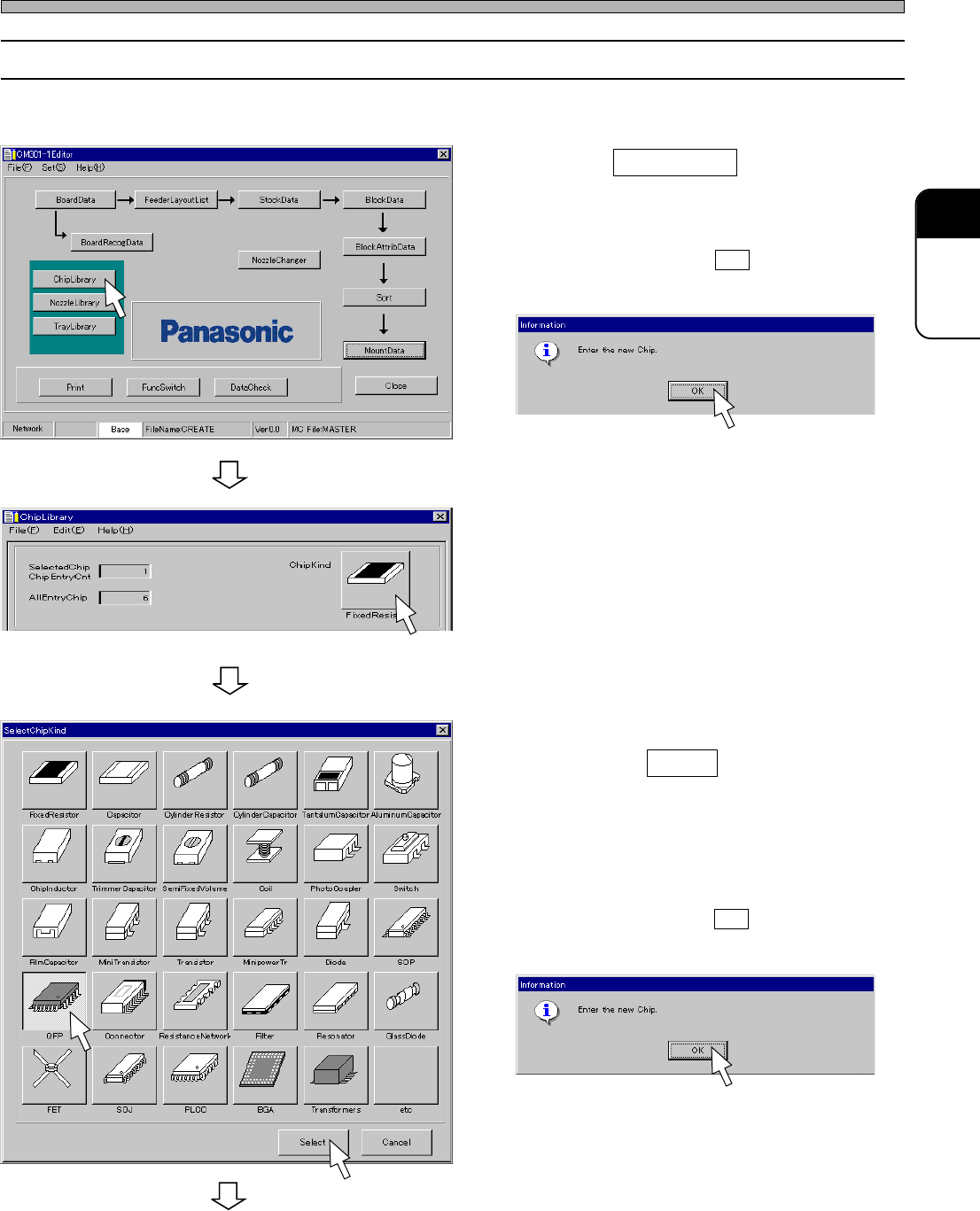
1. Click on ChipLibrary .
• When you choose the chip that is not
registered, [Warning] window opens. Check the
message, and click on OK .
• [ChipLibrary] window opens.
2. Click on ChipKind switch.
• [SelectChipKind] window opens.
3. Choose the type of chip to be edited,
and click on Select .
• “QFP” is chosen on the left picture as an
example.
• When you choose the chip that is not
registered, [Warning] window opens. Check the
message, and click on OK .
• [ChipLibrary] window opens.
To the next page
Chip Data
Copy the data, which will be a base of the chip you will edit, from the standard chip library to the
custom chip library, and edit it.
4H4C-E-PMA01-A02-01
4H4C-EPt-Ed-001
4H4C-EPt-EdCl-001
4H4C-EPt-EdCl-005
4H4C-EPt-EdCl-006
4H4C-EPt-EdCl-005