4H4CEPM.pdf - 第27页
Page 17 301 CM 3-2 Editing Chip Data 1. Click on ChipLibrary . • When you choose the chip that is not registered, [W arning] window opens. Check the message, and click on OK . • [ChipLibrary] window opens. 2. Click on Ch…

Page 16
∗ FeederSpeed
Select the feeding speed of the feeders.
Normal : The standard feeding time set for each feeder is used.
2Times : The twofold value of the standard feeding time set for each feeder is used.
Low : The low-speed cylinder drive feeds the tape. (Option)
7. Extension
Used to edit the detailed data of the chips with pins.
QFP : You can edit QFP chips.
BGA ext : You can edit BGA chips.
8. Recog
REF : Choose a chip recognition number.
9. SelectStandardChip
[SelectStandardChip] window opens.
10. Copy To Library
Data are copied to the custom library.
4H4C-E-PMA01-A02-01
Chip Data
Page 17
301
CM
3-2 Editing Chip Data
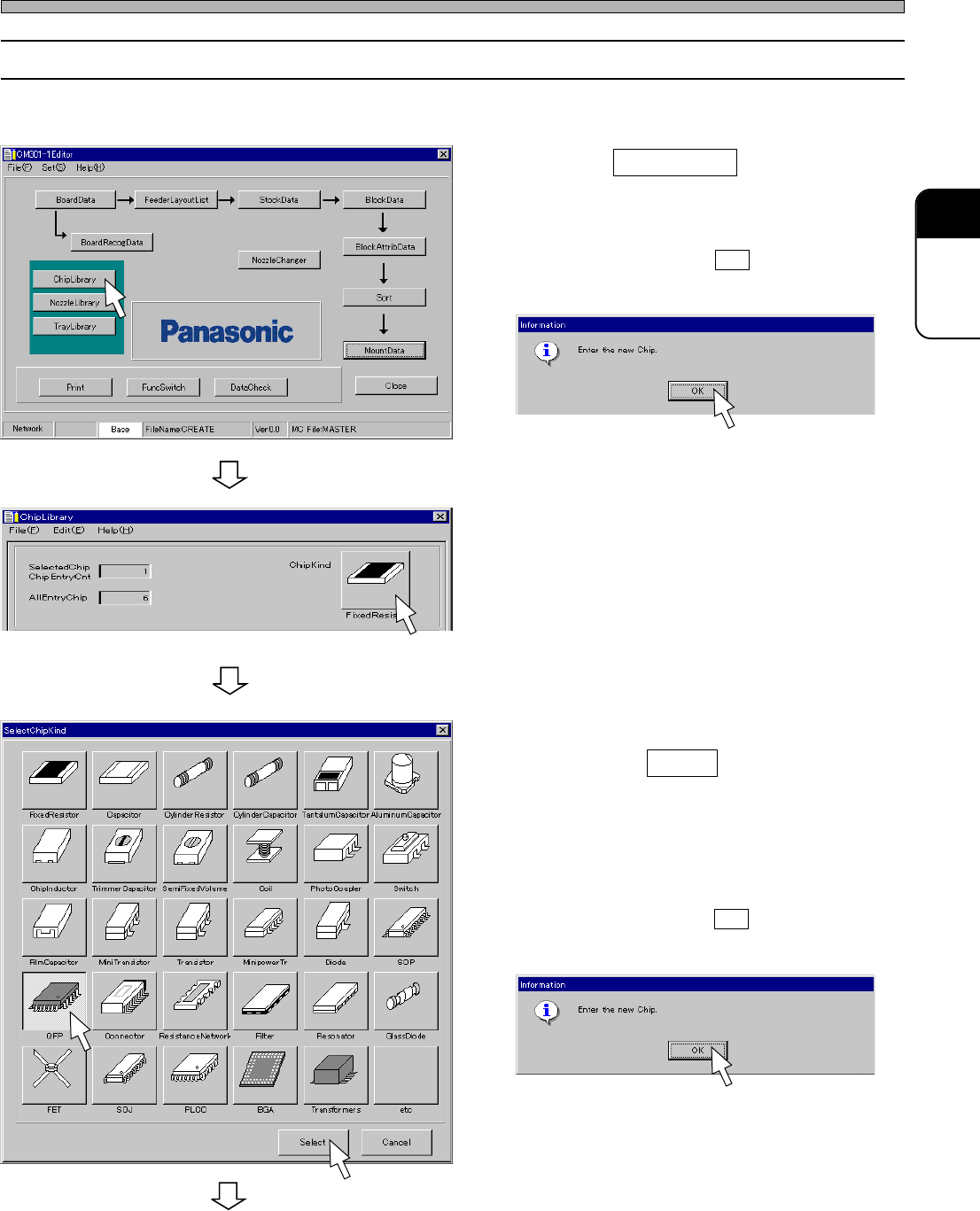
1. Click on ChipLibrary .
• When you choose the chip that is not
registered, [Warning] window opens. Check the
message, and click on OK .
• [ChipLibrary] window opens.
2. Click on ChipKind switch.
• [SelectChipKind] window opens.
3. Choose the type of chip to be edited,
and click on Select .
• “QFP” is chosen on the left picture as an
example.
• When you choose the chip that is not
registered, [Warning] window opens. Check the
message, and click on OK .
• [ChipLibrary] window opens.
To the next page
Chip Data
Copy the data, which will be a base of the chip you will edit, from the standard chip library to the
custom chip library, and edit it.
4H4C-E-PMA01-A02-01
4H4C-EPt-Ed-001
4H4C-EPt-EdCl-001
4H4C-EPt-EdCl-005
4H4C-EPt-EdCl-006
4H4C-EPt-EdCl-005
Page 18
444C-EPt-EdCl-007
Chip Data
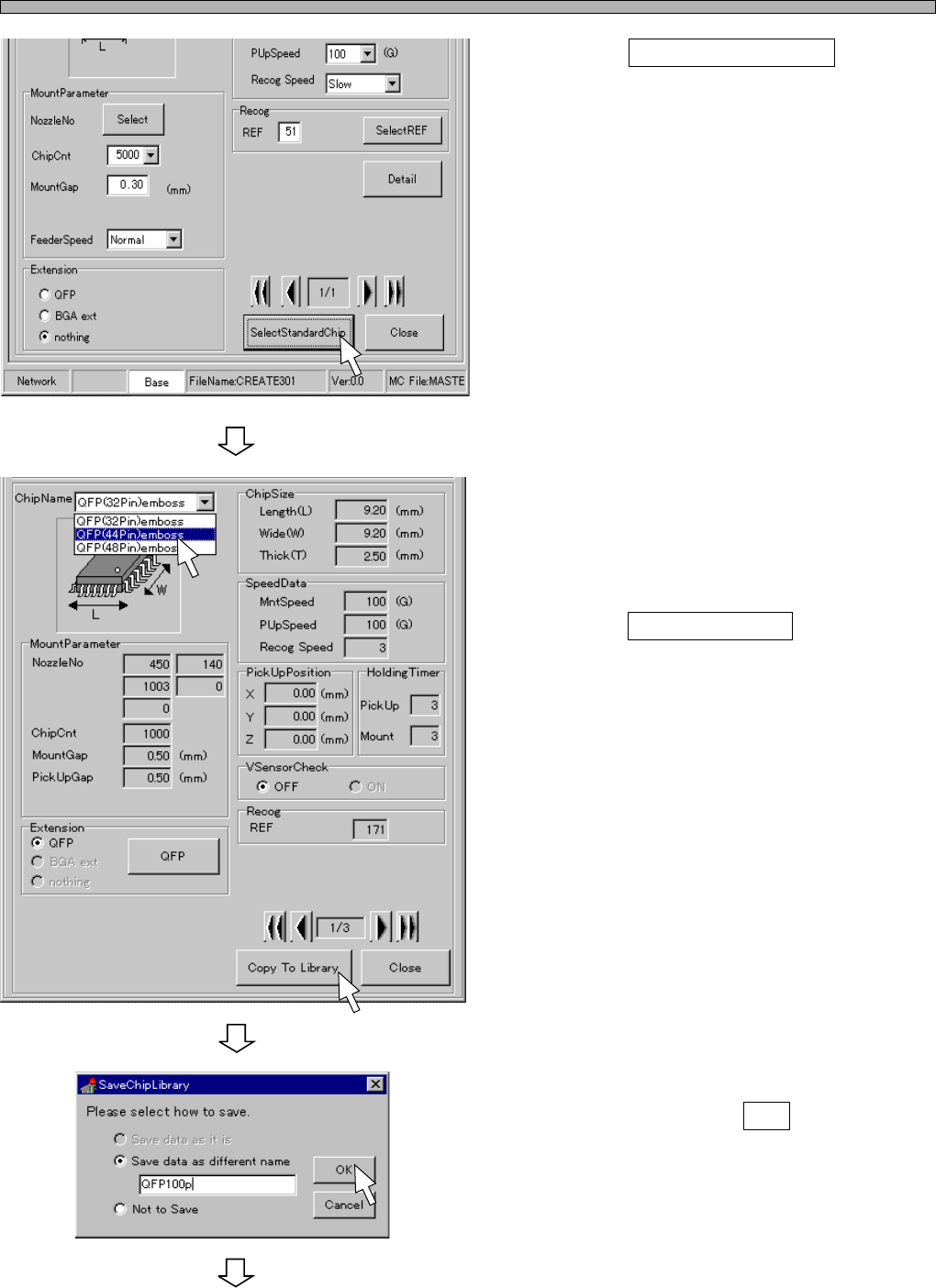
4. Click on SelectStandardChip .
• [SelectStandardChip] window opens.
∗ When the same chip data as you want to
mount is in the standard library, take the steps
from 5. to 7. When such data does not exist,
you can edit the currently displayed custom
chip data and save this data as a different
name. In this case, skip to step 8.
5. Choose the chip you want to copy to
the custom library.
6. Click on Copy To Library .
• [SaveChipLibrary] window opens.
7. Enter the name of the chip to be
saved, and click on OK .
• [ChipLibrary] window opens.
To the next page
4H4C-EPt-EdCl-001
4H4C-EPt-EdCl-007
4H4C-E-PMA01-A02-00