00198150-02_SM_TX_en.pdf - 第164页
7 Conveyor 7.6 Fiber Optic Cable and Light Barriers 164 Service Manual SIPLACE TX Series 06/2017 7.6 Fiber Optic Cable and Light Barriers 7.6.1 Replacing the Laser Light Barrier for the Transmitter/Receiver Parts, Equipm…
7 Conveyor
7.5 Conveyor Belt, Belt Drive and Hexagonal Shaft
Service Manual SIPLACE TX Series 06/2017 163
CAUTION
Replacing a movable idler pulley
The movable idler pulleys are fixed to the inner side of the conveyor wall with a T slot nut
[03113747-xx].
If you want to remove a movable idler pulley, proceed as follows:
ü When removing a movable idler pulley, first fix the T slot nut.
► (1) When removing a movable idler pulley in the middle of the conveyor side, you can
reach the T slot nut through the hole on the other side of the conveyor side. Use your
finger or an appropriate tool to fix the T slot nut.
► (2) When removing a movable idler pulley at the beginning or the end of the conveyor
side, fix the T slot nut with your finger (the conveyor sides are open at the side).
ð The T slot nut must not fall into the conveyor side! The lack of room makes sub-
sequent insertion and fixture highly complicated if not impossible!
► Loosen the movable idler pulley.
CAUTION
Loosen the movable idler pulley only as far as necessary!
► Do not remove the movable idler pulley (unless you explicitly need to remove it). Oth-
erwise the T slot nut on the inner side will fall into the conveyor side.
► Remove the idler pulley to be replaced.
CAUTION
Spacer
The fastening screw for some idler pulleys also holds the spacers in place.
► Make sure that you do not loose these.
► Unthread the deflection pulley from the conveyor toothed belt and remove it.
Installation
► Follow the removal instructions in reverse order for installation. Also observe the following in-
structions:
CAUTION
Installation instructions
► Make sure you use the correct fastening screw.
Tighten this fastening screw with a torque of 0.58Nm. Make sure that you do not
tighten the screws too much. This could cause irreparable damage to the conveyor!
► Use any spacers available.
► Do not bend or damage the toothed belt.
► Make sure that the toothed belt is positioned accurately in the guidance on the motor
shaft or in the belt drive.
► Remove the adhesive tape, if necessary.
► While you tighten the idler pulley, set the tension of the toothed belt correctly (see
7.5.2.1 "Setting the Tension of the Conveyor Toothed Belt" [}159]).
7 Conveyor
7.6 Fiber Optic Cable and Light Barriers
164 Service Manual SIPLACE TX Series 06/2017
7.6 Fiber Optic Cable and Light Barriers
7.6.1 Replacing the Laser Light Barrier for the Transmitter/Receiver
Parts, Equipment and Tools
●
Laser light barrier transmitter [03098280‑xx]
●
Laser light barrier receiver [03098281‑xx]
●
Flashlight, if needed
●
Magnet lifter, if needed
●
Tweezers, if needed
Overview
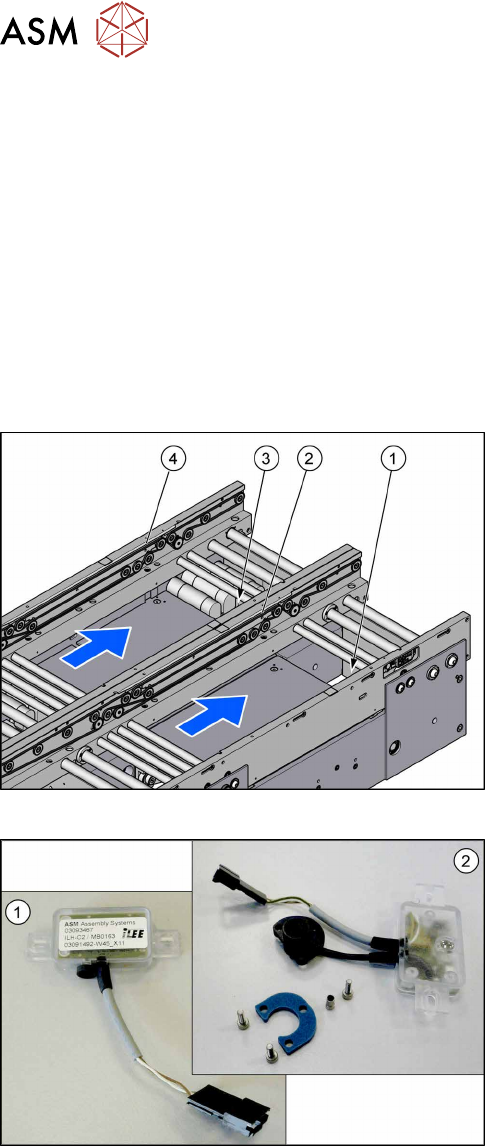
Fig.221: Transmitter and receiver
1. Transmitter PA (lane 1)
2. Receiver PA (lane 1)
3. Transmitter PA (lane 2)
4. Receiver PA (lane 2)
Fig.222: Transmitter and receiver
1. Receiver
2. Transmitter (incl. assembly material)
7 Conveyor
7.6 Fiber Optic Cable and Light Barriers
Service Manual SIPLACE TX Series 06/2017 165
Removal
► Use the software or manually move the conveyor rail into a position which allows you best ac-
cess.
– To move the conveyor rail manually, pull the toothed belt of the width adjustment unit.
► Switch off the machine, disconnect it from the power supply and secure it to prevent
unauthorized reactivation. Observe the instructions in section 1.2 "Preparatory Work..." [}15].
► Move all gantries out of the transport area as far as possible at one side of the machine.
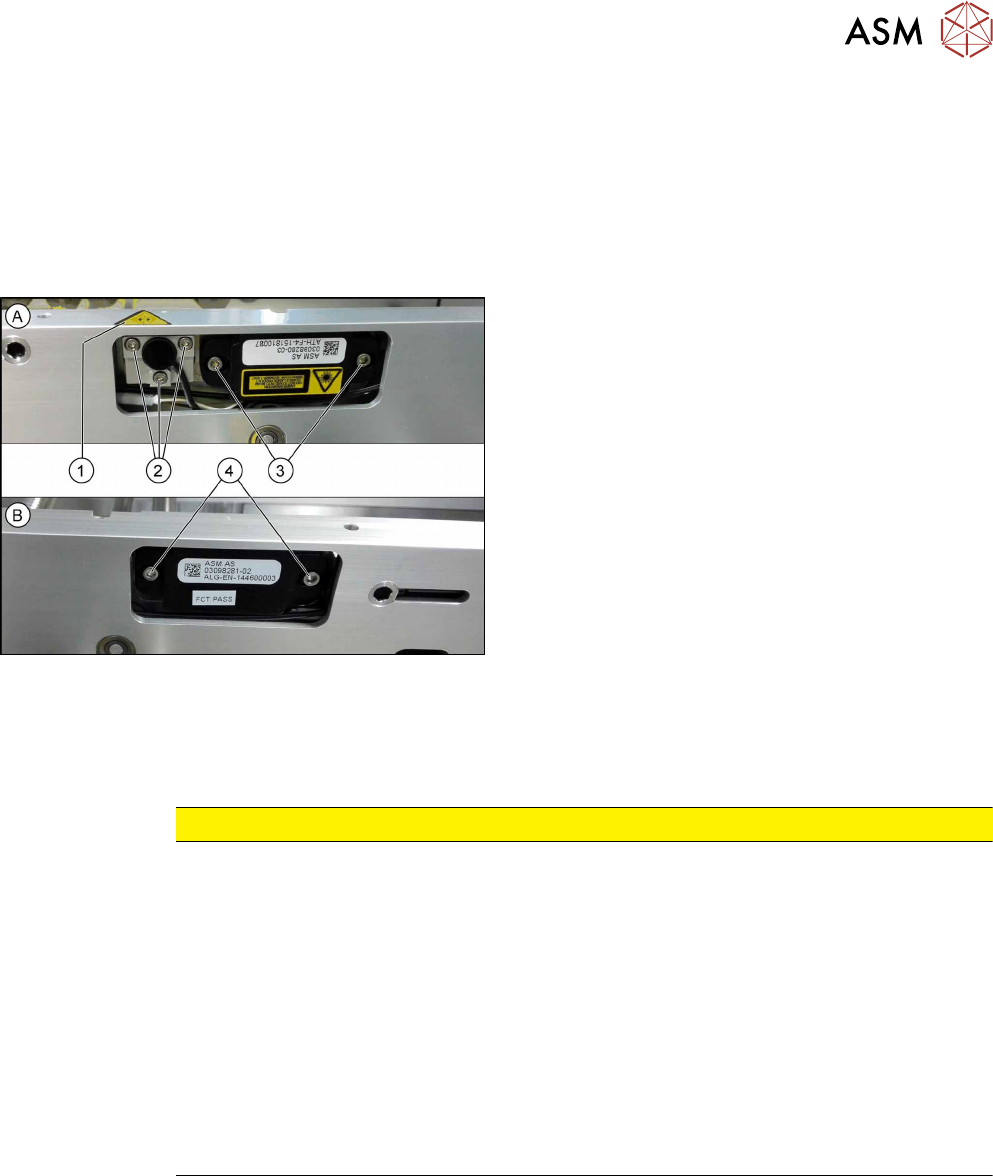
Fig.223: Removing transmitter and receiver
The transmitters are always near the laser warning la-
bels(1). The receivers are always on the opposite
sides.
► (A) Transmitter:
Remove the five fastening screws(2) and(3).
Make sure that no parts fall into the conveyor rail.
► (B) Receiver:
Remove the two fastening screws(4). Make sure
that no parts fall into the conveyor rail.
► Unplug the electrical connection.
Installation
► Follow the removal instructions in reverse order for installation. Also observe the following in-
structions:
CAUTION
Installation instructions
► Reconnect the transmitter/receiver before installation.
► Make sure that all the other cables in the conveyor rail are run under the transmitter/
receiver. There is a particular lack of space at the transmitters.
► Use the bushing for the bottom screw. This screw is used to fix the sensor.
The two upper screws are used to adjust the laser beam.
► The transmitters are fixed hand-tight with the lower screw and adjusted with the top
two screws.
► Check the setting for the transmitter/receiver and correct if necessary (see 7.6.5.1
"Setting the Fiber Optic Cable Sensor" [}176]).
► Teach the PCB sensors using the station software (see 7.10 "Teaching the PCB
Sensors (SW70x)" [}192]).