00198150-02_SM_TX_en.pdf - 第49页
3 SMPS 3.6 Replacing the CSB (Contactor Safety Breaker) or the CSB Cover Service Manual SIPLACE TX Series 06/2017 49 3.6 Replacing the CSB (Contactor Safety Breaker) or the CSB Cover DANGER High voltages High DC voltages…
3 SMPS
3.5 MGCUs
48 Service Manual SIPLACE TX Series 06/2017
3.5.4 Replacing the MGCU Fan [03104136-xx]
Parts, equipment and tools
●
Fan for MGCU [03104136-xx]
Overview
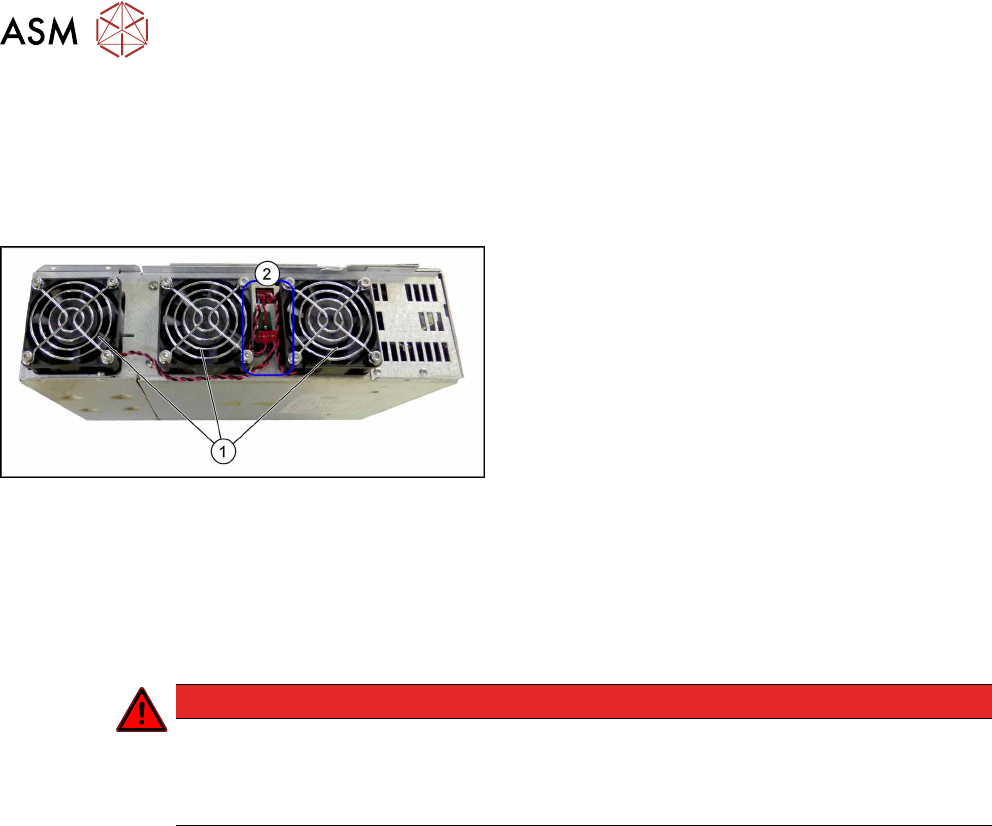
Fig.43: MGCU fans
1. Three fans on the MGCU
2. Electrical connections of the fans
Removal
► Switch off the machine, disconnect it from the power supply and secure it to prevent
unauthorized reactivation. Observe the instructions in section 1.2 "Preparatory Work..." [}15].
► Remove the power supply fastening screw and pull out the power supply. For more informa-
tion about this read section 3.2 "Pulling out the Power Supply" [}35].
DANGER
Checking for absence of voltage!
► Before you start working check the power supply for absence of voltage and observe
the waiting times! For more information about this read section 3.4 "Checking For Ab-
sence of Voltage" [}37].
► Dismantle and remove the MGCU from the SMPS holder (see 3.5.2 "Replacing MGCU
[03117531Sxx]" [}45]).
► Unplug the electrical connection to the fan. You may want to mark the position of this connec-
tion to make clear assignment easier later on.
► Remove the four screws fastening the fan and then remove the fan.
Installation
► Follow the removal instructions in reverse order for installation.
3 SMPS
3.6 Replacing the CSB (Contactor Safety Breaker) or the CSB Cover
Service Manual SIPLACE TX Series 06/2017 49
3.6 Replacing the CSB (Contactor Safety Breaker) or the CSB
Cover
DANGER
High voltages
High DC voltages can be present in the CSB.
► No parts of the CSB may be replaced.
► Only the front cover of the CSB may be dismantled for connecting cables or removing
the complete unit.
► The CSB may only be replaced as a complete unit.
Parts, equipment and tools
Choose the required spare part:
●
Contactor safety breaker [03112066‑xx]
●
Board cover assembly [03116600-xx]
Removal
► Switch off the machine, disconnect it from the power supply and secure it to prevent
unauthorized reactivation. Observe the instructions in section 1.2 "Preparatory Work..." [}15].
► Remove the power supply fastening screw and pull out the power supply. For more informa-
tion about this read section 3.2 "Pulling out the Power Supply" [}35].
DANGER
Checking for absence of voltage!
► Before you start working check the power supply for absence of voltage and observe
the waiting times! For more information about this read section 3.4 "Checking For Ab-
sence of Voltage" [}37].
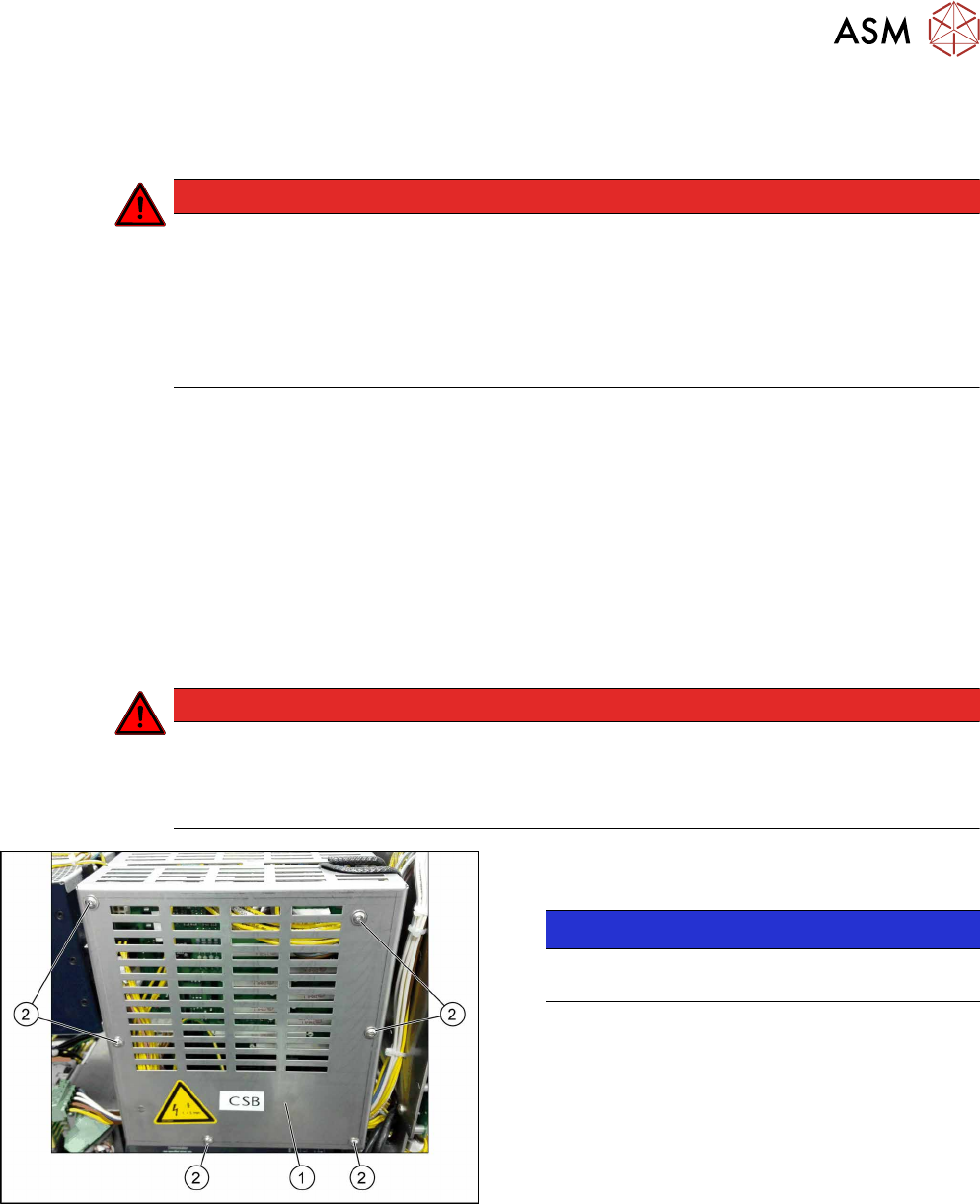
Fig.44: Removing the cover
► Remove the six screws(2) fastening the
cover(1).
NOTICE!
If you are replacing only the CSB cover you can
end removal here and continue with installation.
.
3 SMPS
3.6 Replacing the CSB (Contactor Safety Breaker) or the CSB Cover
50 Service Manual SIPLACE TX Series 06/2017
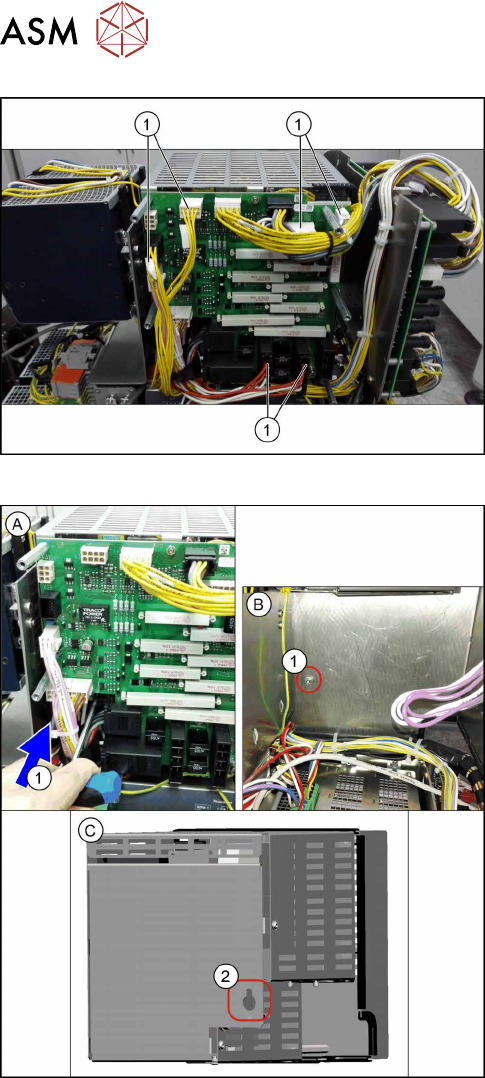
Fig.45: Unplugging the electrical connections at the front
► Unplug the electrical connections(1). You might
like to mark their positions to make clear assign-
ment easier later on.
Fig.46: Removing the CSB
► (A) Loosen the screw(1) on the rear of the CSB.
To access the screw, insert an extension past the
side of the CSB.
Figure (B) shows the power supply without the
CSB for a better view of the screw.
► (C) Unhook the CSB (keyhole (2) on the back of
the CSB).
Lift the CSB until you can reach the connector on
the underside.