00198140-01_UM_JTF-ML_TX12_de_en.pdf - 第102页
Setting up and Commissioning Configuration of JEDEC Tray Feeders in SIPLACE Pro 4.3.5 Configu ration of the Setup – Setup Tree View 102 JEDEC Tray Feeder (JTF-ML) JEDEC Tray Feeder – Carrier Level If a Multiple JEDEC tra…
Setting up and Commissioning
4.3.5 Configuration of the Setup – Setup Tree View Configuration of JEDEC Tray Feeders in SIPLACE Pro
JEDEC Tray Feeder (JTF-ML) 101
4.3.5.3
4.3.5.3 Configuring the JEDEC Tray Feeder on the Table
Configuring the JEDEC Tray Feeder on the Table
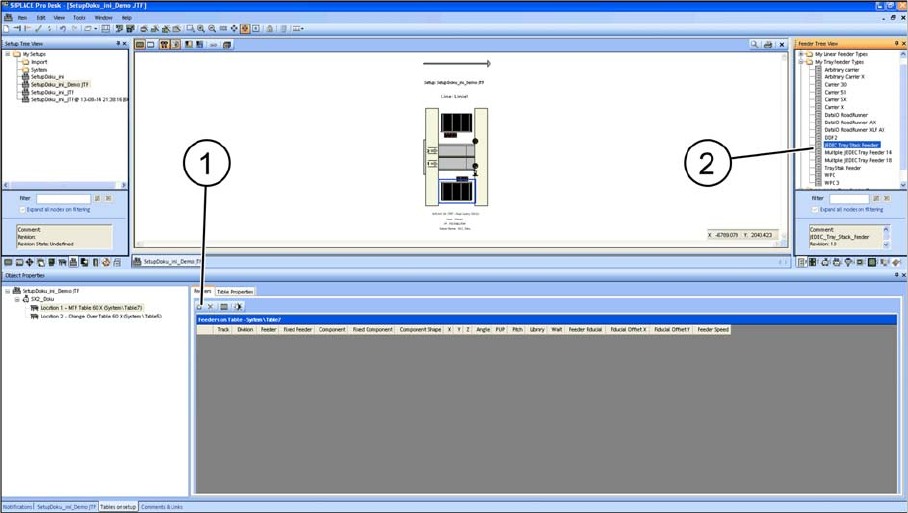
There are two ways to set up the JEDEC tray feeder on the table:
▪ Manually dragging the JTEDEC tray feeder onto the table (2).
▪ By selecting the Insert a new item into the collection (1) menu option.
Configuring the JEDEC Tray Feeder
The JEDEC tray feeder is always set on the track that is allowed for the machine.
This track cannot be changed.
▪ SIPLACE SX1/SX2: tracks 11 - 26
▪ SIPLACE X-Series S, location 3: tracks 1 – 15
▪ SIPLACE X-Series S, location 2: tracks 27 – 40
▪ SIPLACE TX-Series: tracks 29 – 40 (SIPLACE JTF-ML FDK)
Setting up and Commissioning
Configuration of JEDEC Tray Feeders in SIPLACE Pro 4.3.5 Configuration of the Setup – Setup Tree View
102 JEDEC Tray Feeder (JTF-ML)
JEDEC Tray Feeder – Carrier Level
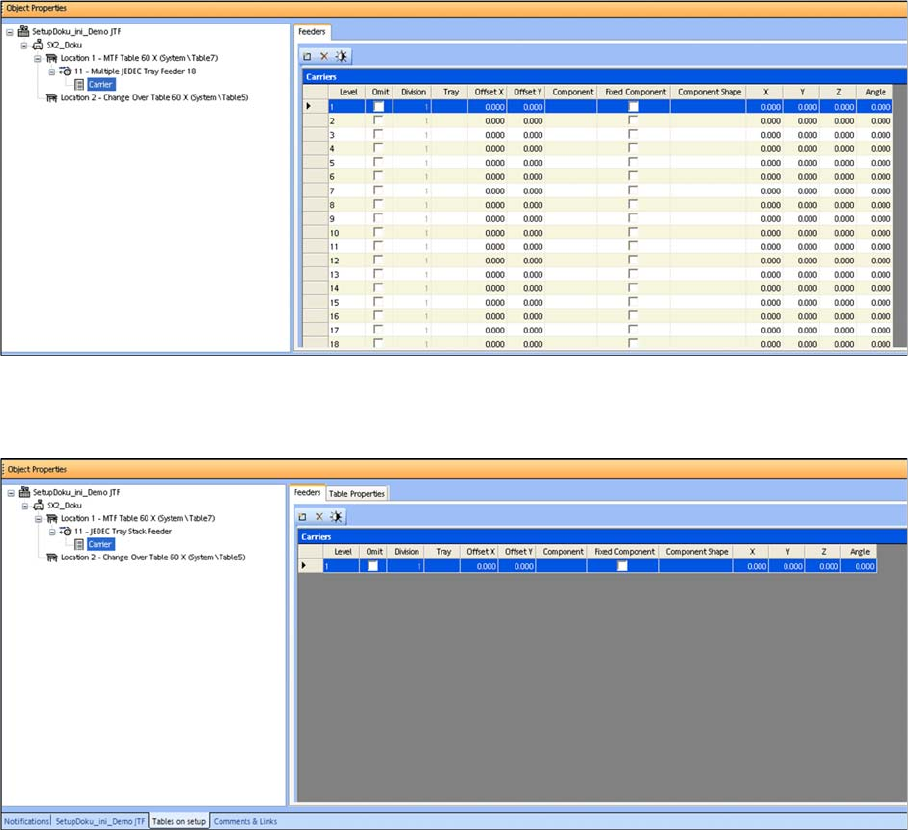
If a Multiple JEDEC tray feeder 18 (SIPLACE JTF-M/JTF-ML for thin trays) was selected, "Carrier" will
list the number of trays (18) as well as their settings and their component occupancy (per tray).
Only 14 trays are displayed for a Multiple JEDEC tray feeder 14 (SIPLACE JTF-M/JTF-ML for thick
trays).
Carrier Level SIPLACE JTF-M/JTF-ML
For a JEDEC tray stack feeder (SIPLACE JTF-S), Carrier shows only one tray, as all trays that are set
up in the JEDEC tray stack feeder must have the same components.
Carrier Level SIPLACE JTF-S
Tasks on the Machine
Controls and Displays
JEDEC Tray Feeder (JTF-ML) 103
5
5 Tasks on the Machine
Tasks on the Machine
This chapter contains a number of subjects that are intended to help you during your daily work on a
SIPLACE line. For example, you are provided with preventative measures that you can take to minimize
the down time on the machine to obtain the highest possible level of efficiency for the SIPLACE line dur-
ing production.
5.1
5.1 Controls and Displays
Controls and Displays
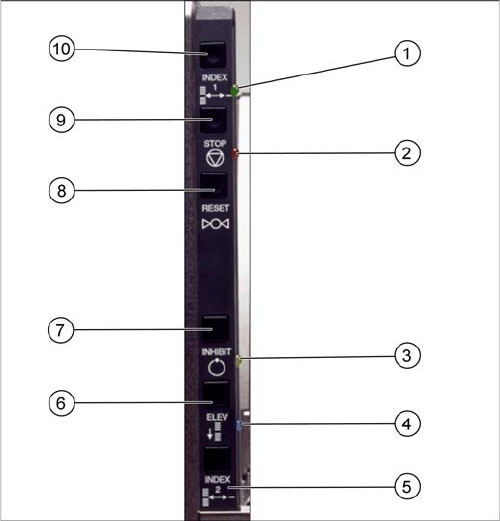
Index 1 (10) and index 2 (5)
Index 1 and 2 only trigger a tray changeover if they are both pressed (series connection).The next tray
in the series is moved into the magazine. A connection to the serial interface is needed for the various
feeder commands.
This function is disabled in production mode.
Stop (9)
If you press the stop button, the pneumatic system immediately switches off and the motors will stop.
The stop button supports the stopping function of the pneumatics system. A signal is sent to the host.
The "Stop and Reset" functions can not be switched off by the production mode.
Reset (8)
The reset button resets the feeder after a stop condition. A signal is sent to the host.
The "Stop and Reset" functions can not be switched off by the production mode.
Inhibit (7)
The inhibit button locks the remote control for the SIPLACE JTF-S. The feeder does not receive any con-
trol commands from the host. This lock is released when the button is pressed again.
This function is disabled in production mode.
The diagram shows the control panel on the feeder.
The functions "Index, Inhibit and Elevator Down" are reg-
ulated by the controller.
The functions "Stop" and "Reset" are electronic stopping
functions for the pneumatic system. If you press the stop
button, the pneumatic system will immediately switch off
and the motors will stop. The status is read by the control-
ler but not regulated by it.
The precise functions are described below: