00198140-01_UM_JTF-ML_TX12_de_en.pdf - 第111页
Tasks on the Machine 5.3.3 Selecting the JEDEC Tray Feeder at the Location Operating the JEDEC Tray Feeder in the Station Software JEDEC Tray Feeder (JTF-ML) 111 SIPLACE X-Series S: Loc 1 select ed at locatio n 1 (exampl…
Tasks on the Machine
Operating the JEDEC Tray Feeder in the Station Software 5.3.2 "Display, Check and Set up Feeders, Components and Nozzles" Menu
110 JEDEC Tray Feeder (JTF-ML)
5.3.2
5.3.2 "Display, Check and Set up Feeders, Components and Nozzles" Menu
"Display, Check and Set up Feeders, Components and Nozzles" Menu
5.3.3
5.3.3 Selecting the JEDEC Tray Feeder at the Location
Selecting the JEDEC Tray Feeder at the Location
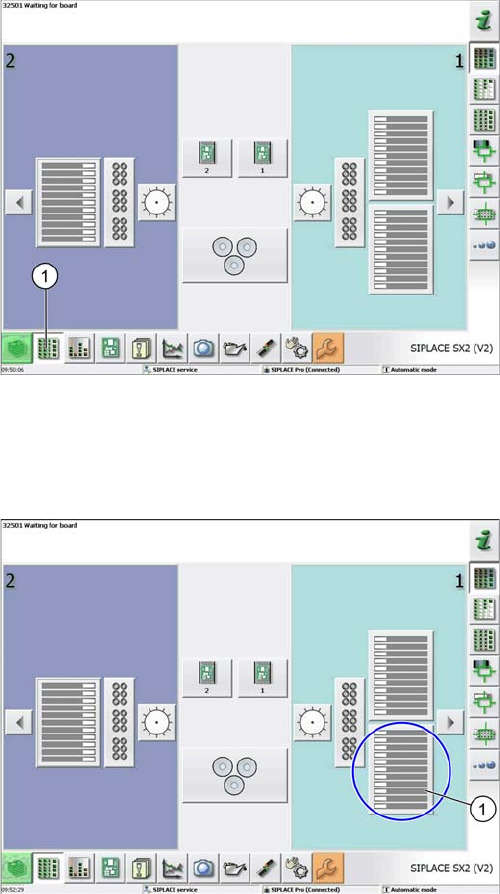
Select menu
(example of SIPLACE SX2 V2)
► Select the Display, check and set up feeders, compo-
nents and nozzles menu (1) to display the sub views
of the relevant locations.
Loc 1 at location 1
(example of SIPLACE SX2 V2)
► Select the relevant location (1) to display the view of
the current setup.
Tasks on the Machine
5.3.3 Selecting the JEDEC Tray Feeder at the Location Operating the JEDEC Tray Feeder in the Station Software
JEDEC Tray Feeder (JTF-ML) 111
SIPLACE X-Series S:
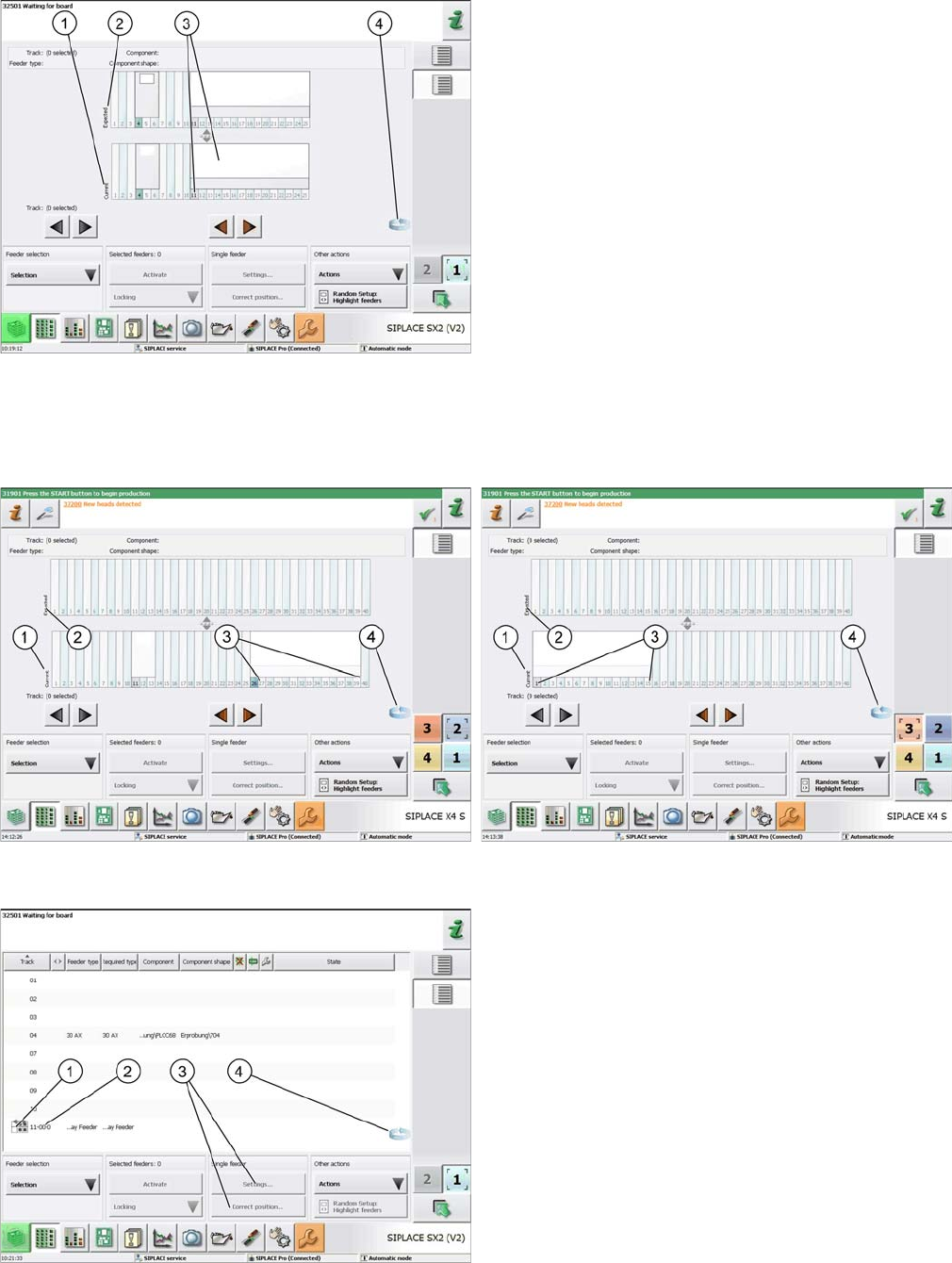
Loc 1 selected at location 1
(example of SIPLACE SX1/2)
1. Current setup (currently set-up feeders)
2. Expected setup (setup expected by SIPLACE Pro)
3. SIPLACE JTF-S, SIPLACE JTF-M feeders on
SIPLACE SX1/2
4. Change button for switching to the Track information
sub menu.
► Press the change button to display the Track informa-
tion submenu.
Location 2 = tracks 27 to 40
(example of SIPLACE X4 S)
Location 3 = tracks 1 to 15
(example of SIPLACE X4 S)
Track 11 selected
(example of SIPLACE SX2 V2)
1. SIPLACE JTF-S, SIPLACE JTF-M for SIPLACE SX1/
2
2. Abbreviation for the SIPLACE JTF feeder (visualiza-
tion)
3. The settings menu is not active until the relevant track
has been selected (highlighted in blue color)
4. Change button to switch back to the current setup
view
Tasks on the Machine
Operating the JEDEC Tray Feeder in the Station Software 5.3.4 JEDEC Tray Feeder Settings
112 JEDEC Tray Feeder (JTF-ML)
5.3.4
5.3.4 JEDEC Tray Feeder Settings
JEDEC Tray Feeder Settings
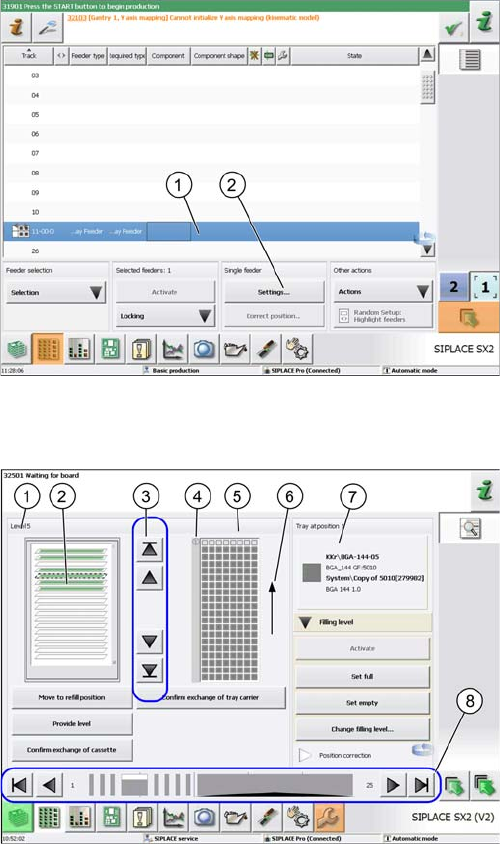
Track 11 highlighted
(example of SIPLACE SX2 V2)
► Select the JEDEC tray feeder for the relevant track
(1).
⇨ The feeder is highlighted in blue color and the Set-
tings menu (2) is enabled for this feeder.
JEDEC tray feeder settings
(example of SIPLACE SX2 V2)
This view is displayed by selecting the Settings button in
the Single Feeder menu:
1. The selected tray (tray 5 in this example) is framed
and displayed as Level 5.
2. Tray occupancy of the JEDEC tray feeder
If the component is set up, the tray will be displayed
in green.
3. Selection buttons for trays (selection via cursor is
possible as well)
4. Position 1 (Tray at Position 1)
5. Picture of the selected tray (tray 5) visualizing the cur-
rent occupancy.
In this example, this first row has already been picked
up. (Gray = occupied, white = empty)
6. Direction of supply
7. Information on the component that is currently in the
feeding position.
8. Feeder on location (arrow keys for selecting the feed-
er)