00198140-01_UM_JTF-ML_TX12_de_en.pdf - 第106页
Tasks on the Machine Task: Operating the Feeder 106 JEDEC Tray Feeder (JTF-ML) Load the magazine into the feeder base Removing the magazine ► Let the host machine send the End- of-Lot (EOL) command to the feeders. ► Open…
Tasks on the Machine
Task: Operating the Feeder
JEDEC Tray Feeder (JTF-ML) 105
5.2
5.2 Task: Operating the Feeder
Task: Operating the Feeder
Loading the trays
► On the host system, link the components / tray code to the slot number of the magazine.
Loading direction
► Place the magazine down on a stabile surface.
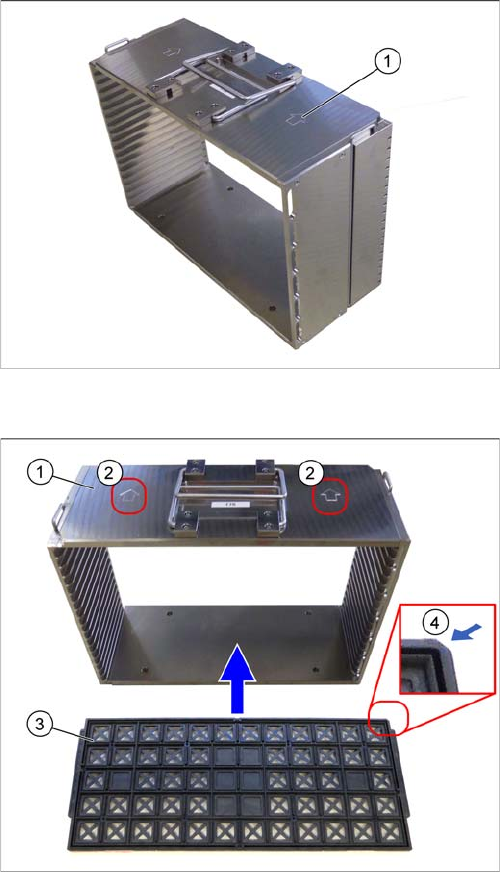
► Observe the arrow (1) on the magazine, which shows
the direction of loading for the magazine.
Observe the orientation (example JTF-M)
1. Magazine
2. Orientation of magazine
The arrow indicates the correct direction of entry into
the JTF-ML.
3. Tray
4. Beveled edge on tray
The beveled edge must be at the front right, in the di-
rection of loading.
► Observe the direction of loading for the trays and the
orientation of the magazine.
Tasks on the Machine
Task: Operating the Feeder
106 JEDEC Tray Feeder (JTF-ML)
Load the magazine into the feeder base
Removing the magazine
► Let the host machine send the End-of-Lot (EOL) command to the feeders.
► Open the door once the lift has reached the bottom.
► Pull out the magazine drawer, together with the magazine.
► Lift it out, hold it horizontal and place it down on a stabile surface.
Removing the tray
► You can pull the trays out of the slots.
Centering pins
► Open the door.
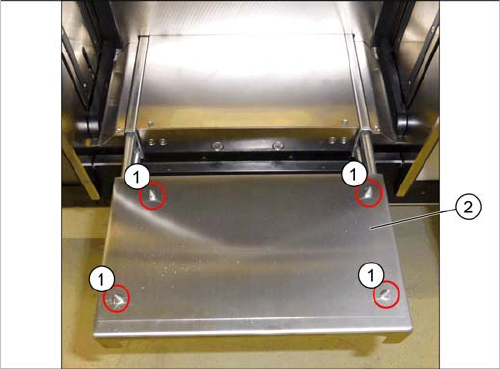
► Pull out the magazine drawer (2).
► Always keep the magazine horizontal when lifting and
holding.
► Place the magazine onto the drawer. Make sure that
the magazine is properly positioned on the four cen-
tering pins (1). Pay attention to the direction of load-
ing.
► Push the magazine drawer, with the magazine, into
the feeder base.
► Close the door.
Tasks on the Machine
5.2.1 Setting the JEDEC Tray Delay Task: Operating the Feeder
JEDEC Tray Feeder (JTF-ML) 107
5.2.1
5.2.1 Setting the JEDEC Tray Delay
Setting the JEDEC Tray Delay
To ensure that the JEDEC tray does not approach the pick position too abruptly, a delay mechanism has
been fitted.
When the slow down sensors are passed, the delay begins after the set time. This time can be set with
the potentiometer.
After the sensors have been passed, the controller continuously reduces the scanning degree of the mo-
tor control until the tray reaches the stop sensor. The speed of the belt is also reduced.
If the tray moves forward, it passes the light barrier, the forward slow down sensor. When moving back-
wards, it passes the light sensor, the return slow down sensor.
CAUTION
Overrotating the potentiometer
These settings should be performed with care. If you overturn the potentiometer, you may need
to replace the entire control control board.
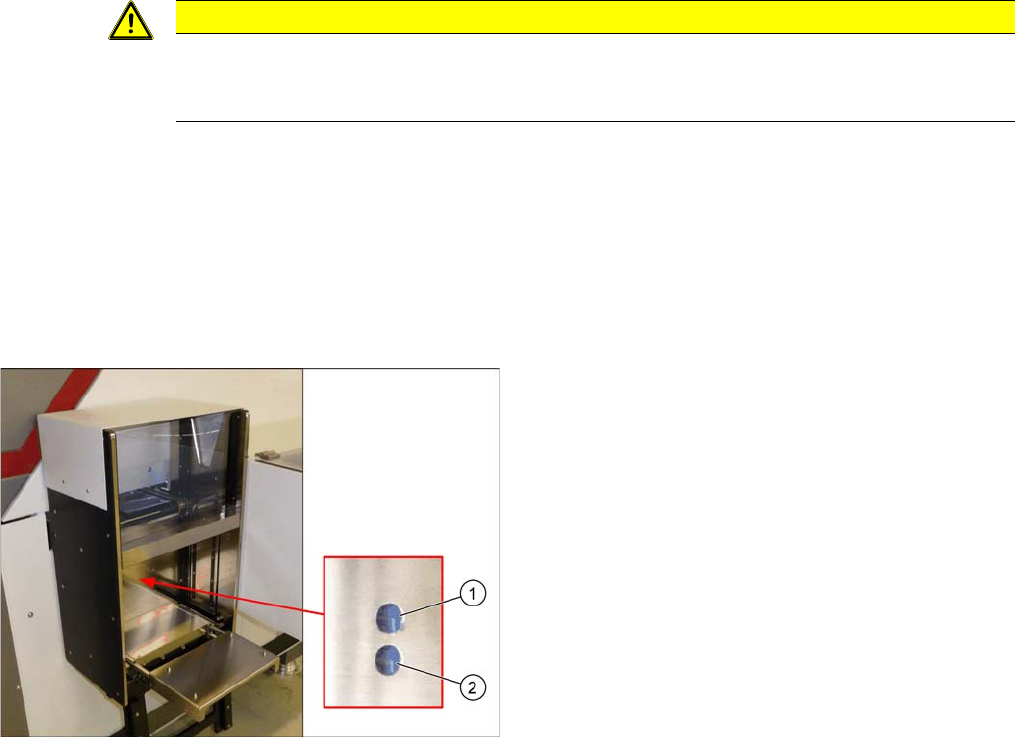
Potentiometer
The diagram shows the potentiometer and the setting for
it. This setting should only be made by trained personnel.
1. Potentiometer delay:
Return-Slow-Down-Sensor
Clockwise: the conveyor ramp down delay is adjusted
so that the tray arrives at the back more quickly.
2. Potentiometer delay:
Forward-Slow-Down-Sensor
Clockwise: the conveyor ramp down delay is adjusted
so that the tray arrives at the front more quickly.