00198140-01_UM_JTF-ML_TX12_de_en.pdf - 第116页
Tasks on the Machine Operating the JEDEC Tray Feeder in the Station Software 5.3.5 JE DEC Tray Feeder Settings – Functions 116 JEDEC Tray Feeder (JTF-ML) Multiple Selection of Trays The Selection button provide s the fol…
Tasks on the Machine
5.3.5 JEDEC Tray Feeder Settings – Functions Operating the JEDEC Tray Feeder in the Station Software
JEDEC Tray Feeder (JTF-ML) 115
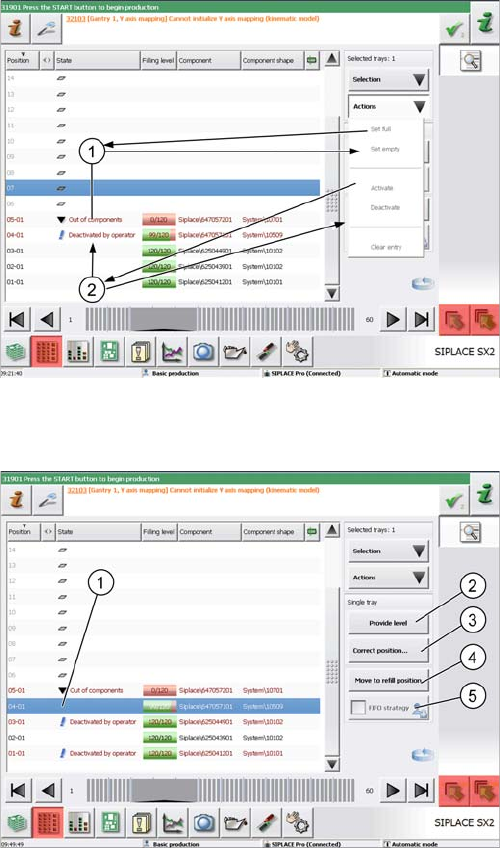
Single Tray Selection
Single selected tray
(example of SIPLACE SX2 V2)
The line for a single selected tray is highlighted in blue
color.
Use the cursor to select a single tray.
You can now make settings for the tray and assign differ-
ent states.
Please note that the trays have been selected in advance
in the example in the screenshot.
1. Set empty: Sets the tray to "Out of components". Use
the Set full button to set it back to full.
2. Deactivate: Deactivates the complete tray which is
then marked as "Deactivated by operator". Use the
Activatebutton to set it back to active.
Functions and actions
(example of SIPLACE SX2 V2)
You can select the following functions and actions for the
single selected tray:
1. Selected tray: highlighted in blue color
2. Provide level: Moves this level to the transfer posi-
tion.
3. Correct position: Correction of the pickup position
4. Move to refill position: Moves the tray back into the
tray carrier in order to remove it. In this state, no com-
ponents can be picked up from any tray.
5. FIFO strategy: This button is active when you are
logged in with the necessary access privileges. As
soon as pickup has been performed once from a JE-
DEC tray on a replacement track, this will be emptied
completely before the actual track is used again.
Tasks on the Machine
Operating the JEDEC Tray Feeder in the Station Software 5.3.5 JEDEC Tray Feeder Settings – Functions
116 JEDEC Tray Feeder (JTF-ML)
Multiple Selection of Trays
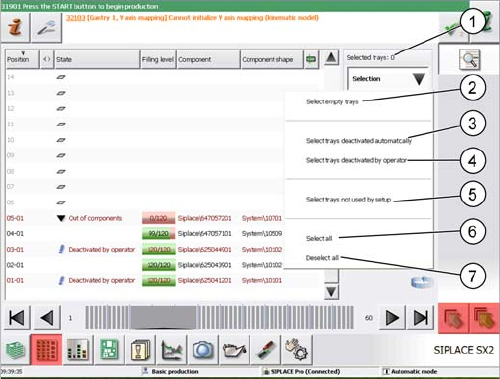
The Selection button provides the following quick selection types:
1. Selected Trays: xx: Indicates the number of selected trays.
2. Select empty trays: All empty trays in the setup are selected.
3. Select trays deactivated automatically: All automatically deactivated trays are selected.
4. Select trays deactivated by operator: All trays that have been manually deactivated by the operator
are selected.
5. Select trays not used by setup: All trays that are not used in the current setup are selected.
6. Select all: All trays are selected regardless of their state.
7. Deselect all: Each previous selection is discarded.
Multiple selection
(example of SIPLACE SX2 V2)
Use the key combination Shift+Alt to select several trays.
The selected trays are then highlighted in blue color.
If trays have been deactivated manually or automatically
before or if the state has been changed, you can now
easily select these trays with the Selection button.
The selected trays are then displayed as Selected Trays:
xx.
Manufacturing Engineering
Consumables
JEDEC Tray Feeder (JTF-ML) 117
6
6 Manufacturing Engineering
Manufacturing Engineering
All the ball bearings used in the feeders are sealed and they do not require any separate lubrication.
The magazine is operated via dry-running chains and therefore may not be greased.
6.1
6.1 Consumables
Consumables
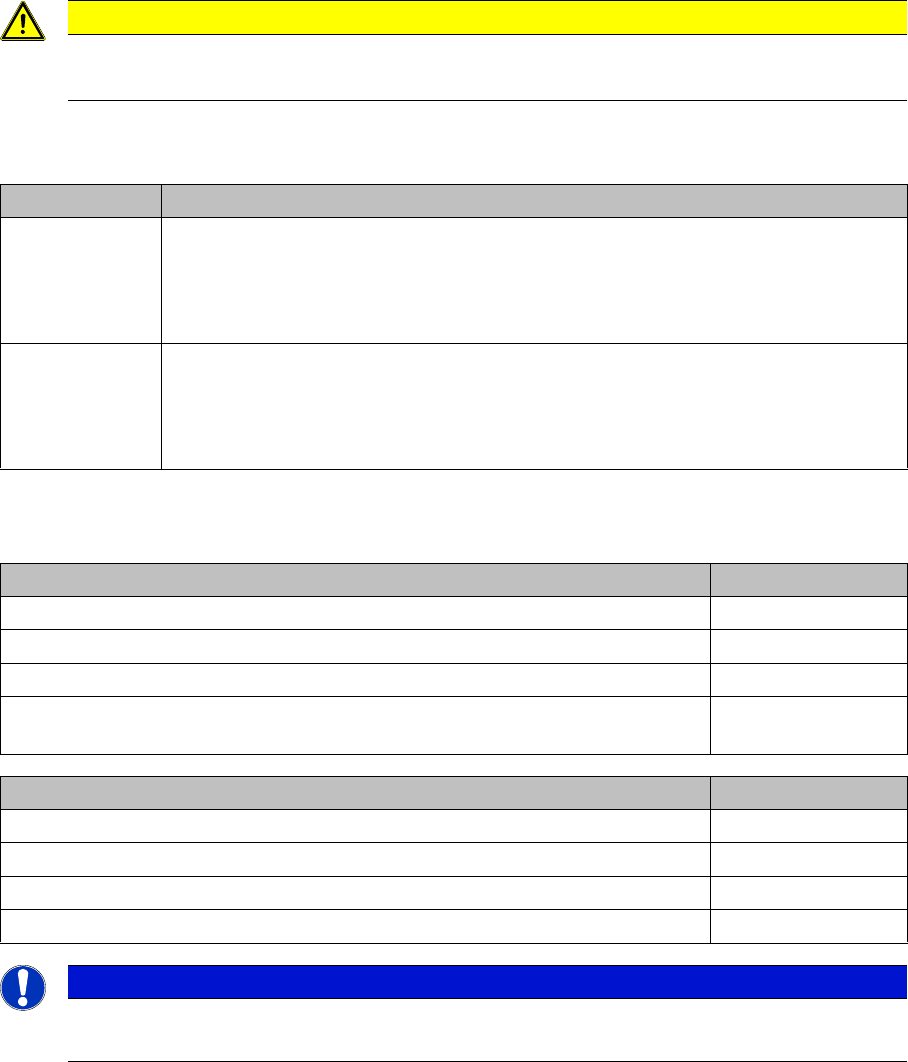
CAUTION
Observe the maintenance instructions
► During these tasks, also observe the preventive maintenance manual for your machine.
Interval Maintenance task
Weekly ► Check whether the parts on the feeder are damaged.
► Check whether the conveyor belts are clean and whether they have any dam-
age.
► Replace any damaged parts.
Monthly ► Clean the feeder.
► Clean the conveyor belts and the tray platform with oil-free alcohol.
► Check whether the rubber on the tray clamps is worn or damaged. Replace it if
necessary.
Consumables Item No.
Cotton gloves 00359087-xx
Protective latex gloves 00372972-xx
Lint-free cleaning cloths 03082092-xx
Ethanol
Isopropanol – IPA can be used as an alternative.
Tools Item No.
Set of Allen keys 00376492-xx
Set of Phillips screwdrivers 00319064- xx
Vacuum cleaner
Waste bin
NOTICE
Additionally required documentation
Depending on the hardware in use, you may need additional documents.