00198140-01_UM_JTF-ML_TX12_de_en.pdf - 第95页
Setting up and Commissioning 4.2.12 Completing the Mechanical Work Retrofitting in the SIPLAC E TX-Series JEDEC Tray Feeder (JTF-ML) 95 4.2.12 4 . 2 . 1 2 C o m p le t in g t h e M e c h a n ic a l W o r k Completing the…
Setting up and Commissioning
Retrofitting in the SIPLACE TX-Series 4.2.11 Preparing the Component Trolley
94 JEDEC Tray Feeder (JTF-ML)
4.2.11
4.2.11 Preparing the Component Trolley
Preparing the Component Trolley
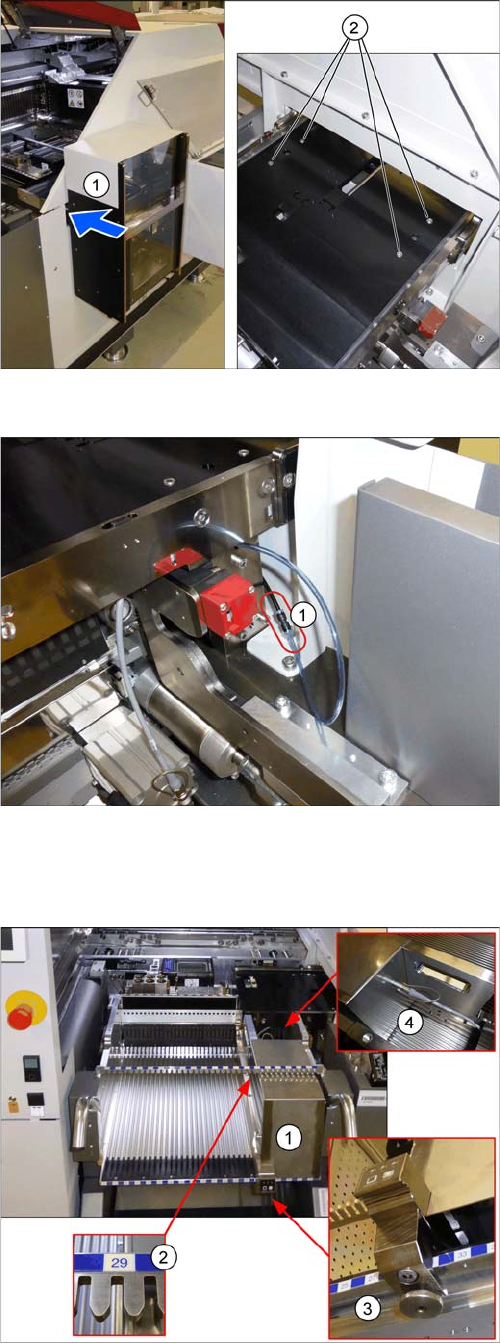
Mounting the SIPLACE JTF-ML
► Fasten the SIPLACE JTF-ML (1) to the holder with
four screws (2).
Connecting the compressed air hose
► Connect the compressed air hose (1).
Preparing the component trolley
► Fit the SIPLACE JTF-ML FDK (1) into place on track
29 (2) of the SIPLACE JTF component trolley.
► Lock the (3) SIPLACE JTF-ML FDK.
► Move the SIPLACE JTF component trolley into the
machine.
► Connect (4) the SIPLACE JTF-ML to the SIPLACE
JTF-ML FDK.
Setting up and Commissioning
4.2.12 Completing the Mechanical Work Retrofitting in the SIPLACE TX-Series
JEDEC Tray Feeder (JTF-ML) 95
4.2.12
4.2.12 Completing the Mechanical Work
Completing the Mechanical Work
► Check and correct the height of the NC holder (see "7.1.2.1 Setting the Nozzle Changer Height"
[ ➙ 120]).
► Check and correct the height of the nozzle changer (see "7.1.2.2 Setting the Height of the Nozzle
Station" [ ➙ 121]).
► Check the setting of the jumper on the NC (if one is present).
It must be set to 2-3 (see also "7.1.2.3 Jumpers on the Nozzle Changer" [ ➙ 122]).
► Fit the NC and the nozzle station.
► Install the used tape chute in location 1.
► Move the component trolley into the machine.
► Turn the machine on.
► Set the software (see "4.2.13 Software Settings" [ ➙ 95]).
4.2.13
4.2.13 Software Settings
Software Settings
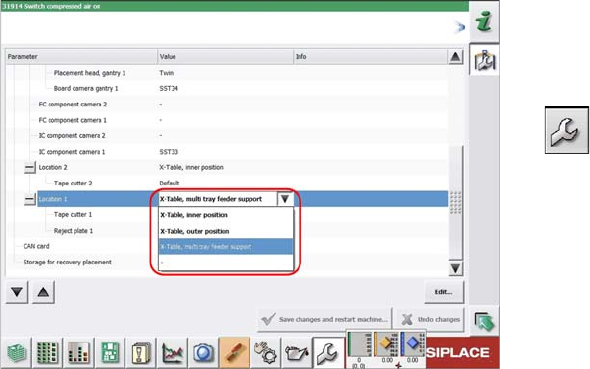
Configuring the SIPLACE JTF-ML
Configuration and calibration is performed in the user lev-
el Service.
► On first reboot with the SIPLACE JTF-ML, this needs
to be entered in the machine configuration. Select
Service → Machine Configuration.
► Select the SIPLACE JTF-ML at location 1.
► Save the changes.
► Reboot the machine.
Setting up and Commissioning
Configuration of JEDEC Tray Feeders in SIPLACE Pro 4.3.1 SIPLACE JTF-ML in SIPLACE Pro – Feeder Tree View
96 JEDEC Tray Feeder (JTF-ML)
4.3
4.3 Configuration of JEDEC Tray Feeders in SIPLACE Pro
Configuration of JEDEC Tray Feeders in SIPLACE Pro
JEDEC tray feeders are available from SIPLACE Pro 11.1. SIPLACE Pro versions up to 10.x do not sup-
port this family of feeders.
4.3.1
4.3.1 SIPLACE JTF-ML in SIPLACE Pro – Feeder Tree View
SIPLACE JTF-ML in SIPLACE Pro – Feeder Tree View
NOTICE
Example
The following graphics show the SIPLACE Pro 11.1 software taking the SIPLACE SX2 V2 as
an example. Proceed in the same way for other machine types. Any relevant differences will be
mentioned explicitly.
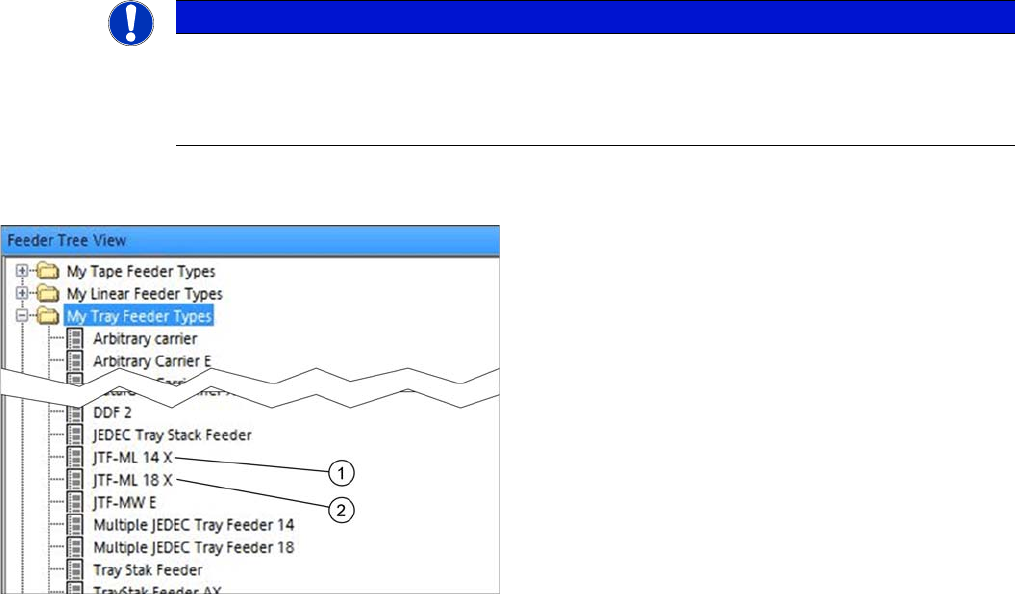
Feeder Tree View
Two SIPLACE JTF-ML feeder types can be selected in
the Feeder Tree View:
1. Multiple JEDEC tray feeder 14 for high components
version for 14 JEDEC trays d = 12.19 mm / max. 14
different component (one component type per tray)
2. Multiple JEDEC tray feeder 18 for standard compo-
nents
version for 18 JEDEC trays d = 7.62 mm / max. 18 dif-
ferent component (one component type per tray)