00198140-01_UM_JTF-ML_TX12_de_en.pdf - 第105页
Tasks on the Machine Task: Operating the Feeder JEDEC Tray Feeder (JTF-ML) 105 5.2 5 . 2 T a s k : O p e r a t in g t h e F e e d e r Task: Operating the Feeder Loading the trays ► On the host s ystem, lin k the componen…

Tasks on the Machine
Controls and Displays
104 JEDEC Tray Feeder (JTF-ML)
Elevator down (6)
This function allows you to change the trays in the magazine without stopping production. The magazine
moves down and the current tray in the pick position remains clamped and the ready LED (green) con-
tinues to shine.
► As soon as the lift stops at the bottom, the door can be opened and the trays can be changed.
► Open the door once the lift has reached the bottom.
► Leave the empty slot (for the tray currently used in the pick position) empty.
This function is disabled in production mode.
LED indicators
Green LED – READY (1)
LED on Shows that a tray was successfully moved to the pick position and
is now ready for components to be removed from the tray (or for it
to be loaded). The LED also shows that a ready signal has been
sent to the host. As soon as the tray leaves the pick position, the
LED will extinguish.
LED off Not ready for loading or unloading or tray changeover.
Orange LED – Stop/Error (2)
LED on Stop condition. For example, occurs after stop button was pressed.
LED flashes Error condition. An error occurred during the tray changeover.
LED off Normal mode
Yellow LED – Inhibit (3)
LED on The yellow LED shows a lock. The feeder will not receive any tray
changeover commands, neither via the remote control nor manual-
ly.
LED off Normal mode.
Blue LED – Full/Empty (4) If the next tray is manually queried after the last tray in the maga-
zine (slot with the highest number), the blue LED will show EMPTY.
This also occurs when there is no magazine inserted.
Tasks on the Machine
Task: Operating the Feeder
JEDEC Tray Feeder (JTF-ML) 105
5.2
5.2 Task: Operating the Feeder
Task: Operating the Feeder
Loading the trays
► On the host system, link the components / tray code to the slot number of the magazine.
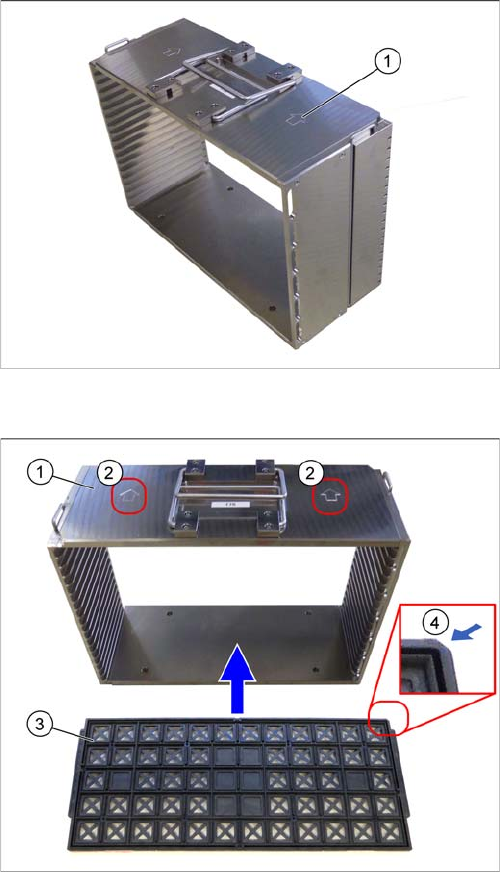
Loading direction
► Place the magazine down on a stabile surface.
► Observe the arrow (1) on the magazine, which shows
the direction of loading for the magazine.
Observe the orientation (example JTF-M)
1. Magazine
2. Orientation of magazine
The arrow indicates the correct direction of entry into
the JTF-ML.
3. Tray
4. Beveled edge on tray
The beveled edge must be at the front right, in the di-
rection of loading.
► Observe the direction of loading for the trays and the
orientation of the magazine.
Tasks on the Machine
Task: Operating the Feeder
106 JEDEC Tray Feeder (JTF-ML)
Load the magazine into the feeder base
Removing the magazine
► Let the host machine send the End-of-Lot (EOL) command to the feeders.
► Open the door once the lift has reached the bottom.
► Pull out the magazine drawer, together with the magazine.
► Lift it out, hold it horizontal and place it down on a stabile surface.
Removing the tray
► You can pull the trays out of the slots.
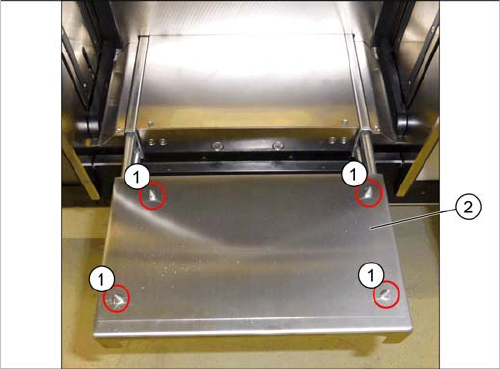
Centering pins
► Open the door.
► Pull out the magazine drawer (2).
► Always keep the magazine horizontal when lifting and
holding.
► Place the magazine onto the drawer. Make sure that
the magazine is properly positioned on the four cen-
tering pins (1). Pay attention to the direction of load-
ing.
► Push the magazine drawer, with the magazine, into
the feeder base.
► Close the door.