00198140-01_UM_JTF-ML_TX12_de_en.pdf - 第97页
Setting up and Commissioning 4.3.2 JEDEC Tray Description – Tray T ree View Configuration of J EDEC Tray Feeders in SIPLACE Pro JEDEC Tray Feeder (JTF-ML) 97 4.3.2 4 . 3 . 2 J E D E C T r a y D e s c r ip t io n – T r a …
Setting up and Commissioning
Configuration of JEDEC Tray Feeders in SIPLACE Pro 4.3.1 SIPLACE JTF-ML in SIPLACE Pro – Feeder Tree View
96 JEDEC Tray Feeder (JTF-ML)
4.3
4.3 Configuration of JEDEC Tray Feeders in SIPLACE Pro
Configuration of JEDEC Tray Feeders in SIPLACE Pro
JEDEC tray feeders are available from SIPLACE Pro 11.1. SIPLACE Pro versions up to 10.x do not sup-
port this family of feeders.
4.3.1
4.3.1 SIPLACE JTF-ML in SIPLACE Pro – Feeder Tree View
SIPLACE JTF-ML in SIPLACE Pro – Feeder Tree View
NOTICE
Example
The following graphics show the SIPLACE Pro 11.1 software taking the SIPLACE SX2 V2 as
an example. Proceed in the same way for other machine types. Any relevant differences will be
mentioned explicitly.
Feeder Tree View
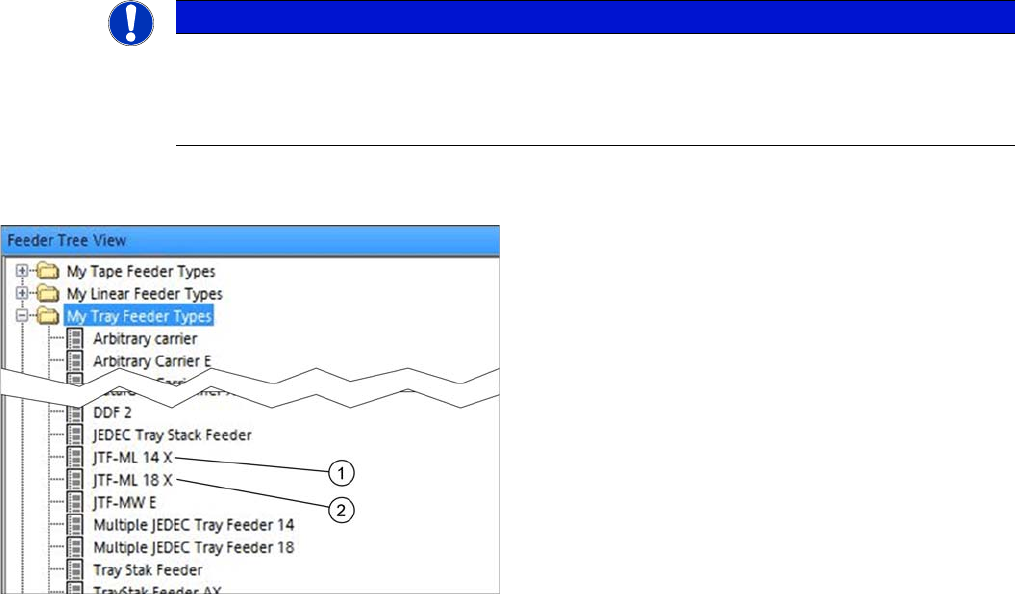
Two SIPLACE JTF-ML feeder types can be selected in
the Feeder Tree View:
1. Multiple JEDEC tray feeder 14 for high components
version for 14 JEDEC trays d = 12.19 mm / max. 14
different component (one component type per tray)
2. Multiple JEDEC tray feeder 18 for standard compo-
nents
version for 18 JEDEC trays d = 7.62 mm / max. 18 dif-
ferent component (one component type per tray)
Setting up and Commissioning
4.3.2 JEDEC Tray Description – Tray Tree View Configuration of JEDEC Tray Feeders in SIPLACE Pro
JEDEC Tray Feeder (JTF-ML) 97
4.3.2
4.3.2 JEDEC Tray Description – Tray Tree View
JEDEC Tray Description – Tray Tree View
Tray Tree View
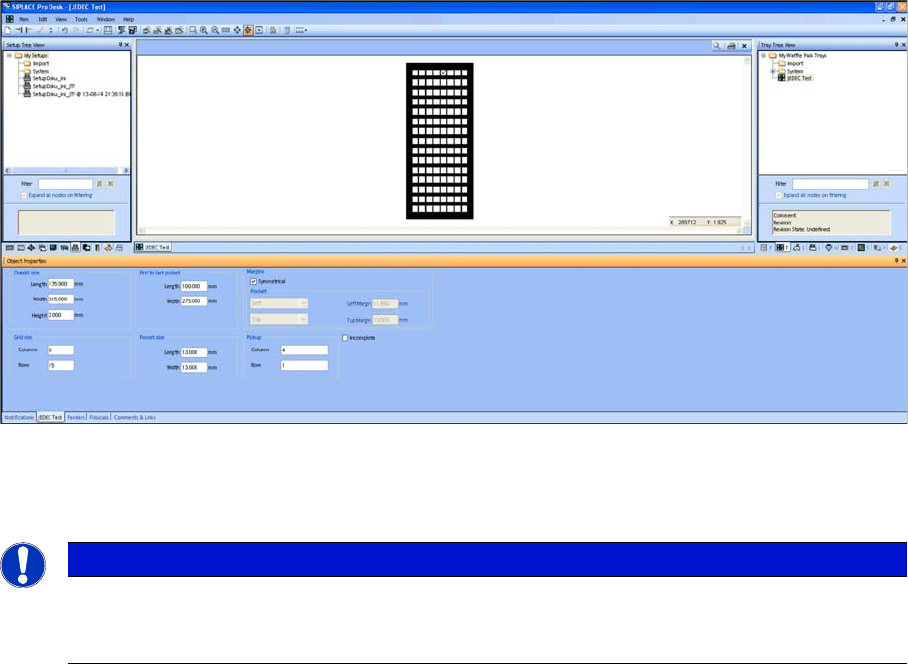
► Define one JEDEC tray with dimensions that comply with the JEDEC tray standard.
► For the dimensions, refer to the data sheet of the manufacturer.
NOTICE
JEDEC tray standard
In order to fit in a JEDEC tray feeder, the dimensions must comply with the JEDEC tray stand-
ard. In the example, a JEDEC tray with the name JEDEC Test was defined.
Setting up and Commissioning
Configuration of JEDEC Tray Feeders in SIPLACE Pro 4.3.3 Configuration of the Station – Station Tree View
98 JEDEC Tray Feeder (JTF-ML)
Tray Tree View – Assign Feeder
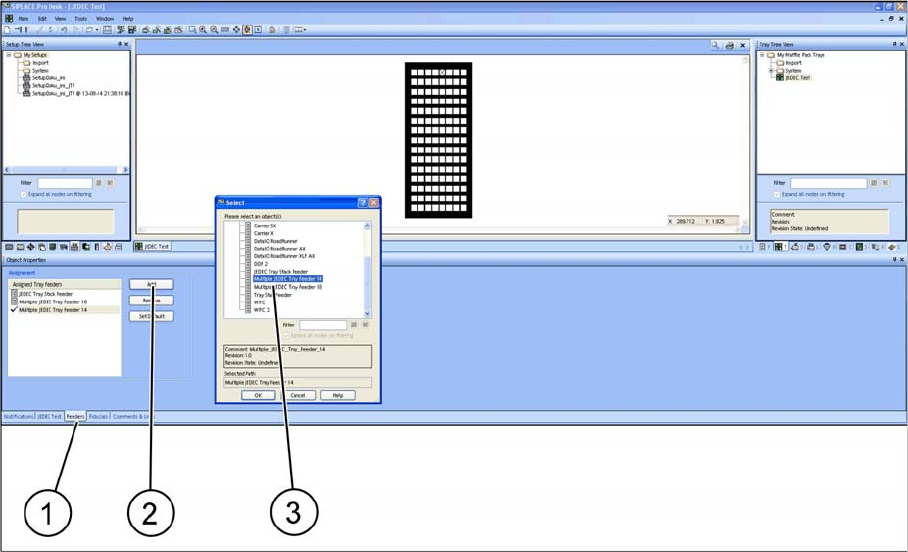
► After defining a JEDEC tray you must assign it to a feeder. Select the relevant SIPLACE JTF feeder
type.
► Select the Feeder tab (1).
► Select Add to add a feeder or Remove to remove a feeder (2).
► Select the relevant SIPLACE JTF feeder(s) (multiple selection is possible) and confirm with OK. As-
signed SIPLACE JTF feeders (3) are displayed in the Assignment window.
4.3.3
4.3.3 Configuration of the Station – Station Tree View
Configuration of the Station – Station Tree View
Not every station can be configured for the use of a JEDEC tray feeder.
TX
The following stations with station software 709.0 or higher support the SIPLACE JTF-ML.
▪SIPLACE TX1
▪SIPLACE TX2