00198140-01_UM_JTF-ML_TX12_de_en.pdf - 第118页
Manufacturing Engineering Consumables 118 JEDEC Tray Feeder (JTF-ML)

Manufacturing Engineering
Consumables
JEDEC Tray Feeder (JTF-ML) 117
6
6 Manufacturing Engineering
Manufacturing Engineering
All the ball bearings used in the feeders are sealed and they do not require any separate lubrication.
The magazine is operated via dry-running chains and therefore may not be greased.
6.1
6.1 Consumables
Consumables
CAUTION
Observe the maintenance instructions
► During these tasks, also observe the preventive maintenance manual for your machine.
Interval Maintenance task
Weekly ► Check whether the parts on the feeder are damaged.
► Check whether the conveyor belts are clean and whether they have any dam-
age.
► Replace any damaged parts.
Monthly ► Clean the feeder.
► Clean the conveyor belts and the tray platform with oil-free alcohol.
► Check whether the rubber on the tray clamps is worn or damaged. Replace it if
necessary.
Consumables Item No.
Cotton gloves 00359087-xx
Protective latex gloves 00372972-xx
Lint-free cleaning cloths 03082092-xx
Ethanol
Isopropanol – IPA can be used as an alternative.
Tools Item No.
Set of Allen keys 00376492-xx
Set of Phillips screwdrivers 00319064- xx
Vacuum cleaner
Waste bin
NOTICE
Additionally required documentation
Depending on the hardware in use, you may need additional documents.
Manufacturing Engineering
Consumables
118 JEDEC Tray Feeder (JTF-ML)
Appendix
7.1.1 Calibrating the Heads and Cameras (SW70x) Excerpts from the Service Manual
JEDEC Tray Feeder (JTF-ML) 119
7
7 Appendix
Appendix
7.1
7.1 Excerpts from the Service Manual
Excerpts from the Service Manual
The following chapters are excerpts from the service manual for your machine. For more information,
refer to the full service manual for your machine.
7.1.1
7.1.1 Calibrating the Heads and Cameras (SW70x)
Calibrating the Heads and Cameras (SW70x)
Automatic calibration (SW707)
► Switch over to the operator level Service (Customer).
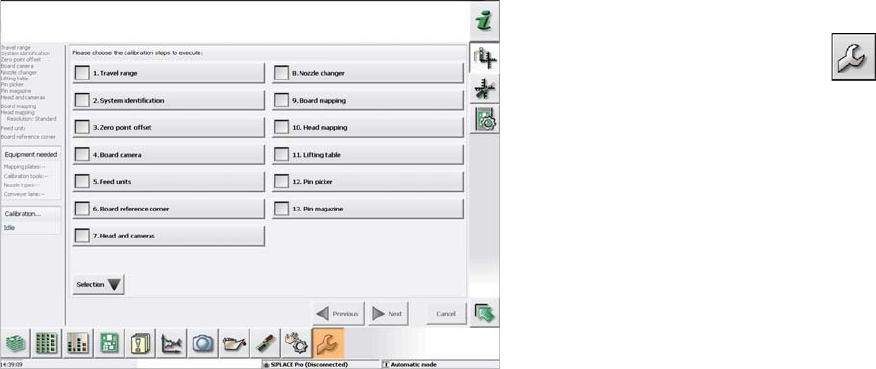
► Switch over to the Service menu and select Ma-
chine calibration or Automatic calibration (depending
on SW version).
► Select Head and cameras and click on Next.
► On the next page, select the gantries on which the
heads to be calibrated are located and then click on
Next.
► The next step is to check the calibration conditions
(nozzle, calibration tool etc.). Follow the instructions
provided.
After this step, calibration will begin. All required interme-
diate steps (head height etc.) will be performed automat-
ically.