00195376-05_SM_D1_D1i_D2_D2i_EN.pdf - 第154页
Service Work C&P6/12 Head 4.4.21 Checking the Cable Routing 154 Service Manual SIPLACE D1/D1i/D2/D2i Cable clamps for flat ribbon cable ▪ The flat ribbon cable mus t be fixed with the clamps (1) and (2 ) . Use the &q…
Service Work
4.4.21 Checking the Cable Routing C&P6/12 Head
Service Manual SIPLACE D1/D1i/D2/D2i 153
▪ Position cable ties correctly:
Cables ties should be positioned so that the cables can be fastened properly and are guided past
any sharp edges.
▪ Cable clamps for flat ribbon cable:
If run together, narrow flat ribbon cables should be placed under wider ones.
The cables should not cross over one another under the clamp.
4.4.21.1
4.4.21.1 Cable Routing for Gantry Head Distributor Board
Cable Routing for Gantry Head Distributor Board
SIPLACE D1/D2 as example
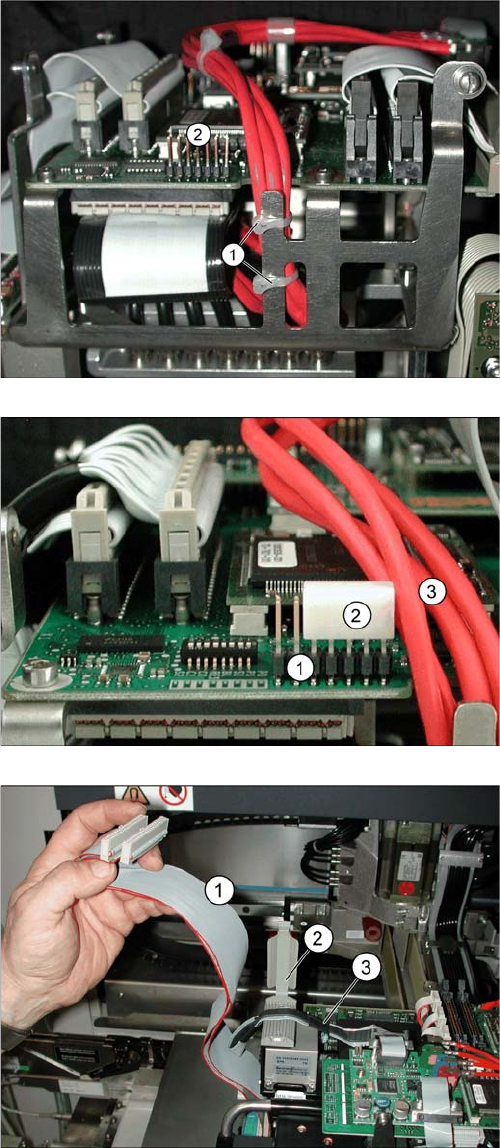
Position cable ties correctly.
The coax camera cables to the gantry head distributor
need to be fixed with cables ties at the side.
The diagram shows the optimum position (1) for two ca-
ble ties, so that the cables do not touch the connector
strip (2).
▪ However, the connector strip (2) should still be fitted
with a dummy plug for safety purposes.
Using a dummy plug
▪ The connector strip (1) needs to be covered.
▪ Use the "dummy plug" [00368931-xx] (2) for this.
▪ Position the dummy plug (2) so that the connectors
pointing towards the cable (3) to be protected are
covered.
Wide flat ribbon cables are run above narrow ones
▪ If run together, narrow flat ribbon cables (3) must be
run under wider ones (1).
▪ Finally, carefully close the clamp.
Service Work
C&P6/12 Head 4.4.21 Checking the Cable Routing
154 Service Manual SIPLACE D1/D1i/D2/D2i
Cable clamps for flat ribbon cable
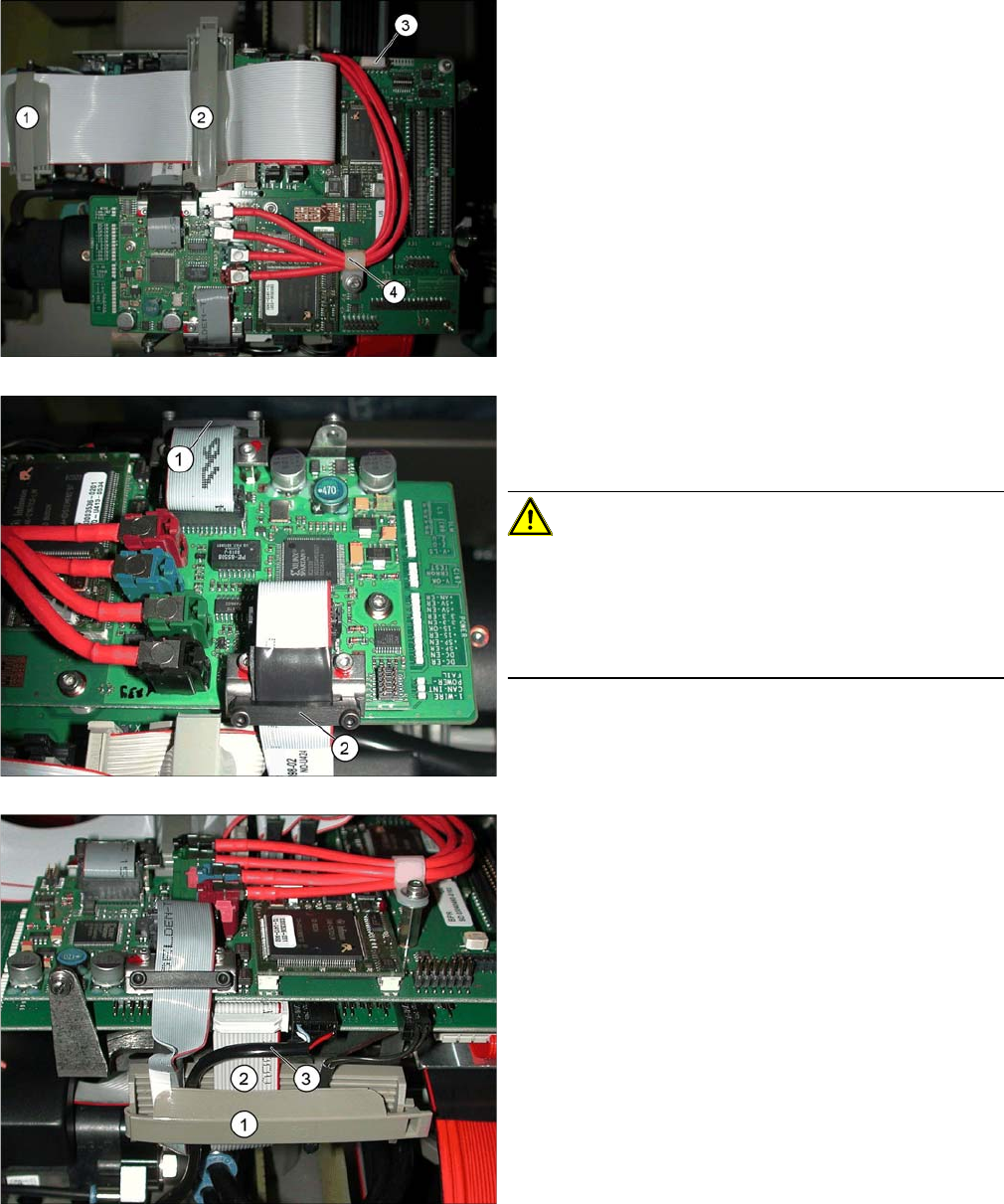
▪ The flat ribbon cable must be fixed with the clamps
(1) and (2). Use the "flat ribbon cable fastening
FCM3" 2 [03001829S01] for this.
▪ The narrower camera cable should be run under the
wide flat ribbon cable.
▪ Unused connector strips should be covered with a
plastic cap (3).
▪ The cable clamp (4) for the coax camera cables
needs to be fixed into place.
Fixture clamps
▪ The camera cables need to be fastened with fixture
clamps before the connector plugs.
CAUTION! Do not pinch the cables!
If the camera cable is pinched at the side and damaged,
this could lead to a short circuit (40V) and, for example,
could damage the DC/DC converter.
Always fix cables with a clamp in the middle (2). Do not
overtighten the screws of the fixture clamp.
▪ Check that the clamps are fixed properly at points (1)
and (2).
Securing the connector strip with a cable clamp
▪ To ensure reliable connections, use a cable clamp
(1).
▪ Inside the cable clamp, the cables should be run next
to one another, see also items (2), (3).
Service Work
4.4.21 Checking the Cable Routing C&P6/12 Head
Service Manual SIPLACE D1/D1i/D2/D2i 155
4.4.21.2
4.4.21.2 X Gantry Cable Routing
X Gantry Cable Routing
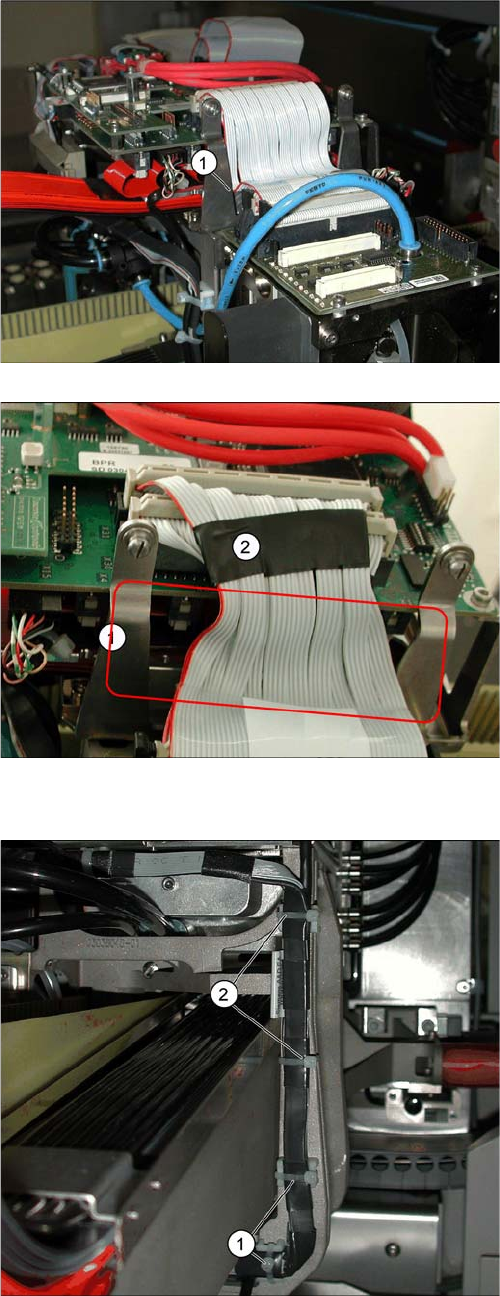
Avoid damage from old supporting plates
▪ Old supporting plates have a gap which is too narrow
for the flat ribbon cable. This could lead to the flat rib-
bon cable insulation being damaged.
▪ If the flat ribbon cable rubs against the supporting
plate, see item (1), either replace the supporting plate
or reduce the width of the flat ribbon cable according-
ly in the vicinity of the gap (2).
Reducing the width of the flat ribbon cable
▪ The width of the flat ribbon cable can be reduced
around the gap (1) by using a wide heat-shrinkable
sleeve or insulating tape (2).
▪ If the flat ribbon cable is damaged, replace it.
Use the "Cable /S-D placement head" [03047845-xx]
for this.
Avoid damage from the Y gantry.
Make sure that the X gantry cables do not touch the Y
gantry.
4 cables ties (1), (2) protect the cables from damage
caused by the Y gantry.
Always use small cable ties, which do not rub against the
gantry.